
Gopeed
Gopeed is a free, open-source download manager for Windows, macOS, Linux, Android, iOS and the Web.
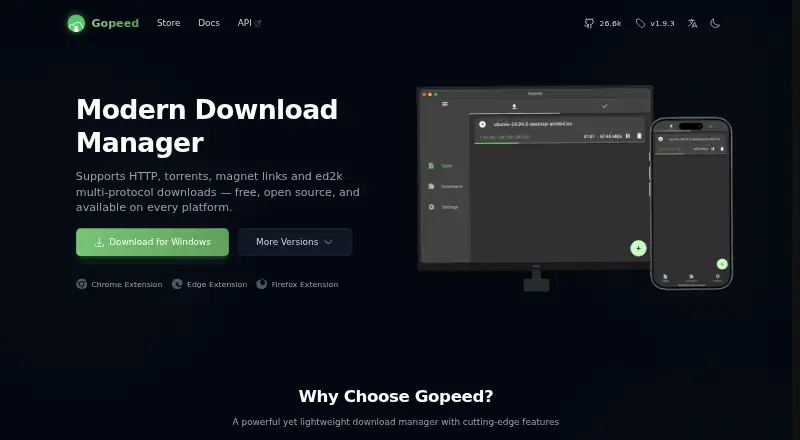
What Gopeed is
Gopeed is a free, open-source download manager for Windows, macOS, Linux, Android, iOS and the Web. It handles HTTP, HTTPS, BitTorrent, magnet and ed2k links. BitTorrent options include seeding, DHT, PEX, uTP, WebTorrent, UPnP and regularly updated tracker lists. JavaScript extensions can add downloads from services such as YouTube, HuggingFace and cloud storage, while Chrome, Edge and Firefox extensions can capture download links automatically. For automation, Gopeed provides an HTTP REST API, an official JavaScript SDK and webhooks that report completion or failure to services including Gotify, Bark, WeCom, DingTalk and Telegram Bot. Its Web version and Docker deployment support remote download services and configurable authentication. Gopeed has no ads or tracking and is released under GPLv3. The API documentation recommends setting an API token, and public Web deployments should enable identity authentication. The iOS build is an IPA for self-signing because BitTorrent-related apps are not allowed on the App Store. The installation guide warns that Windows antivirus may falsely flag host.exe and updater.exe.
Good
- Supports HTTP, HTTPS, BitTorrent, magnet and ed2k links
- Browser extensions can capture download links
- Includes a REST API and JavaScript SDK
- Webhooks report completion or failure
- No ads or tracking
Watch out
- iOS build requires self-signing
- Public Web deployments should enable identity authentication
- Windows antivirus may falsely flag two executables
Who it suits
Gopeed suits users who want downloads across several platforms, remote management, automation or extensible workflows. Users considering iOS should be prepared to self-sign the IPA.
Verdict
Gopeed combines multi-protocol downloading with browser extensions, automation options and remote deployments. Consider its iOS distribution and the security recommendations when choosing how to deploy it.
Plans and prices
From Gopeed's own pricing page, checked 15 Oct 2026.
| Plan | Price | What it gives you |
|---|---|---|
| Free | Free | all core download features · no ads · no hidden paywalls |
The facts
Each one read from Gopeed's own pages, with the date it was checked.
What it does
- API
- The HTTP API can create and manage download tasks, including pausing and deleting downloads.checked 15 Oct 2026
- Architecture
- The Flutter front end and Go back end communicate over HTTP, using Unix sockets on Unix-like systems and TCP on Windows.checked 15 Oct 2026
- Audience
- Gopeed is intended for users who need cross-platform downloads, remote management, automation or extensible download workflows.checked 30 Sep 2026
- BitTorrent features
- Its BitTorrent support includes seeding, DHT, PEX, uTP, WebTorrent, UPnP and daily tracker-list updates.checked 30 Sep 2026
- Build requirements
- Contributor setup requires Go 1.25 or newer and Flutter 3.41 or newer.checked 15 Oct 2026
- Command line
- A CLI can be installed with go install github.com/GopeedLab/gopeed/cmd/gopeed@latest and accepts HTTP, torrent, magnet and ed2k inputs.checked 15 Oct 2026
- Dark mode
- The interface includes a dark mode.checked 15 Oct 2026
- Docker authentication
- Docker deployments can set GOPEED_USERNAME and GOPEED_PASSWORD environment variables for authentication.checked 15 Oct 2026
- Extension distribution
- Extensions can be hosted in Git repositories and installed by entering a repository clone URL.checked 15 Oct 2026
- Extensions
- Users can build JavaScript extensions for site-specific downloads such as video or music extraction.checked 15 Oct 2026
- Extension updates
- A repository field in the extension manifest enables remote updates.checked 15 Oct 2026
- HTTP downloads
- Gopeed supports HTTP and HTTPS transfers.checked 15 Oct 2026
- Independent listing
- AlternativeTo lists Gopeed as free and open source and shows more than 50 alternative applications across desktop and mobile platforms.checked 15 Oct 2026
- Installation warning
- The installation guide says Windows antivirus software may falsely flag host.exe and updater.exe and recommends downloading from official sources.checked 30 Sep 2026
- JavaScript SDK
- The documentation shows an official JavaScript package named @gopeed/rest.checked 15 Oct 2026
- License
- The GitHub repository identifies Gopeed as GPLv3 licensed.checked 15 Oct 2026
- Limit: distribution setup
- HysenLabs says users needing a headless package from their distribution repositories may be disappointed because the project points to its website, GitHub Releases, Docker and go install.checked 15 Oct 2026
- Limit: release maturity
- HysenLabs describes version 2.0.0 as a public beta and cautions that users needing a long-term stable release may be unsuitable adopters.checked 15 Oct 2026
- Localization
- Internationalization is included as a built-in feature.checked 15 Oct 2026
Where it runs
- Apple availability limit
- The maker says BitTorrent-related apps cannot pass Apple's review process, preventing App Store listing.checked 15 Oct 2026
- Browser integration
- Browser extensions for Chrome, Edge and Firefox can automatically capture download links.checked 30 Sep 2026
- Browser interception
- The browser extension can capture download links instead of the browser's native downloader.checked 15 Oct 2026
- Limit: iOS installation
- The official guide requires iOS users to sign and install an IPA themselves, recommending TrollStore.checked 15 Oct 2026
The company
- Maker
- The project and browser extension are published under the GopeedLab name.checked 15 Oct 2026
The full review of Gopeed
Overview
Gopeed is a free download manager for people who work across devices or want to automate and remotely manage download tasks. It is a particularly strong fit for users who need torrent support alongside browser capture and extensible workflows; it is less convenient for iPhone users who expect an App Store install.
Key features
Gopeed handles HTTP and HTTPS alongside BitTorrent, magnet links and ed2k links. Its torrent support includes seeding, DHT, PEX, uTP, WebTorrent, UPnP and daily tracker-list updates, making it better suited to mixed download workloads than a manager focused only on ordinary web links. Video downloading is supported, too.
JavaScript extensions can add download sources from services such as YouTube, HuggingFace and cloud storage. Browser extensions for Chrome, Edge and Firefox capture links automatically, cutting down on manual copying. An HTTP REST API and official JavaScript SDK let developers create and manage tasks; webhooks can report success or failure to services including Gotify, Bark, WeCom, DingTalk and Telegram Bot. These options are valuable for repeatable workflows, though casual users may not need their extra configuration.
The Web version and Docker deployment support remote download services with configurable authentication. Remote control is also supported. This makes Gopeed useful when downloads should run on a separate machine, but operators should set an API token and enable identity authentication for a public Web deployment. The GPLv3 project is free and open source, with no ads or tracking.
Pricing
Gopeed’s Free plan costs nothing and includes all core download features, with no ads or hidden paywalls. It is a practical fit for both occasional downloaders and users who want the full feature set without a paid tier. The plan has no stated usage cap; there is no cheaper tier that trades features for a lower price.
Platforms
Gopeed supports Windows, macOS, Linux, Android, iOS and Web, as well as API, extension and self-hosted deployments. A portable version is available. The iOS build is distributed as an IPA for self-signing because BitTorrent-related apps are not allowed on the App Store, so installation is more involved than on the other supported platforms. On Windows, the installation guide warns that antivirus software may falsely flag host.exe and updater.exe; download from official sources.
Who it's for
Choose Gopeed if you need several download protocols, want browser links captured automatically, or plan to manage downloads remotely or through scripts and notifications. Its breadth will matter most to technically confident users building repeatable workflows. If you only want a straightforward desktop download queue, the API, hooks and remote deployment options may be more complexity than you need.
Pros and cons
- Pros: Broad protocol support, including BitTorrent features such as seeding and DHT, suits more than basic HTTP downloads.
- Pros: Browser capture, JavaScript extensions, an API and webhooks give users several ways to automate tasks.
- Pros: The free, open-source plan includes core features without ads or hidden paywalls.
- Cons: iOS requires self-signing an IPA rather than installing from the App Store.
- Cons: Remote Web deployments require attention to authentication, and Windows antivirus software may falsely flag two installation files.
Alternatives
Compare download manager software if you want to weigh options across the category. For a free option with an open-source description and support across Android, API, extension, iOS, Linux, macOS, Web and Windows, consider JDownloader. Free Download Manager is another free choice, available on Android, extension, Linux, macOS and Windows, with donations optional. Motrix is a free, open-source alternative for Linux, macOS, self-hosted, Web, Windows and extension use.
AB Download Manager is a free, open-source option with no ads, supporting Android, extension, iOS, Linux, macOS and Windows. pyLoad is free and open source, with support for API and self-hosted use alongside Linux, macOS, Web and Windows. Xtreme Download Manager is a free, open-source download manager and video downloader for extension, Linux, macOS and Windows. aria2 is free software under GNU GPL v2 or later for Android, API, Linux, macOS, self-hosted and Windows use. BitComet is free for private personal, non-commercial use and supports Android, Linux, macOS, self-hosted, Web and Windows.
Verdict
Gopeed is the right choice for users who want a free, cross-platform manager that combines torrent-capable downloads with browser capture, extensions and remote automation. Its main advantage is the ability to build a broader workflow around downloads without ads or paid tiers. Look elsewhere if you need a conventional iOS installation or do not want to configure secure access for remote use.
Getting started
- Open the Gopeed website
- Choose a Windows, macOS, Linux, Android, iOS, or Web option
- Install the browser extension for Chrome, Edge, or Firefox if needed
- Deploy the Web version or Docker service for remote downloads
- Configure an API token and identity authentication for exposed services
- Add JavaScript extensions or connect the REST API and webhooks
Questions
Is Gopeed free?
Yes. The Free plan is listed as free and includes all core download features with no ads or hidden paywalls.
Which platforms does Gopeed support?
Gopeed supports Windows, macOS, Linux, Android, iOS, and the Web, along with API, extension, and self-hosted options.
Is Gopeed open source?
Yes. Gopeed is free, open source, and released under the GPLv3 license.
Can Gopeed download BitTorrent files?
Yes. It supports BitTorrent, magnet links, seeding, DHT, PEX, uTP, WebTorrent, UPnP, and daily tracker-list updates.
How does iOS installation work?
The iOS build is distributed as an IPA for self-signing because BitTorrent-related apps are not allowed on the App Store.
Alternatives to Gopeed
- 1

ClipGrab
Free planOpen sourceLinuxmacOSWindows7.9€10 one-time - 2

4K Video Downloader+
Free planAndroidLinuxmacOSWindows7.8Free plan - 3

AB Download Manager
Free planOpen sourceAndroidiOSAPIExtension7.8Free plan - 4

JDownloader
Free planOpen sourceAndroidiOSWebAPI7.8Free plan - 5

BitComet
Free planAndroidWebAPIExtension7.5Free plan - 6
Hydra
Free planOpen sourceWebAPILinuxSelf-hosted7.3Free plan