
jamovi
jamovi is a free, open-source statistical analysis program for working with data on desktop or in a browser.
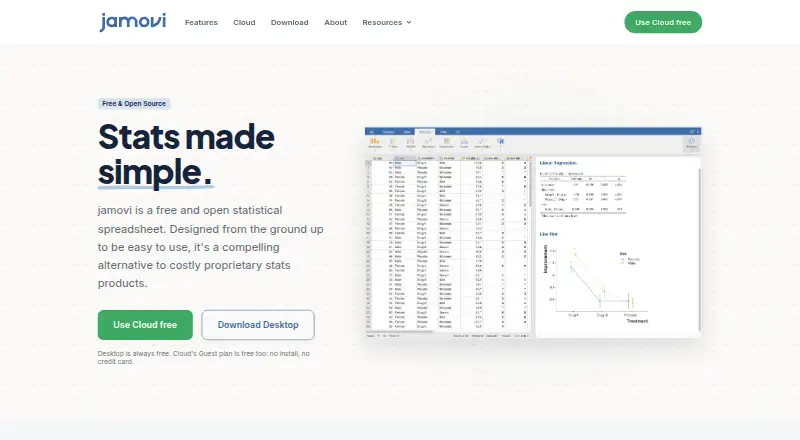
What jamovi is
jamovi is a free, open-source statistical analysis program for working with data on desktop or in a browser. It supports statistical tests, regression models, Bayesian analysis, and scripting, and can import SPSS, SAS, Stata, CSV, and Excel files. Its spreadsheet-style interface lets users select variables and options, with results updating as they work; coding is not required for analysis. jamovi is powered by R and shows the R syntax used behind analyses. Desktop installations work offline, while Cloud runs in a browser without installation. Cloud Guest is free and requires no credit card, though guest sessions lack queue skipping, unlimited session length, longer idle timeouts, and larger datasets. Cloud also connects to OneDrive for opening and saving jamovi files. Data, analyses, and results can be kept together in a shareable, reproducible file. Teams offers group subscriptions, managed accounts, private cloud, and beta on-premise deployment. The software is available for web, Windows, macOS, and Linux.
Good
- Free and open source, with offline desktop use.
- Supports statistical tests, regression, and Bayesian analysis.
- Imports SPSS, SAS, Stata, CSV, and Excel.
- Shows the R syntax behind analyses.
- Combines data and results in a shareable file.
Watch out
- Cloud Guest sessions have limited session length and dataset size.
- Guest sessions do not include queue skipping.
- Desktop use requires installation.
Who it suits
jamovi suits students, researchers, and others who need statistical analysis without writing code. Teams and institutions can also use its centrally managed account and hosting options.
Verdict
jamovi offers a broad set of statistical tools in a point-and-click interface, with desktop and browser options. The free desktop and Cloud Guest plans have distinct tradeoffs, especially for larger or longer cloud sessions.
Plans and prices
From jamovi's own pricing page, checked 28 Sep 2026.
| Plan | Price | What it gives you |
|---|---|---|
| Guest | Free | For everyone; no credit card required. · Browser-based access · Point-and-click analyses powered by R · Full jamovi module library |
| Priority | — | Students and researchers; pricing varies by region. · Always available access · Unlimited session length · Longer idle timeout · Larger datasets |
| Teams | Priced on request | Groups and institutions; custom quote. · Group and classroom subscriptions · Centrally managed accounts · Private cloud hosting · On-premise deployment beta |
| Cloud Guest | Free | Free browser access with no installation or credit card. |
| Desktop | Free | Free forever; works completely offline. |
The facts
Each one read from jamovi's own pages, with the date it was checked.
What it does
- Bayesian analysis
- Yeschecked 20 Sep 2026
- Cloud guest tier
- The Cloud Guest plan is free and requires no credit card.checked 28 Sep 2026
- Cloud installation
- Cloud runs in a browser without installation or setup.checked 28 Sep 2026
- Coding requirement
- Users can analyze data without writing code.checked 28 Sep 2026
- Data import formats
- SPSS (.sav), SAS, Stata, CSV, Excelchecked 20 Sep 2026
- Deployment
- bothchecked 20 Sep 2026
- Desktop pricing
- The desktop application is free forever.checked 28 Sep 2026
- Guest limitations
- Guest sessions do not include queue skipping, unlimited sessions, longer idle timeouts, or larger datasets.checked 28 Sep 2026
- Module library
- Cloud plans include the full jamovi module library.checked 28 Sep 2026
- Offline desktop
- Desktop works completely offline after installation.checked 28 Sep 2026
- OneDrive integration
- Cloud can connect to OneDrive to open and save jamovi files.checked 28 Sep 2026
- Regression models
- Yeschecked 20 Sep 2026
- R integration
- jamovi is powered by R and shows the exact R syntax behind analyses.checked 28 Sep 2026
- Scripting support
- Yeschecked 20 Sep 2026
- Shareable files
- Data, analyses, and results save into one shareable, reproducible file.checked 28 Sep 2026
- Spreadsheet interface
- The interface supports dragging variables, setting options, and instant result updates.checked 28 Sep 2026
- Statistical tests
- Yeschecked 20 Sep 2026
- Support channels
- Support is available through documentation, forums, developers resources, and Patreon.checked 28 Sep 2026
- Usage reach
- jamovi reports more than 5 million downloads and use at 300+ universities.checked 28 Sep 2026
Money
- Free open source
- jamovi is free and open source.checked 28 Sep 2026
- Free plan
- Yeschecked 20 Sep 2026
The company
- Headquarters
- Sydney, Australiachecked 28 Sep 2026
- Team administration
- Teams includes group subscriptions, centrally managed accounts, private cloud, and beta on-premise deployment.checked 28 Sep 2026
Where it runs
- Supported devices
- Cloud works on modern browsers, Chromebooks, lab computers, tablets, and any device.checked 28 Sep 2026
The full review of jamovi
Overview
jamovi is a free, open-source statistics application for desktop and browser-based analysis. It is best suited to students, researchers, and other users who want statistical tools without having to write code. The desktop edition is fully offline; browser access is more flexible, but its free guest tier trades away longer sessions and support for larger datasets.
Key features
jamovi supports statistical tests, regression models, and Bayesian analysis. Its spreadsheet-style interface lets users drag variables into an analysis, adjust options, and see results update immediately. That makes it a practical choice for routine analysis when scripting would add friction. Users who want more transparency can inspect the exact R syntax behind analyses, since jamovi is powered by R.
It imports SPSS (.sav), SAS, Stata, CSV, and Excel files, covering several common formats without requiring users to rebuild their datasets. Data, analyses, and results are saved in one shareable, reproducible file, a useful safeguard when handing work to collaborators. Cloud plans include the full jamovi module library, and Cloud can connect to OneDrive to open and save jamovi files.
Pricing
jamovi separates its no-cost desktop application from its browser plans. The desktop application costs nothing, is free forever, and works completely offline after installation. It is the strongest fit for people who can install software and do not need browser access; it avoids Cloud Guest's session and dataset restrictions.
Cloud Guest costs nothing, requires no credit card, and provides browser-based point-and-click analysis powered by R with the full module library. It suits occasional use or access from a device where installation is impractical. The tradeoff is meaningful for sustained work: Guest sessions do not include queue skipping, unlimited session length, longer idle timeouts, or larger datasets.
Priority is for students and researchers, with pricing that varies by region and no fixed price stated. It adds always-available access, unlimited session length, longer idle timeouts, and support for larger datasets, making it the more appropriate Cloud option for regular or demanding sessions. Teams uses custom pricing for groups and institutions. It adds group and classroom subscriptions, centrally managed accounts, private cloud hosting, and on-premise deployment in beta; those administration and hosting options are relevant to organizations rather than individual users.
Platforms
jamovi is available on Windows, macOS, Linux, and the web, with desktop and Cloud deployment options. Desktop works offline after installation. Cloud runs in a browser without installation or setup and supports modern browsers, Chromebooks, lab computers, tablets, and other devices. That makes Cloud useful where users move between devices or share lab machines, while the desktop version is the better fit when offline access and freedom from Cloud guest limits matter more.
Who it's for
jamovi is a strong fit for students, researchers, and teaching settings that need a point-and-click route to statistical tests, regression, or Bayesian analysis. Its R syntax display also gives technically inclined users a way to see the code behind an analysis without making code a prerequisite. The free desktop edition suits individual offline work; Cloud Guest suits lighter browser use, while Priority and Teams address longer sessions and institutional administration respectively.
It is less suitable when a user needs larger datasets or long, uninterrupted browser sessions but does not want a paid Cloud plan. In that case, the free offline desktop edition may be preferable if installation is possible.
Pros and cons
- Pro: The free desktop edition works offline, so ongoing use does not depend on a browser session.
- Pro: Statistical tests, regression, and Bayesian analysis are accessible through a point-and-click interface, with R syntax visible for users who want to inspect the underlying work.
- Pro: Imports SPSS, SAS, Stata, CSV, and Excel data, and combines data, analysis, and results in a reproducible file.
- Pro: Cloud access needs no installation or credit card, and supports devices including Chromebooks and tablets.
- Con: Cloud Guest lacks queue skipping, unlimited session length, longer idle timeouts, and larger datasets, restricting its usefulness for extended or heavier browser work.
- Con: Priority pricing varies by region, while Teams requires a custom quote, so neither offers a single stated price for budgeting.
Alternatives
Browse statistical analysis software to compare options across the category. JASP is another free option for Linux, macOS, and Windows; its stated requirements include a 64-bit operating system, 4 GB of free disk space, and at least 4 GB of RAM. Choose it if those platform and system requirements suit your setup.
Stata is an alternative for readers considering a paid statistical package: Stata/BE Prof+ is $175 a year for faculty and staff at accredited, degree-granting universities. EViews is another freemium option, with a listed Academic Single-User License at $700 a month requiring current academic affiliation.
gretl is a free, open-source alternative available for Linux, macOS, and Windows. SAS/STAT is a paid alternative with pricing available by contacting SAS. R is a free software environment. PAST offers a free edition with spreadsheet-style data entry, univariate and multivariate statistics, and graphical analysis. LatentGOLD is a freemium Windows option with an annual single-user plan priced at €795 a year.
Verdict
Choose jamovi if you want a free, offline-capable statistics application with a visual workflow, broad data imports, and results saved in a reproducible file. Its main advantage is that it makes analysis approachable without hiding the R syntax. Look elsewhere if your work depends on long or large browser sessions but you do not want a paid Cloud tier; the free desktop version is the better route when installation and offline use are acceptable.
Getting started
- Visit the jamovi website.
- Choose the desktop application for Windows, macOS or Linux and install it for offline use.
- Alternatively, open Cloud in a browser without installation or setup.
- Start with the free Cloud Guest plan without a credit card, or review Priority and Teams options.
- Import SPSS, SAS, Stata, CSV or Excel data to begin an analysis.
Limits worth knowing
Cloud Guest sessions do not include queue skipping, unlimited session length, longer idle timeouts or larger datasets. The free desktop application works offline after installation.
Questions
Is jamovi free?
Yes. jamovi is free and open source, and its desktop application is free forever. Cloud Guest is also free and requires no credit card.
Which platforms can run jamovi?
The desktop application supports Windows, macOS and Linux. Cloud runs in a browser and supports modern browsers, Chromebooks, lab computers, tablets and other devices.
What data formats can it import?
jamovi imports SPSS (.sav), SAS, Stata, CSV and Excel files.
Does jamovi require coding?
Users can analyze data without writing code. jamovi also supports scripting and shows the R syntax behind analyses.
What are the Cloud Guest limits?
Guest sessions do not include queue skipping, unlimited session length, longer idle timeouts or larger datasets.
What options are available for teams?
Teams includes group subscriptions, centrally managed accounts, private cloud and beta on-premise deployment. Pricing is by custom quote.
Alternatives to jamovi
- 1

IBM SPSS Statistics
APILinuxmacOSSelf-hosted8.0 - 2
Stata
LinuxmacOSWindows7.8From $175 a year - 3
StatPlus
iOSWebmacOSWindows7.7 - 4
EViews
Free planmacOSWindows7.6From $59.95 a month - 5
SAS/STAT
WebLinuxmacOSSelf-hosted7.5 - 6
LatentGOLD
Free planWindows7.5Free plan