
JabRef
JabRef is a free, open-source citation and reference manager for collecting and organizing research sources.
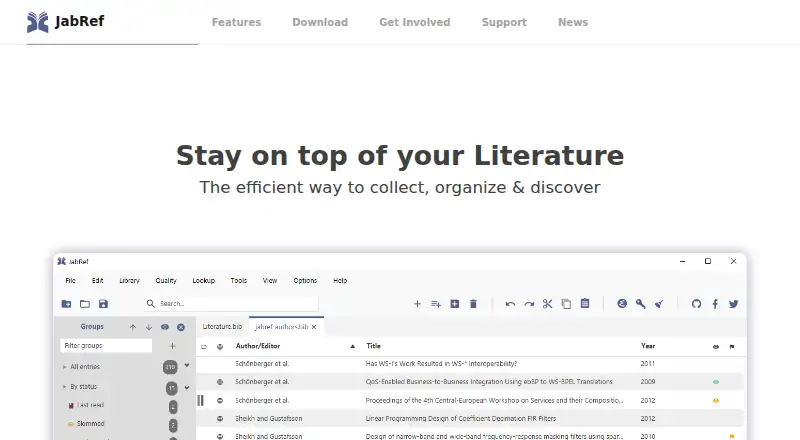
What JabRef is
JabRef is a free, open-source citation and reference manager for collecting and organizing research sources. It works natively with BibTeX and BibLaTeX libraries stored as text, imports more than 15 reference formats, and extracts metadata from PDFs. Users can search scientific catalogs including CrossRef, Google Scholar, PubMed, Springer, arXiv, and zbMATH. Library tools include hierarchical collections, keywords and tags, advanced search and filters, duplicate merging, and customizable citation keys. JabRef supports cite-as-you-write workflows with Word and LibreOffice/OpenOffice, and can send citation keys to editors such as Emacs, LyX, TeXstudio, Vim, and WinEdt. Its browser extension can collect bibliographic information from websites, though the documentation warns it does not work on Chrome. Teams can collaborate through a shared SQL database; SSL database connections are supported, with testing documented only for PostgreSQL. Since version 6, paper summaries and chat are available through external AI providers, which process requests and linked PDFs. Libraries use a text-based format without vendor lock-in. The project points users to its documentation and community forum for help.
Good
- Free and open source, with no paid plan listed.
- Imports over 15 reference formats.
- Extracts metadata from PDFs.
- Supports shared SQL database collaboration.
- Organizes libraries with collections, tags, and filters.
Watch out
- The browser extension does not work on Chrome.
- Excessive catalog searches may cause temporary blocking.
- External AI providers process requests and linked PDFs.
Who it suits
JabRef suits students and researchers who collect references, work with BibTeX or BibLaTeX, or need citation workflows in supported word processors. Teams can use its shared SQL database for collaboration.
Verdict
JabRef brings reference organization, citation workflows, and shared-library support together in one tool. Note the Chrome extension limitation, catalog-use caution, and external processing involved in its AI features.
Plans and prices
From JabRef's own pricing page, checked 15 Oct 2026.
| Plan | Price | What it gives you |
|---|---|---|
| JabRef | Free | desktop reference manager · open source · commercial use permitted |
The facts
Each one read from JabRef's own pages, with the date it was checked.
What it does
- AI features
- Since version 6, JabRef can summarize papers and chat with them using external AI providers; its documentation says linked PDFs are parsed and indexed for this processing.checked 3 Oct 2026
- AI privacy
- AI features can use local or online providers; online providers require an API key, and declining the privacy notice prevents external transmission.checked 15 Oct 2026
- API limitation
- The HTTP server documentation says SSL is needed for the Word add-in and that this support remains under development.checked 15 Oct 2026
- BibTeX and BibLaTeX
- JabRef natively supports BibTeX and BibLaTeX libraries saved in a text-based format.checked 3 Oct 2026
- Citation integrations
- JabRef supports cite-as-you-write workflows with Word and LibreOffice/OpenOffice, and can push citation keys to several external editors including Emacs, LyX, TeXstudio, Vim, and WinEdt.checked 3 Oct 2026
- Citation keys
- Users can configure citation-key generation patterns and add custom fields and entry types.checked 15 Oct 2026
- Citation styles
- JabRef includes thousands of citation styles and permits user-created styles.checked 15 Oct 2026
- CLI and SDK
- JabKit is distributed as a command-line tool runnable through JBang or the published Docker image ghcr.io/jabref/jabkit:edge.checked 15 Oct 2026
- Collaboration
- Teams can work with a shared SQL database, and JabRef supports SSL database connections; its documentation says SSL has only been tested with PostgreSQL.checked 3 Oct 2026
- Collections
- Hierarchical groups can be built from keywords, tags, searches or manual assignments.checked 15 Oct 2026
- Data cleanup
- The software can detect duplicates, merge entries, check integrity and apply cleanup actions when saving.checked 15 Oct 2026
- Documentation
- The project publishes user documentation, FAQs, developer documentation, a forum and GitHub issue tracking.checked 15 Oct 2026
- HTTP API
- The developer HTTP server exposes REST endpoints for listing libraries, querying entries and returning BibTeX, JSON or CSL data.checked 15 Oct 2026
- Identifier lookup
- Bibliographic records can be fetched from ISBN, DOI, PubMed-ID and arXiv-ID identifiers.checked 15 Oct 2026
- Import
- It offers import options for over 15 reference formats and can extract metadata from PDFs.checked 3 Oct 2026
- Import formats
- The application supports importing more than 15 reference formats.checked 15 Oct 2026
- Intended audience
- The project describes JabRef as created by researchers for researchers and says it has been used by students and researchers.checked 3 Oct 2026
- License
- The JabRef software uses the MIT License, allowing commercial use, modification and redistribution with notices retained.checked 15 Oct 2026
- Limit: collaboration and startup
- G2 reviewers mention limited collaboration, a less polished interface and slow application startup.checked 15 Oct 2026
- Limit: performance
- AlternativeTo commenters report Java resource demand, slowness and occasional glitches.checked 15 Oct 2026
- Limit: resource use
- SourceForge reviewers complain that Java can consume substantial memory and that search or some Windows setups can be problematic.checked 15 Oct 2026
Where it runs
- Browser capture
- Official browser extensions support one-click imports from Firefox, Chrome, Edge and Vivaldi.checked 15 Oct 2026
- Browser extension
- The official browser extension can extract bibliographic information from websites and send it to JabRef; its documentation currently warns that it is non-functional on Chrome.checked 3 Oct 2026
The company
- Founded
- The project says JabRef was founded in 2003, with version 1.0 released on November 29, 2003.checked 15 Oct 2026
The full review of JabRef
JabRef is a free, open-source reference manager for students and researchers who build bibliographies around BibTeX or BibLaTeX. Its portable libraries and detailed citation workflows make it a strong academic tool, but less suited to readers who want a simple reading list or rely on Chrome capture.
Overview
Developed since 2003, JabRef combines reference collection, bibliography organization and citation support in one application. Its text-based library format avoids dependence on a vendor-specific format, a meaningful advantage for researchers who want direct control of their references. The trade-off is a workflow centered on citation management rather than general-purpose reading and note-taking.
Key features
JabRef natively handles BibTeX and BibLaTeX libraries and imports more than 15 reference formats, including RIS, Medline, MS Office Bibliography XML and XMP-annotated PDFs. It can extract metadata from PDFs and supports PDF annotation, making it useful when consolidating an existing research collection. The breadth of import options is practical, although catalog searching should remain targeted: excessive use may temporarily block access to a catalog.
For library maintenance, users can arrange sources in hierarchical collections, apply keywords and tags, search and filter records, merge duplicates and customize citation keys. This gives researchers several ways to keep a substantial bibliography structured, rather than forcing it into a single folder-and-search workflow. Online lookup reaches CrossRef, Google Scholar, PubMed, Springer, arXiv and zbMATH, but JabRef positions that search for collecting a few entries, not heavy repeated querying.
Citation support is a particular strength for academic writing. JabRef works with cite-as-you-write workflows in Microsoft Word and LibreOffice/OpenOffice, and can send citation keys to editors including Emacs, LyX, TeXstudio, Vim and WinEdt. That range makes it a natural fit for users who move between word processors and technical writing environments.
The official browser extension can capture bibliographic information from websites and pass it to JabRef, but its documentation warns that it is non-functional on Chrome. Teams can work from a shared SQL database, with SSL connections supported; the project says SSL has only been tested with PostgreSQL, so teams using another database should account for that limitation.
Since version 6, JabRef can summarize papers and answer questions about them through external AI providers. Linked PDFs are parsed and indexed for this processing, and provider services process the requests. That may help readers working through papers, but it is a less appropriate feature for sensitive documents or anyone unwilling to send requests to external services.
Pricing
JabRef costs nothing, and the software is free and open source. There is no paid plan listed and no free trial; the free plan is the product, rather than a capped entry tier that requires an upgrade for core use. Readers who want reference management without a subscription will find a straightforward cost proposition, while those seeking a paid service tier should look elsewhere.
Platforms
JabRef is available for Linux, macOS and Windows, with a browser extension for web capture. The Chrome limitation weakens that extension’s usefulness for Chrome users. Its editor integrations cover several desktop writing environments, but the product is not presented as a mobile or web-based library.
Who it's for
JabRef is best for students, researchers and academic writers who use BibTeX or BibLaTeX, need careful control over bibliography structure, or cite through Word, LibreOffice/OpenOffice or a supported external editor. Its shared-database option also suits teams working from a common reference library. It is a weaker fit for casual readers who want a streamlined reading-list app, Chrome-dependent source capture, or AI processing that stays entirely local.
Pros and cons
- Pros: Text-based BibTeX and BibLaTeX libraries avoid vendor lock-in and suit portable, researcher-controlled bibliographies.
- Pros: Broad import support, PDF metadata extraction and annotation help bring reference and document workflows together.
- Pros: Detailed organization tools and integrations with word processors and technical editors support varied academic writing habits.
- Pros: Free, open-source software means there is no paid tier to unlock the core reference manager.
- Cons: The browser extension is documented as non-functional on Chrome, limiting a convenient capture route for Chrome users.
- Cons: Heavy catalog searching can result in temporary blocking, so it is not suited to repeated bulk lookup.
- Cons: AI features send requests to external providers and process linked PDFs, which may not suit sensitive research materials.
- Cons: SSL database connections have only been tested with PostgreSQL, leaving other team setups less certain.
Alternatives
Citation Management Software and Reference Management Software offer broader category comparisons. Consider Zotero if mobile, web or self-hosted access matters; its free plan includes 300 MB of storage, with a 2 GB plan at $20 a year. Mendeley Reference Manager is another option for users who want a web platform and a free plan with 2GB storage and five Reading Assistant questions.
Sciwand may suit readers looking for a free tier with AI access for seven days and a lifetime plan at 29.99 USD once. Lean Library Workspace offers a free basic tier for up to three projects and three invitations per shared project. Logically is an alternative with a free plan that includes limited daily AI suggestions, chat messages and commands, plus 100MB of reference and file storage.
Qiqqa is another reference-management alternative. Databyss is a free, open-source option for non-commercial use. Petal offers a free plan with 1 GB cloud storage, one seat, three guests and two collections, but citation export is not included.
Verdict
Choose JabRef if you want a free, open-source academic reference manager with portable BibTeX or BibLaTeX libraries and flexible citation workflows. Its strongest reason to choose it is the combination of structured bibliography control and broad writing integrations at no cost. Look elsewhere if Chrome capture is essential, you need a simpler reading-focused app, or external processing of linked PDFs is unacceptable.
Getting started
- Visit the JabRef website
- Install the version for Linux, macOS or Windows
- Create or open a BibTeX or BibLaTeX library
- Import references from a supported format or PDF
- Add the browser extension for website-based bibliographic capture
- Connect citation workflows with a supported editor
Limits worth knowing
Online catalog searching is intended for gathering a few entries; excessive use may temporarily block access from a catalog. The browser extension documentation warns that it does not work on Chrome.
Questions
Is JabRef free?
Yes. JabRef is free and open-source, with a listed price of no cost and no paid plan listed.
Which platforms does JabRef support?
JabRef is available for Linux, macOS and Windows, and also offers a browser extension.
Can JabRef import PDFs?
Yes. It can extract metadata from PDFs and supports XMP-annotated PDF imports.
Does JabRef work with Word?
Yes. It supports cite-as-you-write workflows with Microsoft Word, as well as LibreOffice/OpenOffice.
Can teams share a JabRef library?
Teams can work with a shared SQL database. SSL database connections are supported, with SSL tested with PostgreSQL.
How does JabRef AI work?
Since version 6, it can summarize papers and chat with linked PDFs through external AI providers that process requests.
Alternatives to JabRef
- 1

Zotero
Free planOpen sourceAndroidiOSWebAPI8.6From $20 a year - 2
Qiqqa
Free planOpen sourceAndroidWebSelf-hostedWindows8.0From $6.67 a month - 3
Sciwand
Free planiOSExtensionLinuxmacOS7.7$29.99 one-time - 4

Mendeley Reference Manager
Free planWebExtensionLinuxmacOS7.2From $55 a year - 5
ReadCube Papers
AndroidiOSWebAPI7.2From $95 a year - 6

Logically
Free planWebExtensionmacOSWindows7.1From $12 a month