
Petal
Petal is a research assistant and reference manager for academic work, available on the web and as a browser extension.
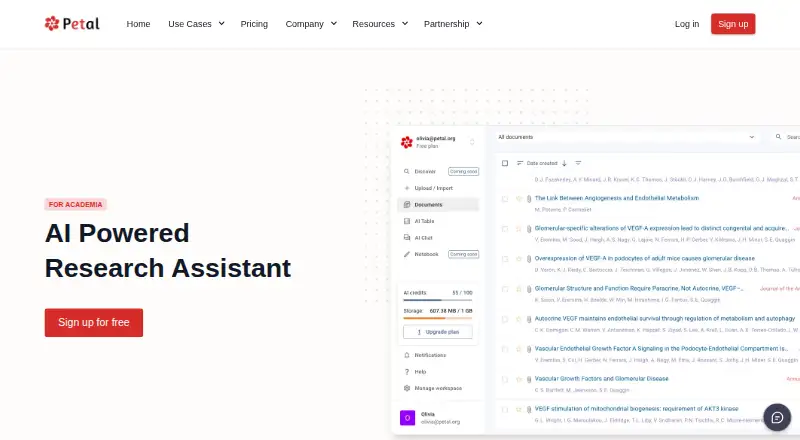
What Petal is
Petal is a research assistant and reference manager for academic work, available on the web and as a browser extension. It provides a library for uploading, storing, and organizing PDFs with collections, metadata, and tags, as well as shared workspaces for group projects, papers, and reviews. Its AI tools can translate, summarize, explain, extract key points, suggest questions and search terms, and support conversational queries. The citation generator supports more than 10,000 styles and can copy citations or export them to BibTeX or Word. References can be imported by identifiers including DOI, PMID, ArXivID, ISBN, ISSN, and EAN, or captured from URLs. Petal lists browser add-ins for Chrome, Firefox, and Safari and a Word add-in for references and bibliographies. The free plan includes 1 GB of cloud storage, one seat, three guests, 400 AI credits, two collections, and three annotations per document; citation export is not included.
Good
- Organizes PDFs with collections, metadata, and tags
- Offers AI summaries, translation, and key-point extraction
- Supports shared workspaces
- Imports references by identifiers or URL metadata
- Word add-in supports citations and bibliographies
Watch out
- Free plan has 1 GB of storage
- Free plan excludes citation export
- No mobile apps are listed
Who it suits
Petal is intended for academic researchers who need to organize PDF literature, compare studies, and manage citations. Shared workspaces may also suit research groups working on reviews or co-authored papers.
Verdict
Petal brings PDF organization, AI research tools, collaboration, and citation management into one academic workflow. Review the free plan’s storage and feature limits, and note that no mobile apps are listed.
Plans and prices
From Petal's own pricing page, checked 2 Oct 2026.
| Plan | Price | What it gives you |
|---|---|---|
| Free | Free | 1 GB cloud storage · 1 seat · 3 guests · 400 AI credits · 2 collections · 3 annotations per document · citation export not included · $0 /mo |
| Plus | $2.55 a month | 2 GB cloud storage · 1 seat · 3 guests · 400 AI credits/month · unlimited collections and annotations · no multi-doc chat or AI Create · $2.55* /mo; page also lists $2.99 with .edu account and $4.99 otherwise |
| Advanced | $8.49 a month | 10 GB cloud storage · 1 seat · 3 guests · 1,200 AI credits/month · unlimited collections and annotations · priority support · $8.49* /mo; page also lists $9.99 with .edu account and $13.99 otherwise |
| Premium | $25.49 a month | 25 GB cloud storage · 1 seat · 3 guests · 2,000 AI credits/month · unlimited collections and annotations · priority support · $25.49 /mo |
The facts
Each one read from Petal's own pages, with the date it was checked.
What it does
- AI tools
- Petal lists translation, summarization, explanation, question and search-term suggestions, key-point extraction, and conversational AI.checked 2 Oct 2026
- Citation styles
- The citation generator supports over 10,000 citation styles and can copy citations or export them as BibTeX or Word.checked 2 Oct 2026
- Collaboration
- Shared workspaces support collaboration on group projects, co-authored papers, and reviews.checked 2 Oct 2026
- Intended users
- Petal says it was created to serve academia and names research institutes, universities, and large organizations as enterprise-license prospects.checked 2 Oct 2026
- Privacy and security
- Petal's privacy policy says user information is primarily stored on servers in Oregon, describes encryption and access controls, and says the company was in the process of seeking ISO 27001 certification when the policy took effect.checked 2 Oct 2026
- Reference imports
- Petal says it can import by DOI, PMID, ArXivID, ISBN, ISSN, and EAN lookup and capture metadata from URLs.checked 2 Oct 2026
- Research assistant
- Petal describes itself as an AI-powered research assistant for academia that helps narrow literature reviews and compare studies.checked 2 Oct 2026
- Research library
- Users can upload, store, and access PDF documents and organize them with collections, metadata, and tags.checked 2 Oct 2026
- Support
- The FAQ says Petal generally responds to customer support requests within 30 minutes.checked 2 Oct 2026
Where it runs
- Browser and Word add-ins
- The product page lists web importer add-ins for Chrome, Firefox, and Safari, plus a Word add-in for inserting references and generating bibliographies.checked 2 Oct 2026
The company
- Company
- Petal's site identifies the company as Paladin Max, Inc. and gives a Walnut Creek, California mailing address.checked 2 Oct 2026
- Founded
- 2021checked 23 Sep 2026
- Headquarters
- Walnut Creek, California, United Stateschecked 23 Sep 2026
Money
- Free-plan limits
- The Free plan includes 1 GB cloud storage, one seat, three guests, 400 AI credits, two collections, and three annotations per document.checked 2 Oct 2026
The full review of Petal
Overview
Petal is an academic research assistant that brings PDF organization, study comparison, AI tools, and citation management together. It suits researchers and student teams who want one workspace for reading and references. Its breadth is appealing, but the free plan’s storage and citation-export limits make it a constrained way to judge the full workflow.
Key features
Petal’s research library stores PDFs and organizes them with collections, metadata, and tags. Shared workspaces support group projects, co-authored papers, and reviews, making it more useful to collaborative research than a standalone citation generator. The free tier’s 1 GB of storage, two collections, and three annotations per document could feel restrictive for a growing library.
Its AI tools cover translation, summaries, explanations, key-point extraction, question and search-term suggestions, and conversational AI. Petal also describes its research assistant as helping narrow literature reviews and compare studies. These capabilities bring discovery and document work into the same product, though AI credits are capped on every plan described here.
For references, Petal supports lookup by DOI, PMID, ArXivID, ISBN, ISSN, and EAN, as well as metadata capture from URLs. It can copy citations or export them as BibTeX or Word, and its citation generator supports over 10,000 styles according to the product description. The plan details give a different count—9,000 styles—so the precise count is not consistent. Free excludes citation export, an important gap for anyone who needs to move references into a manuscript.
Web importer add-ins are offered for Chrome, Firefox, and Safari, and a Word add-in inserts references and generates bibliographies. PDF annotation and team collaboration round out a workflow aimed at research rather than citation formatting alone. Petal says it generally responds to support requests within 30 minutes. Its privacy policy describes encryption and access controls, says user information is primarily stored in Oregon, and notes that the company was seeking ISO 27001 certification when that policy took effect.
Pricing
Petal uses a freemium model. Prices below are monthly amounts as stated; paid-plan pages also show different .edu and non-.edu prices, so check the applicable rate before choosing.
- Free — free: 1 GB storage, one seat, three guests, 400 AI credits, two collections, and three annotations per document. It is a useful starting point for a small personal library, but citation export is excluded.
- Plus — $2.55 a month: 2 GB storage, one seat, three guests, 400 AI credits per month, and unlimited collections and annotations. Multi-document chat and AI Create are not included. The page also gives prices of $2.99 with an .edu account and $4.99 otherwise; the pricing note describes paid access as starting at $4.99/user/mo (annual).
- Advanced — $8.49 a month: 10 GB storage, one seat, three guests, 1,200 AI credits per month, unlimited collections and annotations, and priority support. The page also gives $9.99 with an .edu account and $13.99 otherwise. This tier is better suited to heavier individual use, but it still has one seat.
- Premium — $25.49 a month: 25 GB storage, one seat, three guests, 2,000 AI credits per month, unlimited collections and annotations, and priority support. It raises the storage and AI ceilings but does not add seats.
Across the plans, collaboration is limited by the one-seat allowance and three guests shown for each tier. Plus keeps the same 400-credit allowance as Free, so its clearest gains are storage and removal of collection and annotation caps—not more AI use. No trial terms are given.
Platforms
Petal is available on the web and as a browser extension, with importer add-ins for Chrome, Firefox, and Safari and a Word add-in. It has no mobile apps, so it is a poor fit for anyone who expects a dedicated phone or tablet workflow.
Who it's for
Petal is best for academics, research groups, and students managing PDFs, literature reviews, and citations in one place. Its shared workspaces and institute-oriented enterprise offering suit collaborative research; the single-seat plan allowances mean teams should assess whether the guest model fits their working pattern. Readers seeking a simple citation tool, or a mobile-first reference manager, should look elsewhere.
Pros and cons
- Pro: PDF library, AI research tools, collaboration, and citation features share one academic workflow, reducing the need to split those tasks across separate tools.
- Pro: Broad reference lookup and Word integration help move citations from source discovery into bibliographies.
- Con: Free has just 1 GB storage and no citation export, limiting its usefulness for a substantial library or finished writing workflow.
- Con: Every described plan has one seat, and Petal offers no mobile apps.
- Con: The published citation-style counts differ between the product description and plan details.
Alternatives
Choose NevaScholar Citation Generator if a free, no-sign-up web citation generator with 7,000+ styles is enough. Yomu AI Citation Generator offers a free web citation workflow with 15+ styles, DOI, URL, or title lookup, and bibliography and in-text formats. AllCitations is a free web option with 30+ styles, no citation limits, and no account requirement. CitePlex offers unlimited generation and copying across 11 styles on its free tier, alongside monthly save and project caps. Cytado is a freemium alternative with API, extension, and web platforms. Paperpal is another freemium option with extension and web platforms. AutoCaret Citation Generator offers a free tier with 20 credits and DOCX export. Citation Generator Canada is a free web tool with AI-powered metadata lookup and DOCX and TXT export.
For broader comparison, browse AI Citation Generators, Citation Management Software, Citation Generator Tools, or Reference Management Software.
Verdict
Petal is a strong fit for academic users who want PDF organization, AI-assisted literature work, shared projects, and citation management under one roof. Its main advantage is that connected research workflow; its main drawback is that storage, credits, export, seats, and mobile access put meaningful limits on who can rely on it. Choose it if those integrated tools matter more than a generous free tier or mobile access; otherwise, a focused citation tool may be the better match.
Alternatives to Petal
- 1

BibGuru
Free planWebExtensionmacOSWindows7.7From $4.99 a month - 2

CitePlain
Free planWebExtension7.4From $39 a year - 3
Citation Machine
Free planWeb7.3From $9.95 a month - 4

Cite This For Me
Free planAndroidiOSWebExtension7.3From £6.99 a month - 5

Bibcitation
Free planWebExtension6.7Free plan - 6

CitApp
Free planWebExtension6.799 SEK one-time