cytado
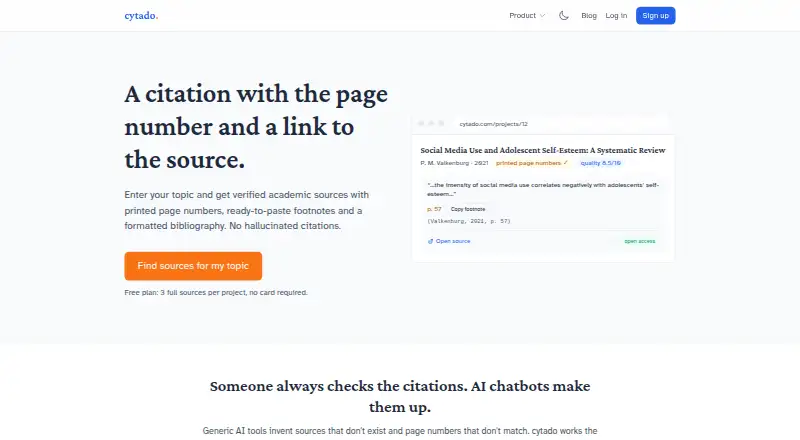
cytado helps users find academic sources for claims and build citations with printed page numbers, quotations, and links to original materials.
What cytado is
cytado helps users find academic sources for claims and build citations with printed page numbers, quotations, and links to original materials. It formats footnotes and bibliographies in APA 7, MLA 9, Chicago, Harvard, and numbered footnote styles, with BibTeX and RIS support. Bibliographies can be exported to Word, PDF, LaTeX, BibTeX, or RIS, and users can paste or upload one for checking against Crossref, OpenAlex, and Google Books. Integrations include Google Docs, Microsoft Word, Claude via MCP, ChatGPT, and a Chrome extension. Its Citation API can find a source for a claim, retrieve sources for a chapter, and check usage. The corpus covers English, Polish, and German publications. The Chrome extension receives only text users select and submit, while the Google Docs add-on receives the highlighted sentence and entered thesis topic. Unpaid projects are limited to one at a time, with daily and monthly search caps.
Good
- Supports five citation styles
- Exports bibliographies to Word, PDF, LaTeX, BibTeX, or RIS
- Checks bibliographies against academic databases
- Integrates with Google Docs and Microsoft Word
- Free options are available
Watch out
- Unpaid projects are limited to one at a time
- Daily and monthly source-search caps apply
- No page numbers for documents without printed pagination
Who it suits
cytado suits students, researchers, and writers who need academic sources, formatted citations, or bibliography checks. It may be useful for people working in supported document integrations or using the Citation API.
Verdict
cytado combines source finding, citation formatting, and bibliography checking across several document tools. Review the free-tier limits and note that sources without printed pagination cannot receive page numbers.
Plans and prices
From cytado's own pricing page, checked 15 Oct 2026.
| Plan | Price | What it gives you |
|---|---|---|
| Free | Free | 3 full sources per project · summaries and quality scores · no card required |
| Test | Free | 100 citations/month · 3 new topics · test key not billed |
| Unlocked project | $13, paid once | all found sources · printed-page fragments · paragraph source finder · Word/PDF/LaTeX/BibTeX/RIS export · project remains unlocked |
| Basic | $19 a month | 400 citations/month · 5 new topics · $0.04 extra citation · $1.00 extra topic · monthly |
| Start | $49 a month | 1,200 citations/month · 15 new topics · $0.04 extra citation · $1.00 extra topic · monthly |
| Pro | $99 a month | 3,000 citations/month · 40 new topics · $0.04 extra citation · $1.00 extra topic · monthly |
The facts
Each one read from cytado's own pages, with the date it was checked.
What it does
- API
- The Citation API offers endpoints to find a source for a claim, retrieve sources for a chapter, and check usage.checked 4 Oct 2026
- API authentication
- API requests use a Bearer token, with separate cyt_test_ and cyt_live_ key types.checked 15 Oct 2026
- API batching
- The find-source endpoint accepts up to 60 claims per request and explicitly drops excess items.checked 15 Oct 2026
- API documentation depth
- The API documentation specifies request fields, response structure, pagination semantics, billing fields and error codes.checked 15 Oct 2026
- API overage limit
- Paid API plans allow overage only up to an additional 100% of the plan before requests receive HTTP 429 responses.checked 15 Oct 2026
- API SDK examples
- Documentation includes curl, Python requests and JavaScript fetch examples rather than a separately named official SDK.checked 15 Oct 2026
- Bibliographies
- It formats footnotes and bibliographies in APA 7, MLA 9, Chicago, Harvard, and numbered footnote styles, with BibTeX and RIS support.checked 4 Oct 2026
- Bibliography generation
- The bibliography generator formats APA 7, MLA 9, Chicago, Harvard and numbered footnotes, with exports to Word, PDF, LaTeX, BibTeX and RIS.checked 15 Oct 2026
- Chrome extension
- The Chrome extension displays a bubble for selected text and returns a publication, printed page, quote and copyable footnote.checked 15 Oct 2026
- Chrome limitation
- The extension cannot read Google Docs canvas text, so cytado directs Google Docs users to its dedicated add-on.checked 15 Oct 2026
- Chrome privacy
- The extension states that only text explicitly selected and submitted is sent to cytado; page content and browsing history are not collected.checked 15 Oct 2026
- Chrome store status
- The extension page says the Chrome Web Store listing was brand new and had no ratings at the time of the page capture.checked 15 Oct 2026
- Citation generation
- Users paste a sentence and cytado returns a supporting publication, the printed page containing the claim and a formatted citation.checked 15 Oct 2026
- Content limits
- The API page says cytado does not provide a page number for documents without printed pagination and returns metadata and short quotations rather than full text for sources it may not republish.checked 4 Oct 2026
- Data handling for institutions
- The institution page says submitted reference lists are used for checking and that full student works are not stored.checked 15 Oct 2026
- Evidence matching
- The evidence API compares a specific claim with full-text passages and returns a source page or an explicit not-found result.checked 15 Oct 2026
- Exports
- Bibliographies can be exported to Word, PDF, LaTeX, BibTeX, or RIS.checked 4 Oct 2026
- Google Docs integration
- The Google Docs add-on lets users highlight text and insert a verified citation as a native Docs footnote.checked 15 Oct 2026
- Google Docs permissions
- The add-on says it accesses only the document in which it is used, sidebar display and cytado.com, without access to the rest of Drive.checked 15 Oct 2026
- Independent architecture
- The maker portfolio lists Chrome MV3, Word and Google Docs add-ins, and a shared account across the browser and document integrations.checked 15 Oct 2026
- Independent infrastructure
- The maker lists AWS services, PostgreSQL, S3, Fastify, Next.js, PM2 and Python workers among the shared stack used for products.checked 15 Oct 2026
Money
- API billing
- A resolved citation is a claim matched to a source with a page number; misses are free and new-topic harvesting is metered separately.checked 15 Oct 2026
The company
- Independent company scale
- The maker describes himself as working solo and operating eight products.checked 15 Oct 2026
- Independent maker profile
- The maker’s independent portfolio identifies Cytado as a 2026 product with web and Chrome Web Store releases, while Word, Docs and WordPress versions were in review.checked 15 Oct 2026
The full review of cytado
Overview
cytado is an academic citation tool for writers who need to connect claims with sources and manage references across document editors and AI assistants. Its strongest case is research that benefits from source matching and printed-page excerpts; writers seeking only quick, broad-style citation formatting may find a simpler free tool a better fit.
Key features
cytado finds academic sources for claims and can return citations with page numbers, quotations, and links to the originals. That makes it more useful for substantiating a draft than a formatter that only turns supplied metadata into a citation. There is an important boundary: page numbers are unavailable for documents without printed pagination, and some sources yield metadata and short quotations rather than full text.
Bibliographies and footnotes can be formatted in APA 7, MLA 9, Chicago, Harvard, and numbered footnote styles. The tool supports in-text citations and exports to Word, PDF, LaTeX, BibTeX, and RIS. Users can paste or upload a bibliography for checking against Crossref, OpenAlex, and Google Books. These are practical additions for writers revising references, though five citation styles are a narrower range than a dedicated generator advertising thousands.
Integrations include Google Docs, Microsoft Word, Claude via MCP, ChatGPT, and a Chrome extension. The Citation API can find a source for a claim, retrieve sources for a chapter, and check usage. The source corpus covers English, Polish, and German publications, which makes it more relevant to those language needs than to research in other languages.
Privacy boundaries are stated for two integrations: the Chrome extension receives only text a user selects and submits, while the Google Docs add-on receives the highlighted sentence and user-entered thesis topic, not the rest of the document or other Drive files. Unpaid projects are limited to one at a time, with daily and monthly caps on source searches. Support replies to questions, billing issues, and feedback within one business day.
Pricing
The free options suit different stages of trying or using cytado. Test costs nothing and includes 100 resolved citations and 3 new topics, with no card required. The separate Free plan costs nothing and provides 3 full sources per project, plus summaries and quality scores, without requiring a card. Neither removes the unpaid-project and search-cap limits.
Unlocked project costs $13, paid once. One payment covers a project for as long as the writer works on it, with all found sources, printed-page fragments, a paragraph source finder, and Word, PDF, LaTeX, BibTeX, and RIS exports. It is the clearest fit for a single paper or thesis project; it does not offer the monthly citation and topic quotas of the subscription plans.
Basic costs $19 a month for 400 citations and 5 new topics; extra citations cost $0.04 and extra topics $1.00. Start costs $49 a month for 1,200 citations and 15 new topics, while Pro costs $99 a month for 3,000 citations and 40 new topics. Both carry the same extra-use prices. Basic is the lower-commitment recurring choice for modest ongoing research, while Start and Pro suit heavier workloads; the monthly plans matter most to users who need larger citation and topic allowances across continuing work.
Platforms
cytado is available through web, API, and extension. Its named integrations extend use to Google Docs, Microsoft Word, Claude via MCP, and ChatGPT, so it can fit workflows that move between writing tools. The API is especially relevant for teams or applications that need citation-finding endpoints rather than only a standalone interface.
Who it's for
cytado is best suited to students, researchers, and writers who need to source claims, check bibliographies, or work with page-linked citations in English, Polish, or German. The one-time project plan is compelling for a bounded writing project; recurring plans make more sense for users who repeatedly work through citation and topic quotas. It is less suitable for anyone who needs page numbers from unpaginated works, full text for every source, or citation styles beyond its five supported formats.
Pros and cons
- Pro: Source finding, bibliography checking, formatting, and exports span the research-to-document workflow, reducing the need to switch among separate citation tasks.
- Pro: The 13.00 USD one-time project plan includes all found sources and printed-page fragments, a useful alternative to a monthly subscription for one long-running paper.
- Pro: The extension and Docs add-on specify narrow data access, which gives users a clearer privacy boundary when submitting selected text.
- Con: Unpaid projects are limited to one at a time and source searches have daily and monthly caps, restricting sustained free use.
- Con: Page numbers depend on printed pagination, and some sources provide only metadata and short quotations, so cytado cannot support every source with the same depth.
- Con: The five citation styles may not cover writers who need a less common format.
Alternatives
Choose Petal if cloud storage and document annotations matter more than citation export: its free plan includes 1 GB of storage, one seat, three guests, 400 AI credits, two collections, and three annotations per document, but citation export is not included.
NevaScholar Citation Generator is a better fit for a web-only user who wants a free, no-sign-up citation generator with more than 7,000 styles. For a free web tool with DOI, URL, or title lookup and 15 or more styles, consider Yomu AI Citation Generator; its free option also includes bibliography and in-text formats with copy or export.
Pick AllCitations for a free web generator with unlimited citations, more than 30 styles, and no account requirement. CitePlex is worth considering when API access and a free web option are priorities; its free plan offers unlimited generate and copy, 11 styles, two projects, and saves 20 citations per month.
Paperpal is another freemium option, with web and extension access, a free trial, and paid plans for regular research and writing needs. AutoCaret Citation Generator may suit writers seeking a web tool with a free allowance of 20 credits—up to about four documents—and DOCX export. Citation Generator Canada is a free web alternative with AI-powered metadata lookup, citation styles, and DOCX and TXT export.
For a broader comparison, see AI Citation Generators.
Verdict
Choose cytado if your work needs more than citation formatting—especially claim-level source finding, bibliography checks, or page-linked excerpts across writing tools. Its one-time project plan is a strong fit for a single substantial paper, while subscription tiers serve repeated research with higher quotas. Look elsewhere if you need a much wider range of citation styles, unrestricted free searching, or page numbers for unpaginated sources.
Alternatives to cytado
- 1

Backrow Citation Generator
Free planAndroidiOSWebAPI8.1From $9.99 a month - 2
Paperpal
Free planWebExtensionmacOSWindows7.9From $139 a year - 3

Conch AI Citation Generator
Free planWebExtension7.5From $144 a year - 4

Scholarly
Free planWeb7.5From $144 a year - 5

CitePlex
Free planWebAPI7.4From $6.58 a month - 6
Solvely
AndroidiOSWebExtension7.2