
CitePlain
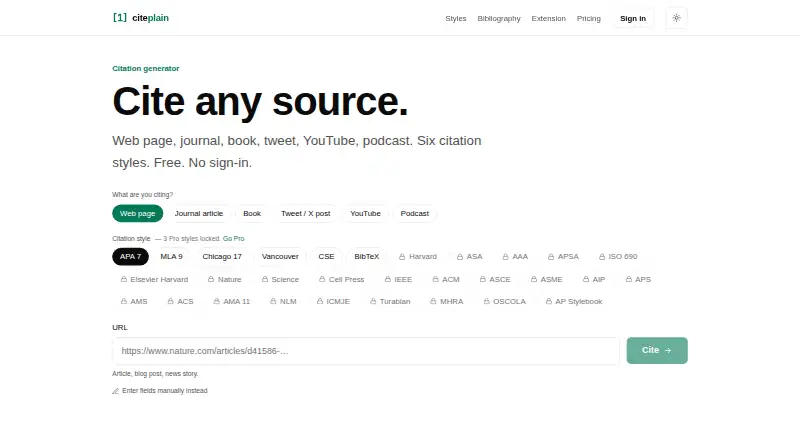
CitePlain creates citations and bibliographies from web pages, journal articles, books, tweets, YouTube videos, and podcasts.
What CitePlain is
CitePlain creates citations and bibliographies from web pages, journal articles, books, tweets, YouTube videos, and podcasts. It accepts URLs, DOIs, or ISBNs and reads citation and Open Graph metadata, with Crossref lookup for DOIs and Open Library lookup for ISBNs. The free plan includes APA 7, MLA 9, Chicago 17, Vancouver, CSE, and BibTeX, plus a bibliography builder for up to 50 sources per batch. Its extension for Chrome, Edge, and Firefox can read metadata from the active tab and provide BibTeX with a stable cite key for Overleaf or Zotero. Pro adds specialised styles, batch URL import for 50 sources, and a cloud library synced across the web app and extension. Free-tier references stay in browser local storage. Pro costs $4.99 a month or $39 a year; lifetime options are listed at $89.00 USD or $199.00 USD once. CitePlain describes itself as a tool for individual citations, not a replacement for a research reference manager.
Good
- Accepts URLs, DOIs, and ISBNs.
- Free tier includes six citation styles.
- Bibliography builder supports 50 sources per batch.
- Browser extension supports Chrome, Edge, and Firefox.
- Free references stay in local browser storage.
Watch out
- Free tier has six citation styles.
- Pro costs $4.99 a month.
- Some niche Pro styles may not match exact house styles.
- No free trial is listed.
Who it suits
CitePlain may suit someone who wants to create individual citations or build a bibliography from web and publication identifiers. Its maker says it is not intended to replace a research reference manager.
Verdict
CitePlain offers citation generation, browser-based metadata capture, and bibliography building, with cloud sync on Pro. Readers needing a full research reference manager should note the product’s stated scope.
Plans and prices
From CitePlain's own pricing page, checked 15 Oct 2026.
| Plan | Price | What it gives you |
|---|---|---|
| Free | Free | 6 source types · 6 citation styles · bibliography builder 50 sources per batch · device-local browser library · Chrome, Edge, Firefox extension · no sign-in · $0 forever |
| Pro monthly | $4.99 a month | Cloud sync · 30+ styles · batch URL import 50 per batch · cloud library · Word and Google Docs add-ins shipping soon · $4.99/month |
| Pro yearly | $39 a year | Cloud sync · 30+ styles · batch URL import 50 per batch · cloud library · Word and Google Docs add-ins shipping soon · $39 per year |
| Founder Lifetime | $89, paid once | Everything in Pro forever · no renewal or expiry · transferable email on request · first 100 customers · $89 one time, lifetime |
| Lifetime Founder | $89, paid once | Everything in Pro, forever · no renewal or expiry · transferable email on request · first 100 customers · $89 one time, lifetime |
| Lifetime | $199, paid once | Everything in Pro forever · no renewal or expiry · $199 lifetime tier for the next 500 |
The facts
Each one read from CitePlain's own pages, with the date it was checked.
What it does
- Audience
- CitePlain describes itself as suited to quickly generating an individual citation and says it is not trying to replace Zotero as a research reference manager.checked 29 Sep 2026
- Batch limit
- The bibliography builder supports 50 sources per batch, and Pro batch URL import supports 50 per batch.checked 29 Sep 2026
- Batch URL import
- Pro supports importing up to 50 URLs per batch.checked 15 Oct 2026
- Bibliography limit
- The bibliography builder accepts up to 50 sources in one batch.checked 15 Oct 2026
- BibTeX integration
- BibTeX export is free and uses stable cite keys intended for Overleaf or Zotero workflows.checked 15 Oct 2026
- Cancellation
- Subscriptions can be cancelled or downgraded through the Stripe Customer Portal, with access continuing through the paid period.checked 15 Oct 2026
- Chicago limitation
- Chicago Notes and Bibliography is the current default, while an Author-Date toggle is planned for a future release.checked 15 Oct 2026
- Clipboard workflow
- Generated citations are copied to the clipboard automatically and can be saved to the browser library.checked 15 Oct 2026
- Cloud sync
- Pro synchronizes a cloud library across the web app, extension and add-ins.checked 15 Oct 2026
- Crossref and Open Library
- Crossref is used for DOI resolution and Open Library for ISBN enrichment.checked 15 Oct 2026
- DOI fallback
- When page metadata is poor but a DOI is present, the extension queries Crossref for the canonical record.checked 15 Oct 2026
- Exports and integrations
- The extension provides BibTeX with a stable cite key for use in Overleaf or Zotero, and DOI fallback uses Crossref.checked 29 Sep 2026
- Extension editing
- The extension lets users correct author, year or title metadata before copying a citation.checked 15 Oct 2026
- Extension engine
- The MV3 extension reads citation, Open Graph, Dublin Core and JSON-LD metadata from the active tab.checked 15 Oct 2026
- Extension store status
- CitePlain's extension page says Chrome, Edge and Firefox store links will activate when listings go live.checked 15 Oct 2026
- GitHub followers
- The BrainBytes Studio GitHub profile shows 9 followers.checked 15 Oct 2026
- GitHub refund statement
- The studio README advertises 30-day refunds.checked 15 Oct 2026
Where it runs
- Browser extension
- The extension is listed for Chrome, Edge, and Firefox and reads metadata from the active tab.checked 29 Sep 2026
- Browser library
- Free saved references are kept in browser local storage and are not sent off the device.checked 15 Oct 2026
- Device data policy
- The studio README says user data stays on the device.checked 15 Oct 2026
The company
- Company location
- The BrainBytes Studio GitHub profile lists Switzerland as its location.checked 15 Oct 2026
- GitHub maker profile
- BrainBytes Studio's GitHub profile labels it an indie developer studio for open-source tools, templates and experiments.checked 15 Oct 2026
Money
- Free citation styles
- The free tier includes APA 7, MLA 9, Chicago 17, Vancouver, CSE and BibTeX.checked 15 Oct 2026
- Free styles
- The free tier includes APA 7, MLA 9, Chicago 17, Vancouver, CSE, and BibTeX.checked 29 Sep 2026
The full review of CitePlain
CitePlain is a citation generator for people who need to turn a source into a formatted reference without taking on a full research library. Its free tier covers common styles and browser-based capture; Pro is the step up for cloud sync and more specialised formats.
Overview
CitePlain handles sources ranging from journal articles and books to tweets, YouTube videos and podcasts. That breadth makes it useful for quick, one-off citations across different kinds of material, while its own stated aim is not to replace a research reference manager such as Zotero.
Key features
Sources can be entered as URLs, DOIs or ISBNs. CitePlain reads publisher citation and Open Graph metadata, uses Crossref for DOI lookups and Open Library for ISBNs. This gives it several routes to identify a source, but the output still depends on the metadata available for that item.
The bibliography builder supports batches of up to 50 sources, and Pro's URL import has the same per-batch limit. The Chrome, Edge and Firefox extension reads metadata from the active browser tab, avoiding the need to re-enter a page's details. BibTeX export includes a stable cite key for use with Overleaf or Zotero, a practical advantage for people whose writing workflow already uses those tools.
Free includes APA 7, MLA 9, Chicago 17, Vancouver, CSE and BibTeX. Pro expands the selection with 24 specialised styles, including Harvard, IEEE, AMA, OSCOLA, ACS and ICMJE. Some niche styles share formatting with their citation-family base, however, so users with exact house-style requirements should check the output rather than assume every variation is reproduced precisely.
On Free, saved references remain in browser local storage and do not leave the device, according to CitePlain. Pro adds a cloud library synced between the web app and extension. Free therefore suits a single-device workflow and a privacy-conscious user; cloud access is the clear reason to pay when working across devices.
Pricing
The Free plan costs $0 forever and includes six source types, six citation styles, a bibliography builder for 50 sources per batch, a device-local browser library and the Chrome, Edge and Firefox extension. It is a capable starting point for common formats, but lacks cloud sync and Pro's specialised styles.
Pro monthly costs $4.99 per month; Pro yearly costs $39 per year. Both include cloud sync, 30+ citation styles, batch URL import for 50 sources per batch and a cloud library across devices. Word and Google Docs add-ins are described as shipping soon, so they should not be treated as current capabilities. The yearly plan is the lower-cost route for someone ready to commit for a year; monthly keeps the commitment shorter.
Lifetime Founder costs $89 one time and includes everything in Pro forever, with no renewal or expiry and a transferable email on request; it is limited to the first 100 customers. Lifetime costs $199 one time, includes everything in Pro forever and has no renewal or expiry; it is the lifetime tier for the next 500. These options suit buyers who prefer a one-time payment, but the stated customer limits matter. Pro subscriptions can be cancelled anytime through the Stripe portal, and the first Pro purchase has a 30-day no-questions-asked refund. There is no free trial.
Platforms
CitePlain is available on the web and as a browser extension for Chrome, Edge and Firefox. The extension's active-tab metadata capture is most useful when citations start from web pages; the web app also supports entering URLs, DOIs and ISBNs.
Who it's for
CitePlain fits students, writers and other readers who need citations or modest bibliographies in common styles, especially those who value local storage or BibTeX export. Pro makes more sense for cross-device users or people who regularly need its broader set of styles. Anyone seeking a full research reference manager should look elsewhere.
Pros and cons
- Pro: URL, DOI and ISBN input plus metadata capture across several source types gives quick-citation users multiple ways to start.
- Pro: The 50-source batch size and stable-key BibTeX export support larger bibliographies and existing Overleaf or Zotero workflows.
- Pro: Free references stay in browser local storage, while Pro provides cloud sync for access across devices.
- Con: Free is limited to six styles; specialised formats and cloud sync require a paid plan.
- Con: Some niche Pro styles may not match exact house-style details, which matters for strict submission requirements.
- Con: CitePlain is positioned as a citation generator, not a substitute for a research reference manager.
Alternatives
For a wider comparison, see Citation Generator Tools.
- Cite This For Me is worth considering if Android or iOS access matters; its free account is limited to Harvard and saves citations for seven days.
- CitApp may suit readers prioritising breadth of styles: its free plan advertises 150+ styles, alongside weekly limits on browser captures, Google Docs insertions and Academic Shield checks.
- Citation[Z] is an option for a free generator with converter and bibliography tools, five styles and bulk paste for up to five references.
- CiteMe may suit users looking for a broader free toolkit: its free plan includes 60+ styles, a reference checker and library saving, each with stated monthly limits.
- MyBib is a sensible alternative for people who want to work without an account and keep work on their device by default; its Plus plan is $2 per month, paid annually.
- Petal is aimed at a different need: its free plan includes cloud storage, collections and document annotations, but not citation export.
- Scribbr Citation Generator is a free alternative for readers who want a tool advertised without costs, ads or usage limits.
- Bibcitation is another free citation generator.
Verdict
CitePlain is a good fit for people who want quick citations, a manageable bibliography and useful BibTeX export, with a genuinely device-local free library. Choose Pro when cloud sync or specialised styles justify the price; choose a full reference manager instead if organising research is the central task.
Getting started
- Open https://citeplain.com/.
- Use the web app or install the extension for Chrome, Edge, or Firefox.
- Enter a URL, DOI, or ISBN, or use the extension to read metadata from the active tab.
- Choose a free citation style, or select a Pro plan for specialised styles and cloud sync.
- Use the bibliography builder for up to 50 sources per batch; Pro also supports batch URL import for 50 per batch.
Limits worth knowing
The free plan includes six citation styles and a bibliography builder limited to 50 sources per batch; its saved references stay in browser local storage. Pro batch URL import is also limited to 50 per batch, and some niche Pro styles share formatting with their citation-family base, so output may not match exact house-style details.
Questions
Is CitePlain free?
Yes. Its Free plan is billed at $0 forever and includes six source types, six citation styles, a bibliography builder for 50 sources per batch, a device-local browser library, and the extension.
How much does Pro cost?
Pro monthly is $4.99 a month, and Pro yearly is $39 a year. Lifetime Founder is $89.00 USD once, and Lifetime is $199.00 USD once.
Which platforms does CitePlain support?
CitePlain is available on the web and as a browser extension for Chrome, Edge, and Firefox.
What citation styles are included?
The free tier includes APA 7, MLA 9, Chicago 17, Vancouver, CSE, and BibTeX. Pro adds 24 specialised styles, including Harvard, IEEE, AMA, OSCOLA, ACS, and ICMJE.
Does CitePlain integrate with Overleaf or Zotero?
The extension provides BibTeX with a stable cite key for use in Overleaf or Zotero.
Who makes CitePlain?
CitePlain is a BrainBytes Studio product. BrainBytes Studio describes itself as an indie solo-dev shop.
Alternatives to CitePlain
- 1

BibGuru
Free planWebExtensionmacOSWindows7.7From $4.99 a month - 2
Citation Machine
Free planWeb7.3From $9.95 a month - 3

Cite This For Me
Free planAndroidiOSWebExtension7.3From £6.99 a month - 4

Petal
Free planWebExtension6.9From $2.55 a month - 5

Bibcitation
Free planWebExtension6.7Free plan - 6

CitApp
Free planWebExtension6.799 SEK one-time