
MyBib
MyBib creates formatted citations, bibliographies, and works cited for academic assignments and papers.
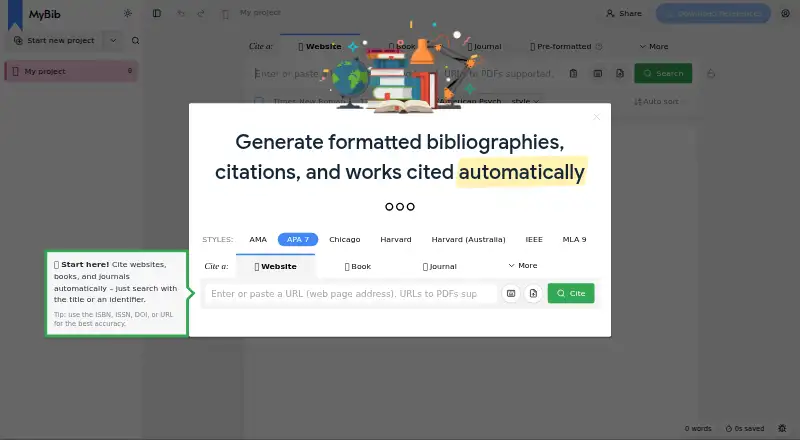
What MyBib is
MyBib creates formatted citations, bibliographies, and works cited for academic assignments and papers. It is available on the web and through free browser extensions for Chrome, Firefox, and Edge. Citations can be generated for books, journals, websites, and videos by entering a title or an identifier such as a URL or ISBN. The maker says it supports more than 9,000 styles, including APA, Chicago, Harvard, and MLA. Users can organize work in nested folders, combine sources in an in-text citation, and add a page, chapter, or section locator. Bibliographies can be downloaded to Word or Google Docs, imported into Zotero or Mendeley, or exported as BibTeX and JSON. The free plan works without an account, with no project or citation limit, and stores work on the user’s device by default. MyBib says it mostly remains usable without internet access. MyBib Plus adds server storage and access across devices for $2 per month, paid annually at $24 per year.
Good
- Supports more than 9,000 citation styles.
- Creates citations from titles, URLs, and ISBNs.
- No limit on projects, citations, or bibliographies.
- Exports include Word, Google Docs, BibTeX, and JSON.
- Free use does not require an account.
Watch out
- Cross-device access requires MyBib Plus.
- Server backup requires MyBib Plus.
- Privacy policy says it may collect email, usage, and cookie data.
Who it suits
MyBib suits students, academics, and teachers who need to format references and organize research. It is also useful for people who want citation exports or need to work across devices with server storage.
Verdict
MyBib covers citation creation, organization, and export for academic work, including a no-cost plan without project or citation caps. Users who need server backup and access across devices must subscribe to MyBib Plus.
Plans and prices
From MyBib's own pricing page, checked 30 Sep 2026.
| Plan | Price | What it gives you |
|---|---|---|
| Free | Free | All existing features · use without an account · work stored on your device by default |
| MyBib Plus | $24 a year | Subscription for server storage · access work on any device · $2 per month, paid annually (so $24 per year) |
The facts
Each one read from MyBib's own pages, with the date it was checked.
Where it runs
- Browser extensions
- MyBib says it offers free extensions for Chrome, Firefox, and Edge.checked 30 Sep 2026
What it does
- Citation styles
- The maker says MyBib supports over 9,000 styles, including APA, Chicago, Harvard, and MLA.checked 30 Sep 2026
- Exports and integrations
- Bibliographies can be downloaded to Word or Google Docs and imported into Zotero or Mendeley; BibTeX and JSON are also available.checked 30 Sep 2026
- Intended users
- MyBib describes students, academics, and teachers as its intended users.checked 30 Sep 2026
- In-text citations
- The in-text citation builder can combine multiple sources into one citation and include a locator such as a page, chapter, or section.checked 30 Sep 2026
- Offline use
- After a technical rebuild, MyBib says it will keep working even if the user loses internet access, mostly.checked 30 Sep 2026
- Organization
- Users can create folders within folders and drag a folder into another folder.checked 30 Sep 2026
- Privacy and security
- MyBib's privacy policy says it may collect account email addresses, usage data, and cookie data, and says it cannot guarantee absolute security of data transmission or storage.checked 30 Sep 2026
- Privacy standards
- MyBib says it uses commercially reasonable administrative, physical, and technical standards to protect student information under FERPA and is committed to GDPR-compliant processing.checked 30 Sep 2026
- Projects
- The project limit has been removed, and MyBib says there is no limit to the number of citations or bibliographies users can create.checked 30 Sep 2026
- Purpose
- MyBib generates formatted bibliographies, citations, and works cited for academic assignments and papers.checked 30 Sep 2026
- Source types
- It can automatically create citations for books, journals, websites, and videos from a title or identifier such as a URL or ISBN.checked 30 Sep 2026
- Storage limit
- Work is stored on the user's device by default; server backup and access across devices require MyBib Plus.checked 30 Sep 2026
- Support
- The privacy policy lists [email protected] as its contact email.checked 30 Sep 2026
The full review of MyBib
Overview
MyBib is a bibliography and citation tool for students, academics, and teachers preparing academic work. It suits people who want a broad choice of styles and room to build many projects without paying; its key trade-off is that the free plan keeps work on the device rather than backing it up across devices.
Key features
Source lookup and style coverage
MyBib can generate citations for books, journal articles, websites, and videos from a title or identifier such as a URL or ISBN. That can save manual entry when a source is recognized, while the maker's claim of more than 9,000 styles, including APA, Chicago, Harvard, and MLA, gives users options beyond the most common academic formats.
Research organization and in-text citations
Nested folders and drag-and-drop folder organization make it possible to separate research by course or paper without a project cap. The in-text citation builder can combine sources and add a page, chapter, or section locator, useful for citations that need to point to a specific passage rather than just a work.
Exports, extensions, and offline use
Bibliographies can be downloaded to Word or Google Docs, imported into Zotero or Mendeley, or exported as BibTeX or JSON. Free Chrome, Firefox, and Edge extensions provide another route to capture sources. MyBib says the rebuilt service will continue to work mostly without internet access, but its default device-based storage means offline availability should not be confused with server backup.
Privacy and support
MyBib's privacy policy says it may collect account email addresses, usage data, and cookie data, and cautions that absolute security of transmission or storage cannot be guaranteed. The service says it uses commercially reasonable administrative, physical, and technical protections for student information under FERPA and is committed to GDPR-compliant processing. Support is available by email at [email protected].
Pricing
Free: free. It includes all existing features, can be used without an account, and stores work on the user's device by default. With no project or citation caps, this is a substantial option for students who do not need server storage or access across devices.
MyBib Plus: $2 a year, billed $2 per month and paid annually ($24 per year). It adds server storage and access to work on any device. This is the relevant upgrade for users who want their work backed up and available across devices; those who are comfortable keeping work on one device can stay on Free.
Platforms
MyBib is available on the web and through browser extensions for Chrome, Firefox, and Edge. Its stated exports connect with Word, Google Docs, Zotero, and Mendeley; no Word add-in is offered.
Who it's for
MyBib is a strong fit for students, academics, and teachers who need citations across varied styles, nested research organization, and flexible exports without per-project or per-citation charges. It is less suited to anyone who requires cloud backup or seamless access from multiple devices without a subscription.
Pros and cons
- Pro: No project or citation limit on the free plan, so extensive academic work does not require an upgrade just to keep growing.
- Pro: More than 9,000 styles, source lookup, and several export routes cover varied citation and writing workflows.
- Con: Free work is stored on the device by default; server backup and cross-device access require Plus.
- Con: The policy allows collection of email, usage, and cookie data and does not promise absolute data security.
Alternatives
For a wider comparison, see Citation Generator Tools.
- CiteMe is worth considering if its reference checker and library quotas meet your needs: its free plan offers 60+ styles, three reference checks per month, 200 saved references per month, one project, and five BibTeX/RIS exports.
- Bibcitation is another free browser-extension and web citation generator; its homepage lists no usage limits.
- CitApp is another freemium browser-extension and web option for readers comparing citation tools.
- Scribbr Citation Generator is a free browser-extension and web option for readers seeking a citation generator without costs, ads, or usage limitations.
- CitePlain is another freemium browser-extension and web alternative.
- Cite This For Me may suit readers who want Android or iOS access as well as web and extension support; its free account is limited to Harvard citations, includes ads, and saves citations for seven days.
- EasyBib is a browser-extension and web alternative with a free citation generator and five free grammar suggestions; its Plus plan renews monthly automatically.
- Petal is another freemium browser-extension and web alternative for readers comparing research tools.
Verdict
Choose MyBib if you want a generous free citation workflow with broad style support, nested folders, and no project or citation cap. Its main reason to look elsewhere is storage: users who need server backup and cross-device access must pay annually for Plus.
Alternatives to MyBib
- 1

BibGuru
Free planWebExtensionmacOSWindows7.7From $4.99 a month - 2

CitePlain
Free planWebExtension7.4From $39 a year - 3
Citation Machine
Free planWeb7.3From $9.95 a month - 4

Cite This For Me
Free planAndroidiOSWebExtension7.3From £6.99 a month - 5

Petal
Free planWebExtension6.9From $2.55 a month - 6

Bibcitation
Free planWebExtension6.7Free plan