instax UP!
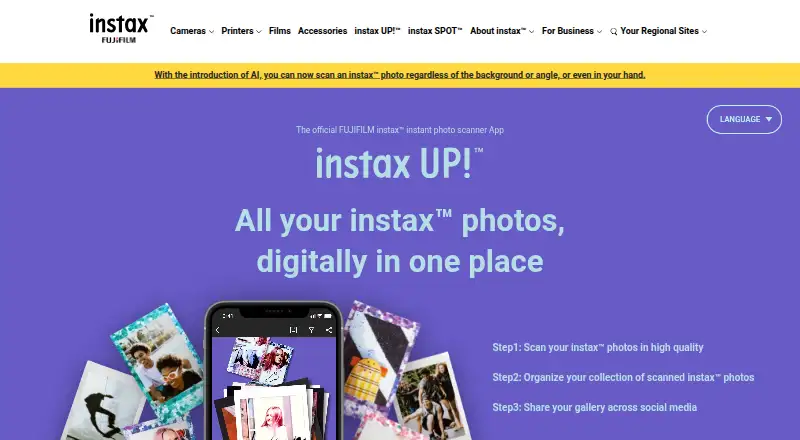
instax UP! scans instax prints and saves digital copies that users can collect and share.
What instax UP! is
instax UP! scans instax prints and saves digital copies that users can collect and share. It supports mini, SQUARE, and WIDE prints, including decorated photos, and offers adjustments for reflections, contrast, brightness, saturation, and warmth. Scanned photos can be browsed in Box View or List View and sorted by date and time, location, or keyword. Albums group images by theme, while instax Days places them on a calendar. The app can also import movies shot on a hybrid instax camera and photos or movies from compatible instax Link, mini Evo, and mini LiPlay apps. Collections can be shared through social media and messaging services, and registration is not required. The app is free for iOS and Android, though users are responsible for data usage charges. The FAQ lists Android 10.0 or later and iOS 14.0 or later; a notice says version 2.3.0 or later requires iOS 16 or later. Deleting the app also deletes scanned photos and other data, so use Data backup and Data transfer to move data to a new phone.
Good
- Scans mini, SQUARE, and WIDE instax prints.
- Adjusts reflections, contrast, brightness, saturation, and warmth.
- Organizes scans in albums and a calendar view.
- No registration is required.
Watch out
- Deleting the app deletes scans and other data.
- Version 2.3.0 or later requires iOS 16 or later.
- Data usage charges are the user's responsibility.
Who it suits
instax UP! suits instax photo owners who want digital scans organized into albums or a calendar and ready to share. It is also useful for people who use compatible instax apps or shoot movies on a hybrid instax camera.
Verdict
instax UP! offers free scanning, organization, editing, and sharing for instax prints. Back up and transfer app data before deleting it or moving to a new phone.
Plans and prices
From instax UP!'s own pricing page, checked 4 Oct 2026.
| Plan | Price | What it gives you |
|---|---|---|
| instax UP! App | Free | Free app; data usage charges are the user's responsibility |
The facts
Each one read from instax UP!'s own pages, with the date it was checked.
What it does
- Albums and calendar
- Albums organize photos by theme, and instax Days displays scanned photos by date in a calendar.checked 4 Oct 2026
- Backup limit
- Deleting the app deletes scanned photos and other data, so users must use Data backup and Data transfer to move data to a new phone.checked 4 Oct 2026
- Photo organization
- Scanned photos can be viewed in Box View or List View and sorted by date/time, location, or keyword.checked 4 Oct 2026
- Photo scanning
- It can scan mini, SQUARE, and WIDE instax prints, including decorated photos.checked 4 Oct 2026
- Purpose
- The app scans and saves instax photos digitally so users can collect and share them.checked 4 Oct 2026
- Registration
- User registration is not required to use the app.checked 4 Oct 2026
- Scan editing
- Users can remove reflections and adjust contrast, brightness, saturation, and warmth.checked 4 Oct 2026
- Security information
- The maker's Product Security page links to product security information and a security update support period page.checked 4 Oct 2026
- Sharing
- Saved collections can be shared to social media and messaging services.checked 4 Oct 2026
- Support
- FUJIFILM provides an app FAQ and scanning guide on the official site.checked 4 Oct 2026
- Supported systems
- The FAQ lists Android 10.0 or later and iOS 14.0 or later; a site notice says version 2.3.0 or later requires iOS 16 or later.checked 4 Oct 2026
- Video import
- Movies shot on a hybrid instax camera can be imported into the app.checked 4 Oct 2026
Where it runs
- App connections
- The app can import photos and movies from compatible instax Link, mini Evo, and mini LiPlay apps.checked 4 Oct 2026
The company
- Founded
- 2006checked 28 Sep 2026
- Headquarters
- Tokyo, Japanchecked 28 Sep 2026
Alternatives to instax UP!
- 1

Google Photos
Free planAndroidiOSWebAPI8.3Free plan - 2
FilmBox by Photomyne
Free planAndroidiOSWebmacOS8.0From $39.99 a year - 3

FilmLab
Free planAndroidiOSLinuxmacOS8.0From $59.99 a year - 4
Brother iPrint&Scan
Free planAndroidiOSmacOSWindows7.4Free plan - 5

NAPS2
Free planOpen sourceAPILinuxmacOSWindows7.4Free plan - 6

Nostalgia
Free planAndroidiOSWebmacOS7.4From $79.99 a year