
FilmLab
FilmLab converts digital captures of film negatives into color or black-and-white images.
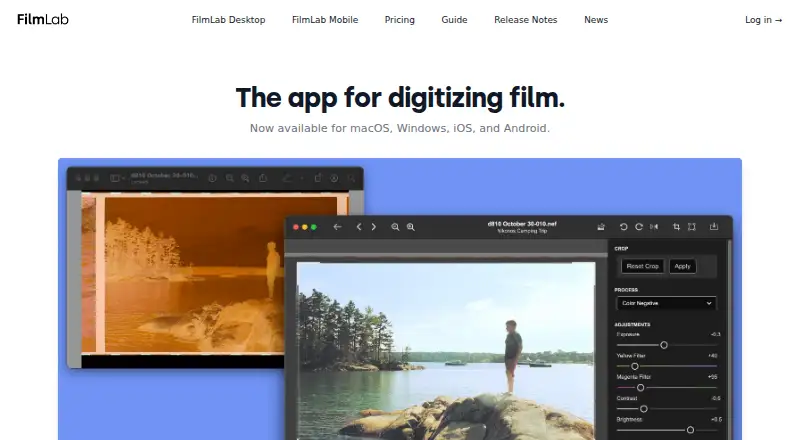
What FilmLab is
FilmLab converts digital captures of film negatives into color or black-and-white images. Its processing engine is designed to produce darkroom-inspired color and tone. Desktop apps open raw files from popular DSLR and mirrorless cameras, as well as raw DNG and TIFF files from scanners. Editing controls include exposure, color balance, contrast, brightness, cropping, rotation, and perspective correction. Users can batch-edit images and copy or paste settings between them. The editing process leaves original scan files unchanged and stores processing instructions in adjacent .fprc files. Mobile apps can preview negatives, make proof sheets, review older negatives, and produce quick scans for sharing. FilmLab apps are standalone. Export formats listed in current release notes include JPEG, TIFF, and JPEG XL. It is available for Windows, macOS, Linux, iOS, and Android. The monthly plan is $7.99 a month and the annual plan is $59.99 a year, each after a 14-day free trial. Lifetime membership is $199.99, paid once and includes future updates and features. Free education licenses are available by request to qualifying educators.
Good
- Opens raw camera files and raw DNG and TIFF scanner files.
- Offers controls for color, exposure, cropping, and perspective.
- Batch editing and copied settings are available.
- Original scan files remain unchanged during editing.
- Standalone apps are available on desktop and mobile.
Watch out
- Desktop does not support collaborative real-time editing.
- Monthly plan costs $7.99 a month after a 14-day trial.
- Education licenses are by request for qualifying educators.
Who it suits
FilmLab suits film photographers who want to convert digital negative scans and adjust or batch-edit images. Its mobile apps also suit people who want to preview or review negatives and make quick scans for sharing.
Verdict
FilmLab provides standalone tools for converting and adjusting film-negative captures, with batch editing and non-destructive processing. Its desktop app lacks collaborative real-time editing, and paid access is billed monthly, annually, or once for lifetime membership.
Plans and prices
From FilmLab's own pricing page, checked 15 Oct 2026.
| Plan | Price | What it gives you |
|---|---|---|
| Education | Free | For school, college or university programs teaching film photography to young people · Free licenses by request |
| Monthly | $7.99 a month | Full FilmLab features on personal Mac, Windows, iOS and Android devices · 14 days free, then $7.99/month |
| Annual | $59.99 a year | Full FilmLab features on personal Mac, Windows, iOS and Android devices · 37% savings versus monthly · 14 days free, then $59.99/year |
| Lifetime | $199.99, paid once | Access to every future FilmLab update and feature · $199.99 once |
The facts
Each one read from FilmLab's own pages, with the date it was checked.
What it does
- Automatic crop
- Desktop 3.3 added automatic frame detection and crop selection based on detected borders and common aspect ratios.checked 15 Oct 2026
- Automatic exposure and color
- Desktop 3.3 improved automatic exposure and color balance while retaining manual controls.checked 15 Oct 2026
- Automatic rotation
- Desktop 3.3 added automatic orientation detection so mixed portrait and landscape frames can be rotated correctly.checked 15 Oct 2026
- Batch editing
- Users can batch-edit images and copy or paste editing settings across images.checked 29 Sep 2026
- Batch processing
- The desktop release notes describe batch processing, batch export and applying film-stock and backlight choices to batches.checked 15 Oct 2026
- Camera scanning
- FilmLab Desktop opens raw files from popular DSLR and mirrorless cameras, plus raw DNG and TIFF files from scanners.checked 29 Sep 2026
- Collaboration limit
- FilmLab Desktop does not currently support collaborative real-time editing.checked 29 Sep 2026
- Data access
- If a customer does not renew a license, they can still access images and metadata they created.checked 29 Sep 2026
- Data portability
- The maker states that images and metadata remain accessible after a license is not renewed.checked 15 Oct 2026
- Desktop workflow
- The desktop app processes film scans without requiring additional software.checked 15 Oct 2026
- Documentation
- The FilmLab Guide calls itself a work in progress and links a desktop manual described as a complete reference for macOS and Windows features.checked 15 Oct 2026
- Export formats
- Documented desktop exports include JPEG, TIFF and JPEG XL, with TIFF compression choices and 8-bit or 16-bit options described in release notes.checked 15 Oct 2026
- Falloff correction
- Desktop 3.5 improved falloff correction with better backlight analysis, vignette mode and batch calibration selection.checked 15 Oct 2026
- Film profiles
- Desktop 3.5 expanded the color-film profile library from 23 to 60 profiles and added more light-source profiles, while noting some small brands remain missing.checked 15 Oct 2026
- Film types
- The mobile listing says FilmLab handles color negatives, black-and-white negatives and color-positive slides across 35mm, medium-format and large-format film.checked 15 Oct 2026
- Image adjustments
- Desktop includes automatic settings and controls for exposure, color balance, contrast, brightness, cropping, rotation, and perspective correction.checked 29 Sep 2026
- Integrations
- The App Store description names scanning setups from Negative Supply, Valoi, pixl-latr, Lomography and Kodak as supported equipment.checked 15 Oct 2026
- Licence status
- The terms describe the site software and source code as proprietary property, so FilmLab is not presented as open source.checked 15 Oct 2026
- Limit: advanced editing
- The same independent review said FilmLab lacks localized retouching tools such as dust removal, gradient masks and brush adjustments.checked 15 Oct 2026
- Limit: difficult film stocks
- An independent review reported that heavily expired, dense-fog or specialty films such as LomoChrome Purple can confuse automatic conversion and require manual correction.checked 15 Oct 2026
- Limit: mobile controls
- An App Store reviewer said the mobile app lacked multi-select uploads and manual exposure adjustment and requested HDR capture.checked 15 Oct 2026
The company
- Company legal identity
- The privacy policy identifies the maker as Develop and Fix, Inc., a corporation based in Maine, USA.checked 15 Oct 2026
- Headquarters
- Kennebunk, Maine, USAchecked 28 Sep 2026
Where it runs
- Limit: Android reliability
- A Google Play reviewer reported warped, low-resolution previews and crashes during capture on several Pixel phones.checked 15 Oct 2026
The full review of FilmLab
FilmLab turns camera or scanner captures of film negatives into color or black-and-white images, with desktop tools for shaping scans and mobile apps for quick previews. It suits film photographers who want a dedicated negative-conversion workflow without relying on another editor. Its strongest case is the combination of batch adjustments and untouched source scans; its subscription cost and lack of collaborative editing make it less compelling for shared workflows.
Overview
FilmLab’s processing engine aims for darkroom-inspired color and tones. On desktop, it opens raw files from popular DSLR and mirrorless cameras, as well as raw DNG and TIFF files from scanners. The mobile apps serve a lighter role: preview negatives, make proof sheets, revisit old negatives, or create quick scans to share.
FilmLab is standalone, so it does not require other software to function. It leaves scan files unchanged and stores processing instructions in adjacent .fprc files. That separation preserves the original capture while allowing FilmLab’s adjustments to be revisited. If a license is not renewed, customers can still access images and metadata they created.
Key features
Desktop combines automatic settings with controls for exposure, color balance, contrast, brightness, cropping, rotation, and perspective correction. Auto-crop, deskew correction, and auto enhancement are also available. These tools cover the practical corrections involved in turning a negative capture into a usable image, though the application does not support collaborative real-time editing.
Batch editing and copy-and-paste settings help keep adjustments consistent across a group of scans, a useful time-saver for anyone digitizing a roll or larger collection. Photo organization is also a listed capability. Export formats include JPEG, TIFF, and JPEG XL.
Pricing
FilmLab offers a 14-day free trial before paid access begins. The desktop page describes a two-week trial, while the manual says first-time users can test a limited number of files for free. That limit may matter if you want to evaluate a larger workflow before paying.
- Education: free. Free licenses are available by request to qualifying educators teaching film photography to young people. This is a focused option for eligible educational programs, not a general-purpose free tier.
- Monthly: $7.99 a month after the 14-day free period. It includes full access to FilmLab features on personal computers and devices, and suits users who want a shorter commitment.
- Annual: $59.99 a year after the 14-day free period, with the same full access across personal computers and devices. It costs less over a year than paying the monthly rate for twelve months, but renews annually.
- Lifetime: $199.99, paid once for lifetime membership, including future updates and features. It avoids recurring billing, but requires a substantially larger upfront payment.
The paid plans describe access across personal computers and devices rather than seat-based tiers. FilmLab’s freemium label does not mean a general free plan with ongoing full access: the free licenses are for qualifying educators, while other users get a limited-file evaluation and then paid plans.
Platforms
FilmLab supports Windows, macOS, and Linux on desktop, plus iOS and Android on mobile. That breadth is useful for photographers who switch between computer platforms or want mobile negative previews alongside desktop processing.
Who it's for
FilmLab is best suited to film photographers digitizing negatives with a camera or scanner, especially those processing batches and wanting to preserve original scans. Its mobile apps also make sense for people who mainly need previews, proof sheets, or shareable quick scans. It is a poorer fit for teams that need to edit together in real time, or for casual users seeking a broadly free desktop option.
Pros and cons
- Pros: Batch editing and transferable settings speed up consistent work across multiple scans.
- Pros: Non-destructive processing keeps original scan files intact, and images and metadata remain accessible after a license is not renewed.
- Pros: Desktop and mobile apps cover both detailed scan processing and quick negative previews across five platforms.
- Cons: There is no collaborative real-time editing, so FilmLab is not suited to shared live review or adjustment.
- Cons: Most users must move to a paid plan after the limited-file trial; a free license is reserved for qualifying educators.
- Cons: Monthly or annual billing continues the cost of full access, while lifetime membership demands a larger one-time payment.
Alternatives
For broader scanning choices, browse Photo Scanning Software.
- Nostalgia is another freemium option with a free plan.
- Google Photos is a freemium alternative with a free plan.
- PhotoScanner is a freemium option with a free plan.
- Brother iPrint&Scan is a free alternative for users with a supported Brother machine; printing and scanning features vary by model.
- MyHeritage Mobile App is a freemium alternative with a free Basic plan.
- Photo Scan by Photomyne is a freemium alternative with a free trial and annual plan.
- NAPS2 is free for individuals and businesses, with no ads or restrictions.
- Reimagine by MyHeritage is a freemium alternative with monthly and annual subscriptions.
Verdict
Choose FilmLab if you digitize film negatives and want dedicated conversion tools, batch editing, and a workflow that preserves source scans. Look elsewhere if real-time collaboration is essential or you need a general free desktop plan; for most individual users, the annual plan is the more economical recurring option, while lifetime membership suits those willing to pay upfront for future updates.
Getting started
- Visit https://www.filmlabapp.com/ to get started.
- Choose a supported platform: Windows, macOS, Linux, iOS, or Android.
- Select a 14-day trial followed by Monthly or Annual access, or choose Lifetime membership.
- On desktop, open a supported camera raw file or raw DNG or TIFF scanner file.
- Adjust the image and export it in a supported format.
Limits worth knowing
The Monthly plan is $7.99 a month and the Annual plan is $59.99 a year after a 14-day trial. The Lifetime plan costs $199.99, paid once and includes future updates and features; first-time users can test a limited number of files for free, according to the manual.
Questions
Does FilmLab have a free plan?
Yes. Free licenses are available by request to qualifying educators teaching film photography to young people.
How much do paid plans cost?
Monthly is $7.99 a month and Annual is $59.99 a year, each after a 14-day trial. Lifetime membership costs $199.99, paid once.
Which platforms are supported?
FilmLab supports Windows, macOS, Linux, iOS, and Android.
Does FilmLab require other software?
No. The apps are standalone and do not require other software to function.
What export formats are available?
Current release notes describe JPEG, TIFF, and JPEG XL export features.
Can desktop users edit together in real time?
No. FilmLab Desktop does not currently support collaborative real-time editing.
Alternatives to FilmLab
- 1

Google Photos
Free planAndroidiOSWebAPI8.3Free plan - 2
FilmBox by Photomyne
Free planAndroidiOSWebmacOS8.0From $39.99 a year - 3
Brother iPrint&Scan
Free planAndroidiOSmacOSWindows7.4Free plan - 4

NAPS2
Free planOpen sourceAPILinuxmacOSWindows7.4Free plan - 5

Nostalgia
Free planAndroidiOSWebmacOS7.4From $79.99 a year - 6

PaperScan
Free planWindows7.4$79 one-time