insMind Background Remover
insMind Background Remover identifies the main subject in an image and removes the surrounding background automatically.
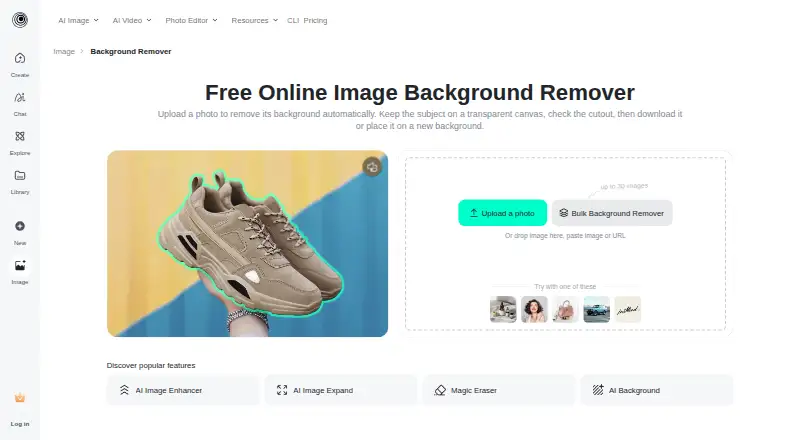
What insMind Background Remover is
insMind Background Remover identifies the main subject in an image and removes the surrounding background automatically. The result can stay on a transparent canvas or use a solid color, another image, or an AI-generated scene as its background. A built-in editor supports follow-up changes such as adding text, removing objects, sharpening, resizing, and adding shadows. The tool is suited to ecommerce product photos, marketing and social graphics, portraits, and profile images. It runs in a desktop or mobile browser, and insMind lists apps for iOS and Android. Users processing multiple images are directed to a separate bulk background remover, which supports JPEG, PNG, and WebP among other formats. The site says online use can start for free, though export resolution, formats, credits, or account requirements may vary with the selected editor option. The maker advises checking hair, fur, transparent objects, narrow gaps, reflections, and low-contrast edges after removal. Logged-in web users' generated content stays in cloud storage until deleted; logged-out content is stored for seven days before automatic deletion.
Good
- Automatically removes the area around the main subject
- Transparent, color, image, and generated-scene backgrounds
- Editor includes resizing, sharpening, and object removal
- Separate bulk tool supports JPEG, PNG, and WebP
- Free online workflow is available to start
Watch out
- Hair, fur, gaps, and reflections may need checking
- Logged-in web content stays stored until deleted
- Export options may depend on editor selection
Who it suits
This tool suits creators, brands, marketers, businesses, and ecommerce sellers preparing product images or promotional graphics. It can also serve people editing portraits or profile images in a browser or mobile app.
Verdict
insMind combines automatic cutouts with background choices and further editing in the same workflow. Check image edges after removal, and review the selected editor option for its export and account requirements.
The facts
Each one read from insMind Background Remover's own pages, with the date it was checked.
What it does
- Automatic cutout
- The tool detects the main subject and removes the surrounding background automatically.checked 9 Oct 2026
- Automatic removal
- The tool detects the main subject and removes the surrounding background automatically.checked 9 Oct 2026
- Background options
- After removal, users can keep the canvas transparent or add a solid color, another image, or an AI-generated scene.checked 9 Oct 2026
- Batch processing
- Yeschecked 23 Sep 2026
- Batch workflow
- The background-remover page directs users who need to process multiple images to a separate bulk background remover.checked 9 Oct 2026
- Edge cases
- The page advises checking hair, fur, transparent objects, narrow gaps, reflections, and low-contrast edges because these can be difficult to process cleanly.checked 9 Oct 2026
- Editing workflow
- The cutout opens in an editor where users can continue editing, including adding text, removing objects, sharpening, resizing, or adding a shadow.checked 9 Oct 2026
- Export formats
- JPEG,PNG,WebP (bulk tool page says it supports these formats among others)checked 23 Sep 2026
- Facial data
- The privacy policy says uploaded images containing facial information may be temporarily analyzed for effects including background removal, but it does not perform facial recognition or collect biometric identification information.checked 9 Oct 2026
- Further editing
- The editor supports follow-up edits such as adding text, removing objects, sharpening, resizing, and adding shadows.checked 9 Oct 2026
- Image handling
- The privacy policy says logged-in web users’ generated content is stored in the cloud until they delete it, while content from logged-out web sessions is stored for seven days and then automatically deleted.checked 9 Oct 2026
- Intended users
- The company describes insMind as serving creators, brands, marketers, and businesses, and identifies e-commerce sellers and teams as users of its product visuals.checked 9 Oct 2026
- Mobile access
- The background remover works in a mobile browser, and insMind’s download page lists iOS and Android apps.checked 9 Oct 2026
- Privacy and image retention
- The privacy policy says logged-in web users' generated content remains in cloud storage until deleted, while content from logged-out web users is stored for seven days and then automatically deleted.checked 9 Oct 2026
- Replacement backgrounds
- Yeschecked 23 Sep 2026
- Security
- The privacy policy describes encryption, access controls, and protection against malicious attacks as security measures for personal information.checked 9 Oct 2026
- Server location
- The privacy policy says its cloud servers are provided by Alibaba Cloud and located in Virginia, USA.checked 9 Oct 2026
- Support
- The privacy policy says users can submit questions, suggestions, opinions, and complaints through customer service channels or Workbench feedback, with a response target of 15 working days.checked 9 Oct 2026
Where it runs
- Browser access
- The tool runs in a browser on desktop or mobile without requiring a separate background-eraser installation.checked 9 Oct 2026
- Mobile app availability
- The download page lists iOS and Android clients and says it supports both platforms.checked 9 Oct 2026
- Mobile apps
- The site links to insMind apps on the Apple App Store and Google Play.checked 9 Oct 2026
Money
- Free access
- The page says users can start the background-removal workflow online for free, while export resolution, formats, credits, or account requirements may depend on the selected editor option.checked 9 Oct 2026
- Free plan
- Yeschecked 23 Sep 2026
The company
- Maker and audience
- The About page describes insMind as an AI creative platform for creators, brands, marketers, and businesses, including ecommerce sellers and teams.checked 9 Oct 2026
Alternatives to insMind Background Remover
- 1

Pixelcut
Free planAndroidiOSWebAPI9.1From $8 a month - 2

Photoroom
Free planAndroidiOSWebAPI9.1From $7.50 a month - 3
Cutout.Pro
Free planAndroidiOSWebAPI9.0From $5 a month - 4

BackgroundRemover
Free planOpen sourceWebAPILinuxmacOS9.0From $108 a year - 5

Erase.bg
Free planAndroidiOSWebAPI8.9Free plan - 6

Artguru Background Remover
Free planAndroidiOSWebAPI8.5From $39.99 a year