
ImageKit
ImageKit is a media processing and delivery service for images and videos.
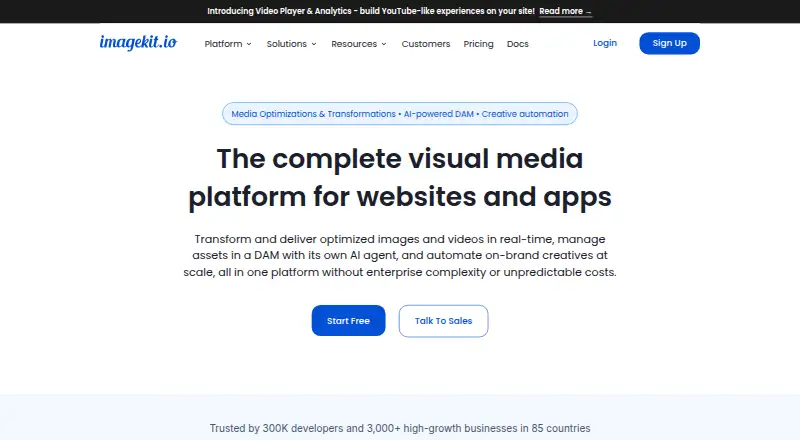
What ImageKit is
ImageKit is a media processing and delivery service for images and videos. It applies transformations such as resizing, cropping, and overlays in real time, and supports adaptive HLS and DASH streaming, subtitles, chapters, shoppable overlays, and analytics for video. Developers can connect through an API and SDKs or integrations for React, Next.js, Angular, Vue.js, Android, and iOS. The platform also includes digital asset management that organizes assets with AI-generated tags and metadata based on plain-English prompts, plus tools for creating banner variations from templates, UI edits, or CSV uploads. Team features include shared templates, secure sharing, and contextual collaboration. ImageKit connects to S3, GCS, Blob, or HTTP origins and works with existing CDNs and storage. Security features include signed URLs and a web application firewall; listed certifications are ISO 27001 and SOC 2 Type II.
Good
- Real-time image and video transformations
- AI-powered asset tagging and metadata
- Connects to existing origins, CDNs, and storage
- Free plan includes 20 GB monthly bandwidth
- Signed URLs, WAF, and listed certifications
Watch out
- Free plan limits DAM storage to 3 GB
- Free plan allows two user logins
- Image uploads capped at 25 MB on Free
Who it suits
ImageKit suits developers and teams that need image and video processing, asset management, or branded creative workflows. Its free plan is aimed at low-traffic sites and apps, side projects, or testing.
Verdict
ImageKit brings media delivery, asset management, and creative automation together, with API access and multiple framework integrations. Check its free-plan limits and the paid plan requirements before choosing it.
Plans and prices
From ImageKit's own pricing page, checked 27 Sep 2026.
| Plan | Price | What it gives you |
|---|---|---|
| Forever free | Free | For low-traffic websites and apps, side projects, or testing; includes monthly limits. · 20 GB monthly bandwidth · 3 GB DAM storage · 2 user logins · Monthly limits on processing and AI extensions · billed monthly |
| Lite | $9 a month | For websites and apps requiring image optimization, transformation, and storage with no limits. · 40 GB bandwidth · 10 GB DAM storage · Usage-based overage for bandwidth and storage · 3 user logins · billed monthly |
| Pro | $89 a month | For complete image and video processing with advanced DAM features and no limits. · 225 GB bandwidth · 225 GB DAM storage · Custom domain name · 5 user logins · Advanced DAM sharing and collaboration · billed monthly |
| Enterprise | Priced on request | Enterprise-grade features, custom limits, on-call support, and tailored requirements. · Custom limits · SSO and multi-account setup · Advanced security controls · On-call support |
The facts
Each one read from ImageKit's own pages, with the date it was checked.
What it does
- API access
- Yeschecked 20 Sep 2026
- Creative automation
- Creates thousands of on-brand banner variations from templates, UI edits, or CSV uploads.checked 27 Sep 2026
- DAM capabilities
- AI-powered DAM organizes assets using automatically generated tags and metadata from plain-English prompts.checked 27 Sep 2026
- Media processing
- Processes and delivers optimized images and videos in real time, including resizing, cropping, overlays, and transformations.checked 27 Sep 2026
- Origin integrations
- Connects S3, GCS, Blob, or any HTTP origin and works with existing CDNs and storage.checked 27 Sep 2026
- Paid from
- 9checked 20 Sep 2026
- Prepay discount
- Prepaying between $500 and $5,000 provides an instant 15% discount.checked 27 Sep 2026
- Pricing model
- Pay only for what you use, with predictable pricing and no surprise invoices.checked 27 Sep 2026
- Security certifications
- Uses signed URLs and WAF, with ISO 27001 and SOC 2 Type II certifications.checked 27 Sep 2026
- Storage limit
- 10checked 20 Sep 2026
- Support options
- Support ranges from community and email support to dedicated, phone, and Slack support on Enterprise.checked 27 Sep 2026
- Upload limits
- Free, Lite, and Pro image upload limits are 25 MB, 40 MB, and 50 MB respectively.checked 27 Sep 2026
- Video features
- Offers adaptive HLS and DASH streaming, subtitles, chapters, shoppable overlays, and analytics.checked 27 Sep 2026
The company
- Company reach
- Trusted by 300K developers and more than 3,000 high-growth businesses in 85 countries.checked 27 Sep 2026
- Founded
- 2017checked 23 Sep 2026
- Team collaboration
- Supports shared templates, secure sharing, contextual collaboration, and team asset workflows.checked 27 Sep 2026
Money
- Free plan
- Yeschecked 20 Sep 2026
- Free plan limits
- 20 GB bandwidth, 3 GB DAM storage, 2 users, 500 video units, and 650 extension units monthly.checked 27 Sep 2026
- Trial and refund
- The page lists refund questions but does not state trial or refund terms.checked 27 Sep 2026
Where it runs
- Supported platforms
- SDKs and integrations include React, Next.js, Angular, Vue.js, Android, iOS, and more.checked 27 Sep 2026
The full review of ImageKit
Overview
ImageKit combines media delivery and transformation with digital asset management and creative automation for websites and apps. It will suit developers and teams that need to serve optimized images and video while keeping shared assets and campaign work in one workflow. Its broad feature set is compelling, but the free tier’s monthly quotas and limited seats make plan fit an important part of the decision.
Key features
ImageKit transforms and delivers images and videos in real time, including resizing, cropping, overlays, and URL-based transformations. That makes it useful for products that need media adapted to different contexts without maintaining separate processed copies. It supports images, video, audio, and raw files, plus metadata, tagging, and version history.
For video, adaptive HLS and DASH streaming, subtitles, chapters, shoppable overlays, and analytics extend the service beyond image optimization. These tools are relevant to teams publishing richer video experiences; a project that only needs basic image delivery may not benefit from that breadth.
The digital asset management system uses AI to generate tags and metadata from plain-English prompts. Creative automation can generate thousands of branded banner variations from templates, UI edits, or CSV uploads. Shared templates, secure sharing, contextual collaboration, and team asset workflows give marketing and product teams ways to coordinate that work, although the low-tier seat caps may constrain larger groups.
ImageKit can connect to S3, GCS, Blob, or any HTTP origin and work alongside existing CDNs and storage. Signed URLs, a web application firewall, and ISO 27001 and SOC 2 Type II certifications support security-conscious deployments. SDKs and integrations include React, Next.js, Angular, Vue.js, Android, and iOS.
Pricing
ImageKit has a free plan and paid plans billed monthly. The Forever free plan costs nothing and is aimed at low-traffic sites, apps, side projects, and testing. It includes 20 GB monthly bandwidth, 3 GB DAM storage, two user logins, and monthly processing and AI-extension limits. Those quotas make it a sensible starting point, not a safe assumption for sustained media traffic or a larger team.
Lite costs $9 a month and includes 40 GB bandwidth, 10 GB DAM storage, and three user logins. Bandwidth and storage overages are usage-based, so the listed allowance is not a hard ceiling on cost. Its 40 MB image upload limit is better than the free plan’s 25 MB, but teams needing video processing or advanced DAM tools will need to look higher.
Pro costs $89 a month and provides 225 GB bandwidth, 225 GB DAM storage, five user logins, a custom domain, and advanced DAM sharing and collaboration. Its 50 MB image upload limit is the highest of the free, Lite, and Pro plans. This tier is the stronger fit for teams combining image and video processing with substantial asset libraries; the five-seat cap remains a consideration.
Enterprise has custom pricing, custom limits, SSO and multi-account setup, advanced security controls, and on-call support. It is the relevant option for organizations that need tailored limits and dedicated operational support. Prepaying between $500 and $5,000 provides an instant 15% discount. The plans are billed monthly; no trial or refund terms are stated.
Platforms
ImageKit supports Android, iOS, and API access, with SDKs and integrations for React, Next.js, Angular, and Vue.js among others. Its origin connections and compatibility with existing CDNs and storage make it suitable for teams extending an existing delivery setup rather than replacing every component.
Who it's for
ImageKit is strongest for developers and cross-functional teams that need image and video optimization, asset organization, and repeatable creative production in one service. The free plan can serve a small project or evaluation; Lite fits modest image-focused workloads, while Pro is better for teams using advanced DAM and video capabilities. It is less suitable when a project needs many named users on a lower tier or predictable costs despite usage above included quotas.
Pros and cons
- Pros: Image and video transformation, streaming features, DAM, and creative automation cover more of the media workflow than delivery alone.
- Pros: Connections to common cloud storage origins and existing CDNs can complement an established infrastructure.
- Pros: Signed URLs, WAF, ISO 27001, and SOC 2 Type II address security requirements for managed media.
- Cons: The free plan limits bandwidth to 20 GB monthly, storage to 3 GB, and access to two users, which can restrict even early team workflows.
- Cons: Lite and Pro have three and five logins respectively, and Lite’s bandwidth and storage overages are usage-based.
- Cons: Enterprise uses custom pricing, so teams needing its SSO, tailored limits, or on-call support must pursue a separate quote.
Alternatives
For a broader category comparison, see CDN Software and Digital Asset Management Software.
- Azion Content Delivery is worth considering for a free, personal-project-oriented delivery option with 1 TB/month data transfer in its Hobby plan.
- Fastly Image Optimizer may fit a narrower image-request workload, with a free tier covering 100,000 image requests per month.
- Uploadcare offers a free plan with 1,000 operations per month, 5 GB traffic, and 1 GB storage, a possible alternative for personal-use needs.
- Amazon CloudFront is an alternative for readers whose priority is CDN distribution, with a free plan including 1M requests and 100GB data transfer.
- CacheFly is another option to compare for CDN delivery, with a free developer account and a paid Adoption plan.
- Cloudinary is a comparable freemium option, with a free plan for three users and 25 monthly credits.
- Gcore CDN offers a PAYG CDN plan with 1 TB monthly traffic included and image optimization, which may suit delivery-focused needs.
- QUIC.cloud CDN has a free plan with six CDN nodes in the USA and EU and unlimited bandwidth across selected PoPs.
Verdict
Choose ImageKit if your team needs optimized image and video delivery alongside managed assets and automated branded creative. Its integration options and workflow breadth are the main reasons to select it; look elsewhere if seat caps, usage-based overages, or the jump to custom-priced Enterprise do not fit your team or budget.
Getting started
- Visit https://imagekit.io/.
- Choose the Forever free plan or a paid plan starting at $9 per month.
- Connect through the API or available SDKs and integrations, including Android, iOS, React, Next.js, Angular, and Vue.js.
- Connect an S3, GCS, Blob, or HTTP origin, or use an existing CDN and storage.
Limits worth knowing
The Forever free plan includes 20 GB monthly bandwidth, 3 GB DAM storage, two user logins, and monthly processing and AI extension limits. Lite costs $9 per month and includes 40 GB bandwidth, 10 GB DAM storage, and three user logins.
Questions
Is there a free plan?
Yes. Forever free costs $0 and includes 20 GB monthly bandwidth, 3 GB DAM storage, and two user logins, with monthly processing and AI extension limits.
Which platforms and integrations are supported?
Platforms include Android, API, and iOS. SDKs and integrations include React, Next.js, Angular, and Vue.js.
What media and asset features does ImageKit offer?
It processes images and videos with transformations, and offers video streaming features and digital asset management. Supported asset types include images, videos, audio, and raw files.
Who makes ImageKit?
ImageKit is made by ImageKit, founded in 2017.
Does ImageKit offer a free trial?
The listed plans include a free plan; no trial terms are provided.
Alternatives to ImageKit
- 1

Apache Traffic Server
Free planOpen sourceAPILinuxmacOSSelf-hosted7.2Free plan - 2
Cloudinary
Free planWebAPIExtension7.2Free plan - 3

imgix
WebAPI7.1From $25 a month - 4

Amazon CloudFront
Free planWebAPI6.9From $15 a month - 5

Sirv
Free planWebAPI6.9From $19 a month - 6

CacheFly
Free planWebAPI6.8From $299 a month