Hyperview
Hyperview is a cloud-based data center infrastructure management platform for tracking infrastructure assets and conditions.
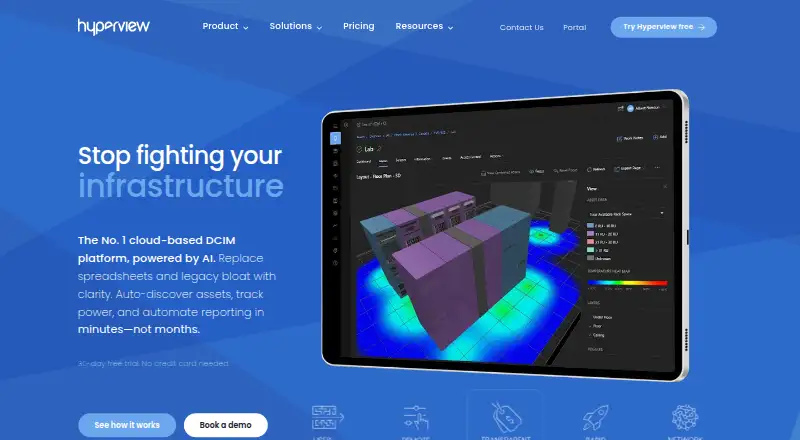
What Hyperview is
Hyperview is a cloud-based data center infrastructure management platform for tracking infrastructure assets and conditions. Agentless discovery gathers information about network-connected servers, storage, PDUs, network devices, sensors, virtual machines, and cloud instances. Monitoring covers power, energy, capacity, temperature, and humidity, with alerts and heat maps. Visualization options include 2D and 3D views, custom dashboards, room layouts, and drag-and-drop. Hyperview offers a versioned REST API and pages for ServiceNow CMDB synchronization and bringing Equinix Smart View data into the platform. It is hosted on Microsoft Azure, with region selection including US West, US East, Canada Central, EU North, UAE North, and APAC SEA. Pricing is $3 per asset per year, with a 500-asset minimum; add-ons cost extra. The 30-day trial includes all features and does not require a credit card. Included limits specify 10 sensors per asset, 30 days of full-resolution sensor retention, three years of daily summaries, and 5 MB of document storage per asset.
Good
- Agentless discovery covers network-connected infrastructure and cloud instances.
- Monitoring includes power, energy, capacity, temperature, and humidity.
- Provides 2D and 3D views, dashboards, and room layouts.
- 30-day trial includes all features without a credit card.
Watch out
- No free plan is listed.
- Paid plan has a 500-asset minimum.
- Full-resolution sensor retention is limited to 30 days.
- Add-ons are priced separately.
Who it suits
Hyperview suits data center managers, colocation providers, systems administrators, network engineers, and CIOs managing infrastructure assets and conditions. The listed plan requires at least 500 assets.
Verdict
Hyperview brings asset discovery, environmental and power monitoring, and visualizations into a cloud-based DCIM platform. The 500-asset minimum and per-asset pricing make it important to check whether the plan fits the size of your environment.
Plans and prices
From Hyperview's own pricing page, checked 29 Sep 2026.
| Plan | Price | What it gives you |
|---|---|---|
| 30-day free trial | Free | 30 days · all features · no credit card needed |
| Hyperview | $3 a year | 500-asset minimum · core features included · add-ons priced separately · Per asset, per year; minimum 500 assets; qualifying regions listed on page; excluding taxes |
| Per-asset plan | $3 a year | 30-day free trial · listed as 1 asset per year · per asset per year |
| Subscription | $125 a month | all features after trial · starts at $125 per month · monthly |
The facts
Each one read from Hyperview's own pages, with the date it was checked.
What it does
- Add-on
- The Connectivity add-on is listed at $2.00/asset/yr, and the pricing page says network mapping and reporting, document/media association, and IP address management are coming soon.checked 29 Sep 2026
- AI assistant
- The product includes an AI Assistant in beta for feature guidance and task help.checked 14 Oct 2026
- API documentation
- The documentation site includes API reference material, an API changelog and release notes covering versions 3 through 5.checked 14 Oct 2026
- API examples
- Hyperview publishes API integration samples in PowerShell, Python and Java on GitHub.checked 14 Oct 2026
- Asset management
- The platform maintains asset inventories, hierarchies, lifecycle information and relationships between equipment.checked 14 Oct 2026
- Audience
- The site identifies data center managers, colocation providers, systems administrators, network engineers, and CIOs as audiences for Hyperview.checked 29 Sep 2026
- Auto-discovery
- Agentless discovery can identify network-connected assets and populate device information.checked 14 Oct 2026
- Data collector
- Monitoring and discovery require installing and registering a Hyperview Data Collector on a networked server.checked 14 Oct 2026
- Deployment
- TrustRadius lists Hyperview as SaaS and says it has no mobile application.checked 14 Oct 2026
- Documentation depth
- The documentation includes quickstart, product guides, user guides, account-security guidance, release notes and API change histories.checked 14 Oct 2026
- Energy management
- The product tracks energy data such as kilowatt usage and provides energy-management views.checked 14 Oct 2026
- Environmental monitoring
- Supported monitoring includes temperature, humidity, airflow, cooling and leak-related sensors.checked 14 Oct 2026
- Hosting
- The service is hosted on Microsoft Azure and offers region selection including US West, US East, Canada Central, EU North, UAE North, and APAC SEA.checked 29 Sep 2026
- Integrations
- Documented integrations include Google Maps, AccuWeather, VMware vSphere, ServiceNow CMDB and Equinix Smart View.checked 14 Oct 2026
- Limit: API
- One G2 reviewer reports a 10,000-asset response limit and inconsistent asset-type casing across API endpoints.checked 14 Oct 2026
- Limit: customization and imports
- Reviewers say reporting customization and bulk asset-import flexibility can be restrictive.checked 14 Oct 2026
Money
- Capacity planning
- Capacity-planning tools help teams analyze available rack, power and facility capacity.checked 14 Oct 2026
The company
- Company
- Hyperview says it was founded on September 24, 2012.checked 29 Sep 2026
- Company founded
- LinkedIn lists Hyperview as founded in 2012.checked 14 Oct 2026
- Company headquarters
- LinkedIn lists Vancouver, British Columbia as headquarters.checked 14 Oct 2026
- Company legal name
- Crunchbase identifies the legal entity as Hyperview Technologies Inc.checked 14 Oct 2026
- Company size
- LinkedIn lists the company size as 11–50 employees.checked 14 Oct 2026
- Founded
- 2012checked 28 Sep 2026
- Headquarters
- The maker's contact page lists Vancouver HQ at 410–1122 Mainland Street, Vancouver, BC, Canada V6B 5L1.checked 29 Sep 2026
The full review of Hyperview
Hyperview is a cloud DCIM service for teams that need one operational view of data-center equipment, conditions, and capacity. It suits operators with substantial inventories and mixed physical, virtual, and cloud infrastructure. The principal buying question is whether its minimum commitment and per-asset model match your estate.
Overview
Hyperview combines agentless discovery, infrastructure monitoring, and visual planning in a Microsoft Azure-hosted service. Discovery can collect network-connected servers, storage, PDUs, network devices, sensors, virtual machines, and cloud instances, giving data-center staff a broad inventory without deploying agents to each asset.
Its monitoring covers power, energy, capacity, temperature, and humidity. Alerts and heat maps turn those readings into operational signals, while 2D and 3D views, room layouts, drag-and-drop placement, and custom dashboards connect conditions to the physical space. Rack management, cooling monitoring, and space and capacity planning make it more useful for facility and capacity decisions than a basic configuration database.
Key features
Discovery and visualization
Agentless collection is a strong fit for teams responsible for varied equipment and cloud resources. Physical racks and virtual machines can be considered in the same planning workflow, and room layouts provide a spatial context for capacity work. The 2D and 3D options are useful when a dashboard alone cannot explain where an issue or constraint sits.
Environmental and power oversight
Power, energy, temperature, humidity, and capacity monitoring address the measurements that drive uptime and expansion decisions. Alerts support exception-based operations, while heat maps can expose hot or heavily loaded areas. Included retention is 30 days of full-resolution sensor data and three years of daily summaries, a sensible split for recent diagnosis and longer trend review but not an unlimited historical archive.
Integration, security, and hosting
A versioned REST API supports integration work, and dedicated pages cover ServiceNow CMDB synchronization and importing Equinix Smart View data. Hyperview states SOC 2 Type II compliance, encryption in transit and at rest, and access controls down to the asset level. Azure region selection includes US West, US East, Canada Central, EU North, UAE North, and APAC Southeast, which helps organizations align hosting with regional requirements.
Each asset includes up to 10 sensors and 5 MB of document storage. Those quotas are adequate for focused telemetry and lightweight records, but teams attaching extensive media or many sensor feeds should model consumption before committing. The Connectivity add-on is $2.00/asset/yr; network mapping and reporting, document/media association, and IP address management are identified as forthcoming capabilities rather than current reasons to buy it.
Pricing
30-day free trial
The trial costs nothing for 30 days, includes all features, and requires no credit card. It is the right way to validate discovery scope, visual planning, retention, and integrations before a paid rollout.
Hyperview
The paid plan costs $3 per asset per year, with a minimum of 500 assets, in qualifying regions and excluding taxes. Core features are included and add-ons are separate. The minimum therefore represents at least 1,500 USD per year before tax and extras, even if your actual inventory is smaller; small facilities should look elsewhere or confirm that unused capacity is acceptable. Pricing is annual per asset, so growth in the monitored estate directly increases renewal cost.
Platforms
Hyperview is delivered as a cloud deployment and supports web, Android, iOS, Windows, Linux, and API access. That combination covers browser operations, mobile access, desktop environments, and programmatic integration without requiring a self-hosted installation.
Who it's for
Data center managers, colocation providers, systems administrators, network engineers, and CIOs are the natural audience. It is particularly suited to organizations that need shared asset, environmental, power, and capacity views across sizeable inventories. Smaller server rooms, teams seeking a free tier, or buyers unwilling to pay for a 500-asset baseline should not treat it as a default choice.
Pros and cons
Pros
- Broad agentless discovery: Covers servers, storage, power, networking, sensors, virtual machines, and cloud instances in one inventory approach.
- Operational plus spatial insight: Monitoring, heat maps, dashboards, and 2D/3D room layouts connect readings to physical planning.
- Enterprise integration and controls: A versioned REST API, ServiceNow and Equinix pathways, asset-level access controls, encryption, and stated SOC 2 Type II compliance support governed deployments.
- Regional cloud hosting: Multiple Azure regions help organizations choose a nearer or policy-compatible location.
Cons
- 500-asset minimum: The entry commitment can make the service uneconomic for smaller environments.
- Usage quotas: Ten sensors and 5 MB of documents per asset, plus limited full-resolution retention, may constrain data-heavy deployments.
- Important networking functions cost extra or are pending: Connectivity is $2.00/asset/yr, while mapping, reporting, document/media association, and IP management are described as coming soon.
Alternatives
IT Capacity Management Software and Data Center Infrastructure Management Software lists are useful starting points for comparing categories.
- Infovista VistaPlan suits buyers wanting Android, iOS, desktop, web, API, extension, or self-hosted coverage and who are prepared to request a demo for pricing.
- Google Cloud Capacity Planner is the better fit when a free, API and web-based planning tool is enough; there is no additional charge for using it, while Google Cloud resources remain billable.
- ITRS Capacity Planner is an alternative paid capacity-planning product across Android, iOS, Linux, web, and Windows.
- IBM Capacity Management Analytics is worth considering for Linux, macOS, self-hosted, web, or Windows environments, including a z/OS edition.
- Rocket EDX offers paid plans with variable usage or a fixed-price subscription.
- Device42 is a paid alternative with a free trial and annual pricing based on device count.
- FNT Command offers an Asset Inventory plan at €99 a month when billed annually, with per-user location, lifecycle, reporting, and permission features.
- CenterOS Capacity Management provides contact-priced private-cloud and SaaS deployments.
Verdict
Choose Hyperview when you manage 500 or more assets and want discovery, environmental and power monitoring, visual layouts, and capacity planning in one cloud service. Its API, regional hosting, and governance features strengthen the case for larger professional operations. Look elsewhere if your inventory is smaller, you need a free plan, or network and document-management functions must be included rather than added separately.
Alternatives to Hyperview
- 1

Danbyte
Free planOpen sourceWebAPILinuxSelf-hosted7.4Free plan - 2
Global Site Management
Free planAndroidiOSWebWindows7.0Free plan - 3

Cormant-CS
AndroidWebAPISelf-hosted6.9From $7,200 a year - 4

Sunbird dcTrack
AndroidiOSWebAPI6.9From $19.50 a month - 5
RackTables
Free planWeb6.2Free plan - 6
Sentry Power Manager
WebAPISelf-hosted6.2