IBM Capacity Management Analytics
IBM Capacity Management Analytics helps IT infrastructure managers and data center executives analyze resource use and plan future capacity across IBM z Syst…
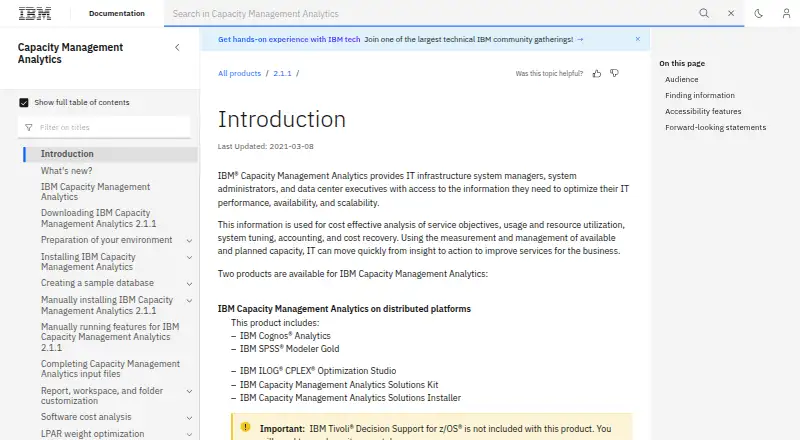
What IBM Capacity Management Analytics is
IBM Capacity Management Analytics helps IT infrastructure managers and data center executives analyze resource use and plan future capacity across IBM z Systems and distributed infrastructures. Its Solutions Kit includes a predefined data model, reports, and predictive and prescriptive models for analyzing and planning IT resources. The product can forecast future capacity needs and detect CICS transaction anomalies in real time. Reports can drill through to related reports and prompt for date range, time range, and aggregation interval. The distributed-platform package includes IBM Cognos Analytics, IBM SPSS Modeler Gold, IBM ILOG CPLEX Optimization Studio, the Solutions Kit, and its installer. IBM Tivoli Decision Support for z/OS is not included with that package and must be bought separately; the z/OS edition includes it. Deployment is on premises, with a long-term planning horizon. Installation can use the Solution Installer or manual component setup. The installer supports Linux on System z or x86-64, but requires English on the installer operating system and client computers. The product is paid, and no plan price is listed.
Good
- Forecasts future capacity requirements.
- Detects CICS transaction anomalies in real time.
- Reports support drill-through to related reports.
- Supports long-term planning across z Systems and distributed infrastructure.
Watch out
- Tivoli Decision Support for z/OS is a separate purchase for distributed platforms.
- The installer requires English on installer and client computers.
- No plan price is listed.
Who it suits
It is intended for IT infrastructure managers and data center executives planning resource use and capacity. The Solutions Kit documentation also identifies administrators, analysts, report authors, content administrators, and modelers as users.
Verdict
The product brings capacity forecasting, anomaly detection, and reporting into an on-premises planning toolkit. Confirm which edition and components are required, since the distributed-platform product excludes Tivoli Decision Support for z/OS.
Plans and prices
From IBM Capacity Management Analytics's own pricing page, checked 30 Sep 2026.
| Plan | Price | What it gives you |
|---|---|---|
| IBM Capacity Management Analytics 2.1.1 | Priced on request | Distributed platforms or z/OS edition · z/OS edition includes IBM Tivoli Decision Support for z/OS |
The facts
Each one read from IBM Capacity Management Analytics's own pages, with the date it was checked.
What it does
- Analytics
- The Solutions Kit includes a predefined data model, reports, predictive models, and prescriptive models for analyzing and planning IT resource use.checked 30 Sep 2026
- Anomaly detection
- It can detect CICS transaction anomalies in real time.checked 30 Sep 2026
- Capacity forecasting
- The product forecasts future capacity requirements to help ensure capacity is available when the business needs it.checked 30 Sep 2026
- Deployment
- The product can be installed with a Solution Installer or by installing components manually; the installer supports Linux on System z or x86-64.checked 30 Sep 2026
- Download support
- IBM directs customers who need download help to eCustomer Care through the Passport Advantage website.checked 30 Sep 2026
- Included components
- The distributed-platform product includes IBM Cognos Analytics, IBM SPSS Modeler Gold, IBM ILOG CPLEX Optimization Studio, the Solutions Kit, and the Solutions Installer.checked 30 Sep 2026
- Installer limit
- The Solution Installer requires English on the installer operating system and client computers.checked 30 Sep 2026
- Integrations
- Its documented architecture combines Tivoli Decision Support for z/OS, SPSS Modeler, Cognos Analytics, CPLEX Optimization Studio, and a DB2 database.checked 30 Sep 2026
- Intended users
- The documentation identifies administrators, analysts, report authors, content administrators, and modelers as intended users of the Solution Kit guide.checked 30 Sep 2026
- Pricing limitation
- The product's software cost analysis is for reference and planning; IBM says SCRT is the official pricing tool and its values are used for billing.checked 30 Sep 2026
- Purpose
- It helps IT infrastructure managers and data center executives analyze and improve IT performance, availability, scalability, resource use, and planned capacity.checked 30 Sep 2026
- Reporting
- Reports support drill-through to related reports and prompts for date range, time range, and aggregation interval.checked 30 Sep 2026
- Security
- The product encrypts stored passwords using AES 256 and decrypts them within Java programs during configuration and use.checked 30 Sep 2026
- Separate prerequisite
- IBM Tivoli Decision Support for z/OS is not included with the distributed-platform product and must be purchased separately.checked 30 Sep 2026
The full review of IBM Capacity Management Analytics
IBM Capacity Management Analytics is an on-premises planning suite for organizations managing IBM z Systems and distributed infrastructure. It best suits data-center teams that need long-range capacity forecasts alongside analytics and reporting; its component-based architecture makes edition and prerequisite checks important before purchase.
Overview
The product is built to help infrastructure managers and data-center executives plan resource use, availability, scalability, and performance. Its distributed-platform edition brings together analytics and optimization software with a Solutions Kit of predefined data models, reports, and predictive and prescriptive models. That gives planning teams a prepared analytical foundation, but it is a multi-component deployment rather than a lightweight standalone tool.
Deployment is on-premises. Teams can use the Solution Installer or install components manually. The installer supports Linux on System z or x86-64, and requires English on both the installer operating system and client computers—a practical constraint for organizations with localized environments.
Key features
Capacity planning and analytics
Long-term demand forecasting helps teams anticipate future capacity needs, while what-if scenarios and service-level planning support decisions about resource allocation and targets. The Solutions Kit's models and reports give analysts material for planning rather than requiring every analysis to start from scratch.
Reports support drill-through to related reports and prompts for date range, time range, and aggregation interval. Those options make it easier to move from a broad view to a more focused analysis. The product can also detect CICS transaction anomalies in real time, adding an operational signal to its longer-horizon planning capabilities.
Architecture, security, and release controls
The documented architecture combines Tivoli Decision Support for z/OS, SPSS Modeler, Cognos Analytics, CPLEX Optimization Studio, and a DB2 database. Stored passwords are encrypted with AES 256 and decrypted within Java programs during configuration and use. The product also supports multi-application releases, environment promotion, approval gates, dependency tracking, scheduling, and an audit trail—useful controls for teams coordinating planned changes.
Pricing
IBM Capacity Management Analytics 2.1.1: custom pricing. The plan is offered for distributed platforms or z/OS; the z/OS edition includes IBM Tivoli Decision Support for z/OS. The distributed-platform product does not include that prerequisite, which must be purchased separately. Its cost analysis is for reference and planning; IBM identifies SCRT as the official pricing tool whose values are used for billing.
There is no free plan. Because this is an on-premises suite with multiple components and edition choices, prospective buyers should confirm which components and prerequisites their intended deployment requires. IBM directs customers needing download assistance to eCustomer Care through Passport Advantage.
Platforms
The product is on-premises software for IBM z Systems and distributed infrastructures, with Linux, macOS, and Windows among its platform labels and web access. The Solution Installer specifically supports Linux on System z or x86-64; its English-language requirement applies to installer and client computers.
Who it's for
Capacity and infrastructure managers, data-center executives, analysts, report authors, content administrators, and modelers are the natural audience. It is a stronger fit for established IT environments that need long-term forecasting, scenario planning, and governed release processes than for teams seeking a simple, cloud-first capacity dashboard.
Pros and cons
- Pros: Forecasting, what-if planning, service-level planning, and real-time CICS anomaly detection cover both forward planning and a specific operational signal.
- Pros: Predefined models and drill-through reporting provide a structured starting point for analysis.
- Pros: Approval gates, dependency tracking, promotion, scheduling, and audit trails support controlled multi-application releases.
- Cons: The distributed-platform edition excludes Tivoli Decision Support for z/OS, so buyers may need a separate purchase.
- Cons: The component-rich on-premises architecture and English-only installer requirements can complicate deployment for some organizations.
- Cons: There is no free plan, and pricing is custom.
Alternatives
Compare IT Capacity Management Software for a broader category view. Consider these alternatives when their platform or purchasing details better fit your organization:
- ITRS Capacity Planner is another paid option, with Android, iOS, Linux, web, and Windows platforms.
- Syncsort Capacity Management is a paid option for web and Windows.
- Algomox ITMox offers custom enterprise pricing through a pricing conversation and supports API, self-hosted, and web platforms.
- Virtana VirtualWisdom has a free trial and paid monitoring-license option that includes capacity management; it supports API, Linux, self-hosted, and web.
- BMC Helix Continuous Optimization is a paid web option.
- Kentik Network Capacity Planning offers a 30-day free trial and a Pro plan at $2,000 a year, with 50 users.
- Sunbird dcTrack offers a trial and an annual dcTrack DCIM Operations subscription at $19.50 a month, with unlimited users, sites, and assets.
- FNT Command offers a trial and an Asset Inventory plan at €99 a month, billed annually.
Verdict
IBM Capacity Management Analytics is best for organizations that need on-premises, long-term capacity planning across IBM z Systems and distributed infrastructure, with reporting and release governance in the same toolkit. Its forecasting and structured planning capabilities are compelling, but the multi-component architecture, separate z/OS prerequisite for distributed deployments, and custom pricing make it a poor fit for buyers seeking a simpler or free starting point.
Getting started
- Open the IBM Capacity Management Analytics documentation
- Choose the distributed-platform or z/OS edition
- Install with the Solution Installer or install components manually
- Use Linux on System z or x86-64 for Solution Installer deployment
- Provide an English installer operating system and client computers
- Configure the included analytics and Solutions Kit components
Limits worth knowing
IBM Tivoli Decision Support for z/OS must be purchased separately for the distributed-platform product; the z/OS edition includes it. The Solution Installer requires English on the installer operating system and client computers.
Questions
Is there a free plan?
No. IBM Capacity Management Analytics is listed as paid software.
What does the distributed-platform package include?
It includes IBM Cognos Analytics, IBM SPSS Modeler Gold, IBM ILOG CPLEX Optimization Studio, the Solutions Kit and the Solutions Installer.
Is Tivoli Decision Support for z/OS included?
It is not included with the distributed-platform product and must be purchased separately. The z/OS edition includes it.
How can it be installed?
You can use the Solution Installer or install the components manually. The installer supports Linux on System z or x86-64.
What does the Solutions Kit provide?
It provides a predefined data model, reports, predictive models and prescriptive models for analyzing and planning IT resource use.
Alternatives to IBM Capacity Management Analytics
- 1
Hyperview
AndroidiOSWebAPI7.8From $3 a year - 2
FNT Command
AndroidiOSWebAPI7.1From €99 a month - 3

Sunbird dcTrack
AndroidiOSWebAPI6.9From $19.50 a month - 4
BMC Helix Continuous Optimization
WebAPILinuxSelf-hosted6.6 - 5

Device42
WebAPILinuxmacOS6.5 - 6
Infovista VistaPlan
AndroidiOSWebAPI6.5