
Guideflow
Guideflow is a SaaS for creating interactive demos, product tours, and step-by-step guides.
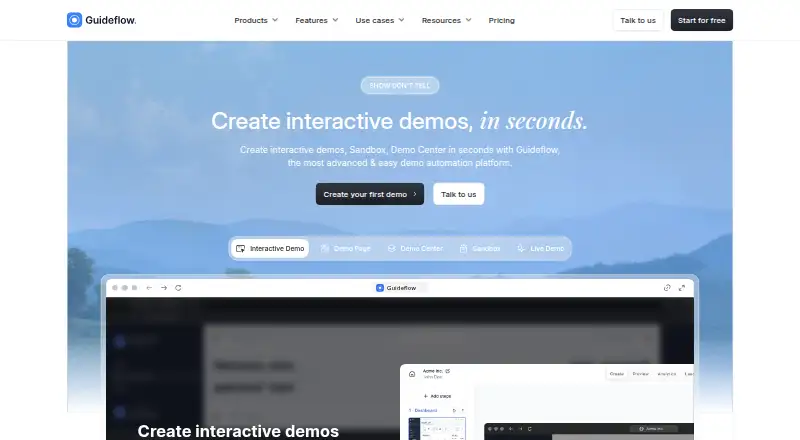
What Guideflow is
Guideflow is a SaaS for creating interactive demos, product tours, and step-by-step guides. It lists sales, marketing, customer success, customer support, and employee training or onboarding as use cases. Users can capture workflows with a Chrome extension, Figma plugin, or desktop app for Windows and macOS. Guideflow says its AI features can create interactive demos and guides, and its analytics track visitor activity, engagement, and conversion metrics. Demos can be shared through public links, embedded widgets, personalized pages, MP4 video, or GIF exports. Listed CRM connections include Zoho CRM, Salesforce, Pipedrive, Microsoft Dynamics 365, HubSpot, and Close; Webhook, Zapier, and Make integrations can trigger actions from Guideflow events. The Free plan includes 5 guideflows, unlimited viewers, 7-days analytics, a watermark, and one team member. Solo costs $35 a month, billed yearly, and includes unlimited guideflows, advanced analytics, AI demo content, video and GIF export, and one member. Guideflow states that it is SOC 2 Type II and aligns with GDPR and CCPA. Enterprise controls listed include permission levels, SSO including SAML, HTTPS, firewalls, encryption, and a 99,9% SLA.
Good
- Creates interactive demos, product tours, and step-by-step guides.
- Shares demos as links, embeds, personalized pages, MP4, or GIF.
- Analytics track activity, engagement, and conversion metrics.
- Free plan includes unlimited viewers.
Watch out
- Free plan is limited to 5 guideflows.
- Free plan analytics cover 7-days.
- Free plan includes a watermark and one team member.
Who it suits
Guideflow suits teams that need demos or guides for sales, marketing, customer support, customer success, or employee onboarding. Its capture options include browser, Figma, and desktop workflows.
Verdict
Guideflow offers several ways to build, share, and measure interactive demos, with capture tools for browser, Figma, and desktop workflows. Its free plan has limits on guideflows, analytics duration, branding, and team size.
Plans and prices
From Guideflow's own pricing page, checked 15 Oct 2026.
| Plan | Price | What it gives you |
|---|---|---|
| Free | Free | 5 guideflows · unlimited viewers · 7-days analytics · watermark · 1 team member |
| Solo | $40 a month | unlimited guideflows · advanced analytics · AI demo content · video & GIF export · AI translation · blur sensitive elements · lead forms & surveys · visitor identification · 1 member included · additional users $35 each |
| Growth | $499 a month | HTML-based demo · HTML capture · AI personalization · text, pict. & graph edit · demo library · advanced branching · Guideflow MCP · Slack/Teams channel · dedicated CSM · 10 members included · +$50 per add. user · yearly |
| Startup | $599 a month | HTML-based demos · HTML capture · AI personalization · text, picture and graph editing · demo library · advanced branching · Slack/Teams channel · dedicated CSM · 10 members included · additional users $50 each |
| Advanced | $1,799 a month | Demo Page · HTML-based demo · Sandbox demo · Demo Center add-on · clickable environment · auto-linking elements · offline demos · presenter notes · custom domain · team training · dedicated CSM · custom seat number |
| Enterprise | Priced on request | Demo Center · Live Demo add-on · AI Dataset generator · professional services · dedicated landline · dedicated expert · demo creation · custom seat number |
The facts
Each one read from Guideflow's own pages, with the date it was checked.
What it does
- AI
- The AI feature can adjust steps and popups and provide translations, voiceovers and avatars.checked 15 Oct 2026
- Analytics
- Analytics include impressions, completion rate, collected leads and conversion monitoring in real time.checked 15 Oct 2026
- Automation and API
- Guideflow lists Webhook, Zapier, and Make integrations for triggering actions from Guideflow events.checked 1 Oct 2026
- Capture
- The Chrome extension captures workflows on apps or websites, including screens, clicks and scrolling, to generate an interactive experience.checked 15 Oct 2026
- Chrome adoption
- The Chrome Web Store listing shows about 6,000 users for the extension.checked 15 Oct 2026
- Crunchbase profile
- Crunchbase describes Guideflow as a private product-demo platform for sales and pre-sales, lists San Francisco as headquarters and gives an 11–50 employee range.checked 15 Oct 2026
- Developer extensibility
- Remote Navigator exposes cross-origin window.postMessage controls for reading guideflow state and moving to specific, next or previous steps.checked 15 Oct 2026
- Documentation
- The help center documents setup, sharing, variables, integrations and developer-oriented API behavior, with Markdown pages and an llms.txt index.checked 15 Oct 2026
- Downloads
- Official downloads are provided for a Chrome extension, Windows and macOS desktop apps, and a Figma plugin.checked 15 Oct 2026
- Editing
- Its no-code builder lets users add notes, branding colors, images, logos, text, graphs and calls to action.checked 15 Oct 2026
- Enterprise controls
- Guideflow lists permission levels, SSO including SAML, HTTPS, firewalls, encryption, and a 99,9% SLA among its enterprise controls.checked 1 Oct 2026
- Integrations
- The integrations page positions Guideflow as a workflow-connected tool and lists customer stacks including DocuSign, HubSpot, Surfer, Gorgias, Zendesk, Slack-related workflows and others.checked 15 Oct 2026
- Limit: complex paths
- A G2 reviewer says the product becomes restrictive when sophisticated user paths are required.checked 15 Oct 2026
- Limit: customization
- A G2 reviewer reports that customization options can feel limited.checked 15 Oct 2026
- Personalization
- Guideflow supports personalized demos with editable text, images and graphs plus hiding or blurring selected elements.checked 15 Oct 2026
- Praise: analytics
- G2 reviewers say engagement analytics help prioritize follow-up and understand how prospects or customers interact with demos.checked 15 Oct 2026
- Praise: ease of use
- G2 reviewers repeatedly describe Guideflow as easy to learn, quick to set up and simple to edit.checked 15 Oct 2026
- Praise: reuse and updates
- G2 reviewers value reusing captured demos, updating individual steps and personalizing HTML captures instead of re-recording presentations.checked 15 Oct 2026
The company
- Company founding
- Guideflow's About page states that the company was founded in 2023 and has more than 25 members across four continents.checked 15 Oct 2026
- Company locations
- The company describes hubs or offices spanning San Francisco, Denver, Toronto, Paris, Singapore and Tallinn.checked 15 Oct 2026
- Company scale
- Guideflow’s about page states 25+ members, 4 continents, 50 M+ interactions, and a 2023 founding year.checked 1 Oct 2026
- LinkedIn company size
- LinkedIn lists Guideflow as privately held with 11–50 employees and headquarters in Tallinn, Estonia, with a Paris location.checked 15 Oct 2026
Money
- Free limits
- The pricing page’s Free plan includes 5 guideflows, unlimited viewers, 7-days analytics, a watermark, and 1 team member.checked 1 Oct 2026
Where it runs
- Praise: interactive demos
- G2 reviewers praise interactive walkthroughs for making onboarding, training and product presentations faster and more understandable.checked 15 Oct 2026
The full review of Guideflow
Guideflow suits teams that want to turn product workflows into shareable interactive demos and measure how audiences respond. It covers capture, distribution, and lead generation, but its free plan is narrow and the jump to team pricing is steep.
Overview
Guideflow is a plug-and-play service for building interactive demos, product tours, and step-by-step guides. Teams can share a guideflow as a public link, embedded widget, personalized page, MP4, or GIF, making it useful for both guided product experiences and video-style distribution.
Its analytics track visitor activity, engagement, and conversions. That gives sales and marketing teams a way to assess how prospects interact with demos; customer success and support teams can use tours and guides to explain workflows, while employee training and onboarding are also listed use cases.
Key features
Capture and creation
Workflows can be captured with a Chrome extension, Figma plugin, or desktop app for Windows and macOS. Guideflow also promotes AI-assisted creation of demos and step-by-step guides. Solo includes AI demo content, while Growth and Startup add AI personalization and editing of text, pictures, and graphs. These tools suit teams producing repeatable walkthroughs, though the richer HTML capture and editing options start at much higher-priced tiers.
Sharing, leads, and measurement
Public links and embeds make demos easy to distribute, while personalized pages and video or GIF exports support different presentation formats. Lead forms and surveys and visitor identification are included with Solo, alongside advanced analytics. Free analytics last just seven days, so it is a poor fit for teams that need longer-term engagement reporting without upgrading.
Integrations and controls
CRM connections include Zoho CRM, Salesforce, Pipedrive, Microsoft Dynamics 365, HubSpot, and Close. Webhook, Zapier, and Make integrations can trigger actions from Guideflow events, extending its role beyond a standalone demo builder. Guideflow states that it is SOC 2 Type II and aligns with GDPR and CCPA. Enterprise controls include permission levels, SSO with SAML, HTTPS, firewalls, encryption, and a 99,9% SLA.
Pricing
Guideflow has a free plan and paid plans starting at $35 a month billed yearly. The free plan is billed monthly and includes five guideflows, unlimited viewers, seven-days analytics, a watermark, and one team member. That is enough to share a small set of demos broadly, but the cap, branding, and short analytics window constrain sustained team use.
- Solo: $35 a month billed yearly. It includes unlimited guideflows, advanced analytics, AI demo content, video and GIF export, AI translation, sensitive-element blurring, lead forms and surveys, visitor identification, and Guideflow MCP. One member is included; each additional user costs +$35. This is the clearest fit for an individual creating and measuring demos, but the per-user charge makes expansion costly.
- Growth: $499 a month billed yearly. It includes HTML-based demos and capture, AI personalization, text, picture, and graph editing, a demo library, advanced branching, Guideflow MCP, a Slack/Teams channel, and a dedicated CSM. Ten members are included, with each additional user costing +$50. It targets established teams that need shared demo production and support, at a substantial step up from Solo.
- Startup: $599 a month billed monthly. It includes the same core HTML demo, capture, personalization, editing, library, branching, Slack/Teams channel, and dedicated CSM features as Growth, with ten members included and +$50 per additional user. Monthly billing avoids an annual term, but costs more per month than Growth.
- Advanced: $1,499 a month billed yearly. It adds Demo Page, sandbox demos, clickable environments, auto-linking elements, offline demos, presenter notes, custom domain, team training, and a dedicated CSM. Demo Center is an add-on, and the plan has a custom seat number. Its controls and offline/presentation features are aimed at larger, more structured deployments.
- Enterprise: custom pricing, billed yearly. It includes Demo Center, AI Dataset generator, professional services, a dedicated landline and expert, demo creation, and a custom seat number. Live Demo is an add-on, so organizations should account for that separately when it is needed.
Support varies by subscription and can include email support, live chat, or a dedicated customer success manager. Growth, Startup, and Advanced include a dedicated CSM; Guideflow does not give a trial length for its own plans.
Platforms
Guideflow spans web, API, extension, macOS, and Windows. The Chrome extension, Figma plugin, and desktop apps provide distinct capture routes, while the web service supports creating and sharing demos.
Who it's for
Guideflow is a strong fit for sales and marketing teams that need interactive product presentations, plus customer success, support, and onboarding groups that need reusable walkthroughs. Solo makes sense for an individual with an ongoing demo program. Growth or Startup is more appropriate when several teammates need HTML capture, branching, and shared support. The free tier is better for a limited proof of concept than a continuing analytics or branding workflow.
Pros and cons
- Pro: Multiple capture methods, including Chrome, Figma, and desktop apps, accommodate different product workflows.
- Pro: Links, embeds, personalized pages, and video exports give teams several ways to distribute the same demo.
- Pro: CRM and automation integrations connect demo engagement with sales and operational workflows.
- Con: Free is limited to five guideflows, one member, a watermark, and seven days of analytics.
- Con: Growth at $499 a month billed yearly is a large jump from Solo, which may put shared HTML demo production beyond smaller teams.
- Con: Per-additional-user charges apply to Solo, Growth, and Startup, so costs rise as those teams grow.
Alternatives
Compare Interactive Product Demo Software options if you want to weigh Guideflow against the category. Consider Floik for its free tier with five published Flos, ten created Flos, five-minute recordings, and 25 guide steps per Flo, or its $39 per mo Pro plan. Supademo is another freemium option, with a free plan for one creator/admin, five interactive demos, and 50 video recordings (4K). For recording-focused needs, Flonnect Presentation Recorder has a free tier with 20 lifetime videos, 10 bug reports per month, five HTML/demo captures per month, and 1 GB storage.
Arcade offers a free plan with one user, one published demo, one published video, 200 AI credits per month, and unlimited views. Folio has a free plan for one user with up to two basic demos and two basic templates. Storylane offers one free seat and one published demo with unlimited views, AI content assistant, and voiceovers; its Starter plan is $40 a month. MagicDemo gives one free user up to five demos, basic analytics, a template library, and community support, with MagicDemo branding. Navattic has a free Starter plan with one seat, one HTML or media demo, unlimited views, and basic analytics.
Verdict
Choose Guideflow if your team needs to capture workflows through several routes, distribute interactive demos in multiple formats, and track engagement alongside lead capture. Solo is a practical starting point for one-person production, but the restrictive free tier and steep move to Growth or Startup make it less appealing for budget-conscious teams that need shared production or longer-term analytics.
Getting started
- Visit https://www.guideflow.com/.
- Start with the Free plan or choose a paid plan; Solo is $35 per month billed yearly.
- Capture a workflow using the Chrome extension, Figma plugin, or Windows or macOS desktop app.
- Create an interactive demo, product tour, or step-by-step guide.
- Share it through a public link, embedded widget, personalized page, MP4 export, or GIF export.
Limits worth knowing
The Free plan includes 5 guideflows, unlimited viewers, 7-days analytics, a watermark, and 1 team member. Solo costs $35 per month billed yearly and includes 1 member; each additional user costs $35.
Questions
Does Guideflow have a free plan?
Yes. Free includes 5 guideflows, unlimited viewers, 7-days analytics, a watermark, and 1 team member.
What platforms can I use to capture workflows?
Guideflow lists a Chrome extension, a Figma plugin, and desktop apps for Windows and macOS. Its listed platforms also include API and web.
What can I connect to Guideflow?
The integrations catalog lists Zoho CRM, Salesforce, Pipedrive, Microsoft Dynamics 365, HubSpot, and Close. Webhook, Zapier, and Make can trigger actions from Guideflow events.
How can I share a demo?
Demos can be shared as public links, embedded widgets, or personalized pages, and exported as MP4 video or GIF.
What does Guideflow state about security?
Guideflow states it is SOC 2 Type II and aligns with GDPR and CCPA. Listed enterprise controls include permission levels, SSO including SAML, HTTPS, firewalls, encryption, and a 99,9% SLA.
Alternatives to Guideflow
- 1

Supademo
Free planWebAPIExtensionmacOS7.9From $38 a month - 2

Floik
Free planWebExtensionmacOSWindows7.8Free plan - 3

Flonnect Presentation Recorder
Free planWebExtensionmacOSWindows7.8From $12 a month - 4

Navattic
Free planWebAPIExtension7.6From $500 a month - 5
DemoFast
Free planWebExtension7.5From $15 a month - 6
Folio
Free planWebAPIExtension7.5Free plan