
Floik
Floik turns screen recordings or uploaded videos into interactive guides, standard operating procedures, feature walkthroughs and narrated videos.
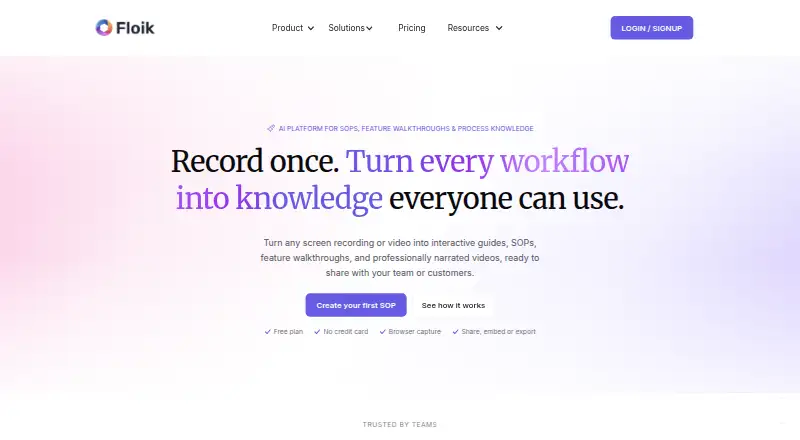
What Floik is
Floik turns screen recordings or uploaded videos into interactive guides, standard operating procedures, feature walkthroughs and narrated videos. Its Chrome extension captures browser workflows, including steps, screenshots and actions. One recording can generate an AI-written step-by-step guide, an interactive video or an explainer video. AI tools also provide voiceover and translation; the listed translation limits are up to two languages on Pro and 30+ on Pro+. Content can be shared by link or embedded, and paid plans list MP4, PDF and HTML exports. Downloads are available with annual billing only. The free Starter plan allows five published Flos, ten created Flos, videos up to five minutes and guides up to 25 steps per Flo. Pro costs $39 a month billed annually for one user; monthly billing is listed at $49 a month. Floik lists integrations with documentation, support, collaboration and project tools, along with HTML and web embeds. Its use cases include training, onboarding, support, software rollout and change management.
Good
- A recording can produce three kinds of instructional content.
- Chrome extension captures workflow steps, screenshots and actions.
- Free Starter plan includes five published Flos.
- Content can be shared by link or embedded.
- Pro+ lists translation for 30+ languages.
Watch out
- Starter limits videos to five minutes per Flo.
- Starter guides are limited to 25 steps per Flo.
- Downloads are available with annual billing only.
- Pro monthly billing is $49 a month.
Who it suits
Floik suits teams that need to turn browser workflows or existing videos into guides and walkthroughs for training, onboarding, software rollout or customer support. The free Starter plan may fit users creating a small number of short Flos.
Verdict
Floik is focused on converting recordings into shareable instructional content, with multiple output formats and AI writing, voiceover and translation tools. Check the Starter limits and annual-billing requirement for downloads when selecting a plan.
Plans and prices
From Floik's own pricing page, checked 14 Oct 2026.
| Plan | Price | What it gives you |
|---|---|---|
| Starter | Free | 1 user · 7-day trial period · share up to 5 Flos · interactive demos & guides · embed anywhere · free to try it out |
| Pro (annual) | $39 a month | 1 user · unlimited Flos · exports available with annual billing · billed annually; page shows $39/mo and $49 with Save 20% |
| Pro (monthly) | $49 a month | 1 user · unlimited Flos · billed monthly |
| PRO | $49 a month | 1 user · unlimited Flos + branding · AI voiceover and guide creation · translate up to 2 languages · custom domain · billed monthly |
| Pro+ (annual) | $119 a month | 5 users · unlimited Flos · exports available with annual billing · billed annually; page shows $119/mo and $159 with Save 25% |
| Pro+ (monthly) | $159 a month | 5 users · unlimited Flos · billed monthly |
| PRO+ | $159 a month | 5 users · team space · text overlays and page edit · private share and integrated embed · advanced insights · billed monthly |
| Enterprise | Priced on request | custom users · SSO · roles and permissions · custom CMS integration · custom embed templates · dedicated Slack and CSM · custom pricing |
The facts
Each one read from Floik's own pages, with the date it was checked.
What it does
- Acquisition
- Kovai.co's November 18, 2024 release says Document360 acquired Floik software and assets from Pingthis Private Limited effective October 31, 2024.checked 14 Oct 2026
- AI features
- The product offers AI-written guide copy, AI voiceover, and translation; the pricing page lists translation for up to two languages on Pro and 30+ languages on Pro+.checked 30 Sep 2026
- AI narration
- The site advertises AI voiceovers in more than 40 languages and regional dialects.checked 14 Oct 2026
- Capture
- The Chrome extension records browser workflows and captures steps, screenshots, and actions.checked 30 Sep 2026
- Chrome extension users
- The Chrome Web Store lists about 2,000 users and Document360 Ltd as publisher.checked 14 Oct 2026
- Documentation and support
- Floik Academy provides tutorials for setup, guides, interactive demos, explainer videos, screen capture and editing.checked 14 Oct 2026
- Editing tools
- Listed editing tools include trimming, cropping, blurring, smart crop, slide reordering, rich text, music and image elements.checked 14 Oct 2026
- Embedding
- Floik supports iframe embedding and a script-based custom Flo element with domain whitelisting.checked 14 Oct 2026
- Embedding access
- Floik script embeds support allowed-domain controls, and the pricing page lists a two-domain limit on Pro+ and five domains on Enterprise.checked 30 Sep 2026
- Exports
- Paid plans list MP4, PDF, HTML and Markdown export options, with some downloads restricted to annual plans.checked 14 Oct 2026
- Funding and founders
- Crunchbase lists Vartika Bansal and Vidyasankar Krishnamurthy as founders and Elevation Capital as a seed investor.checked 14 Oct 2026
- Integrations
- The home page displays Notion, Confluence, Zendesk, Salesforce, Slack, HubSpot, Intercom, Jira, Asana, Microsoft Teams, Loom, GitBook, GitHub, SharePoint, Outlook, HTML embed and web embed.checked 14 Oct 2026
- Intended users
- Floik describes use cases across operations, IT and software rollout, training and onboarding, customer support, customer education, and change management.checked 30 Sep 2026
- Interactive guides
- Its AI can generate step instructions, titles, descriptions, annotated screenshots, introductions and summaries.checked 14 Oct 2026
- Licence
- Terms say the platform and its intellectual property belong to the company and users receive a limited, non-exclusive, non-transferable licence.checked 14 Oct 2026
- Limit: administration
- A G2 reviewer says user management needs improvement because users must move videos to team space and there is only one administrator.checked 14 Oct 2026
- Limit: editing workflow
- Product Hunt reviewers report limited post-recording editing, difficult timeline positioning and template interaction issues.checked 14 Oct 2026
- Limit: signup friction
- A Product Hunt reviewer reported needing to log in three times during signup.checked 14 Oct 2026
- Outputs
- A single recording can become an AI-written step-by-step guide, an interactive video, or an explainer video.checked 30 Sep 2026
The company
- Company
- The privacy policy identifies Document360 Limited as the provider of Floik; the official company pages opened do not state Floik’s headquarters or founding year.checked 30 Sep 2026
- Company headquarters
- LinkedIn lists Bangalore as headquarters, with another location in Stanford, California.checked 14 Oct 2026
- Company size
- LinkedIn lists Floik as a privately held technology company with 2–10 employees.checked 14 Oct 2026
Where it runs
- Explainer videos
- Explainer videos can combine screen and camera recordings, text, images, overlays, AI narration and simple editing.checked 14 Oct 2026
- Interactive videos
- Interactive videos support clickable hotspots, text, images, camera overlays, calls to action, zoom, pan and spotlight effects.checked 14 Oct 2026
The full review of Floik
Floik is a workflow-capture tool for teams turning software processes into guides and videos. It suits operations, training, and customer-education teams that need several formats from one recording. Its strongest case is reuse; the main trade-off is that the free plan is tightly capped and downloads require annual billing.
Overview
Floik converts screen recordings or uploaded videos into interactive guides, standard operating procedures, feature walkthroughs, and narrated videos. A Chrome extension captures browser steps, screenshots, and actions, while a recording can be turned into a step-by-step guide, an interactive video, or an explainer video. Sharing by link or embed makes it useful for both internal instruction and customer-facing material.
AI-written guide copy, voiceover, and translation extend that workflow. The breadth of output is useful when a team needs to repurpose one capture, though the Starter limits make it better suited to evaluating the format than maintaining a sizable content library.
Key features
- Browser capture: The Chrome extension records browser workflows and captures their steps, screenshots, and actions. This is a focused fit for documenting software processes; uploaded video is another starting point.
- Three output formats: A single recording can produce a written guide, interactive video, or explainer video. That flexibility lets teams choose between scannable instructions and narrated demonstrations without starting from separate captures.
- AI writing and localization: Floik can draft guide copy, create voiceovers, and translate content. Pro lists translation for up to two languages, while Pro+ lists 30+; teams serving broader language audiences have a clear reason to consider the higher tier.
- Distribution and integrations: Content can be shared by link or embedded. The home page lists integrations including Notion, Confluence, Zendesk, Salesforce, Slack, HubSpot, Intercom, Jira, Asana, Microsoft Teams, Loom, GitBook, GitHub, SharePoint, and Outlook. Paid plans include MP4, PDF, and HTML exports, but downloads are available only with annual billing.
- Access and administration: Script embeds support allowed-domain controls. Pro+ allows two domains and Enterprise five. Enterprise also lists SAML single sign-on, roles and permissions, GDPR and ISO compliance, and dedicated data center options. Floik’s privacy policy describes safeguards and says information may be stored with third-party cloud infrastructure providers.
Pricing
Floik is freemium, with a 14-day trial and paid plans starting at $39/user/mo (annual). The trial length is useful for evaluating a workflow before committing, but readers should distinguish annual prices from monthly billing and note that downloads are limited to annual billing.
- Starter: Price not listed. The free plan allows five published Flos and ten created Flos, with videos capped at five minutes and guides at 25 steps per Flo. It is a reasonable way to test the capture-to-content process, but those caps are restrictive for regular team publishing.
- Pro: $39 a month, billed annually for one user; the monthly-billed option is $49 a month. Both list unlimited Flos, 10-minute recordings, and guides up to 200 steps. Pro is the logical solo upgrade from Starter, but its annual price is the route to exports, and translation is limited to two languages.
- Pro+: $119 a month, billed annually for five users; monthly billing is $159 a month. It includes unlimited Flos, 10-minute recordings, 200-step guides, and advanced insights up to 30 days. The five seats make it more appropriate for a small team than an individual, and it raises the translation allowance to 30+ languages. The two-domain embed limit is worth checking for multi-site use.
- Enterprise: Custom pricing, with custom users, onboarding, and limits. It is aimed at organizations needing the listed security controls, five-domain embed allowance, priority support, or a customer success manager; the plan's cost will depend on the arrangement.
Pro and Pro+ both have monthly-billed options, but those cost more per month than their annual counterparts. Starter's finite creation and publishing quotas are the main reason to move up; Enterprise is the option when custom scale and administration matter more than a fixed seat package.
Platforms
Floik is available as an extension, on macOS, on the web, and on Windows. The Chrome extension is the stated browser-workflow capture route; the other listed platform options broaden where teams can access the product.
Who it's for
Floik is a strong fit for operations and IT teams documenting procedures or software rollouts, and for training, onboarding, customer support, customer education, and change-management teams that need reusable explanations. It is less compelling for an individual who only needs occasional short captures: Starter's caps may suffice initially, while Pro's annual billing is a meaningful commitment for downloads.
Pros and cons
- Pro: One recording can become three distinct content types, reducing the need to create separate instructional assets for each audience.
- Pro: Link sharing, embeds, broad named integrations, and paid exports provide several routes for distributing finished content.
- Pro: Pro+ expands translation to 30+ languages and includes five users, making it better suited to small teams with broader localization needs.
- Con: Starter limits both library size and individual content length: five published, ten created, five-minute videos, and 25-step guides.
- Con: MP4, PDF, and HTML downloads require annual billing, so monthly subscribers give up that export route.
- Con: Pro+ is a five-user package rather than a cheaper single-seat step up, which may not suit a solo creator who needs its higher translation allowance.
Alternatives
Floik belongs among Interactive Product Demo Software and AI Screen Recorders. Consider these alternatives when their plan structure or stated emphasis better matches your needs:
- Guideflow is worth comparing if a yearly $35 a month plan with unlimited guideflows, advanced analytics, AI demo content, export, translation, and sensitive-element blurring better suits the budget or workflow.
- Supademo has a free plan and a free trial; compare it if you want to assess another freemium option for interactive demos and recordings.
- Flonnect Presentation Recorder offers a free tier with 20 lifetime videos, transcription and editing, bug reports, HTML/demo captures, and 1 GB storage, making it a candidate for modest capture needs.
- Arcade has a free plan capped at one user, one published demo, and one published video, with 200 AI credits monthly; it may suit someone whose initial needs fit those limits.
- Folio offers a free plan with one user and up to two basic demos and templates, for readers whose demo volume is small.
- Storylane provides a free plan with one seat, one published demo, unlimited views, an AI content assistant, and voiceovers; it is an alternative to consider for a single-demo start.
- Hexus has a yearly Start plan at $40 a month for one user and unlimited flows, with limited analytics and exports up to 720p/30FPS; compare it if those limits align with your output needs.
- MagicDemo offers a free plan for one user and up to five demos, with basic analytics and its branding; it may fit a small initial demo library.
Verdict
Choose Floik if your team needs to turn captured workflows into written guides and multiple video formats, then distribute them across internal or customer-facing channels. Its combination of capture, AI assistance, and output choices is the central advantage. Look elsewhere if you need ample free publishing, monthly-billed downloads, or a solo plan with Pro+-level translation without buying five seats.
Getting started
- Visit https://www.floik.com/.
- Use the Chrome extension to record a browser workflow, or provide an uploaded video.
- Choose a guide or video output for the recording.
- Share the result by link or embed it.
- Use the free Starter plan or select a paid plan; annual billing is required for downloads.
Limits worth knowing
Starter permits five published Flos, ten created Flos, videos up to five minutes, and guides up to 25 steps per Flo. Pro allows 10-minute videos and guides up to 200 steps; Pro+ also lists 10-minute videos, 200-step guides, and advanced insights up to 30 days. Translation is listed for up to two languages on Pro and 30+ on Pro+; downloads are available only with annual billing.
Questions
Is there a free plan?
Yes. Starter is free and allows five published Flos, ten created Flos, videos up to five minutes, and guides up to 25 steps.
What does Pro cost?
Pro costs $39/user/mo with annual billing. A monthly Pro option costs $49/mo.
What platforms does Floik support?
Floik is listed for extension, macOS, web, and Windows.
Can Floik content be exported?
Paid plans list MP4, PDF, and HTML exports. Downloads are available with annual billing only.
What tools does Floik integrate with?
Listed integrations include Notion, Confluence, Zendesk, Salesforce, Slack, HubSpot, Intercom, Jira, Asana, Microsoft Teams, Loom, GitBook, GitHub, SharePoint, and Outlook.
Who provides Floik?
Floik’s provider is identified as Document360 Limited.
Alternatives to Floik
- 1

Guideflow
Free planWebAPIExtensionmacOS7.9From $40 a month - 2

Supademo
Free planWebAPIExtensionmacOS7.9From $38 a month - 3

Flonnect Presentation Recorder
Free planWebExtensionmacOSWindows7.8From $12 a month - 4

Navattic
Free planWebAPIExtension7.6From $500 a month - 5

DemoFast
Free planWebExtension7.5From $15 a month - 6
Folio
Free planWebAPIExtension7.5Free plan