
Gorilla Scheduling
Gorilla Scheduling is professional film scheduling software for turning a screenplay into a production plan.
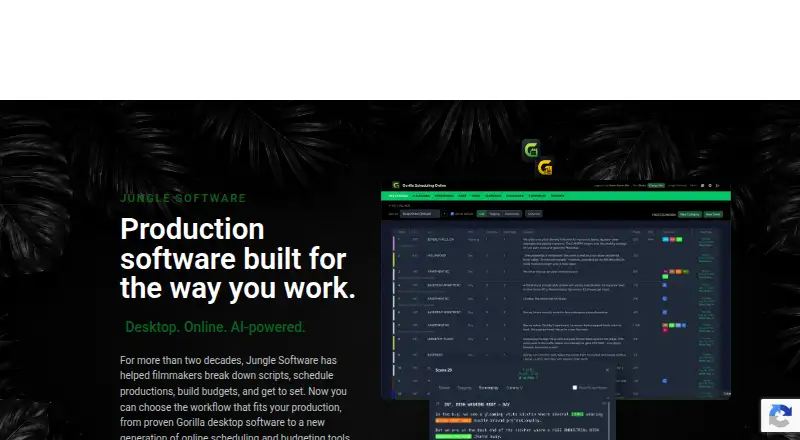
What Gorilla Scheduling is
Gorilla Scheduling is professional film scheduling software for turning a screenplay into a production plan. Its workflow covers screenplay import and breakdown, stripboards, cast and crew, shoot days, and production reports. The browser-based Gorilla Scheduling Online supports collaboration without requiring a desktop installation, and it can import Final Draft and PDF screenplays. Gorilla also supports Movie Magic Scheduling data imports and exports to Movie Magic’s .sex format, alongside Final Draft .fdx imports and exports. Reports can include shooting and one-line schedules, Day Out of Days, cast and crew lists, element reports, breakdown sheets, stripboard reports, and calendar reports. Breakdown Assistant AI helps identify and organize screenplay elements for review in the scheduling workflow. Koala Call Sheets uses information entered in Gorilla Scheduling to create and distribute call sheets, including PDF and email options. Online Work Offline mode allows selected breakdown and scheduling changes, with edits syncing when connectivity returns. Projects can move between Desktop and Online without being rebuilt. Desktop scheduling and budgeting plans are also available.
Good
- Imports Final Draft and PDF screenplays in the online version.
- Supports Movie Magic data imports and .sex exports.
- Produces schedules, breakdowns, cast lists, and other reports.
- AI assistance organizes screenplay elements for review.
- Offline mode syncs selected edits when back online.
- Online and Desktop projects can transfer without rebuilding.
Watch out
- Free Online plan excludes collaboration and certain reports and exports.
- Fringes and integrated Ratebook require a paid plan.
- Desktop plans are billed every three months.
- No mobile app platform is offered.
Who it suits
Gorilla Scheduling suits film productions and film schools that need screenplay breakdown, scheduling, cast and crew organization, or production reporting. Its browser collaboration, offline editing mode, and transfer between Desktop and Online can suit teams moving between those workflows.
Verdict
Choose Gorilla Scheduling for film planning built around screenplay breakdowns, stripboards, shoot days, and production reports. Look elsewhere if you need a mobile app or budget tracking within the listed scheduling feature set; budgeting is offered separately as a Desktop plan.
Plans and prices
From Gorilla Scheduling's own pricing page, checked 1 Oct 2026.
| Plan | Price | What it gives you |
|---|---|---|
| Gorilla Online Free | Free | limited features · collaboration, certain reports/exports, fringes and integrated Ratebook require paid plan |
| Gorilla Scheduling Standard | $24.99 a month | desktop product · standard tier · each month |
| Gorilla Scheduling or Budgeting | $29.99 a month | scheduling or budgeting · monthly · cancel before renewal |
| Gorilla Scheduling Premium | $34.99 a month | desktop product · premium tier · each month |
| Gorilla Combo Pack | $49.99 a month | scheduling and budgeting · monthly · cancel before renewal |
| Gorilla Budgeting Desktop | $64.99 a month | Mac and Windows · budgeting, accounts, globals, fringes, expenses, reports · $64.99 every 3 months |
| Gorilla Scheduling Desktop | $64.99 a month | Mac and Windows · scheduling, screenplay breakdown, stripboards, reports · $64.99 every 3 months |
| Gorilla Scheduling Desktop | $199 a year | Mac and Windows · scheduling, screenplay breakdown, stripboards, reports · $199 per year |
| Gorilla Budgeting Desktop | $199 a year | Mac and Windows · budgeting, accounts, globals, fringes, expenses, reports · $199 per year |
| Gorilla Scheduling or Budgeting | $269 a year | scheduling or budgeting · annual subscription · annually |
The facts
Each one read from Gorilla Scheduling's own pages, with the date it was checked.
What it does
- AI breakdown
- Breakdown Assistant AI helps identify and organize production elements from a screenplay for review inside the scheduling workflow.checked 1 Oct 2026
- AI feature
- Breakdown Assistant AI uses OpenAI to suggest tagged screenplay elements while leaving acceptance decisions to the user.checked 15 Oct 2026
- API and SDK
- The maker’s product, support and download pages reviewed provide no public API or SDK documentation.checked 15 Oct 2026
- Breakdown elements
- Breakdown records can include cast, props, locations, wardrobe, vehicles and other production elements.checked 15 Oct 2026
- Call-sheet add-on
- Koala Call Sheets creates, customizes, PDFs, emails and distributes call sheets from Gorilla production data.checked 15 Oct 2026
- Call sheets
- Koala Call Sheets creates, customizes, PDFs, emails and distributes call sheets using information entered in Gorilla Scheduling.checked 1 Oct 2026
- Capterra pricing listing
- Capterra lists a $34.99 monthly starting price, a $299 yearly option, a free trial and no free version.checked 15 Oct 2026
- Cast and crew
- The product manages cast, crew, availability, conflicts, contacts and production information.checked 15 Oct 2026
- Data storage
- Gorilla Online project data is stored securely in the cloud and associated with the user account.checked 1 Oct 2026
- Education
- Gorilla Scheduling Online includes tools for film schools, including browser-based screenplay breakdown, stripboard scheduling, production planning and reporting.checked 1 Oct 2026
- Film-school use
- The online edition includes tools for instructors and students to practice breakdown, scheduling and reporting.checked 15 Oct 2026
- Final Draft integration
- Gorilla Scheduling supports importing and exporting Final Draft (.fdx) screenplay or schedule files.checked 1 Oct 2026
- Licence
- The EULA grants a limited software licence; Jungle Software retains title and the software is copyrighted.checked 15 Oct 2026
- Limit: reliability and support
- A G2 reviewer reported slow performance, failed or hanging imports, unreliable undo, Dropbox or folder restrictions and ineffective ticket support.checked 15 Oct 2026
The company
- Company headquarters
- Claris lists Jungle Software headquarters in Simi Valley, California.checked 15 Oct 2026
- Company history
- Jungle Software says Gorilla was born in July 2002 after filmmakers and programmers built production modules for their own film work.checked 1 Oct 2026
- Company legal name
- The terms identify the maker as Jungle Software, LLC.checked 15 Oct 2026
- Company origin
- Jungle Software’s history page says Gorilla was born in July 2002 after the founders built production modules for their own film.checked 15 Oct 2026
- Company size
- LinkedIn lists Jungle Software as privately held with 2–10 employees.checked 15 Oct 2026
- Founded
- LinkedIn lists Jungle Software as founded in 2002.checked 15 Oct 2026
Where it runs
- Desktop platforms
- Gorilla Scheduling Desktop is offered for Mac and Windows.checked 15 Oct 2026
- GetApp support listing
- GetApp lists web, Android and iPhone/iPad deployment plus email, phone, FAQ, knowledge-base and chat support.checked 15 Oct 2026
Money
- Desktop trial
- The desktop demo is available for 15 days.checked 15 Oct 2026
- Free access
- Jungle Software says users can create a free Gorilla Online account in a browser.checked 15 Oct 2026
The full review of Gorilla Scheduling
Gorilla Scheduling is film-production software for teams planning shoots from screenplay breakdown through production reporting. It is strongest for crews that need desktop scheduling with an option to collaborate online. Its main trade-offs are no mobile app and no budget tracking in the scheduling product.
Overview
Gorilla brings screenplay import, scene breakdowns, stripboards, cast and crew management, shoot days and production reports into one workflow. Projects can move between Desktop and Online without rebuilding them, which gives productions flexibility to combine installed software with browser-based collaboration. The product is focused on scheduling: budget tracking is not included in Gorilla Scheduling.
Key features
Gorilla Online imports Final Draft and PDF screenplays. Gorilla also imports Movie Magic Scheduling data and exports to Movie Magic’s .sex format; it can import and export Final Draft .fdx screenplay or schedule files. That exchange is useful for productions working across established screenplay and scheduling formats.
Reports include shooting and one-line schedules, Day Out of Days, cast and crew lists, element reports, breakdown sheets, stripboard reports and calendar reports. This range helps teams communicate plans in several production-ready forms rather than relying on a stripboard alone.
Breakdown Assistant AI helps identify and organize screenplay elements for review within the scheduling workflow. It supports the breakdown process but keeps human review in the loop. Koala Call Sheets can create, customize, PDF, email and distribute call sheets using information entered in Gorilla Scheduling, keeping that task connected to the production data.
Gorilla Online works in a browser without desktop installation and supports collaboration. Its Work Offline mode allows edits to breakdown sheets, scheduling elements, shoot days, crew and stripboard order, then syncs changes when online. Project data is stored in the cloud and associated with the user account. Film schools also get browser-based tools for breakdown, stripboard scheduling, production planning and reporting.
Pricing
Gorilla Online Free costs nothing. It gives teams a way to start without payment, but collaboration, certain reports and exports, fringes and the integrated Ratebook require a paid plan, limiting it for productions that depend on those capabilities.
Gorilla Scheduling Desktop costs $64.99 a month, billed $64.99 every 3 months. It runs on Mac and Windows and includes scheduling, screenplay breakdown, stripboards and reports. Choose it when installed scheduling is the priority; it does not add budgeting.
Gorilla Budgeting Desktop costs $64.99 a month, billed $64.99 every 3 months, for Mac and Windows. It includes budgeting, accounts, globals, fringes, expenses and reports, but not the scheduling feature set. Gorilla Combo Pack costs $109.99 a month, billed $109.99 every 3 months, and combines Scheduling and Budgeting for productions that need both. The desktop plans’ quarterly billing is worth weighing against the monthly price wording.
Gorilla offers a 15-day trial. The entry pricing note starts at $24.99/mo, while the named desktop plan prices above are billed every three months.
Platforms
Gorilla Scheduling is available on macOS, Windows and the web. The browser-based Online version avoids desktop installation; there is no mobile app, so teams needing phone or tablet app access should look elsewhere.
Who it's for
Gorilla fits film productions and film schools that need screenplay breakdown, shoot-day scheduling, cast and crew management, production reports and file exchange with Final Draft or Movie Magic Scheduling. It is a weaker fit for teams seeking mobile apps or integrated budget tracking in the scheduling plan.
Pros and cons
- Pros: Broad production reporting, including Day Out of Days and calendar reports, gives teams several ways to communicate schedules and elements.
- Pros: Final Draft and Movie Magic file exchange, plus project transfer between Desktop and Online, helps preserve continuity across workflows.
- Pros: Online collaboration and offline editing with later sync support browser-based work beyond a constant connection.
- Cons: The free plan excludes collaboration and certain reports and exports, so a no-cost setup may not cover a working production’s needs.
- Cons: Scheduling Desktop and Budgeting Desktop are separate plans, and the desktop prices bill quarterly.
- Cons: No mobile app and no budget tracking in Gorilla Scheduling limit it for teams wanting those capabilities in the same product.
Alternatives
Choose CineLog if you want a free tier with one active project, 50 MB of media storage and up to two collaborators, or need Android and iOS apps alongside desktop and web access.
Production Slate has a free plan with caps on projects, budget items, crew, shoot days and call-sheet distribution, making it an option for smaller productions that can work within those limits.
Cinetech offers a free read-only demo project and a scheduling plan at $15 a month billed monthly; consider it if a lower monthly scheduling entry point matters.
Prescene offers a free screenplay editor tier with unlimited drafts and no AI usage, and a Plus plan at $49 a month; it may suit readers focused on screenplay editing.
Shamel Studio has a free plan for one limited project with editing tools and community support, and offers call sheets and production reports as a 12.00 USD add-on.
Studiovity is available on mobile, desktop and web, with a PRO plan and an Education monthly option; consider it if broad platform coverage or education-oriented pricing is a priority.
Filmustage offers a free tier with one active project, partial AI breakdown and non-AI tools; its Director’s Cut plan costs $55 a month.
MoviePrepper is another film-production option to compare.
Browse Film Production Scheduling Software or Video Production Management Software for more options.
Verdict
Choose Gorilla Scheduling if your production needs screenplay-centered scheduling, detailed reports and a bridge between desktop and browser workflows. The file exchange, offline edits and reporting breadth make it a capable fit for production planning. Look elsewhere if mobile app access or budget tracking within the scheduling product is essential.
Getting started
- Visit the Gorilla Software website.
- Choose Gorilla Scheduling Online in a browser or a Mac or Windows Desktop plan.
- Start with the free Online plan or use the 15-day trial.
- Import a Final Draft or PDF screenplay into the online version.
- Build breakdowns, scheduling elements, shoot days, and reports.
Limits worth knowing
The Gorilla Online Free plan has limited features: collaboration, certain reports and exports, fringes, and the integrated Ratebook require a paid plan. The Desktop scheduling plan is $64.99 per month, billed $64.99 every three months; the budgeting and combo plans are separate paid offerings.
Questions
Is there a free plan?
Yes. Gorilla Online Free is free, with limited features.
How much do paid plans cost?
The Desktop Scheduling and Budgeting plans each cost $64.99 per month, billed $64.99 every three months; the Combo Pack is $109.99 per month, billed every three months.
Which platforms does it support?
The listed platforms are macOS, web, and Windows. The online version runs in a browser, while Desktop plans support Mac and Windows.
Can it import and export screenplay files?
It supports importing and exporting Final Draft .fdx screenplay or schedule files. Gorilla Scheduling Online can also import Final Draft and PDF screenplays.
Does it work with Movie Magic Scheduling?
Gorilla Scheduling can import Movie Magic Scheduling data and export to Movie Magic Scheduling in .sex format.
Does the Online plan include collaboration?
Collaboration requires a paid plan; the free Online plan excludes it.
Alternatives to Gorilla Scheduling
- 1
Studiovity
AndroidiOSWebAPI7.8 - 2

GitHub CodeQL
Free planWebExtensionLinuxmacOS7.5From $30 a month - 3
StudioBinder
Free planWeb7.5From $29 a month - 4
Prescene
Free planWebAPI7.4From $49 a month - 5

Production Slate
Free planAndroidiOSWeb7.4From $99 a year - 6

Cinetech
Free planWeb7.3From $15 a month