
Production Slate
Production Slate is production management software for budgets, schedules, crew, call sheets and read receipts.
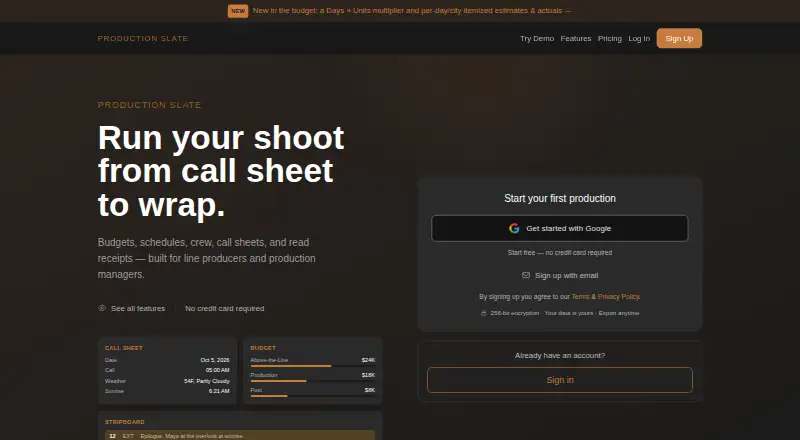
What Production Slate is
Production Slate is production management software for budgets, schedules, crew, call sheets and read receipts. It is built for line producers, production managers, assistant directors and small production companies working on films, shorts, music videos, commercials, branded content, web series or TV. Users can import FDX scripts, read them in the app and highlight text to tag props, wardrobe and set dressing. Scheduling includes draggable scene strips, labor cost calculations, crew and location assignments, and day-out-of-days reports. Call sheets can automatically include crew, cast, scenes, weather, sunrise and sunset, and nearest hospital information. Organizations can share projects automatically and assign page-level Owner, Editor or Viewer access. The Pro plan supports Excel, CSV and Movie Magic Budget import and export; budgets can also be exported as PDFs. The progressive web app works on iPhone, iPad, Android and desktop. A free plan is available, with Pro listed at $12 a month or $99/year; Team is billed at $20 per user per month.
Good
- Imports FDX scripts for in-app reading and breakdowns.
- Schedules scenes with labor costs and assignments.
- Call sheets can include weather and sunrise or sunset.
- Project access can be assigned by page role.
- Progressive web app works across mobile and desktop.
Watch out
- Free plan caps projects at two.
- Free plan allows 15 crew members.
- Free plan limits call sheets to 10 recipients.
- Team plan is billed per user.
Who it suits
Production Slate suits line producers, production managers, assistant directors and small production companies. Its listed production types include film, television, music video and commercial work.
Verdict
Production Slate combines script breakdowns, scheduling, budgets and call sheets for production teams. The free plan has project and crew limits, while Pro adds unlimited personal projects and broader data exchange.
Plans and prices
From Production Slate's own pricing page, checked 30 Sep 2026.
| Plan | Price | What it gives you |
|---|---|---|
| Free | Free | 2 projects · 50 budget items · 15 crew · 5 shoot days · call sheets to 10 recipients × 3 sends per project · attachments 10 MB/file, 25 MB/sheet · $0/ month |
| Pro | $12 a month | Unlimited personal projects, budget items, crew, shoot days · unlimited call sheet sends, up to 25 recipients per send · clean PDFs · script reader · Excel / CSV / Movie Magic Budget import + export · unlimited crew payroll entries with tiered overtime · $12/ month or $99/year |
| Team | $20 a month | Per-seat · no base fee or minimums · unlimited projects, budgets, crew, shoot days, payroll · unlimited call sheet recipients and sends · freelancers invited to one project are free · $20/ user / month |
| Pro | $99 a year | Unlimited personal projects, budget items, crew, shoot days · unlimited call sheet sends, up to 25 recipients per send · clean PDFs · script reader · Excel / CSV / Movie Magic Budget import + export · unlimited crew payroll entries with tiered overtime · $99/year |
| Enterprise | Priced on request | For organizations with 50+ members needing SSO, SLAs, audit logs, or dedicated support · Contact [email protected] for Enterprise pricing |
The facts
Each one read from Production Slate's own pages, with the date it was checked.
What it does
- Call sheets
- Call sheets can automatically include crew, cast, scenes, weather, sunrise and sunset, and nearest hospital information.checked 30 Sep 2026
- Data exchange
- The Pro plan supports Excel, CSV, and Movie Magic Budget import and export; budgets also support PDF export.checked 30 Sep 2026
- Data export and retention
- The maker says users can export production data as PDFs or download it as a JSON file, and that accounts remain accessible indefinitely if inactive.checked 30 Sep 2026
- Data hosting
- The privacy policy says data is stored in Supabase hosted on AWS in the United States, with encrypted database backups stored with Backblaze in the United States.checked 30 Sep 2026
- Intended users
- The product is built for line producers, production managers, assistant directors, and small production companies.checked 30 Sep 2026
- Mobile access
- Production Slate says its progressive web app works on iPhone, iPad, Android, and desktop.checked 30 Sep 2026
- Privacy and compliance
- Production Slate LLC identifies itself as the data controller under the GDPR and UK GDPR and says it does not sell personal data.checked 30 Sep 2026
- Product
- Production Slate describes itself as production management software for budgets, schedules, crew, call sheets, and read receipts.checked 30 Sep 2026
- Production types
- The maker lists films, shorts, music videos, commercials, branded content, web series, and TV as intended production types.checked 30 Sep 2026
- Scheduling
- The schedule supports drag-and-drop scene strips, labor cost calculations, crew and location assignments, and day-out-of-days reports.checked 30 Sep 2026
- Script breakdown
- Users can import FDX scripts, read them in the app, and tag props, wardrobe, and set dressing by highlighting text.checked 30 Sep 2026
- Security
- The privacy policy says data is encrypted in transit with TLS 1.2+ and at rest with AES-256, with row-level security policies on all database tables.checked 30 Sep 2026
- Support
- The maker lists [email protected] for Enterprise pricing and privacy-related requests, and says it aims to respond to privacy requests within 30 days.checked 30 Sep 2026
The company
- Team access
- Organizations can share projects automatically and assign page-level Owner, Editor, and Viewer access.checked 30 Sep 2026
The full review of Production Slate
Overview
Production Slate is production management software for film and video teams working across schedules, budgets, crew, and call sheets. It is best suited to line producers, production managers, assistant directors, and small production companies. Its free tier makes it possible to start small, while Pro and Team remove many of the limits that constrain a growing production.
Key features
Breakdowns and schedules
Import an FDX script, read it in the app, and tag props, wardrobe, and set dressing by highlighting text. That connects script breakdowns to planning without requiring the team to re-enter those details manually. Scheduling adds drag-and-drop scene strips, crew and location assignments, labor cost calculations, and day-out-of-days reports, a practical combination for teams coordinating both logistics and costs.
Call sheets and collaboration
Call sheets can automatically include crew, cast, scenes, weather, sunrise and sunset, and the nearest hospital. The free plan caps each project at three sends to up to 10 recipients; Pro allows unlimited sends to up to 25 recipients, and Team removes the recipient cap. Organizations can share projects automatically and set page-level Owner, Editor, or Viewer access, which helps separate editing responsibilities from read-only access.
Data, security, and portability
Pro supports Excel, CSV, and Movie Magic Budget import and export, and budgets can be exported as PDFs. Users can also export production data as PDFs or download it as JSON. Production Slate says it encrypts data in transit with TLS 1.2+ and at rest with AES-256, and applies row-level security policies to database tables. Data and encrypted backups are hosted in the United States. The company identifies itself as the data controller under GDPR and UK GDPR, says it does not sell personal data, and says accounts remain accessible indefinitely if inactive.
Pricing
- Free — free: Covers two projects, 50 budget items, 15 crew, and five shoot days. Each project gets call sheets to 10 recipients for up to three sends; attachments are limited to 10 MB per file and 25 MB per sheet. It is a useful starting point for a small production, but the project, crew, and shoot-day ceilings make it a poor fit for sustained or larger work.
- Pro — $12 a month, billed $12/ month or $99/year: Adds unlimited personal projects, budget items, crew, shoot days, call sheet sends, and crew payroll entries, with up to 25 recipients per send. It also includes clean PDFs, a script reader, and Excel, CSV, and Movie Magic Budget import and export. This is the clearest fit for an individual producer who needs room to manage multiple productions and exchange budget data.
- Team — $20 a month: Billed per user, with no base fee or minimums. It includes unlimited projects, budgets, crew, shoot days, payroll, call sheet recipients, and sends. Freelancers invited to one project are free, which is useful when a core team works with rotating collaborators; per-seat billing still means the cost rises with the permanent team.
- Enterprise — custom pricing: For organizations with 50 or more members that need SSO, SLAs, audit logs, or dedicated support.
Platforms
Production Slate works on Android, iOS, and the web. Its progressive web app is described as working on iPhone, iPad, Android, and desktop, giving crews mobile access without limiting the product to a single device type.
Who it's for
Production Slate suits line producers, production managers, assistant directors, and small production companies making films, shorts, music videos, commercials, branded content, web series, or TV. It is particularly compelling when a team wants script breakdown, scheduling, labor costs, crew assignments, and call sheets in one workflow. A production that exceeds the Free caps, or needs more than 25 call-sheet recipients per send without Team, should budget for a paid plan.
Pros and cons
Pros
- FDX highlighting can tag props, wardrobe, and set dressing directly in the script, tying breakdown work to production planning.
- Schedules combine scene-strip organization with labor costs, crew and location assignments, and day-out-of-days reports.
- Call sheets can assemble useful production-day details automatically, including weather, sunrise and sunset, and nearest hospital information.
- Team permits unlimited recipients and sends, while freelancers on a single project are free.
- PDF and JSON data exports provide a way to take production information out of the service.
Cons
- The Free plan's two-project, 15-crew, and five-shoot-day limits can quickly constrain active productions.
- Free call sheets are limited to three sends per project and 10 recipients, so even small productions may need Pro as schedules change.
- Pro's 25-recipient cap may be insufficient for larger call-sheet lists; unlimited recipients require the per-user Team plan.
- Team costs $20 per user per month, so organizations with many permanent users face a rising seat cost.
- Data and backups are hosted in the United States, a consideration for organizations with stricter data-location requirements.
Alternatives
ScenePaper is worth considering if a free plan with every tool and every seat matters more than Production Slate's stated production workflow. Shamel Studio may suit a web-only user seeking editing tools on a one-project free plan, with call sheets and production reports offered as a separate add-on.
PreProducer is an alternative for teams that need a downloadable desktop option across Linux, macOS, or Windows as well as the web. Dramatify is a web and mobile alternative with a paid Fiction STARTER plan requiring at least three seats.
Cinetech offers a free demo project with read-only access and a paid Scheduling plan, making it an option for evaluating a web scheduler. Gorilla Scheduling is another option for teams that want macOS, Windows, or web access and are willing to use a paid plan for collaboration and certain reports and exports.
CineSched is a free, open-source macOS app. FilmBase is a paid macOS and Windows option with a monthly plan that includes unlimited projects and offline use once installed.
For broader category comparisons, see Film Production Scheduling Software and Video Production Management Software.
Verdict
Production Slate is a strong fit for small production teams that want breakdowns, scheduling, budgeting, crew planning, and call sheets tied together, with a free tier for modest projects and paid plans that scale up. Choose Pro for an individual producer who needs unlimited personal projects and data exchange; choose Team when shared work and unlimited call-sheet reach matter. Look elsewhere if the free caps are too tight, a larger team cannot justify per-seat pricing, or United States hosting does not suit your requirements.
Getting started
- Open the Production Slate website
- Choose Free, Pro, Team, or Enterprise
- Create a project for your production
- Import an FDX script or begin budget and schedule work
- Add crew, locations, scenes, and call-sheet details
- Invite collaborators with Owner, Editor, or Viewer access
Limits worth knowing
The Free plan includes two projects, 50 budget items, 15 crew members, five shoot days, and call sheets to 10 recipients with three sends per project. Pro removes those personal-project limits and adds imports, exports, clean PDFs, and a script reader.
Questions
What does Production Slate cost?
The Free plan is free. Pro costs $12 a month or 99 USD per year; Team costs $20 per user per month. Enterprise pricing is provided by contacting [email protected].
Which platforms are supported?
Production Slate is available on Android, iOS, and the web. Its progressive web app works on iPhone, iPad, Android, and desktop.
What does the Free plan include?
Free includes two projects, 50 budget items, 15 crew, five shoot days, and call sheets sent to up to 10 recipients, three times per project.
Can it import production files?
The Pro plan supports Excel, CSV, and Movie Magic Budget import and export. Scripts can be imported from FDX files.
Does it support team permissions?
Organizations can share projects automatically and assign Owner, Editor, or Viewer access at page level.
Who makes Production Slate?
Production Slate LLC identifies itself as the data controller under the GDPR and UK GDPR.
Alternatives to Production Slate
- 1

Celtx
Free planAndroidiOSWebExtension8.2From $11.24 a month - 2
Autodesk Flow Production Tracking
AndroidiOSWebAPI7.8 - 3
Studiovity
AndroidiOSWebAPI7.8 - 4

Gorilla Scheduling
Free planWebmacOSWindows7.7Free plan - 5
StudioBinder
Free planWeb7.5From $29 a month - 6

ScenePaper
Free planAndroidiOSWebAPI7.3Free plan