GitHub Secret Scanning
GitHub Secret Scanning detects exposed credentials so they can be addressed before they are exploited.
What GitHub Secret Scanning is
GitHub Secret Scanning detects exposed credentials so they can be addressed before they are exploited. It scans branches throughout Git history as well as issues, pull requests, discussions, wikis, and secret gists. When it finds a credential leak, GitHub adds an alert to the repository’s Security and quality tab with details about the exposed credential. Push protection can block secrets before they reach code. Organizations can define regular-expression patterns for their own secrets, while generic patterns can find items such as private keys, connection strings, and generic API keys. AI detection can identify unstructured secrets such as passwords. Validity checks may contact the issuing service to determine whether a credential remains active; provider partners may also validate findings or be notified to take action, such as revoking a credential. Scanning is automatic and free for public repositories. Organization-owned private and internal repositories require GitHub Secret Protection on GitHub Team or GitHub Enterprise Cloud.
Good
- Scans Git history and repository collaboration content
- Push protection can block secrets before code is pushed
- Organizations can define custom detection patterns
- Public-repository scanning is automatic and free
- Validity checks can determine whether secrets remain active
Watch out
- Private and internal repository access requires GitHub Secret Protection
- Validity checks may contact the credential's issuing service
Who it suits
It suits teams that need to find exposed credentials in GitHub repositories and related content. Public-repository scanning is available free, while organization-owned private and internal repositories require GitHub Secret Protection on a supported plan.
Verdict
GitHub Secret Scanning covers repository history and several collaboration surfaces, with options to prevent pushes and customize detection. Public repositories can use it free; private and internal organization repositories have a plan requirement.
Plans and prices
From GitHub Secret Scanning's own pricing page, checked 4 Oct 2026.
| Plan | Price | What it gives you |
|---|---|---|
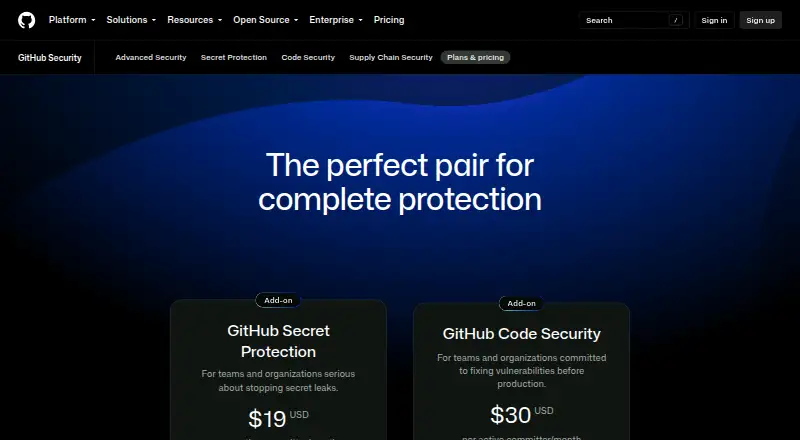
| GitHub Secret Protection | $19 a month | Secret scanning and push protection included for Team and Enterprise · Free for public repositories · Validity checks, Copilot secret scanning, generic patterns, bypass controls, security overview insights, and scan history API included for Team and Enterprise · per active committer/month |
The facts
Each one read from GitHub Secret Scanning's own pages, with the date it was checked.
What it does
- AI detection
- AI-detected secrets can identify unstructured secrets such as passwords.checked 4 Oct 2026
- Alerts
- When it detects a credential leak, GitHub creates an alert on the repository’s Security and quality tab with details about the exposed credential.checked 4 Oct 2026
- Custom patterns
- Organizations can define regular expressions to detect organization-specific secrets not covered by default patterns.checked 4 Oct 2026
- Enterprise option
- GitHub Enterprise Server supports secret scanning for user-owned repositories when the enterprise has GitHub Secret Protection enabled.checked 4 Oct 2026
- Generic patterns
- Generic patterns can detect secrets not tied to a specific provider, including private keys, connection strings, and generic API keys.checked 4 Oct 2026
- Private repository access
- Organization-owned private and internal repositories can use secret scanning with GitHub Secret Protection enabled on GitHub Team or GitHub Enterprise Cloud.checked 4 Oct 2026
- Provider integration
- GitHub partners with service providers to validate detected secrets and may notify a provider so it can take action, such as revoking the credential.checked 4 Oct 2026
- Public monitoring
- An enterprise can enable public monitoring to detect secrets its members leak in public repositories across GitHub.checked 4 Oct 2026
- Public repositories
- Secret scanning runs automatically for free on public repositories.checked 4 Oct 2026
- Purpose
- Secret scanning automatically detects exposed credentials so they can be secured before they are exploited.checked 4 Oct 2026
- Push protection
- Push protection proactively blocks secrets before they reach code.checked 4 Oct 2026
- Scan coverage
- It scans all branches across Git history and also scans issue and pull request content, discussions, wikis, and secret gists.checked 4 Oct 2026
- Validity checks
- Validity checks determine whether a detected secret is still active and may contact its issuing service to check whether it was revoked.checked 4 Oct 2026
The company
- Founded
- 2008checked 28 Sep 2026
- Headquarters
- San Francisco, California, United Stateschecked 28 Sep 2026
Alternatives to GitHub Secret Scanning
- 1

Semgrep Code
Free planOpen sourceWebAPIExtensionLinux8.3From $15 a month - 2
MobSF
Free planOpen sourceWebAPILinuxmacOS8.2From $2,999.99 a year - 3

GitHub CodeQL
Free planWebExtensionLinuxmacOS7.5From $30 a month - 4
gosec
Free planOpen sourceAPILinuxmacOSSelf-hosted7.2Free plan - 5
Horusec
Free planWebAPIExtensionLinux6.6Free plan - 6
Xygeni
Free planWebAPIExtensionLinux6.6Free plan