
GamePal
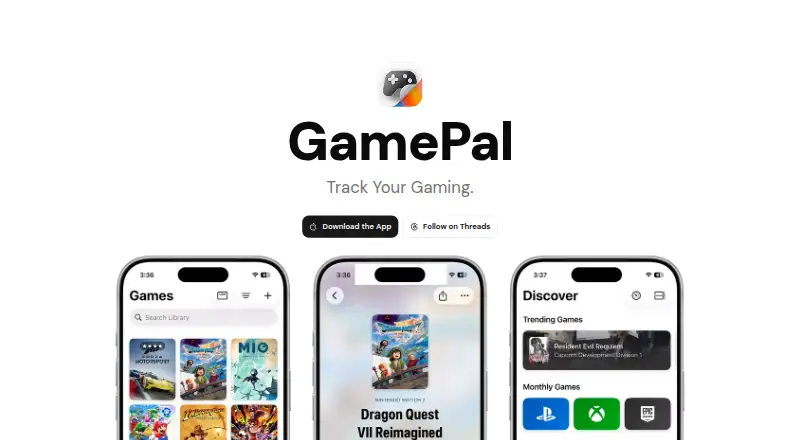
GamePal is an iOS app for tracking gaming activity and managing a game collection.
What GamePal is
GamePal is an iOS app for tracking gaming activity and managing a game collection. Users can mark games as played, completed, or wishlisted, and keep a journal of thoughts and experiences. It also provides gaming-session updates through Live Activities, widgets for stats and recent or upcoming games, release alerts, event tracking, and Siri Shortcuts for logging games or checking stats. Discover offers recommendations, curated lists, and trending titles across platforms; Monthly Games lists titles from PlayStation Plus, Xbox Game Pass, and other subscription services. The app requires iOS 18.0 or later and has a free download, though some features require Platinum. Platinum features include unlimited collections, advanced journal entries with media, widgets, Live Activities, a Monthly Games calendar, and Shortcut actions. Platinum costs $2.99 a month, $29.99 a year, or 49.99 USD once for lifetime access. The privacy policy says personal data is accessed only with explicit permission through system prompts.
Good
- Tracks played, completed, and wishlisted games
- Includes a journal for gaming experiences
- Offers release alerts and event tracking
- Free download is available
- Personal data access requires explicit permission
Watch out
- Requires iOS 18.0 or later
- Some features require a paid Platinum plan
- No desktop app is listed
Who it suits
GamePal suits iOS users who want to organize their game collections, record gaming experiences, and track releases and events. Users need iOS 18.0 or later; some listed features require a Platinum plan.
Verdict
GamePal combines collection tracking with a gaming journal, alerts, events, and discovery features. The free download has feature limits, and Platinum is required for some listed tools.
Plans and prices
From GamePal's own pricing page, checked 15 Oct 2026.
| Plan | Price | What it gives you |
|---|---|---|
| GamePal | Free | Core collection and tracking experience |
| GamePal (free) | Free | Free download; some features require Platinum |
| GamePal Platinum Monthly | $2.99 a month | Automatic session tracking · Game Notes and Tasks · Advanced statistics and insights · Custom notification sounds · Personalized daily reminders · Photo attachments · monthly |
| GamePal Platinum Yearly | $29.99 a year | Automatic session tracking · Game Notes and Tasks · Advanced statistics and insights · Custom notification sounds · Personalized daily reminders · Photo attachments · yearly |
| GamePal Platinum Lifetime | $49.99, paid once | Unlimited game collections · Advanced journal entries with media · Widgets and Live Activities · Priority access to new features · Monthly Games calendar · Shortcut actions · one-time purchase |
The facts
Each one read from GamePal's own pages, with the date it was checked.
What it does
- Accessibility
- Apple lists larger text, dark interface, non-color differentiation, sufficient contrast and reduced motion support.checked 15 Oct 2026
- Analytics
- The privacy policy says GamePal uses TelemetryDeck for anonymous app usage analytics and does not share personally identifiable information with it.checked 4 Oct 2026
- Collection
- Users can mark games as played, completed, or wishlisted.checked 4 Oct 2026
- Collection management
- Users can mark games as played, completed or wishlisted and organize a personal library.checked 15 Oct 2026
- Copyright year
- The App Store copyright notice is © 2024 Jeremy Swinnen.checked 15 Oct 2026
- Developer documentation
- The official website provides an iPhone download and feature descriptions but no public API, SDK, self-hosting or developer-documentation section.checked 15 Oct 2026
- Discover
- Discover provides personalized recommendations, curated lists and trending titles across platforms.checked 15 Oct 2026
- Events
- GamePal lists gaming conferences, showcases and community events.checked 15 Oct 2026
- Gaming journal
- The app supports journal entries, photos and logged play sessions.checked 15 Oct 2026
- Hall of Fame
- The app includes a Hall of Fame for showcasing favorite games.checked 15 Oct 2026
- iCloud sync
- The App Store listing says data synchronizes across Apple devices through iCloud.checked 15 Oct 2026
- IGDB database
- Games can be added manually or searched in a database powered by IGDB.checked 15 Oct 2026
- Journal
- The app lets users record thoughts, memories, and experiences while playing.checked 4 Oct 2026
- Launch date
- Product Hunt lists GamePal as launched in 2024.checked 15 Oct 2026
- License
- The official website and App Store pages do not state an open-source license or provide source-code access.checked 15 Oct 2026
- Limit: database coverage
- Reviewers report that some games and formats are missing from the database.checked 15 Oct 2026
- Limit: paywalls
- Some reviewers consider automatic timing, journaling, customization and other Platinum gates excessive or expensive.checked 15 Oct 2026
- Limit: performance
- Independent review summaries include slow search, crashes and lag after updates.checked 15 Oct 2026
- Live Activities
- Live Activities show session updates on the Lock Screen and Dynamic Island.checked 15 Oct 2026
- Offline use
- MacMagazine reports that the app works without an internet connection and stores data locally on the device.checked 15 Oct 2026
Where it runs
- Limit: multiple platforms
- Reviewers request one game entry that can represent ownership on multiple platforms instead of separate entries.checked 15 Oct 2026
- Limit: platform coverage
- An App Store reviewer asked for Xbox and Steam account connections and the ability to enter previously accumulated play hours.checked 15 Oct 2026
The company
- Maker address
- Apple's EU seller details give Schijnbeemdenlaan 31, 2110 Wijnegem, Belgium.checked 15 Oct 2026
- Maker identity
- Apple identifies Jeremy Swinnen as the seller and developer.checked 15 Oct 2026
The full review of GamePal
GamePal is an iPhone app for organizing a game collection, recording play, and keeping release and event information close at hand. It suits players who want a backlog and gaming diary in one mobile tool, especially those invested in Apple’s widgets and automation. The main trade-off is that several of its most useful conveniences require a Platinum purchase.
Overview
GamePal combines collection management with a personal record of gaming. You can mark titles as played, completed, or wishlisted, which gives a backlog a clear status instead of leaving it as an undifferentiated list. The journal adds a place for thoughts, memories, and experiences, making the app relevant to players who want to remember how a game felt rather than merely record that it was launched.
Its scope extends beyond personal logging. Release notifications, event tracking, recommendations, and subscription-service game listings make it a broader gaming companion than a simple checklist. The free download is a sensible starting point for basic organization, but users who want the app’s phone-integrated features or richer journaling should expect to pay.
Key features
Collection and journal
Status labels for played, completed, and wishlisted games are useful for backlog control and for separating finished games from future purchases. The journal supports personal notes about play. Advanced journal entries with media are reserved for Platinum, so the free experience is better suited to text-based, lightweight records than to a full multimedia diary.
At-a-glance tracking
Live Activities place gaming-session updates on the Lock Screen and Dynamic Island, while widgets display statistics, recently played games, and upcoming releases. These features reduce the need to open the app for routine updates, but both are listed as Platinum benefits and therefore do not form part of the unrestricted free tier.
Events, alerts, and discovery
GamePal follows conferences, showcases, and community events, and can notify you when upcoming games approach release. Discover supplies personalized recommendations, curated lists, and trending titles across platforms. Monthly Games gathers titles offered through PlayStation Plus, Xbox Game Pass, and other subscription services; its calendar is a Platinum feature. Together, these tools make GamePal useful for staying current, although players interested only in logging their own collection may find the wider scope unnecessary.
Shortcuts and privacy
Siri Shortcuts can log games and check statistics. Shortcut actions are part of Platinum, so the automation matters most to users who already build iPhone routines around Siri. The privacy policy says personal data is accessed only after explicit permission through system prompts. Anonymous usage analytics are handled by TelemetryDeck, with no personally identifiable information shared with it.
Pricing
| Plan | Price | What it means |
|---|---|---|
| GamePal (free) | free | Free download; some features require Platinum |
| GamePal Platinum Monthly | $2.99 a month | Premium features, billed monthly |
| GamePal Platinum Yearly | $29.99 a year | Premium features, billed yearly |
| GamePal Platinum Lifetime | $49.99, paid once | Premium features, one-time lifetime billing |
The free plan covers the no-cost entry point but does not promise unrestricted access. Platinum includes unlimited game collections, advanced journal entries with media, widgets, Live Activities, the Monthly Games calendar, and Shortcut actions. Monthly billing is the flexible choice for trying those tools; yearly billing lowers the effective monthly cost for ongoing use, while Lifetime suits a long-term user who prefers to avoid recurring charges. No trial period, renewal terms, seat allowances, or quota figures are provided, so prospective subscribers should not assume a trial or additional usage capacity beyond the stated benefits.
Platforms
GamePal is a mobile iOS app and requires iOS 18.0 or later. There is no desktop app, making it a poor fit for users who want to manage a collection primarily from Windows, macOS, Linux, or a browser.
Who it's for
Choose GamePal if you want a phone-first backlog, gaming journal, release reminder, and event calendar in one place, particularly when Lock Screen updates, widgets, or Siri actions matter. It is less suitable for desktop-focused players, users who need cross-platform access, or anyone satisfied with a basic tracker and unwilling to pay for Platinum’s prominent features.
Pros and cons
Pros
- Broad personal dashboard: Collection statuses, journal entries, release alerts, events, recommendations, and subscription-game listings cover more than simple playtime logging.
- Strong iPhone integration: Live Activities, widgets, and Siri Shortcuts can keep tracking visible and reduce manual navigation.
- Clear upgrade path: Platinum explicitly adds unlimited collections and the richer journal, calendar, widget, Live Activity, and Shortcut functions.
- Permission-focused privacy: Personal data access requires explicit system permission, while TelemetryDeck receives anonymous analytics without personally identifiable information.
Cons
- Several headline tools are paid: Widgets, Live Activities, media-rich journal entries, the Monthly Games calendar, and Shortcut actions require Platinum.
- Apple-only and mobile-only: The iOS 18.0 requirement and lack of a desktop app exclude older iPhones and computer-centered workflows.
- Free tier may feel limited: Users seeking unlimited collection capacity or richer records must move beyond the free download.
Alternatives
For a wider selection of playtime-focused tools, browse Game Playtime Trackers.
Actually Played is a free, no-trial Minecraft mod for Linux, macOS, and Windows, so it is the better choice for desktop Minecraft tracking rather than a general iOS collection journal.
PlayTracker offers free gamer access across Android, iOS, web, and Windows, with a paid Indie plan at €12 a month for expanded game statistics and insight graphs; choose it for broader device coverage and stats.
Arknights: Endfield Playtime Tracker is a free web and Windows tracker dedicated to that game.
GameDiary is a free option spanning Android, iOS, Linux, macOS, self-hosted, web, and Windows.
Outplayed is a Windows freemium product with Core and Premium hosting tiers.
GamingGaiden is a free Windows app with no stated price or usage limits.
Game Time Manager is free and open source for Windows 10 and 11.
PlayCounter is a free Windows alternative whose desktop client uses the MIT license.
Verdict
GamePal is a strong fit for iPhone players who want collection status, personal gaming notes, release and event awareness, and Apple-native surfaces in one app. Its main reason to choose it is the breadth of that phone-centered package; its main reason to look elsewhere is the iOS-only platform and the concentration of standout features behind Platinum.
Alternatives to GamePal
- 1

PlayTracker
Free planAndroidiOSWebWindows7.3From €12 a month - 2
Game Time Manager
Free planOpen sourceWindows7.0Free plan - 3
Actually Played
Free planLinuxmacOSWindows6.6Free plan - 4
Arknights: Endfield Playtime Tracker
Free planWebWindows6.3Free plan - 5

Pyroblast
Free planWeb6.2Free plan - 6
GameDiary
AndroidiOSWebLinux6.1