GameDiary
GameDiary tracks PlayStation Portable game sessions in the background and displays playtime statistics.
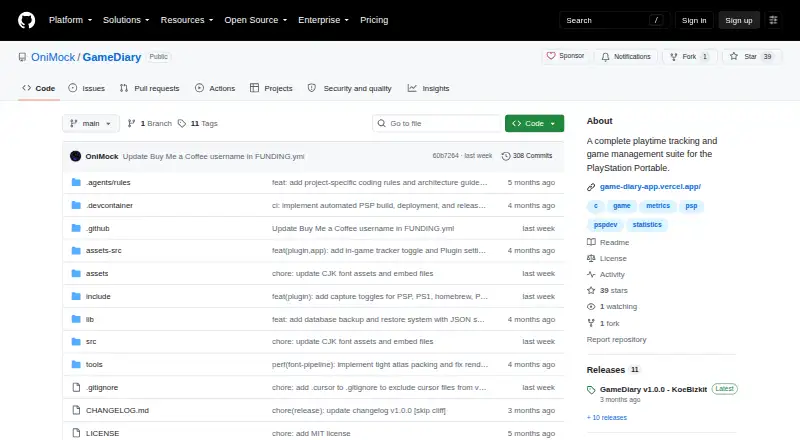
What GameDiary is
GameDiary tracks PlayStation Portable game sessions in the background and displays playtime statistics. Its PSP release pairs a kernel-mode tracking plugin with a user-mode application, covering native PSP games and PlayStation 1 classics running through POPS. It shows time by game and for the full library, along with session history and activity graphs; the plugin can also extract icons from EBOOTs and ISOs. The interface supports English, Spanish, Portuguese, Russian, German, French, Italian, Japanese, and Chinese, with language detection based on PSP settings. Separate web tools let users edit sessions visually and merge backups from multiple Memory Sticks or PSP consoles. Those tools use a backup.json file exported from the PSP app and can be opened from a PC or smartphone. Game data, settings, session logs, and icons are stored on the Memory Stick. Installation requires a PSP 1000, 2000, 3000, or Go with custom firmware and a Memory Stick or MicroSD-to-MS adapter. GameDiary is free and licensed under MIT. Some homebrew that changes RAM boundaries or uses custom interrupts may briefly pause tracking, and the tracker overlay may cause temporary flicker or visual artifacts in some games.
Good
- Tracks native PSP games and PS1 classics through POPS.
- Shows per-game and library-wide playtime.
- Includes session history and activity graphs.
- Web tools edit sessions and merge backups.
Watch out
- Requires a PSP running custom firmware.
- Requires a Memory Stick or MicroSD-to-MS adapter.
- Some homebrew may temporarily pause tracking.
- Overlay may briefly cause visual artifacts in some games.
Who it suits
GameDiary suits PSP owners who want automatic session tracking for PSP games and PS1 classics played through POPS. It also suits users who want to review or edit exported session data in a web interface.
Verdict
GameDiary combines background PSP tracking with statistics and browser-based backup tools. Its custom-firmware and hardware requirements are essential to check before use.
The facts
Each one read from GameDiary's own pages, with the date it was checked.
What it does
- Compatibility
- The maker links to a community-maintained compatibility list covering tested UMDs, PS1 games, and homebrew.checked 7 Oct 2026
- Data handling
- The PSP app exports a backup.json file for use with the web tools, and game data is stored on the Memory Stick.checked 7 Oct 2026
- Data storage
- GameDiary stores its database, session logs, settings, and icons in ms0:/PSP/COMMON/GameDiary/.checked 7 Oct 2026
- Download
- The GitHub release page offers a standard GameDiary.zip with PRX and EBOOT and a separate debug ZIP that produces diagnostic text logs.checked 7 Oct 2026
- Game coverage
- It tracks native PSP games and PlayStation 1 classics running through POPS.checked 7 Oct 2026
- Game icons
- The plugin automatically extracts game icons from EBOOTs and ISOs.checked 7 Oct 2026
- Hardware caveat
- The maker documents that the tracker status overlay may briefly cause screen flicker or visual artifacts in some games.checked 7 Oct 2026
- Icon handling
- The plugin automatically extracts game icons from EBOOTs and ISOs.checked 7 Oct 2026
- Known limitation
- Some homebrew that overwrites RAM boundaries or uses custom interrupts may temporarily pause tracking intervals.checked 7 Oct 2026
- Languages
- The interface supports English, Spanish, Portuguese, Russian, German, French, Italian, Japanese, and Chinese, with language detection from PSP settings.checked 7 Oct 2026
- License
- The project is licensed under the MIT License.checked 7 Oct 2026
- Play statistics
- The app shows per game and total library playtime, session history, and activity graphs.checked 7 Oct 2026
- Purpose
- GameDiary tracks PlayStation Portable game playtime in the background and displays gaming statistics.checked 7 Oct 2026
- Release
- The GitHub releases page lists GameDiary v1.0.0, with standard and debug downloads.checked 7 Oct 2026
- Requirements
- Installation requires a PSP 1000, 2000, 3000, or Go with custom firmware and a Memory Stick or MicroSD to MS adapter.checked 7 Oct 2026
- Statistics
- The app shows per-game and library-wide playtime, session history, and activity graphs.checked 7 Oct 2026
- Support
- The project README invites users to support development through a coffee purchase or crypto donation.checked 7 Oct 2026
- Tracking
- A background kernel plugin tracks play sessions for PSP games and PS1 classics running through POPS.checked 7 Oct 2026
- Web access
- The maker describes the web interface as responsive and accessible from a PC or smartphone, using an exported backup.json file from the PSP app.checked 7 Oct 2026
- Web tools
- The web tools provide a visual editor for game sessions and a tool to merge backup files from multiple Memory Sticks or PSP consoles.checked 7 Oct 2026
Where it runs
- PSP app components
- The PSP release includes a kernel mode tracking plugin (PRX) and a user mode application (EBOOT).checked 7 Oct 2026
The full review of GameDiary
GameDiary is a free playtime tracker for owners of a PSP running custom firmware. It is best for players who want automatic records across PSP games and PS1 classics, not a tracker for a broader modern library.
Overview
A kernel-mode plugin records play sessions in the background, while a separate PSP application displays per-game and library-wide playtime, session history, and activity graphs. Coverage includes native PSP games and PS1 classics running through POPS, making it a focused way to keep a record across both formats without manually logging sessions.
The plugin extracts icons from EBOOTs and ISOs. Game data, session logs, settings, and icons are stored on the Memory Stick in ms0:/PSP/COMMON/GameDiary/; the PSP application can export a backup.json file for use with the web tools.
Key features
The web tools add a visual editor for game sessions and a utility for merging backups from multiple Memory Sticks or PSP consoles. That is useful for correcting a record or consolidating play histories, but the workflow depends on exporting a backup from the PSP first. The responsive interface can be opened on a PC or smartphone.
The interface supports English, Spanish, Portuguese, Russian, German, French, Italian, Japanese, and Chinese, and detects language from PSP settings. A community-maintained compatibility list covers tested UMDs, PS1 games, and homebrew. Some homebrew that overwrites RAM boundaries or uses custom interrupts can temporarily interrupt tracking intervals; the status overlay may also briefly cause flicker or visual artifacts in some games.
Pricing
GameDiary is free under the MIT License. There is no paid tier to unlock the tracking or web tools, making it a straightforward option for compatible PSP owners who want a no-cost, open-source tracker.
Platforms
The core tracker runs on PlayStation Portable models 1000, 2000, 3000, and Go, with custom firmware and a Memory Stick or MicroSD-to-Memory-Stick adapter required. GameDiary also covers PS1 classics through POPS and PSP homebrew, subject to the tracking interruptions noted above. Its web tools are accessible from a PC or smartphone using the exported backup file; they do not replace the PSP app or remove the hardware requirements.
The GitHub release provides a standard ZIP containing the PRX plugin and EBOOT application, plus a separate debug ZIP that generates diagnostic text logs.
Who it's for
Choose GameDiary if you own a compatible PSP, already use custom firmware, and want automatic session tracking with library statistics and a way to edit or merge backups. It is not the right fit if you want tracking across current PC or mobile games, or if installing custom firmware and managing Memory Stick files is outside your comfort zone.
Pros and cons
- Pros: Automatic tracking covers native PSP games and PS1 classics through POPS, so both can contribute to one play history.
- Pros: Session history, activity graphs, and per-game and total-library playtime give more context than a simple cumulative counter.
- Pros: The editor and backup merger help repair or combine records, including across multiple PSP consoles.
- Cons: Custom firmware and specific PSP hardware are mandatory, sharply limiting its audience.
- Cons: Certain homebrew can temporarily pause tracking, and the status overlay may cause brief visual artifacts.
- Cons: Web editing and merging require a backup export from the PSP app rather than working directly with live data.
Alternatives
For a tracker spanning desktop platforms rather than PSP hardware, Actually Played is a free option for Linux, macOS, and Windows, focused on client-side Minecraft tracking without dependencies. PlayTracker is a better fit for a cross-platform gaming audience: it supports Android, iOS, web, and Windows, with a free gamer plan and a €12-per-month Indie plan that includes game stats and estimates and full Insight graph detail.
If your tracking need is tied to one game, Arknights: Endfield Playtime Tracker is free on web and Windows and targets Arknights: Endfield. Outplayed is a Windows alternative with a free Core plan that includes three months of Outplayed.tv hosting and a Premium plan with unlimited hosting, ad removal, layout customization, and enhanced fullscreen mode.
On iOS, GamePal offers a free download, with some features requiring Platinum; its monthly Platinum plan is $2.99 a month. For Windows users, GamingGaiden is another free option, while Game Time Manager is free and open source, with Windows 10 and 11 as its tested systems. PlayCounter is also a free Windows option; its desktop client is MIT-licensed, while production API, migrations, and deployment code are maintained privately.
Verdict
GameDiary is a strong specialist choice for PSP owners with custom firmware who want automatic tracking across PSP and POPS games, backed by useful session statistics and backup tools. Its focused coverage and free MIT-licensed release are compelling, but the hardware and firmware prerequisites—and occasional tracking or display interruptions—make a broader tracker the better choice for players outside that niche.
Getting started
- Open the GameDiary GitHub release page
- Download the standard GameDiary.zip containing the PRX and EBOOT
- Use a PSP 1000, 2000, 3000, or Go with custom firmware
- Insert a Memory Stick or MicroSD-to-MS adapter
- Install the PSP components and run the tracker
- Export backup.json to use the web editing and merge tools
Limits worth knowing
Some homebrew that overwrites RAM boundaries or uses custom interrupts may temporarily pause tracking intervals. The tracker overlay can briefly produce screen flicker or visual artifacts in some games.
Questions
Is GameDiary free?
Yes. GameDiary uses a free plan and is licensed under the MIT License.
Which PSP models are required?
Installation requires a PSP 1000, 2000, 3000, or Go with custom firmware and a Memory Stick or MicroSD-to-MS adapter.
What games does it track?
It tracks native PSP games and PlayStation 1 classics running through POPS, as well as PSP homebrew.
Can I edit or combine playtime backups?
Yes. Export backup.json from the PSP app, then use the web tools to edit sessions visually or merge backups from multiple Memory Sticks or PSP consoles.
Where is GameDiary data stored?
The database, session logs, settings, and icons are stored in ms0:/PSP/COMMON/GameDiary/.
Alternatives to GameDiary
- 1

GamePal
Free planiOS7.3From $29.99 a year - 2

PlayTracker
Free planAndroidiOSWebWindows7.3From €12 a month - 3
Game Time Manager
Free planOpen sourceWindows7.0Free plan - 4
Actually Played
Free planLinuxmacOSWindows6.6Free plan - 5
Arknights: Endfield Playtime Tracker
Free planWebWindows6.3Free plan - 6

Pyroblast
Free planWeb6.2Free plan