Arknights: Endfield Playtime Tracker
Arknights: Endfield Playtime Tracker is a free Windows tool that automatically records playtime for Arknights: Endfield.
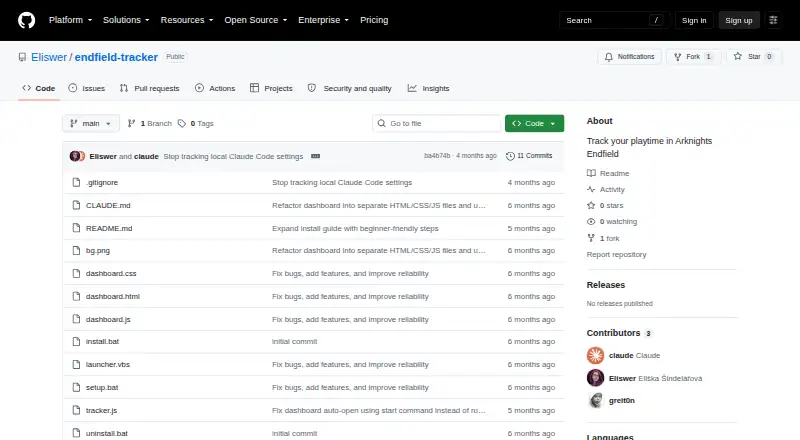
What Arknights: Endfield Playtime Tracker is
Arknights: Endfield Playtime Tracker is a free Windows tool that automatically records playtime for Arknights: Endfield. It checks every five seconds for a running Endfield.exe process and times the session. A browser dashboard at 127.0.0.1:27182 displays a live timer, session history, and a NOW PLAYING banner. When the game closes, a Windows toast shows the session duration and total playtime. The tracker also creates a readable playtime.txt log with sessions grouped by date. Playtime is saved locally as JSON, and interim session data is saved every 60 seconds; after a crash or unexpected shutdown, an incomplete session can be finalized on the next startup. The dashboard retains up to 100 sessions, and detection requires the game executable to be named Endfield.exe. Installation requires Windows and Node.js, with setup using batch files and an option to start automatically at Windows login. It uses built-in Node.js modules with no external dependencies. Users can set an initialOffset to account for playtime before installation; its default is zero. Uninstalling removes the automatic startup task but keeps playtime data in local app data.
Good
- Checks for the game every five seconds.
- Shows a live timer and session history in a local dashboard.
- Saves a date-grouped playtime log.
- Can recover incomplete sessions after a crash.
- Uses no external dependencies.
Watch out
- Requires Windows and Node.js.
- Detection requires the executable name Endfield.exe.
- Dashboard history is limited to 100 sessions.
- No mobile app is available.
Who it suits
This tracker suits Windows players of Arknights: Endfield who want automatic session records and locally stored playtime data. It requires Node.js and detects the game only when its executable is named Endfield.exe.
Verdict
The tracker provides automatic Endfield session timing, local records, and recovery for incomplete sessions. Confirm the executable name and Node.js requirement before setup.
Plans and prices
From Arknights: Endfield Playtime Tracker's own pricing page, checked 30 Sep 2026.
| Plan | Price | What it gives you |
|---|---|---|
| Free | Free | Free to use and modify · Windows · tracks Arknights: Endfield playtime |
The facts
Each one read from Arknights: Endfield Playtime Tracker's own pages, with the date it was checked.
What it does
- Configuration
- Users can configure an initialOffset in seconds to account for playtime from before installing the tracker; its default is zero.checked 30 Sep 2026
- Crash recovery
- It saves interim session data every 60 seconds and finalizes incomplete sessions on the next startup.checked 30 Sep 2026
- Dashboard
- A browser dashboard at 127.0.0.1:27182 shows a live timer, session history, and a NOW PLAYING banner.checked 30 Sep 2026
- Data and privacy
- Playtime data is stored locally in JSON, and the dashboard server binds to 127.0.0.1 so it is not accessible from other machines.checked 30 Sep 2026
- Dependencies
- The tracker uses built-in Node.js modules and has zero external dependencies.checked 30 Sep 2026
- Game detection
- It checks every five seconds whether Endfield.exe is running and times the session.checked 30 Sep 2026
- History limit
- The tracker keeps up to the last 100 sessions with timestamps.checked 30 Sep 2026
- Installation
- Installation requires Node.js and the README's setup steps use Windows batch files, with an option to start automatically at Windows login.checked 30 Sep 2026
- License
- The README says the tracker is free to use and modify.checked 30 Sep 2026
- Limits
- The dashboard keeps the last 100 sessions, and the game executable must be named Endfield.exe for detection.checked 30 Sep 2026
- Local storage
- Playtime data is stored locally in JSON under %LOCALAPPDATA%\endfield-tracker\data.json.checked 30 Sep 2026
- Network scope
- The local HTTP dashboard binds to 127.0.0.1 and the README says it is not accessible from other machines.checked 30 Sep 2026
- Notifications
- When the game closes, it shows a Windows toast with session time and total playtime.checked 30 Sep 2026
- Playtime log
- It generates a human-readable playtime.txt log with sessions grouped by date.checked 30 Sep 2026
- Purpose
- The tracker automatically records playtime for Arknights: Endfield.checked 30 Sep 2026
- Recovery
- It saves interim session data every 60 seconds and can finalize incomplete sessions after a crash or unexpected shutdown.checked 30 Sep 2026
- Requirements
- Installation instructions require Node.js and Windows; the README describes setup using batch files and a VBScript launcher.checked 30 Sep 2026
- Resource use
- The README estimates about 35 MB of RAM, negligible CPU, and less than 1 MB of disk use.checked 30 Sep 2026
- Uninstall and data retention
- The uninstall script removes the automatic startup task while preserving playtime data in the user's local app data folder.checked 30 Sep 2026
The full review of Arknights: Endfield Playtime Tracker
Arknights: Endfield Playtime Tracker is a free Windows utility for Endfield players who want sessions recorded automatically instead of starting a timer by hand. It is a focused choice for keeping playtime on one PC, not for managing a library across devices.
Overview
The tracker checks every five seconds for the game process and times a session when it finds Endfield.exe. Its browser dashboard, served at 127.0.0.1:27182, shows a live timer, session history and a NOW PLAYING banner. When the game closes, a Windows toast reports the session time and total playtime; a date-grouped playtime.txt file provides a readable record.
Both the JSON playtime data and dashboard stay local to the Windows machine. The server binds to 127.0.0.1, so it cannot be accessed from other computers. That is a straightforward fit for a private, single-PC record, but not for sharing or checking history across devices.
Key features
Recovery is a useful safeguard for sessions interrupted by a crash or shutdown: interim data is saved every 60 seconds, and incomplete sessions are finalized at the next startup. It is not second-by-second protection, but it can spare players from losing an entire session. The dashboard retains up to 100 timestamped sessions, so its history is geared toward recent activity rather than a deep archive.
Players can set an initialOffset in seconds to account for time played before installing the tracker; the default is zero. The tracker uses built-in Node.js modules without external dependencies. Its README estimates roughly 35 MB of RAM, negligible CPU use and less than 1 MB of disk space, making it a modest background utility by those estimates.
Pricing
The Free plan costs nothing and is free to use and modify. It includes Windows support and automatic tracking for Arknights: Endfield. There is no paid tier or trial to weigh against it; the trade-off is a narrow, game-specific tool rather than a broader tracking service.
Platforms
This is a desktop utility for Windows, with a browser dashboard served locally. Setup requires Node.js and uses Windows batch files, with a VBScript launcher and an option to start automatically at Windows login. The game executable must be named Endfield.exe for detection, a meaningful limitation if a player's installation uses another name. There is no mobile app.
Uninstalling removes the automatic startup task while preserving playtime data in the local app data folder. That makes it possible to keep the record after removing the launcher, though the data remains on that PC.
Who it's for
It suits Endfield players on Windows who want automatic session timing, local storage and a simple recent-history view without paying. It is less suitable for anyone who does not want to install Node.js, needs cross-platform tracking, or wants a long-term dashboard archive beyond 100 sessions.
Pros and cons
- Pros: Automatic detection avoids manual timer controls; local JSON, a readable text log and a local-only dashboard keep the record on the PC; periodic saves can recover incomplete sessions; the tracker is free to use and modify.
- Cons: Detection depends on the exact Endfield.exe process name; Windows and Node.js are required; the dashboard retains only 100 sessions; local-only access rules out viewing the dashboard from another machine.
Alternatives
For a different platform or a broader tracking setup, consider the Game Playtime Trackers directory.
- Actually Played is worth considering for Linux or macOS users, and its free plan is described as a client-side Minecraft mod with no dependencies.
- PlayTracker may suit gamers who want a service spanning Android, iOS, web and Windows, with a free gamer plan and a €12 per month Indie plan for game stats and Insight detail.
- GameDiary is another free option, with Android, iOS, Linux, macOS, self-hosted, web and Windows support.
- Outplayed is a Windows alternative with a free plan and paid hosting tiers.
- GamePal is an iOS alternative with a free download and optional Platinum features, including a monthly plan at $2.99 a month.
- Game Time Manager is a free, open-source Windows option for players who want another desktop tracker.
- PlayCounter is a free Windows alternative with a desktop client under the MIT license.
- RoTracker is a free web option for Roblox activity tracking, with multi-account tracking and playtime analytics.
Verdict
Choose Arknights: Endfield Playtime Tracker if you play Endfield on Windows and want a free, automatic record that stays on your PC, especially if recovery from interrupted sessions matters. Look elsewhere if you need cross-platform access, a larger history, or detection that does not depend on the Endfield.exe name.
Getting started
- Use a Windows computer and install Node.js.
- Follow the setup instructions using the provided batch files.
- Optionally use the VBScript launcher or configure automatic startup at Windows login.
- Start the tracker and open the dashboard at 127.0.0.1:27182.
- If needed, set initialOffset in seconds to account for playtime before installation.
Limits worth knowing
The dashboard retains up to the last 100 sessions. The free plan is for tracking Arknights: Endfield playtime on Windows, and detection requires the executable name Endfield.exe.
Questions
How much does the tracker cost?
The Free plan costs nothing and is free to use and modify.
Which platforms does it support?
It supports Windows, with a browser dashboard served locally. There is no mobile app.
Does it need Node.js?
Yes. Installation requires Node.js and Windows.
Where is playtime data stored?
It is stored locally as JSON under %LOCALAPPDATA%\endfield-tracker\data.json.
Can another computer access its dashboard?
No. The dashboard server binds to 127.0.0.1 and is not accessible from other machines.
Is the tracker open source?
The README says it is free to use and modify.
Alternatives to Arknights: Endfield Playtime Tracker
- 1

GamePal
Free planiOS7.3From $29.99 a year - 2

PlayTracker
Free planAndroidiOSWebWindows7.3From €12 a month - 3
Game Time Manager
Free planOpen sourceWindows7.0Free plan - 4
Actually Played
Free planLinuxmacOSWindows6.6Free plan - 5

Pyroblast
Free planWeb6.2Free plan - 6
GameDiary
AndroidiOSWebLinux6.1