PlayCounter
PlayCounter is a free Windows desktop app that automatically tracks playtime for recognized PC games across launchers.
What PlayCounter is
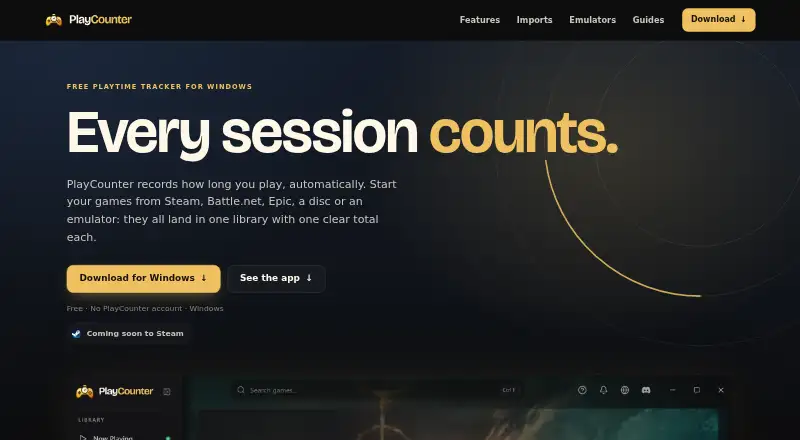
PlayCounter is a free Windows desktop app that automatically tracks playtime for recognized PC games across launchers. It displays a live timer during a session and saves that session when a recognized game closes. The library shows covers, total hours and session counts; history includes dates, session lengths, streaks and playtime summaries. Users can track milestones, add notes and keep separate playthroughs for each game. Listed sources include Steam, Epic, Battle.net, Xbox app, GOG, EA app, Ubisoft Connect, Riot Client, itch.io, disc installs and standalone executables. Steam, Xbox and Epic imports can add playtime those services report, while Battle.net import supplies a game list without playtime. Sessions, notes and history stay on the user's PC, and no account is needed. The app works offline, though automatic game matching, covers and update checks need a server connection. The public installer supports Windows; macOS, Linux and console live tracking are not supported by it. The app sends a pseudonymous installation identifier at startup and about hourly, plus process identifiers for online game matching.
Good
- Automatically records recognized games across launchers.
- Session history includes dates, lengths and streaks.
- Sessions and notes remain on the user's PC.
- No account is required.
Watch out
- The public installer is for Windows only.
- Offline use lacks automatic matching and cover images.
- Battle.net imports do not provide playtime.
Who it suits
PlayCounter suits Windows PC players who want automatic records of playtime across supported launchers and local game installs. Its separate playthroughs, notes and history may appeal to players who track multiple runs of a game.
Verdict
PlayCounter combines automatic Windows game tracking with local session history and notes. Keep in mind that its public installer does not support macOS, Linux or console live tracking.
Plans and prices
From PlayCounter's own pricing page, checked 2 Oct 2026.
| Plan | Price | What it gives you |
|---|---|---|
| Free | Free | Windows app · no subscription · no PlayCounter account |
The facts
Each one read from PlayCounter's own pages, with the date it was checked.
What it does
- Achievements and journal
- It offers playtime milestones and lets users keep notes and separate playthroughs for each game.checked 2 Oct 2026
- Data storage
- Recorded sessions, notes and history stay on the user's PC, and the desktop app requires no account.checked 2 Oct 2026
- Emulators
- The site lists dedicated per-game detection for DOSBox, Dolphin, PCSX2 and mGBA, with some matches requiring review.checked 2 Oct 2026
- Imports
- Steam, Xbox and Epic imports can bring in the playtime those services report; Battle.net import provides a game list but no playtime.checked 2 Oct 2026
- Library and history
- The library shows game covers, total hours and sessions, while history includes session dates, lengths, streaks and playtime summaries.checked 2 Oct 2026
- Offline use
- The app can be used offline, but automatic game matching, cover images and update checks are unavailable without a server connection.checked 2 Oct 2026
- Online data
- The app sends a pseudonymous installation identifier at startup and about hourly, and sends process identifiers for online game matching.checked 2 Oct 2026
- Open source
- The desktop client is available under the MIT license, while the current production API, database migrations and deployment code are maintained privately.checked 2 Oct 2026
- Purpose
- PlayCounter automatically records playtime for recognized PC games in one library, regardless of launcher.checked 2 Oct 2026
- Session tracking
- It shows a live session timer and saves a session when you quit a recognized game.checked 2 Oct 2026
- Support
- The site links to step-by-step guides and a Discord community.checked 2 Oct 2026
- Supported sources
- The site lists Steam, Epic Games, Battle.net, Xbox app, GOG, EA app, Ubisoft Connect, Riot Client, itch.io, disc installs and standalone executables.checked 2 Oct 2026
The company
- Maker
- The privacy policy identifies Philipp Pradzinski as the controller and lists an address in Schwerte, Germany.checked 2 Oct 2026
Where it runs
- Platform availability
- The public installer is for Windows; the site says macOS, Linux and console live tracking are not supported by the public installer.checked 2 Oct 2026
The full review of PlayCounter
Overview
PlayCounter is a Windows desktop app that automatically tracks playtime across recognized PC games from multiple launchers. Its local session history and per-game notes make it a strong fit for players who want a private record of what they play, rather than a social gaming profile.
It tracks sessions as games run, then builds a library of covers, hours and session history. The trade-off is a Windows-only public installer and online-dependent matching features.
Key features
PlayCounter’s automatic tracking spans Steam, Epic Games, Battle.net, Xbox app, GOG, EA app, Ubisoft Connect, Riot Client and itch.io, as well as disc installs and standalone executables. A live timer shows the current session; quitting a recognized game saves it to the record. That launcher breadth is useful for players whose libraries are scattered, though tracking depends on the game being recognized.
The library combines covers with total hours and session counts. History adds dates, session lengths, streaks and playtime summaries, while milestones give long-term play a sense of progress. Notes and separate playthroughs are especially useful for players who revisit games or keep track of different runs.
Imports can add service-reported playtime from Steam, Xbox and Epic. Battle.net import supplies a game list but not hours, so it cannot fill the same historical gap. Dedicated detection is also available for DOSBox, Dolphin, PCSX2 and mGBA; some matches need review, making this a useful option for emulator users but not a fully hands-off record in every case.
Sessions, notes and history stay on the PC, and the app needs no account. The desktop client is MIT-licensed, but the production API, database migrations and deployment code are privately maintained. The app sends a pseudonymous installation identifier at startup and about hourly, plus process identifiers for online game matching. Offline use remains possible, but automatic matching, cover images and update checks need a server connection.
Pricing
PlayCounter is free: free, with no subscription and no PlayCounter account. There is no free trial because the app has a free plan. With no paid tier, the main compromise is not a feature quota but the Windows-only installer and the loss of server-dependent features offline.
Platforms
The public desktop app supports Windows. The site does not support macOS, Linux or console live tracking through its public installer, and there is no mobile app. Steam, Xbox, PC Game Pass, Epic, GOG, EA, Ubisoft, Battle.net and itch.io are among the supported platforms and sources. Multiple data exports are supported.
Who it's for
PlayCounter suits Windows players who want one automatic playtime record across launchers, a detailed session history, and notes or separate records for different playthroughs. It is less suitable for anyone who needs cross-device access, console live tracking, or a public social profile. Players who prefer to keep records offline can still use the app, but should expect matching and artwork features to be unavailable without a server connection.
Pros and cons
- Broad automatic tracking: covers many launchers, disc installs and standalone games in one library.
- Useful session detail: dates, lengths, streaks, summaries, milestones and playthrough notes make the record more than a single lifetime-hours count.
- Local-first and account-free: sessions and notes stay on the PC, and the desktop app requires no account.
- Emulator support: dedicated detection includes DOSBox, Dolphin, PCSX2 and mGBA, though some matches need review.
- Online connection still matters: offline mode loses automatic matching, covers and update checks, and the app sends identifiers for installation and game matching.
- Windows only: the public installer leaves out Mac, Linux and console live-tracking users.
Alternatives
PlayTracker is the better fit for readers who want Android, iOS or web access alongside Windows, and it has a free gamer plan; its Indie plan is €12 a month.
Pyroblast is a free web alternative for connecting Steam, PlayStation and Xbox accounts rather than relying on a Windows desktop tracker.
Steins;Tracker is another free Windows option for game tracking, customization and statistics, with a Pro tier for exclusive icons, themes and advanced features at custom pricing.
GamePal is an iOS alternative, with a free download and Platinum features at $2.99 a month.
Steam Wrapped is another free Windows option.
GamingGaiden is another free Windows option.
Actually Played is a free option for Linux, macOS and Windows users; its listed offering is a client-side Minecraft mod with no dependencies.
Thusfar is another free Windows alternative.
Browse the Game Playtime Trackers category for more options.
Verdict
Choose PlayCounter if you use Windows and want an account-free, detailed playtime record that follows games across launchers and keeps notes alongside sessions. Its combination of automatic tracking and local history is the main draw. Look elsewhere if you need macOS, Linux or console live tracking, or if you want matching and artwork to work offline.
Alternatives to PlayCounter
- 1
GamePal
Free planiOS7.3From $29.99 a year - 2

PlayTracker
Free planAndroidiOSWebWindows7.3From €12 a month - 3
Game Time Manager
Free planOpen sourceWindows7.0Free plan - 4
Actually Played
Free planLinuxmacOSWindows6.6Free plan - 5
Arknights: Endfield Playtime Tracker
Free planWebWindows6.3Free plan - 6

Pyroblast
Free planWeb6.2Free plan