FTW
FTW brings supported solar equipment, batteries and car chargers from different brands together for home energy control.
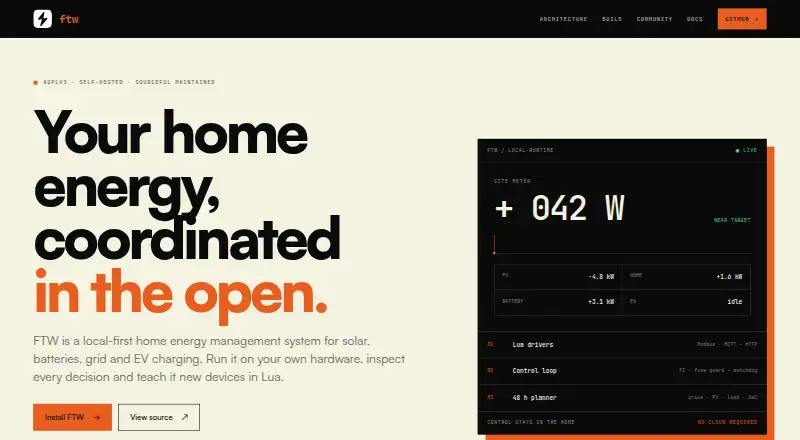
What FTW is
FTW brings supported solar equipment, batteries and car chargers from different brands together for home energy control. Its Energyplan plans energy use by weighing charging needs, electricity prices and tariffs, solar and household forecasts, battery state and efficiency. FTW Core checks proposed plans and commands against site and equipment limits, and keeps a local fallback if the planner is unavailable. The early 0.x beta reports whether controlled devices are following FTW, waiting, limited or need attention, using device readings and, when available, separate meter confirmation. Lua drivers connect supported meters, inverters and batteries, though supported models, firmware and verified functions vary. OCPP 1.6J and 2.0.1 chargers can use FTW’s built-in server without a Lua driver, subject to charger functions. The API and Home Assistant are available for observation or automation. FTW runs on the user's own Raspberry Pi or Linux host, with Linux and Docker installation paths. Active control requires a working site meter and confirmed main fuse rating. The community edition is free for private household use; other Energyplan use requires a separate written Sourceful license.
Good
- Plans around prices, tariffs, solar and household forecasts.
- Local fallback if the planner is unavailable.
- Supports OCPP 1.6J and 2.0.1 chargers.
- API and Home Assistant support observation or automation.
Watch out
- Early 0.x beta; guided migration is not ready.
- Supported device models, firmware and functions vary.
- Active control requires a working site meter.
- No official support, warranty or response-time commitments.
Who it suits
FTW suits households seeking to coordinate supported solar, battery and EV charging equipment, especially those able to run it on their own Linux host or Raspberry Pi. Active control requires a working site meter and confirmed main fuse rating.
Verdict
FTW combines energy planning with local checks and control for supported home equipment. Its beta status, setup requirements and private-household Energyplan licensing terms are important considerations.
Plans and prices
From FTW's own pricing page, checked 8 Oct 2026.
| Plan | Price | What it gives you |
|---|---|---|
| FTW Community | Free | Private household use · Community support is best-effort · Other use of Energyplan requires a separate Sourceful license |
The facts
Each one read from FTW's own pages, with the date it was checked.
What it does
- Beta status and migration
- The site describes the current release as an early 0.x beta; guided transfer of old settings and history is not ready.checked 8 Oct 2026
- Community support
- FTW Community has no official support, warranty, response times or service-level commitments; help is best-effort from users and maintainers.checked 8 Oct 2026
- Deployment
- FTW runs on the user's own host, with the homepage describing Raspberry Pi and Linux deployment.checked 8 Oct 2026
- EV charging
- OCPP 1.6J and 2.0.1 chargers can connect to FTW's built-in server without a Lua driver, subject to the charger’s supported functions.checked 8 Oct 2026
- Home Assistant and API
- The architecture page lists API and Home Assistant for observation and automation.checked 8 Oct 2026
- Installation
- The current release line is the 0.x beta, with installation paths for Linux and Docker; FTW runs on a Raspberry Pi or Linux host.checked 8 Oct 2026
- License and use
- The community edition uses AGPLv3 with a narrow Energyplan exception; the proprietary Energyplan worker is permitted with FTW for a private household, while other use or distribution requires a separate written Sourceful license.checked 8 Oct 2026
- Licensing
- FTW's open-source code uses AGPLv3 with an Energyplan exception; the Energyplan worker is permitted with FTW for private household use, while other use requires a separate written license.checked 8 Oct 2026
- Local control
- FTW Core checks proposed plans and commands against site and equipment limits, and keeps a local fallback if the planner is unavailable.checked 8 Oct 2026
- Other integrations
- FTW lists API and Home Assistant for observation or automation.checked 8 Oct 2026
- Purpose
- FTW makes supported solar, batteries and car charging from different brands work together at home.checked 8 Oct 2026
- Requirements
- Active control requires a working site meter and confirmed main fuse rating.checked 8 Oct 2026
- Safety limits
- Stale required site-meter data stops dispatch, and active control requires a working site meter and confirmed main fuse rating.checked 8 Oct 2026
- Status
- FTW is described as an early beta, and versions 2.x and 3.x will receive no further updates.checked 8 Oct 2026
Where it runs
- Device integrations
- Lua drivers connect supported meters, inverters and batteries; supported models, firmware and verified functions vary.checked 8 Oct 2026
- Device status
- The beta distinguishes whether controlled devices follow FTW, are waiting, are limited or need attention, using device readings and, where available, separate meter confirmation.checked 8 Oct 2026
Money
- Energy planning
- Energyplan weighs charging needs, electricity prices, tariffs, solar and household forecasts, battery state and efficiency to plan energy use.checked 8 Oct 2026
The company
- Founded
- 2022checked 28 Sep 2026
- Headquarters
- Kalmar, Swedenchecked 28 Sep 2026
- Maker
- Sourceful Energy develops and maintains FTW.checked 8 Oct 2026
The full review of FTW
FTW is an open-source system for coordinating supported solar, batteries and EV charging in a home. It is best suited to technically capable private-household users who can host and configure it themselves. Its planning and local safeguards are promising, but the early beta and narrow Energyplan licensing terms call for care.
Overview
FTW brings devices from different manufacturers into a household energy plan. Energyplan weighs charging needs, electricity prices and tariffs, solar output, household forecasts, battery state and efficiency to decide how energy should be used. FTW Core checks proposed plans and commands against site and equipment limits, and keeps a local fallback available if the planner is unavailable.
This division is a practical strength: planning can account for several competing household inputs, while local checks provide a separate control layer. It is not a guarantee that every device or function will work together. Meter and equipment support depends on the model, firmware and verified functions.
Key features
Planning, control and status
Active control requires a working site meter and a confirmed main fuse rating. If required site-meter data goes stale, FTW stops dispatch rather than continuing on unreliable readings. That is a meaningful safety boundary, but it also makes a dependable meter setup essential for anyone expecting automatic control.
The beta distinguishes devices that follow FTW, are waiting, are limited or need attention. It uses device readings and, where available, separate meter confirmation. The status cues can help users see whether commands are taking effect, though separate confirmation is not available for every setup.
Integrations and deployment
Lua drivers connect supported meters, inverters and batteries; compatibility varies by model, firmware and verified function. EV chargers supporting OCPP 1.6J or 2.0.1 can connect to FTW’s built-in server without a Lua driver, subject to the charger’s supported functions. API and Home Assistant integrations support observation or automation rather than replacing the need to check device compatibility.
FTW runs on a user-managed host, with Linux and Docker installation paths and Raspberry Pi deployment described. That flexibility suits people comfortable maintaining a home server; it is a less natural fit for those who want a hosted service or official support.
Pricing
FTW Community costs nothing for private-household use. It is open source under AGPLv3 with an Energyplan exception. The proprietary Energyplan worker is permitted with FTW for a private household; other use or distribution requires a separate written Sourceful license. This restriction matters to anyone considering commercial, organizational or redistributed use.
Community support is best-effort from users and maintainers, with no official support, warranty, response times or service-level commitments. The free price therefore suits a self-reliant household willing to handle setup and troubleshooting, not a user who needs guaranteed assistance.
Platforms
FTW supports API, Linux, self-hosted and web use. Its current 0.x beta has Linux and Docker installation paths and can run on a Raspberry Pi or Linux host. This is a self-hosted deployment, not a turnkey mobile-app offering.
Who it's for
FTW is aimed at private households with supported solar, battery or charging equipment, a working site meter and the technical ability to run software on their own host. It is especially relevant when coordinating several energy inputs and devices matters more than having a polished, supported service.
It is a poor fit for users who need mature software, guided migration, guaranteed support or unrestricted commercial licensing. The current release is an early 0.x beta, guided transfer of older settings and history is not ready, and versions 2.x and 3.x will receive no further updates.
Pros and cons
- Pros: Energyplan considers tariffs, forecasts, solar, charging needs and battery efficiency together, giving household planning broader context than a single-device controller.
- Pros: FTW Core checks equipment and site limits and stops dispatch when required meter data is stale, adding guardrails to active control.
- Pros: OCPP charger connectivity can avoid a Lua driver for compatible chargers, while Linux, Docker and Raspberry Pi deployment provide self-hosting choices.
- Cons: The early beta lacks guided migration of old settings and history, so existing users should expect a less seamless transition.
- Cons: Device support varies by model, firmware and verified functions, and active control depends on a working site meter and confirmed fuse rating.
- Cons: Community support has no formal commitments, and Energyplan's private-household license boundary excludes other use without a separate written license.
Alternatives
Enertiv is worth considering when a paid platform with Android and iOS support is a better fit; its free portfolio diagnostic uses ESPM data with read-only access and no commitment.
BEMServer is another free, open-source option for Linux and self-hosted use, though its listed plan places installation, configuration, maintenance and selected modules outside the free software offer.
Honeywell Forge is an alternative for readers seeking a paid product family with broader desktop and mobile platform support; pricing depends on the product, and Advanced Process Control uses term-based licensing and feature choices.
Siemens Building X offers application or API subscriptions billed yearly, with pricing by quote; choose it when a subscription-based platform better matches the deployment.
Spacewell, KERO, Verdigris and CIM PEAK are other options to compare.
For a broader category comparison, see Energy Management Software.
Verdict
FTW is a compelling free option for technically capable private households that want to coordinate supported solar, batteries and EV charging on their own hardware. Its multi-input planning and cautious local control are the central reasons to choose it. Look elsewhere if you need mature releases, supported migration, formal assistance or Energyplan use beyond a private household.
Getting started
- Choose a Raspberry Pi or Linux host for self-hosted deployment.
- Use the Linux or Docker installation path for the 0.x beta.
- Connect supported meters, inverters and batteries through Lua drivers, or connect supported OCPP chargers to the built-in server.
- Provide a working site meter and confirm the main fuse rating before active control.
- Use the API or Home Assistant connection for observation or automation.
Limits worth knowing
The free FTW Community plan is for private household use; other use of Energyplan requires a separate Sourceful license. Active control stops when required site-meter data is stale and requires a confirmed main fuse rating.
Questions
How much does FTW Community cost?
FTW Community is free for private household use.
Is FTW open source?
Its community code uses AGPLv3 with an Energyplan exception. Energyplan is permitted with FTW for private household use; other use requires a separate written Sourceful license.
Which platforms does FTW support?
FTW is listed for API, Linux, self-hosted and web. Its deployment information describes Raspberry Pi and Linux hosting, with Linux and Docker installation paths.
What equipment can connect to FTW?
Lua drivers connect supported meters, inverters and batteries. OCPP 1.6J and 2.0.1 chargers can use the built-in server, depending on their supported functions.
Does FTW offer official support?
FTW Community has no official support, warranty, response times or service-level commitments. Help is best-effort from users and maintainers.
Alternatives to FTW
- 1
RETScreen
Free planWindows7.1From C$869 a year - 2

EnergyCAP
WebAPImacOSWindows6.9From $4,000 a year - 3

EnergyElephant
AndroidiOSWebAPI6.9From $7.30 a month - 4

Enertiv
Free planAndroidiOSWebAPI6.6Free plan - 5
Honeywell Forge
AndroidiOSWebAPI6.4 - 6

Spacewell
AndroidiOSWebAPI6.4