Frigate
Frigate is an open-source network video recorder for IP cameras that performs real-time AI object detection locally on the user’s hardware.
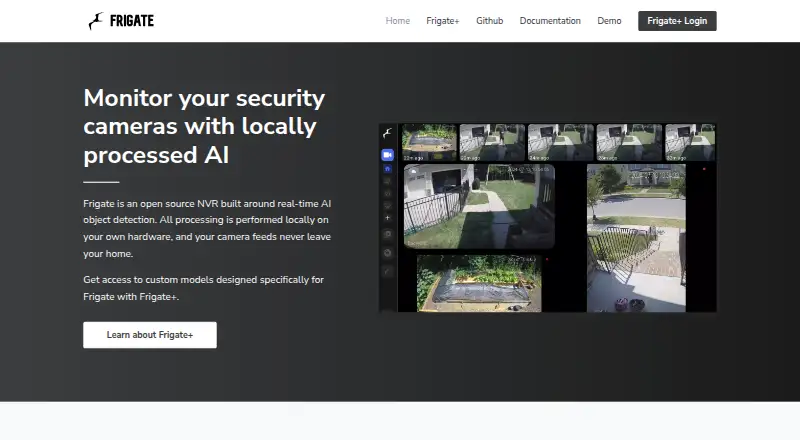
What Frigate is
Frigate is an open-source network video recorder for IP cameras that performs real-time AI object detection locally on the user’s hardware. Its maker says camera feeds remain in the home. With a supported AI accelerator, detection can distinguish objects such as people and cars from motion; the site says Frigate can process 100+ object detections per second with such an accelerator. It tracks objects and lets users refine notifications by location. Recording options include retention settings based on detected objects and 24/7 recording. Frigate runs in a Docker container on a Docker host, including as a Home Assistant App. Documentation recommends Docker Compose and says it runs best with Docker on bare-metal Debian-based distributions. The free plan is an open-source NVR; the Frigate+ Subscription costs $50 a year, billed annually, and includes access to Frigate+ models, up to 12 fine-tuned models, and AI-suggested labels for uploads. Windows is not officially supported. Frigate does not implement OIDC, SAML, or LDAP natively, though upstream authentication proxies can be used for those protocols.
Good
- Processes camera feeds locally on user hardware.
- Tracks objects for location-based notification refinement.
- Supports both detected-object retention and 24/7 recording.
- Integrates with Home Assistant and MQTT systems.
- Free open-source NVR plan is available.
Watch out
- Windows is not officially supported.
- Native OIDC, SAML, and LDAP are not implemented.
- Frigate+ costs $50 a year, billed annually.
- Frigate+ does not yet allow custom labels.
Who it suits
Frigate suits people running IP cameras on their own hardware, especially those using Docker or Home Assistant. It may also fit users who want local processing and object-based recording or notifications.
Verdict
Frigate offers local camera recording and object detection, with a free open-source plan and an optional Frigate+ subscription. Its Docker deployment and lack of official Windows support are important setup considerations.
Plans and prices
From Frigate's own pricing page, checked 29 Sep 2026.
| Plan | Price | What it gives you |
|---|---|---|
| Frigate | Free | Open-source NVR; runs as a Docker container on a Docker host |
| Frigate+ Subscription | $50 a year | Access to Frigate+ models · Up to 12 fine tuned models · AI suggested labels for uploads · Supports open source Frigate · annually |
The facts
Each one read from Frigate's own pages, with the date it was checked.
What it does
- API
- Frigate provides an HTTP API with endpoints covering areas including cameras, classification, events, media and recordings.checked 29 Sep 2026
- Authentication
- Frigate stores user information in its database and hashes passwords with PBKDF2-SHA256 using 600,000 iterations.checked 29 Sep 2026
- Detection speed
- The site says Frigate can run 100+ object detections per second with a supported AI accelerator.checked 29 Sep 2026
- False positives
- With a supported AI accelerator, Frigate uses object detection to distinguish objects such as people and cars from motion.checked 29 Sep 2026
- Frigate+ limit
- Frigate+ model training supports only specific labels and does not yet allow custom labels.checked 29 Sep 2026
- Home Assistant integration
- The integration provides camera, image, sensor, switch and binary sensor entities, plus browsing for snapshots and recordings.checked 29 Sep 2026
- Installation
- Frigate runs as a Docker container on Docker hosts, including as a Home Assistant App.checked 29 Sep 2026
- Integrations
- The maker lists Home Assistant, OpenHab, NodeRed and systems with MQTT support as integrations.checked 29 Sep 2026
- Privacy
- The maker says all processing is local and camera feeds never leave the home.checked 29 Sep 2026
- Purpose
- Frigate is an open source NVR for IP cameras that performs real-time AI object detection locally on the user’s hardware.checked 29 Sep 2026
- Recommended setup
- The documentation recommends Docker Compose and says Frigate runs best with Docker on bare-metal Debian-based distributions.checked 29 Sep 2026
- Recording
- Frigate records video with retention settings based on detected objects and supports 24/7 recording.checked 29 Sep 2026
- Security limit
- The documentation says Frigate does not implement OIDC, SAML or LDAP natively and can use upstream authentication proxies for those protocols.checked 29 Sep 2026
- Zones
- Frigate tracks objects in real time and lets users refine notifications based on precise locations.checked 29 Sep 2026
Where it runs
- Windows support
- Windows is not officially supported, though the documentation says some users have run Frigate under WSL or VirtualBox.checked 29 Sep 2026
The full review of Frigate
Overview
Frigate is an open-source NVR that pairs IP-camera recording with AI object detection on local hardware. It is best for camera owners who are comfortable managing a Docker host and want footage kept inside the home.
Key features
Frigate supports 24/7 recording as well as retention rules based on detected objects. That gives users a choice between a complete record and storage tied to activity, rather than motion alone. With a supported AI accelerator, it can distinguish objects such as people and cars from motion, which can cut down on irrelevant alerts. The maker says compatible accelerators can run more than 100 detections per second, but that performance depends on the hardware.
Real-time object tracking and zones let users tune notifications to precise locations in a camera view. This is useful when activity in one area matters more than movement elsewhere. Frigate also supports real-time alerts and behavior and event detection. Integrations include Home Assistant, OpenHab, NodeRed and systems using MQTT. The Home Assistant integration exposes camera, image, sensor, switch and binary sensor entities, and supports browsing snapshots and recordings.
An HTTP API covers cameras, classification, events, media and recordings, making Frigate suitable for systems that need to connect to its data. The maker says all processing is local and camera feeds stay in the home, a meaningful advantage for owners who do not want footage sent elsewhere. Frigate stores user information in its database and hashes passwords with PBKDF2-SHA256 using 600,000 iterations. It does not natively support OIDC, SAML or LDAP, so organizations that require those protocols must use an upstream authentication proxy.
Pricing
The free Frigate plan costs nothing and includes the open-source NVR running as a Docker container on a Docker host. It is the natural starting point for self-hosters who can provide and maintain their own deployment. There is no paid Frigate core plan described; the optional Frigate+ Subscription costs $50 a year, billed annually. It adds access to Frigate+ models, up to 12 fine-tuned models and AI-suggested labels for uploads, while supporting open-source Frigate. That subscription is aimed at users who want those model capabilities; it does not remove the Docker-host requirement. Frigate+ training supports specific labels only, with no custom labels yet.
Platforms
Frigate is available through API, Linux, self-hosted deployment and the web. It runs in Docker on Docker hosts, including as a Home Assistant App. Documentation recommends Docker Compose and says it runs best with Docker on bare-metal Debian-based distributions. Windows is not officially supported, although some users have run it under WSL or VirtualBox; Windows-first users should expect an unsupported setup rather than a standard installation path.
Who it's for
Frigate is a strong fit for technically capable home-camera owners who want local AI detection, configurable retention and Home Assistant or MQTT integration. Its reliance on Docker and the value of supported AI acceleration make it less suitable for people seeking a turnkey Windows install or who do not want to manage their own host. Organizations requiring native OIDC, SAML or LDAP should also account for the proxy requirement.
Pros and cons
- Pros: Local processing keeps camera feeds in the home, according to the maker, which suits privacy-conscious owners.
- Pros: Object-based retention, continuous recording, zones and real-time alerts provide meaningful control over what is recorded and when notifications fire.
- Pros: Home Assistant entities, MQTT support and an HTTP API offer several ways to connect Frigate to a broader setup.
- Cons: Docker is required, and the recommended bare-metal Debian-based setup makes deployment a poor match for users who want a conventional desktop installer.
- Cons: Windows has no official support, and native OIDC, SAML and LDAP are absent, adding work for some users and organizations.
- Cons: Frigate+ model training is restricted to supported labels, so teams needing custom labels cannot use it for that purpose yet.
Alternatives
For broader AI video analytics options, browse AI Video Analytics Software. Roboflow is worth considering when model training and inference credits are the priority: its free tier includes 10 credits monthly, described as enough for about 30 model trainings or 80,000 inferences, while Frigate centers on local camera recording and detection. Amazon Rekognition Content Moderation is an API and web option with a 12-month free tier that includes 60 video-analysis minutes per month; choose it when that hosted free allowance suits the workload better than a self-hosted NVR.
Camio offers usage-based service levels matched to needs, with custom pricing. Scylla Command Center is an enterprise option with custom pricing and support for 100+ video-wall displays, multi-site management and redundancy features. Spot AI has a free dashboard tier with limited analysis volume and no hardware or support, plus paid services priced by order form. Triya AI is another paid option for Android, iOS, self-hosted and web environments. Videonetics AI Video Analytics has a 30-day free trial and custom pricing. Lumeo starts its Core plan at $99 a month, with 10 streams and 30-day recording retention; it may suit readers who want a hosted stream-based service rather than managing Frigate's Docker deployment.
Verdict
Choose Frigate if you want an open-source, locally processed camera NVR and are willing to run Docker; its recording controls, object-based detection and home-automation integrations make that setup worthwhile. Look elsewhere if you need official Windows support, native enterprise identity protocols or a managed deployment that avoids maintaining a host.
Getting started
- Visit https://frigate.video/ and review the documentation.
- Prepare a Docker host; the documentation recommends Docker Compose and bare-metal Debian-based distributions.
- Run Frigate as a Docker container, or use it as a Home Assistant App.
- Connect IP cameras and configure recording and retention settings.
- Optionally connect Home Assistant, OpenHab, NodeRed or an MQTT-supporting system.
- Choose the free Frigate plan or subscribe to Frigate+ for $50 a year, billed annually.
Questions
Is Frigate free?
Yes. The open-source Frigate plan is free. Frigate+ is a separate subscription costing $50 a year, billed annually.
What does Frigate+ include?
It includes access to Frigate+ models, up to 12 fine-tuned models and AI-suggested labels for uploads.
Which platforms does Frigate support?
Listed platforms are API, Linux, self-hosted and web. Windows is not officially supported, although the documentation says some users have run it under WSL or VirtualBox.
Can Frigate integrate with Home Assistant?
Yes. Its Home Assistant integration provides camera, image, sensor, switch and binary sensor entities, plus browsing for snapshots and recordings. Other listed integrations include OpenHab, NodeRed and systems with MQTT support.
Does Frigate process camera feeds locally?
Yes. Frigate performs object detection on the user's hardware, and its maker says camera feeds never leave the home.
Does Frigate support native enterprise authentication protocols?
It does not implement OIDC, SAML or LDAP natively. The documentation says upstream authentication proxies can be used for those protocols.
Alternatives to Frigate
- 1

Spot AI
Free planAndroidiOSWebAPI8.2From $1,500 a year - 2
AXIS Camera Station Secure Entry
AndroidiOSWebAPI6.8 - 3
Solink Drive-Thru AI
AndroidiOSWeb6.6 - 4
March Networks Command Enterprise
AndroidiOSWebWindows5.6 - 5
Milestone XProtect
AndroidiOSWebWindows5.6 - 6
Avigilon Unity Video
AndroidiOSWebWindows5.5