
FreshRSS
FreshRSS is a free, self-hosted RSS and Atom feed aggregator for following websites, podcasts, and video channels.
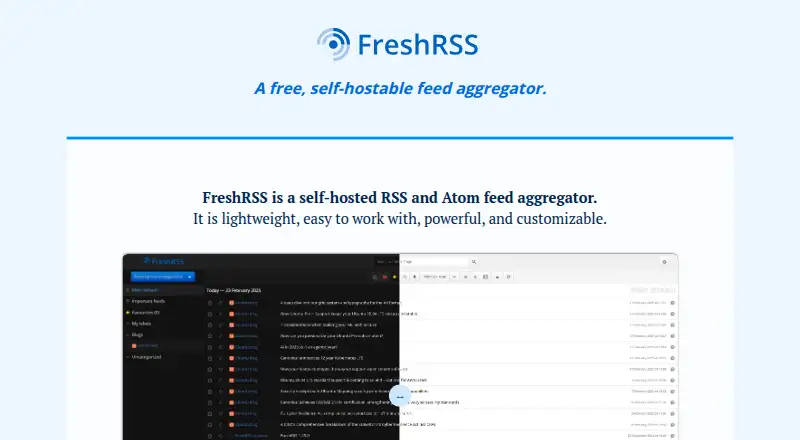
What FreshRSS is
FreshRSS is a free, self-hosted RSS and Atom feed aggregator for following websites, podcasts, and video channels. Readers can view and search articles, save searches for quick access, and organize items with custom tags. Feed management includes OPML import and export, generating feeds from filters, and scraping websites to create feeds. WebSub delivers updates from compatible sources, while APIs support mobile clients and connections through Google Reader and Fever-compatible clients. FreshRSS also supports multiple users, anonymous reading, themes, extensions, configurable options, and a command-line interface. The project says it can manage 1M+ articles and 50k+ feeds. Running an installation requires a web server, PHP 8.1 or later, and a supported database: PostgreSQL 10+, SQLite, MariaDB 10.6+, or MySQL 8.0+. The project advises exposing only the ./p/ folder to the web because ./data/ contains personal data. FreshRSS comes with no warranty; bug reports and feature requests can be submitted through GitHub issues.
Good
- Free, self-hosted RSS and Atom feed aggregation.
- Import and export feeds using OPML.
- WebSub provides updates from compatible feeds.
- Supports multiple users, themes, and extensions.
- Works with mobile clients through APIs.
Watch out
- Self-hosting requires a web server and PHP 8.1 or later.
- A supported database is required for self-hosting.
- The project states that FreshRSS comes with no warranty.
Who it suits
FreshRSS suits people who want to host and customize their own feed reader. The project also lists shared community instances and managed hosting providers for those who do not want to run an installation themselves.
Verdict
FreshRSS offers feed reading, search, customization, and feed management for people prepared to host it or use an available shared instance. Check its server requirements and web exposure guidance before setting up a self-hosted installation.
Plans and prices
From FreshRSS's own pricing page, checked 15 Oct 2026.
| Plan | Price | What it gives you |
|---|---|---|
| Free | Free | Self-hosted software · no subscription tier stated |
| FreshRSS | Free | Self-hosted RSS and Atom feed aggregator · no paid product plan listed |
The facts
Each one read from FreshRSS's own pages, with the date it was checked.
What it does
- API compatibility
- The documented Fever API supports feed and category retrieval, item retrieval, favicons, read and starred markers, and extension hooks.checked 15 Oct 2026
- API limitation
- The Fever API documentation says Hot Links are unsupported.checked 15 Oct 2026
- Authentication
- FreshRSS supports form authentication, HTTP authentication and OpenID Connect.checked 15 Oct 2026
- Client ecosystem
- Documented compatible clients include Fluent Reader, Read You, Newsflash, Fiery Feeds, Reeder Classic, ReadKit and a Python API client.checked 15 Oct 2026
- Customization
- FreshRSS supports themes, extensions and configurable options.checked 11 Oct 2026
- Deployment channels
- FreshRSS offers an edge rolling branch for newer features and security fixes and a latest branch with fewer updates but older fixes.checked 15 Oct 2026
- Documentation
- The administrator manual covers installation, updates, backups, logging, extensions, themes, databases, CLI use, access control, OIDC and web-server configuration.checked 15 Oct 2026
- Extensibility
- Official and community extensions are installed by placing an extension folder in the extensions directory.checked 15 Oct 2026
- Feed tools
- FreshRSS supports OPML feed import and export, feed generation from filters, and web scraping to create feeds from websites.checked 11 Oct 2026
- Generated feeds
- Filters can be used to generate new feeds.checked 15 Oct 2026
- Google Play client
- The Google Play FreshRSS Reader client connects to an existing FreshRSS server, synchronizes unread and favorite articles, supports offline actions, and states that it provides no hosting service.checked 15 Oct 2026
- Independent assessment
- Gappsy describes FreshRSS as community-maintained, with no corporate ownership and no first-party mobile app.checked 15 Oct 2026
- Independent praise
- Valebyte highlights no advertising or tracking, self-controlled data and no stated feed limits for a self-hosted installation.checked 15 Oct 2026
- Integrations
- FreshRSS receives WebSub push notifications from compatible sources such as Friendica, WordPress, Blogger and Medium, and supports mobile and native clients through Google Reader and Fever APIs.checked 11 Oct 2026
- Languages
- The interface is translated into more than 15 languages.checked 15 Oct 2026
- Licence
- FreshRSS is free software released under the GNU AGPL 3 licence.checked 15 Oct 2026
- Limit: interface
- Independent reviewers describe the default design as somewhat outdated or dense.checked 15 Oct 2026
- Limit: missing workflow features
- An AlternativeTo reviewer specifically cites missing batch archiving or export and article highlighting or annotation.checked 15 Oct 2026
- Limit: plugin distribution
- Hawk Host reports that FreshRSS has no automatic plugin store and extensions must be extracted onto the server.checked 15 Oct 2026
- Limit: scraping maintenance
- Hawk Host says filters and scrapers require configuration and maintenance, and scraped feeds can silently break when source markup changes.checked 15 Oct 2026
- Mobile access
- Browser access is optimized for small screens, and native clients can connect through Google Reader or Fever APIs.checked 15 Oct 2026
- OPML
- Feed subscriptions can be imported and exported with OPML.checked 15 Oct 2026
- Origin
- Project development began in October 2012, according to creator Marien Fressinaud's project history.checked 15 Oct 2026
- Praise: feed extraction
- AlternativeTo reviewers praise full-text extraction and the ability to create feeds from sites that do not publish feeds.checked 15 Oct 2026
The full review of FreshRSS
FreshRSS is a self-hosted reader for RSS and Atom feeds from websites, podcasts, and video channels. It is best for readers who want control over their feed service and are comfortable arranging hosting. Its feed tools and client support make it flexible, but running it brings real setup and security responsibilities.
Overview
FreshRSS combines feed reading, article search, and subscription management in one service. Saved searches provide quick access to recurring queries, while OPML import and export make it easier to move a feed collection. That control is valuable if you want to manage your own reader rather than rely on a hosted service; it is less appealing if you want an account that works without server setup.
Self-hosting requires a web server, PHP 8.1 or later, and PostgreSQL 10+, SQLite, MariaDB 10.6+, or MySQL 8.0+. FreshRSS advises exposing only the ./p/ folder to the web because ./data/ contains personal data. That deployment boundary makes security part of the job, not an optional refinement. The project welcomes bug reports and feature requests through GitHub issues, but provides no warranty.
Key features
Feed management goes beyond subscribing to published feeds: FreshRSS can generate feeds from filters and scrape websites to create feeds. Those tools can help bring more sources into one reading workflow, though web scraping is not the same as a source publishing a feed. WebSub provides real-time updates from compatible feeds, including sources such as Friendica, WordPress, Blogger, and Medium; other feeds do not gain push updates from this support.
The project says FreshRSS can manage more than 1 million articles and 50,000 feeds, a scale that gives large collections room to grow. Themes, extensions, and configurable options let users tailor the reader, while custom tags help organize articles. Multiple users and anonymous reading support shared use, and a command-line interface and APIs serve readers who want to connect other tools or mobile clients.
Google Reader and Fever APIs support mobile and native clients, broadening how FreshRSS can be read beyond its web interface. That compatibility is useful for people who already prefer a particular client, but it still depends on having a FreshRSS instance to connect to.
Pricing
FreshRSS is free: the FreshRSS plan costs nothing and is a self-hosted RSS and Atom feed aggregator. There is no paid product plan listed, no free trial, and no subscription renewal to budget for. The tradeoff is operational rather than monetary: you need a suitable server and must manage the installation and its exposure yourself.
The project also points to shared community instances and managed hosting providers, which may suit readers who want FreshRSS without running their own server. The free plan is the product's self-hosted software; it does not remove the need to choose and rely on an instance.
Platforms
FreshRSS runs on the web and supports Linux, Android, iOS, and Windows; macOS support is through compatible clients. APIs for mobile clients and Google Reader and Fever compatibility offer routes to native and mobile reading. The breadth is useful if you read across devices, while macOS users should expect to use a compatible client rather than a native FreshRSS platform.
Who it's for
FreshRSS is a strong fit for technically comfortable readers who want to host and customize their own feed reader, manage a large subscription collection, or build a reading setup around compatible clients. Multiple users and anonymous reading can also suit shared or public reading use. Readers who do not want to maintain a server, check security configuration, or depend on a community or managed instance should choose a hosted reader instead.
Pros and cons
- Pros: Free self-hosted software gives readers control over the service without a paid product plan.
- Pros: OPML tools, filter-generated feeds, and website scraping make subscription management adaptable.
- Pros: WebSub, APIs, and Google Reader and Fever compatibility connect supported feeds and clients.
- Cons: Installation requires a web server, PHP, and a supported database, so it is not a ready-to-use hosted account.
- Cons: The project warns that personal data resides in ./data/ and recommends limiting web exposure to ./p/, leaving deployment security to the operator.
- Cons: There is no warranty, which matters to readers who need formal product guarantees.
Alternatives
For a desktop-focused free reader, Fluent Reader is an alternative with Android, iOS, Linux, macOS, and Windows support. If you want a free hosted option with a stated cap, Feeder offers 200 feeds, 30-minute updates, 50 posts of history per feed, and two AI summaries per day on its free plan. Feedly may suit readers who prefer a freemium service with a free account and up to three personal Boards.
Feedreader is another freemium option, with a free Standard Edition and a MySQL Edition priced at €29, paid once. For a self-hosted alternative outside feed reading, Passman is a free password manager. Inoreader offers a free plan with 150 RSS feed subscriptions for readers who prefer a subscription service. NewsBlur gives free users up to 64 sites, real-time RSS updates, and story-saving features. If you want a free reader for a text terminal on Linux or macOS, Newsboat is the more focused choice. Browse RSS Reader Software or Reading Apps for more options.
Verdict
Choose FreshRSS if you want a free reader you can host, customize, and connect to compatible clients, with tools for managing substantial feed collections. Its main advantage is control without a paid product plan; its main cost is the work of hosting and securing the instance. If you want a reader that does not make you responsible for server setup, a hosted alternative is the better fit.
Getting started
- Visit https://freshrss.org/.
- Choose whether to use a self-hosted installation or a listed community instance or managed hosting provider.
- For self-hosting, prepare a web server, PHP 8.1 or later, and PostgreSQL 10+, SQLite, MariaDB 10.6+, or MySQL 8.0+.
- Expose only the ./p/ folder to the web, keeping ./data/ private.
- Add feeds and use OPML import, filters, or website scraping to build your reading list.
Limits worth knowing
FreshRSS is free, with no paid product plan listed. Self-hosting requires a web server, PHP 8.1 or later, and one of the listed database options.
Questions
How much does FreshRSS cost?
FreshRSS is free. The listed FreshRSS plan is free.
Is there a free plan or trial?
Yes, the free plan is available. There is no free trial listed.
What platforms does FreshRSS support?
The listed platforms include Android, API, iOS, Linux, macOS, self-hosted, web, and Windows. macOS support is through compatible clients.
Does FreshRSS work with other reader apps?
It supports mobile and native clients through Google Reader and Fever APIs, and provides APIs for mobile clients.
What do I need to host FreshRSS?
You need a web server, PHP 8.1 or later, and PostgreSQL 10+, SQLite, MariaDB 10.6+, or MySQL 8.0+.
Where can users get help or report issues?
The project welcomes bug reports and feature requests through GitHub issues. It states that FreshRSS comes with no warranty.
Alternatives to FreshRSS
- 1

NewsBlur
Free planOpen sourceAndroidiOSWebAPI8.5From $36 a year - 2

ReadTheory
Free planAndroidiOSWebmacOS8.1From $40 a month - 3

BookFusion
Free planAndroidiOSWebAPI8.0From $2.99 a month - 4

Inoreader
Free planAndroidiOSWebAPI7.9From €7.50 a month - 5

Reading Eggs
AndroidiOSWebmacOS7.9From $99.99 a year - 6

Duolingo
Free planAndroidiOSWebmacOS7.7Free plan