
Feeder
Feeder brings online sources you choose into one reading experience.
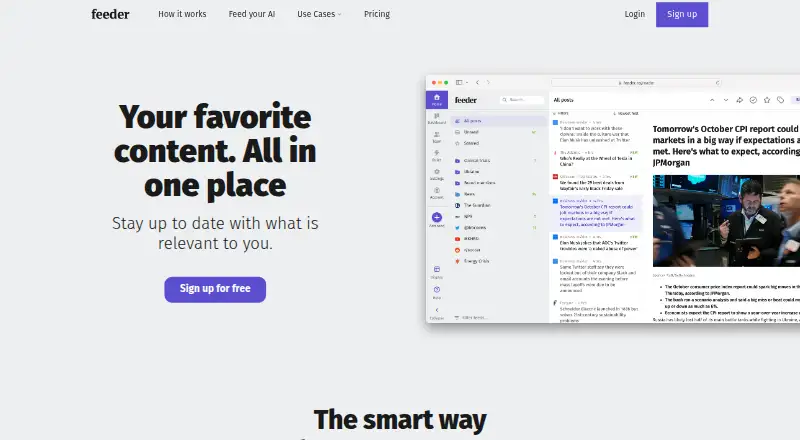
What Feeder is
Feeder brings online sources you choose into one reading experience. It connects to blogs, news, weather, government databases, job boards, Mastodon and newsletters, then lets you shape the incoming posts with keyword or topic filters and exclusions. Feeds can be grouped into folders; favorite posts can be saved, collections created and content shared. AI tools include summaries, text-to-speech, feeds generated for pages without RSS, and a setup assistant.
The Free plan costs nothing and supports up to 200 feeds, with 50 posts of history per feed and two AI summaries per day. Checks can run as often as every 30 minutes, though the default interval is every two hours. Plus costs $9.99 a month, billed monthly, and Professional costs $19.99 a month, billed monthly. Enterprise pricing is available by contacting sales. Feeder is available on web, Android, iOS and as an extension. Its listed connections include MCP, Slack, Microsoft Teams, Discord, Telegram, Zapier and webhooks, with availability depending on the plan.
Good
- Collects blogs, news, weather, job boards and other sources.
- Filters posts by topics, keywords and excluded terms.
- Organizes feeds into folders and collections.
- Includes AI summaries, text-to-speech and AI-generated feeds.
- Offers web, extension, Android and iOS access.
Watch out
- Free limits history to 50 posts per feed.
- Free includes only two AI summaries per day.
- Enterprise pricing requires contacting sales.
- REST API access is not self-serve.
Who it suits
Feeder suits readers who want to consolidate varied online sources and filter out unwanted posts. Its stated use cases include cybersecurity teams, marketing professionals, software engineers and financial services.
Verdict
Choose Feeder if you want to bring many online sources into a filtered, organized reading space across web and mobile platforms. Look elsewhere if your workflow depends on self-serve API keys or the Free plan’s history and daily AI summary allowances are too restrictive.
Plans and prices
From Feeder's own pricing page, checked 14 Oct 2026.
| Plan | Price | What it gives you |
|---|---|---|
| Free | Free | 200 feeds · 30-minute updates · RSS sources · ad-free · 50 posts/feed |
| Plus | $7.99 a month | 2,500 feeds · 5-minute updates · premium sources · dashboard · rules and filters · email summaries · yearly |
| Plus | $9.99 a month | 2,500 feeds · 5-minute updates · premium sources · dashboard · rules and filters · email summaries · monthly |
| Professional | $14.99 a month | 10,000 feeds · 1-minute updates · collaboration · integrations · create RSS feeds · public dashboards · yearly per user |
| Professional | $19.99 a month | 10,000 feeds · 1-minute updates · collaboration · integrations · create RSS feeds · public dashboards · monthly per user |
| Enterprise | Priced on request | customized limits · SSO/SAML · custom permissions · invoice billing · webinars · premium support · all features |
The facts
Each one read from Feeder's own pages, with the date it was checked.
What it does
- AI features
- Feeder offers AI summaries, text-to-speech, AI-generated feeds for pages without RSS, and an AI setup assistant.checked 30 Sep 2026
- AI functions
- Optional AI functions include post summaries, translation, beta audio narration and feeds generated from pages without RSS.checked 14 Oct 2026
- AI quotas
- The Free tier includes two summaries per day and three AI feeds; Professional includes 60 summaries, 5,000 translated posts, five audio narrations and 200 AI feeds daily or in-plan.checked 14 Oct 2026
- API documentation depth
- The public feeder-api repository documents OAuth2 endpoints and feed, folder, post and unread-count resources, but Feeder warns that its documentation was written in 2017 and may be outdated.checked 14 Oct 2026
- API limits
- Feeder does not offer self-serve API keys; REST API access is available by request for app builders, and API access is part of Enterprise.checked 30 Sep 2026
- Content sources
- Feeder connects to sources including blogs, news, weather, government databases, job boards, Mastodon and newsletters.checked 30 Sep 2026
- Data handling
- Feeder stores account email, device IP addresses, device identifiers and user-created feeds, folders, preferences, starred posts and unread posts; web-server IP logs are kept seven days.checked 14 Oct 2026
- Filtering
- Users can filter posts by keywords or topics and exclude keywords to reduce unwanted content.checked 30 Sep 2026
- Filters
- Keyword include and exclude filters can reduce feed noise and trigger targeted notifications.checked 14 Oct 2026
- Founders and start
- Erik Rothoff and Johan Rothoff are identified as founders, and Feeder says it began in 2010.checked 14 Oct 2026
- Hosted architecture
- Feeder describes its main product as software hosted on its own servers with client apps connecting to those servers.checked 14 Oct 2026
- Integrations
- MCP, webhooks, Zapier, Slack, Microsoft Teams, Discord, Telegram and RSS or JSON publishing are documented, with availability depending on plan.checked 14 Oct 2026
- Intended users
- Feeder presents use cases for cybersecurity teams, marketing professionals, software engineers and financial services.checked 30 Sep 2026
- Limit: extension reliability
- Another Firefox reviewer says the extension must be disabled and re-enabled every few days to work again.checked 14 Oct 2026
- Limit: extension settings
- A Firefox reviewer reports that layout settings are forgotten after a page reload.checked 14 Oct 2026
- Limit: notification delays
- A Google Play reviewer says Gengo notifications sometimes arrived several hours late and found support unhelpful.checked 14 Oct 2026
- Limit: subscription complaints
- Apple App Store reviews complain that unlimited reading is paywalled and that annual pricing can feel excessive or unclear.checked 14 Oct 2026
Where it runs
- Android requirement
- The Feeder.co Android app supports phones and tablets running Android 7.0 or later.checked 14 Oct 2026
- Cross-platform sync
- Logged-in web, extension, iOS and Android clients synchronize feeds, folders and read state through Feeder servers.checked 14 Oct 2026
- Limit: Android performance
- A Google Play reviewer reports sluggish swipes and a non-native, glitchy feel in the Android app.checked 14 Oct 2026
The company
- Company legal name
- The service is operated by Really Simple i Stockholm AB, organization number 559064-1428.checked 14 Oct 2026
- Company size
- LinkedIn lists Feeder as a privately held software-development company with 2–10 employees, headquartered in Stockholm.checked 14 Oct 2026
- Headquarters
- Stockholm, Swedenchecked 28 Sep 2026
Money
- Free-plan limit
- The Free plan allows up to 200 feeds and checks them as often as every 30 minutes; its default check interval is every two hours.checked 30 Sep 2026
The full review of Feeder
Feeder is a source-monitoring reader that gathers chosen online updates into one place. It suits readers who need to follow varied sources and filter the resulting stream, rather than those seeking a newsletter publishing platform. Its strongest case is breadth plus organization; the trade-off is that quicker updates and higher AI-summary allowances require a paid plan.
Overview
Feeder brings together sources such as blogs, news, weather, government databases, job boards, Mastodon and newsletters. That range supports both general reading and focused monitoring. Keyword and topic filters, including keyword exclusions, help cut noise, while folders, favorites and collections provide useful ways to organize material. Sharing lets readers pass content along.
The service adds AI summaries and text-to-speech, can generate feeds for pages without RSS, and includes an AI setup assistant. Those extras make Feeder more flexible than a simple feed list, though the daily summary quota varies by plan.
Key features
Filtering and organization
Readers following many subjects can narrow incoming posts with keywords or topics and exclude terms they do not want. Folders and collections help keep separate interests manageable, while favorites preserve posts worth returning to. These tools make Feeder a stronger fit for ongoing monitoring than for someone who only wants a minimal chronological reader.
AI and integrations
Summaries can reduce the effort of scanning a large stream, and text-to-speech offers another way to consume posts. AI-generated feeds address pages without RSS, an important extension for sources that otherwise would not fit a feed-based workflow. Feeder also connects with MCP, Slack, Microsoft Teams, Discord, Telegram, Zapier and webhooks, although integration availability depends on plan.
There is no self-serve API key option. App builders can request REST API access, and API access is included with Enterprise. That makes Feeder less suitable for developers who want to start integrating immediately without contacting the company.
Pricing
Feeder has a Free plan and no free trial. The no-cost tier is a useful way to begin monitoring, but its history, update cadence and AI quota are meaningful constraints.
| Plan | Price | What it includes |
|---|---|---|
| Free | free | Up to 200 feeds, checks as often as every 30 minutes, 50 posts of history per feed and 2 AI summaries per day |
| Plus | $9.99 a month, billed Monthly | 2,500 feeds, 5 minute updates, premium sources, dashboard, rules and filters, 10 AI summaries per day |
| Professional | $19.99 a month, billed Monthly | 10,000 feeds, 1 minute updates, collaboration, software integrations, RSS feed creation, 60 AI summaries per day |
| Enterprise | Custom pricing | Customized limits, SSO/SAML, custom permissions, invoice billing, webinars and premium support |
Free is best for light monitoring: it permits 200 feeds, but retains only 50 posts per feed and allows two AI summaries daily. The default check interval is every two hours, even though checks can be as often as every 30 minutes. Plus is the more practical step up for readers who need faster five-minute checks, premium sources or more room for summaries. Professional is aimed at larger monitoring workflows: its 10,000-feed ceiling, one-minute checks, collaboration and software integrations justify the higher monthly cost when those capabilities matter. Enterprise’s custom limits and access controls suit organizations needing tailored terms and SSO/SAML; the price is custom pricing.
Platforms
Feeder is available on Android, iOS, the web and as an extension. That spread makes it a reasonable choice for readers who want to move between mobile and browser-based reading.
Who it's for
Feeder is a good fit for people tracking a broad mix of public sources who want filtering and organization in the same service. Its use cases also include cybersecurity teams, marketing professionals, software engineers and financial services, where monitoring multiple kinds of updates can be useful. Readers who require self-serve API keys, or who need more than two daily AI summaries and 50 posts of history without paying, should look elsewhere.
Pros and cons
- Pro: Broad source coverage spans everyday publishing and specialized sources such as government databases, job boards and Mastodon.
- Pro: Keyword and topic filters, exclusions, folders and collections help manage a busy stream rather than merely collect it.
- Pro: AI summaries, text-to-speech and generated feeds for pages without RSS extend how readers can consume and collect updates.
- Con: Free limits history to 50 posts per feed and AI summaries to two per day, which can be restrictive for frequent readers.
- Con: The Free plan defaults to two-hour checks; readers needing consistently quicker monitoring must move to Plus or Professional.
- Con: No self-serve API keys means developers must request REST API access, unless using Enterprise.
Alternatives
For a different kind of tool, AWeber offers email marketing with a free tier for up to 500 subscribers and 3,000 monthly emails, making it the better direction when the priority is sending campaigns rather than aggregating sources. Quaily is a free publishing option across web and desktop platforms; its model takes a 10% commission plus channel transaction fees after earning revenue, so it is a distinct fit for creators monetizing published work.
Audienceful has a free plan with 1,000 contacts, one team collaborator and one automated journey, which is a more direct choice for contact-based email workflows. DailyDraft is another newsletter-oriented alternative. Distill offers paid newsletter plans, including a Starter tier at $12 a month with 1,000 subscribers, unlimited links, three newsletters and one workspace, for readers whose need is newsletter delivery rather than source monitoring.
Letter focuses on AI newsletter creation and has a free plan with one letter, content import, test sending and code export. Reduce offers a free tier and a Starter plan at $10 a month for digests, sources and AI podcast episodes, making it an option for readers seeking summarized digests. Welcome.AI Plus provides a free company and category following feed with AI briefings and a personalized digest email, a more focused alternative for following organizations and topics.
Readers comparing category options can also browse AI Newsletter Generators and RSS Reader Software.
Verdict
Choose Feeder if you want one place to monitor varied online sources, filter the incoming stream and use mobile or web reading tools. Its breadth and organization are the main reasons to choose it. Look elsewhere if you need self-serve API keys, or if Free’s limited history and two daily AI summaries do not support your reading volume.
Getting started
- Open feeder.co to review the service and plans.
- Choose the Free, Plus or Professional plan, or contact sales about Enterprise.
- Use Feeder on web, Android, iOS or through its extension.
- Connect sources such as blogs, news or newsletters and organize feeds into folders.
Limits worth knowing
The Free plan allows up to 200 feeds, 50 posts of history per feed and two AI summaries daily. It checks feeds as often as every 30 minutes, with a default interval of two hours.
Questions
Is Feeder free?
Yes. The Free plan costs nothing and supports up to 200 feeds.
What do the paid plans cost?
Plus is $9.99 a month, billed monthly. Professional is $19.99 a month, billed monthly; Enterprise pricing is available from sales.
Which platforms does Feeder support?
Feeder is available on web, Android, iOS and as an extension.
What integrations does Feeder list?
Connections include MCP, Slack, Microsoft Teams, Discord, Telegram, Zapier and webhooks. Availability varies by integration and plan.
Does Feeder offer API access?
It does not offer self-serve API keys. REST API access is available by request for app builders and is part of Enterprise.
What can Feeder do with sources?
It can gather sources such as blogs, news, weather, government databases, job boards, Mastodon and newsletters. Users can filter, organize, save and share posts.
Alternatives to Feeder
- 1

AWeber
Free planWebAPI7.6From $4.99 a month - 2

EmailBuilder.ai
Free planWebAPIExtension7.4From $39 a month - 3
NewsBriefly AI
Free planWeb7.3From $7 a month - 4

Publicate
WebExtension7.1From $190 a year - 5
Quaily
Free planWebAPILinuxmacOS7.0Free plan - 6

Audienceful
Free planWebAPI6.9From $348 a year