
Foxit PDF Compressor
Foxit PDF Compressor reduces PDF file size for sharing, email, or storage.
What Foxit PDF Compressor is
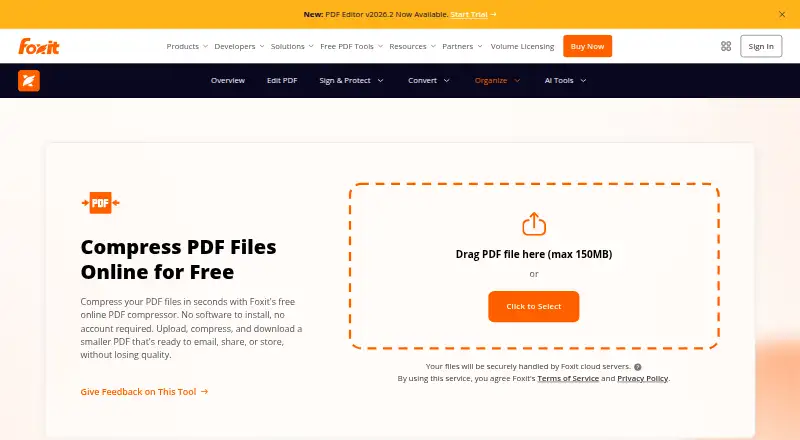
Foxit PDF Compressor reduces PDF file size for sharing, email, or storage. The online tool works by uploading one PDF, starting compression, and downloading the smaller file; the free option allows one file at a time up to 150 MB without an account. Foxit says its online compression keeps text, images, and formatting clear, and that OCR-friendly compression can reduce scanned documents while keeping scanned text readable. It also says uploads are encrypted in transit and removed from its servers after processing. For desktop use, Foxit PDF Editor provides offline compression, batch processing, and multiple optimization levels. Foxit describes using compressed files with SharePoint, OneDrive, Google Drive, and Microsoft Teams. The listed plans include PDF Editor at $129.99 a year, PDF Editor+ at $159.99 a year, and PDF Editor 14 perpetual license at $209.99, paid once. PDF Editor+ has a 14-day free trial with no credit card required. Foxit was founded in 2001 and is headquartered in Fremont, California.
Good
- Free online compression allows files up to 150 MB.
- No account is required for online compression.
- Desktop editor supports offline and batch compression.
- PDF Editor+ includes a 14-day free trial.
Watch out
- Online tool handles one PDF upload at a time.
- PDF Editor costs $129.99 a year.
- Perpetual license costs $209.99, paid once.
Who it suits
The online compressor suits people who need to shrink a single PDF without creating an account. Desktop users handling batches or needing offline compression can consider Foxit PDF Editor.
Verdict
Foxit offers a free single-file online path and desktop compression options for offline and batch work. Check the per-plan limits and prices to choose the option that fits your workflow.
Plans and prices
From Foxit PDF Compressor's own pricing page, checked 11 Oct 2026.
| Plan | Price | What it gives you |
|---|---|---|
| Foxit online PDF compressor | Free | One PDF upload at a time · max 150 MB · no account required |
| PDF Editor | $129.99 a year | Windows, macOS and web · PDF compression and editing · 300 AI credits/month · per user/year; annual plan, paid in full |
| PDF Editor+ | $159.99 a year | Includes PDF Editor · iOS and Android apps · 150 eSign envelopes/year · AI Smart Redact · per user/year; annual plan, paid in full |
| Foxit PDF Editor 14 (Perpetual License) | $209.99, paid once | Windows or macOS · excludes AI Assistant, Workspace, Smart Redact, DMS and cloud features · one-time per user |
The facts
Each one read from Foxit PDF Compressor's own pages, with the date it was checked.
The company
- Company
- The product page identifies the copyright holder as Foxit Software Incorporated.checked 11 Oct 2026
- Founded
- 2001checked 28 Sep 2026
- Headquarters
- Fremont, California, United Stateschecked 28 Sep 2026
What it does
- Compression quality
- Foxit says online compression preserves text clarity, images and formatting.checked 11 Oct 2026
- Desktop option
- Foxit PDF Editor offers offline compression, batch processing and advanced optimization settings, with multiple compression levels.checked 11 Oct 2026
- Integrations
- The page describes using compressed PDFs with SharePoint, OneDrive, Google Drive and Microsoft Teams.checked 11 Oct 2026
- Intended users
- Foxit presents compression for organizations managing document archives, regulated records, business communications and high-volume PDF workflows.checked 11 Oct 2026
- Online security
- Foxit says files are encrypted in transit and automatically deleted from its servers after processing.checked 11 Oct 2026
- Purpose
- Foxit's free online compressor reduces PDF file size for emailing, sharing and storage.checked 11 Oct 2026
- Scanned PDFs
- The product page says OCR-friendly compression can shrink scanned and image-heavy documents while keeping scanned text readable.checked 11 Oct 2026
- Security and compliance
- Foxit's Trust Center lists SOC 2 Type 2 and GDPR support; its HIPAA-ready statement applies to Foxit's controls and customer obligations.checked 11 Oct 2026
- Support
- Foxit provides a searchable Support Center with help articles, troubleshooting steps and ticket submission.checked 11 Oct 2026
- Workflow
- Users upload a PDF, start compression and download the smaller file.checked 11 Oct 2026
Money
- Trial
- Foxit PDF Editor+ has a 14-day free trial, and the pricing page says no credit card is required.checked 11 Oct 2026
The full review of Foxit PDF Compressor
Foxit PDF Compressor combines a no-account web compressor with offline and batch controls in Foxit PDF Editor. It is a sensible fit for occasional sharing as well as organizations handling archives, regulated records, or high-volume document flows. The free browser tool is convenient for single files, while recurring or larger workloads justify a paid desktop plan.
Overview
The web workflow is deliberately short: upload a PDF, start compression, and download the result. Foxit says the process retains text clarity, images, and formatting. OCR-friendly handling targets scanned and image-heavy documents, keeping scanned text readable rather than treating every PDF like a text-only file.
Security-conscious users get encrypted transfer and automatic deletion from Foxit’s servers after processing. Foxit’s Trust Center lists SOC 2 Type 2 and GDPR support. Its HIPAA-ready statement covers Foxit’s controls and customer obligations, so healthcare teams still need to address their own responsibilities.
Key features
- Free online compression: No account is needed, which suits an occasional document. One upload at a time and a 150 MB maximum make it unsuitable for a queue or oversized source files.
- Scanned-PDF handling: OCR-friendly compression is useful for scans and image-heavy records where readability matters as much as size reduction.
- Offline and batch work: Foxit PDF Editor moves processing to the desktop and supports batch compression, multiple compression levels, and advanced optimization settings. That is the meaningful upgrade for repeat production work or files that should remain offline.
- Workflow integrations: Compressed PDFs can be used with SharePoint, OneDrive, Google Drive, and Microsoft Teams, fitting common business sharing and storage routines.
- Support: A searchable Support Center provides help articles, troubleshooting guidance, and ticket submission when a workflow needs assistance.
Pricing
The Foxit online PDF compressor is free at no cost. It allows one PDF upload at a time, caps files at 150 MB, and requires no account. It is the right starting point for occasional, modest-sized files, but the cap and single-file workflow are hard limits for sustained processing.
PDF Editor costs $129.99 per user/year, billed annually and paid in full. It runs on Windows, macOS, and the web, adding compression and editing plus 300 AI credits per month. This is the practical tier for an individual or team needing offline or batch capability without the mobile apps and eSign allowance in the higher plan.
PDF Editor+ costs $159.99 per user/year, also billed annually and paid in full. It includes PDF Editor, adds iOS and Android apps, 150 eSign envelopes per year, and AI Smart Redact. A 14-day free trial is available with no credit card required, making this the plan to assess when mobile access, signing, or redaction are part of the same workflow.
The Foxit PDF Editor 14 (Perpetual License) costs $209.99 per user once. It covers Windows or macOS without recurring billing, but excludes AI Assistant, Workspace, Smart Redact, DMS, and cloud features. Choose it when a one-time desktop purchase matters more than connected services; those exclusions make it a poor match for cloud-centered or AI-dependent work.
Platforms
Foxit lists Android, iOS, macOS, web, and Windows support. The free compressor is browser-based. Desktop compression and batch processing are available through Foxit PDF Editor, while the perpetual edition is limited to Windows or macOS and PDF Editor+ supplies the mobile apps.
Who it's for
Choose Foxit for occasional users who need a quick, free reduction without creating an account, especially when files stay below 150 MB. It is also aimed at organizations managing document archives, regulated records, business communications, and high-volume PDF workflows where offline processing, batch jobs, optimization controls, and established storage or collaboration services matter.
It is not the best fit for users who routinely process many files using only the free web tool, or for buyers seeking a broad cloud feature set from the perpetual license. Teams must also weigh per-user annual billing against a one-time desktop purchase.
Pros and cons
Pros
- Free, no-account web path: Fast access for occasional compression.
- 150 MB free-file ceiling: Covers many everyday PDFs while keeping the entry point unrestricted by signup.
- OCR-friendly scan compression: Helps preserve readable text in image-heavy records.
- Offline batch controls: Paid Editor plans address larger queues and repeat operations.
- Document protections: Encrypted transfer, post-processing deletion, SOC 2 Type 2, and GDPR support strengthen the business case.
Cons
- Single-file free workflow: No batch work without moving to desktop software.
- Paid plans are per user: Annual tiers require full payment for the year.
- Perpetual edition omits cloud and AI features: Its one-time price trades connected capabilities for ownership.
- Compliance responsibility is shared: HIPAA readiness does not remove customer obligations.
Alternatives
PDF Candy is a better match when you want freemium coverage across Android, iOS, Linux, macOS, web, and Windows, but its free Web + Desktop plan has page and hourly restrictions, no batch processing, and a limited file size.
PDF2Go suits users seeking a broad cross-platform freemium toolkit; its free tier reaches most tools but limits file processing.
PDF24 Compare PDF is the straightforward choice for a completely free service with no limits, registration, or time restrictions.
Xodo Compress PDF is worth considering if a free online route with a trial is sufficient, though its free compressor allows only one low-compression action per day.
BentoPDF Hyper Compress fits technically minded users who prefer self-hosting or an open-source AGPL-compatible option, with paid Solo service also offered.
Smallpdf is an alternative for a wider general PDF toolkit, with a seven-day trial and a free tier covering 30 tools.
PDFOptim is aimed at lighter personal use: its free plan allows three operations per day, files up to 25 MB, and private processing.
AvePDF suits users wanting many document tools alongside compression, with a free allowance of two processing operations per six hours, 128 MB files, and 10 files per processing.
See the PDF Compression Software list for more options.
Verdict
Foxit is a strong choice for anyone who needs both a frictionless free compressor and a credible route to offline, batch, and business PDF work. Choose it for scan-aware compression, desktop controls, and organizational safeguards; look elsewhere if you need unrestricted free batch processing or a perpetual license that still includes cloud and AI features.
Alternatives to Foxit PDF Compressor
- 1

BentoPDF Hyper Compress
Free planOpen sourceWebAPIExtensionLinux8.3From $99 a year - 2
PDF2Go
Free planAndroidiOSWebAPI8.2$6.42 usage-based - 3

Smallpdf
Free planAndroidiOSWebWindows8.1From $10 a month - 4

Xodo Compress PDF
Free planAndroidiOSWebAPI8.1From $7.99 a month - 5

PDF Candy
Free planAndroidiOSWebLinux7.9From $4 a year - 6

Compresto
iOSWebAPIExtension7.5$49 one-time