
Forward
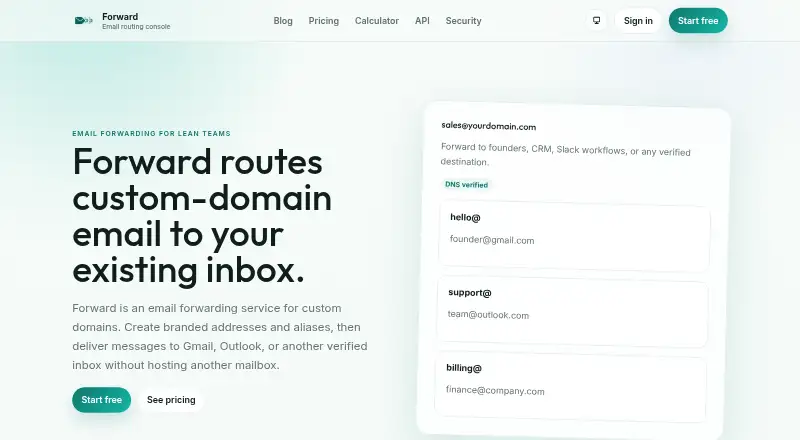
Forward routes custom-domain email aliases to Gmail, Outlook, or another verified inbox without hosting an additional mailbox.
What Forward is
Forward routes custom-domain email aliases to Gmail, Outlook, or another verified inbox without hosting an additional mailbox. Users can create aliases and apply routing rules based on sender, subject, or localpart. Catch-all forwarding sends mail addressed to any address at a domain, including typos and aliases that were never created, to a verified destination. Forward also supports sending as a domain from Gmail, apps, and workflows. Its API manages domains, aliases, and forwarding logs, and is available on Creator, Pro, and Business. Teams can use a hosted MCP endpoint to inspect domains, manage aliases, and connect routing to workflows; the service also mentions CRM and Slack workflows. Forward is freemium. Its free plan includes one domain, 25 aliases, 500 forwards per day, seven days of logs, and one team seat. Forward describes itself as suited to founders, agencies, operators, and automation teams looking for branded routing without extra full mailboxes.
Good
- Routes aliases to Gmail, Outlook, or another verified inbox
- Supports sender, subject, and localpart rules
- Catch-all routing covers typos and uncreated aliases
- Supports sending as a domain
- Free plan includes one domain and 25 aliases
Watch out
- Free plan allows 500 forwards per day
- Free plan retains logs for seven days
- API is available only on Creator, Pro, and Business
- Account export must be requested from support
Who it suits
Forward may suit founders, agencies, operators, and automation teams that want to route branded email addresses to existing inboxes. Teams needing API-based domain and alias management can consider plans that include API access.
Verdict
Forward provides alias routing, catch-all delivery, and domain sending without another hosted mailbox. Review the free-plan limits and yearly billing terms on the listed paid plans before choosing.
Plans and prices
From Forward's own pricing page, checked 30 Sep 2026.
| Plan | Price | What it gives you |
|---|---|---|
| Free | Free | 1 domain · 25 aliases · 500 forwards/day · 7 days logs · 1 team seat · Always free |
| Starter | $2 a month | 3 domains · 200 aliases · 2,000 forwards/day · 30 days logs · basic SMTP · 1 team seat · Bill yearly and save $5/year |
| Creator | $5 a month | 20 domains · unlimited aliases · 10,000 forwards/day · 90 days logs · SMTP · 3 team seats · Bill yearly and save $11/year |
| Pro | $12 a month | 100 domains · unlimited aliases · 50,000 forwards/day · 180 days logs · SMTP · 3 team seats · Bill yearly and save $25/year |
| Business | $29 a month | 300 domains · unlimited aliases · 200,000 forwards/day · 365 days logs · SMTP · 10 team seats · Bill yearly and save $58/year |
The facts
Each one read from Forward's own pages, with the date it was checked.
What it does
- Aliases and rules
- Users can create aliases and route by sender, subject, or localpart.checked 30 Sep 2026
- API
- The API manages domains, aliases, and forwarding logs, and is available on Creator, Pro, and Business.checked 30 Sep 2026
- Catch-all routing
- Catch-all forwarding routes any address at a domain, including typos and uncreated aliases, to a verified destination.checked 30 Sep 2026
- Data retention
- Message content is processed transiently rather than stored long-term, while troubleshooting logs focus on delivery metadata and retention follows plan limits.checked 30 Sep 2026
- Deletion and export
- Users can remove domains, aliases, SMTP credentials, API keys, and team members, but account export is not self-serve and must be requested from support.checked 30 Sep 2026
- Integrations
- Forward routes messages to Gmail, Outlook, or another verified destination, and its homepage mentions CRM and Slack workflows.checked 30 Sep 2026
- MCP
- The homepage says teams can use a hosted MCP endpoint to inspect domains, manage aliases, and connect routing to workflows.checked 30 Sep 2026
- Security
- The privacy policy says Forward uses TLS in transit, encryption at rest for sensitive data, access controls, authentication, and DKIM, SPF, and SRS controls.checked 30 Sep 2026
- SMTP sending
- Forward supports sending as a domain from Gmail, apps, and workflows.checked 30 Sep 2026
- Support
- The contact page states typical support replies are under 24 hours during Monday-to-Friday business hours and confirmed security issues receive a response within 48 hours.checked 30 Sep 2026
- What it does
- Forward routes custom-domain email aliases to Gmail, Outlook, or another verified inbox without hosting another mailbox.checked 30 Sep 2026
- Who it is for
- Forward describes itself as suited to founders, agencies and operators, and automation teams that need branded routing without additional full mailboxes.checked 30 Sep 2026
- Workspace roles
- Owner and admin roles can make workspace changes, while members have read access to shared data but cannot change domains, aliases, credentials, team membership, or billing.checked 30 Sep 2026
The full review of Forward
Forward is a custom-domain email routing service for people who want branded addresses delivered into an existing inbox. It is strongest for founders, agencies and automation teams that need routing controls and domain-based sending without another hosted mailbox. Its appeal is tempered by daily forwarding caps, annual billing on paid plans and exports that require support.
Overview
Forward sends aliases on a custom domain to Gmail, Outlook or another verified inbox, so users can keep handling mail where they already work. Rules can route by sender, subject or localpart, while catch-all forwarding also captures mail sent to typos or addresses that were never set up. That breadth is useful for covering a domain, but makes careful destination and rule management important.
Forward also supports sending as a domain from Gmail, apps and workflows, plus multiple recipients, delivery logs and outbound or reply mail. That makes it more capable than an inbound-only forwarder for teams that want branded addresses on both sides of an exchange.
Key features
Workflow and API access
The API manages domains, aliases and forwarding logs, but is available only on Creator, Pro and Business. A hosted MCP endpoint can inspect domains, manage aliases and connect routing to workflows; Forward also mentions CRM and Slack workflows. These options suit automation teams, while Starter users do not get API access.
Security and administration
Forward uses TLS in transit, encryption at rest for sensitive data, access controls and authentication, alongside DKIM, SPF and SRS controls. Message content is processed transiently rather than stored long-term; troubleshooting logs focus on delivery metadata and retention follows plan limits. Owners and admins can change workspace settings, while members can read shared data but cannot change domains, aliases, credentials, team membership or billing.
Users can remove domains, aliases, SMTP credentials, API keys and team members. Account export, however, must be requested from support rather than handled directly. Typical support replies are under 24 hours during weekday business hours, and confirmed security issues receive a response within 48 hours.
Pricing
Forward has a free plan and paid plans from $2/mo. The paid prices below are monthly rates with yearly billing, so the quoted monthly amount is not a month-to-month term.
| Plan | Price and terms | Included |
|---|---|---|
| Free | free; always free | 1 domain, 25 aliases, 500 forwards/day, 7 days of logs and 1 team seat |
| Starter | $2 a month; billed yearly, save $5/year | 3 domains, 200 aliases, 2,000 forwards/day, 30 days of logs, basic SMTP and 1 seat |
| Creator | $5 a month; billed yearly, save $11/year | 20 domains, unlimited aliases, 10,000 forwards/day, 90 days of logs, SMTP and 3 seats |
| Pro | $12 a month; billed yearly, save $25/year | 100 domains, unlimited aliases, 50,000 forwards/day, 180 days of logs, SMTP and 3 seats |
| Business | $29 a month; billed yearly, save $58/year | 300 domains, unlimited aliases, 200,000 forwards/day, 365 days of logs, SMTP and 10 seats |
Free is a sensible trial of the basic model, but one domain, 25 aliases and 500 daily forwards leave little room for a busy or growing setup. Starter raises the caps and adds basic SMTP, yet stays at one seat and 200 aliases, and lacks API access. Creator is the first plan with API access and unlimited aliases, with three seats and 10,000 daily forwards; Pro raises domain, forwarding and log ceilings but keeps the same seat count. Business fits larger teams needing 10 seats, 300 domains and longer logs, at a substantially higher yearly commitment.
Platforms
Forward is available on the web and through an API. API access is plan-limited to Creator, Pro and Business.
Who it's for
Forward suits founders, agencies and operators who want branded domain addresses routed into verified inboxes rather than separately hosted mailboxes. Automation teams have stronger reasons to consider it because the API, hosted MCP endpoint and workflow connections can link mail routing to other processes. It is less suitable for anyone who needs self-serve account export, several seats on an entry plan, or uncapped daily forwarding.
Pros and cons
- Pros: Sender-, subject- and localpart-based rules plus catch-all routing cover both deliberate aliases and unexpected addresses.
- Pros: Domain sending, multiple recipients and reply mail extend it beyond inbound forwarding.
- Pros: Higher plans combine API access, longer log retention and more seats for teams scaling their routing setup.
- Cons: Daily forwarding quotas apply on every plan, including 500/day on Free.
- Cons: Paid rates are billed yearly, and Starter is limited to one seat with no API access.
- Cons: Account export requires a support request, which is a drawback for teams that need direct control over portability.
Alternatives
Email Forwarding Services is a useful starting point for comparing the category. Choose Forward Email instead if open-source software and broad platform coverage, including self-hosted, desktop and mobile options, matter more. ImprovMX is another free-plan web and API alternative, with its Free tier including 1 domain, 25 aliases and 500 forwarded emails/day. Choose MailerZ if its 14-day message store is more important than send-as, SMTP or API access on the free tier, where those are disabled. EForw offers a free plan with unlimited catch-all aliases on one domain. InboxMail is worth considering if its free plan's AI actions, campaign and agent inbox allowances fit your needs. Mailcast has a free plan and free trial, but its free tier limits users to one domain and 25 aliases and does not allow sending from the domain. Cloudflare Email Routing is a free alternative for unlimited inbound routing; its paid Workers plan includes 3,000 outbound emails per month. Mailwip is a paid alternative with a free trial and a $2 a month Individual plan for up to four domains and unlimited aliases, but no SMTP emails per day.
Verdict
Forward is a good fit for founders, agencies and automation-minded teams that want custom-domain aliases, catch-all coverage and domain sending delivered through existing inboxes. Its routing controls and workflow hooks are the main reasons to choose it; the clearest reasons to look elsewhere are the yearly billing, plan-based daily caps and support-mediated export.
Getting started
- Open the Forward website
- Create a free account or select a paid plan
- Add and verify a custom domain
- Create aliases and routing rules
- Choose Gmail, Outlook, or another verified destination
- Connect SMTP, API, or hosted MCP features when available on your plan
Limits worth knowing
The Free plan includes one domain, 25 aliases, 500 forwards per day, seven days of logs, and one team seat. Starter costs $2 a month billed yearly and includes three domains, 200 aliases, 2,000 forwards per day, 30 days of logs, basic SMTP, and one team seat.
Questions
Is Forward free?
Yes.
Which destinations can receive forwarded mail?
Forward can route messages to Gmail, Outlook, or another verified inbox.
Does Forward support catch-all addresses?
Yes. Catch-all forwarding sends mail for any address at a domain, including typos and aliases that were never created.
Can I send mail as my domain?
Yes. Forward supports sending as a domain from Gmail, apps, and workflows.
Which plans include the API?
The API is available on Creator, Pro, and Business plans and manages domains, aliases, and forwarding logs.
Can team members change workspace settings?
Owners and admins can make workspace changes. Members have read access to shared data but cannot change domains, aliases, credentials, team membership, or billing.
Alternatives to Forward
- 1
DNSExit Email Forwarding
Free planWebAPI7.3From $6.99 a year - 2

Forward Email
Free planAndroidiOSWebAPI7.3From $3 a month - 3

Cloudflare Stream
AndroidiOSWebAPI6.9 - 4
ImprovMX
Free planWebAPI6.8From $50 a year - 5

SMTP Zen Email Forwarding
AndroidiOSWeb6.8From $1.20 a month - 6
Gomailify
AndroidiOSWeb6.7From $12 a year