DNSExit Email Forwarding
DNSExit Email Forwarding creates addresses on a custom domain and sends incoming messages to inboxes you already use, including Gmail, Outlook, Yahoo, or ano…
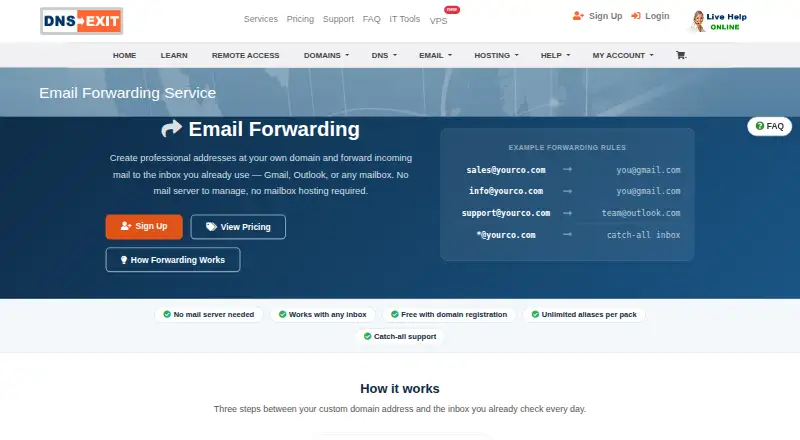
What DNSExit Email Forwarding is
DNSExit Email Forwarding creates addresses on a custom domain and sends incoming messages to inboxes you already use, including Gmail, Outlook, Yahoo, or another mailbox. It applies the domain’s MX settings and routes mail through its infrastructure. Addresses for functions such as sales, support, and billing can be directed to different people without creating separate mailboxes. A catch-all rule can route messages sent to any address at the domain, including misspellings or newly created names, to one inbox. The service handles incoming forwarding; its product page does not describe sending mail from the domain. Mailbox hosting and a mail server to manage are not required, but the domain must use DNSExit DNS. Setup involves pointing the domain to DNSExit DNS, opening the domain in the dashboard’s DNS manager, and adding addresses and destinations under MX Settings. DNSExit describes setup as taking under five minutes and links to an Email Forwarding FAQ. The free plan is for DNSExit-registered domains. Paid packs are billed annually: 5 Emails is $6.99 a year, with 10, 20, and 50 address options also listed.
Good
- Catch-all can route mail for any domain address.
- Separate addresses can go to different people.
- No mailbox hosting or mail server is required.
- Free plan for domains registered through DNSExit.
Watch out
- Domain must use DNSExit DNS.
- Page does not describe sending mail from the domain.
- Free plan is limited to DNSExit-registered domains.
Who it suits
It suits domain owners who want incoming mail routed to existing inboxes without mailbox hosting. Teams can use separate addresses for functions such as sales, support, and billing.
Verdict
DNSExit Email Forwarding is for routing custom-domain incoming mail rather than hosting mailboxes or sending domain mail. Check the DNS requirement and address-pack limits when choosing a plan.
Plans and prices
From DNSExit Email Forwarding's own pricing page, checked 15 Oct 2026.
| Plan | Price | What it gives you |
|---|---|---|
| Free | Free | DNSExit-registered domain · DNSExit DNS required · Free for domains registered through DNSExit |
| Free (DNSExit-registered domains) | Free | Free for domains registered through DNSExit |
| 5 Emails | $6.99 a year | 5 forwarding addresses · Billed annually |
| 10 Emails | $7.99 a year | 10 forwarding addresses · Billed annually |
| 20 Emails | $12.49 a year | 20 forwarding addresses · Billed annually |
| 50 Emails | $18.99 a year | 50 forwarding addresses · Billed annually |
The facts
Each one read from DNSExit Email Forwarding's own pages, with the date it was checked.
What it does
- Aliases
- Users can create domain aliases such as sales, info, and support addresses.checked 15 Oct 2026
- API bulk actions
- Multiple DNS changes can be submitted together in one JSON request, including mixed add, update, and delete actions.checked 15 Oct 2026
- API integrations
- The API documentation includes TXT automation examples for Let's Encrypt DNS validation and curl-based scripts.checked 15 Oct 2026
- API record coverage
- The API documents add, update, and delete operations for A, AAAA, TXT, CNAME, MX, SRV, and SELF records.checked 15 Oct 2026
- API update interval
- DNSExit recommends using an update interval longer than four minutes for dynamic-IP requests.checked 15 Oct 2026
- Catch-all
- Wildcard rules can send mail for every address on a domain to one destination, including mistyped or newly created addresses.checked 15 Oct 2026
- Destinations
- The product page names Gmail, Outlook, Yahoo, and any mailbox as possible destinations.checked 8 Oct 2026
- Documentation
- DNSExit provides a support center with self-help guides, FAQs, a mail diagnostic tool, and troubleshooting resources.checked 15 Oct 2026
- Domain DNS requirement
- Email forwarding requires the domain to use DNSExit DNS so DNSExit can apply the required MX settings.checked 8 Oct 2026
- Domain requirement
- A forwarding domain must use DNSExit DNS so the service can apply the required MX records.checked 15 Oct 2026
- External-domain surcharge
- Domains registered elsewhere incur an additional $4.00 per year.checked 15 Oct 2026
- Infrastructure size
- DNSExit claims more than 1.1 million domains, over 500 production servers, and 10 data centers in four countries.checked 15 Oct 2026
- Licence
- DNSExit's terms state that the site's software, processes, and related materials are owned by Netdorm or its suppliers, indicating a proprietary service rather than open-source software.checked 15 Oct 2026
- Limit: access and outage complaints
- Trustpilot reviewers report inaccessible hosted sites, disabled accounts after upgrades, delayed refunds, and slow or absent responses.checked 15 Oct 2026
- Limit: DNS outages
- A July 2025 WHTop review reports intermittently inactive and out-of-sync DNS servers, stale IP answers, bounced support mail, and more than a month without service.checked 15 Oct 2026
- Limit: domain registration
- A G2 reviewer reports that domain names must be pre-registered before they can be used with the service.checked 15 Oct 2026
- Limit: G2 sample size
- G2 warns that two reviews are too few to provide strong buying insight, and pricing is not shown on the listing.checked 15 Oct 2026
- Limit: support and software age
- Other WHTop reviews complain about an outdated interface, inconsistent or nonexistent technical support, and occasional mail-delivery or hosting problems.checked 15 Oct 2026
- Mail handling
- DNSExit applies the domain's MX settings and routes incoming messages through its infrastructure to the chosen destination.checked 8 Oct 2026
The company
- Company
- DNSExit says it is a subsidiary of NetDorm, Inc., an ICANN-accredited registrar serving customers since 1998.checked 8 Oct 2026
- Founded
- Netdorm says it was founded in 1998 and DNSExit launched in August 2001.checked 15 Oct 2026
- Headquarters
- The company lists Cincinnati, Ohio as its headquarters at 8190-A Beechmont Ave, Suite 278.checked 15 Oct 2026
- Maker identity
- The legal operator is Netdorm, Inc., doing business as DNSExit.com.checked 15 Oct 2026
Money
- Limit: billing complaints
- Trustpilot complaints include a reported duplicate renewal charge and allegations of charges for services the customer did not authorize.checked 15 Oct 2026
The full review of DNSExit Email Forwarding
Overview
DNSExit Email Forwarding gives a custom domain addresses that deliver incoming messages to an inbox you already use. It is best for individuals and small teams that need branded roles such as sales or support without maintaining separate mailboxes. The low annual cost is attractive for modest address counts, but using DNSExit DNS is a prerequisite and the service is presented for receiving rather than sending domain mail.
Key features
The service applies your domain's MX settings and passes incoming mail through DNSExit's infrastructure to destinations including Gmail, Outlook, Yahoo, or another mailbox. This keeps the familiar mailbox while presenting a professional address to correspondents. Separate forwarding addresses can go to different people, so a small team can divide sales, support, and billing without buying a hosted mailbox for every role.
Catch-all forwarding sends mail addressed to any name at the domain to one inbox, including typos and addresses created later. It is a useful safety net for a solo operator, but it is unsuitable when unfiltered mail must be split among several recipients. DNSExit advertises unlimited aliases per pack, while its paid plans are defined by five to 50 forwarding addresses and the entry records an alias limit of five; buyers should therefore size a plan by the stated address allowance rather than assume unlimited practical capacity.
Setup requires pointing the domain to DNSExit DNS, opening the domain in the dashboard's DNS manager, and adding forwarding addresses and destinations under MX Settings. DNSExit says this takes under five minutes, and an Email Forwarding FAQ is linked for setup questions. No mailbox hosting or mail server administration is required. The trade-off is significant: moving the domain's DNS to DNSExit is mandatory for the forwarding MX configuration, and the service description does not cover sending from the custom domain.
Pricing
The free plan costs 0.00 USD and is free for domains registered through DNSExit. That makes it a sensible starting point when your domain is already with DNSExit, but it does not provide a generally free option for domains registered elsewhere.
| Plan | Price | Included forwarding addresses | Best fit |
|---|---|---|---|
| Free (DNSExit-registered domains) | free | Free for domains registered through DNSExit | DNSExit domain owners with basic needs |
| 5 Emails | $6.99 a year, billed annually | 5 forwarding addresses; add $4.00/year for domains registered elsewhere | Individuals and very small teams |
| 10 Emails | $7.99 a year, billed annually | 10 forwarding addresses; add $4.00/year for domains registered elsewhere | Several role addresses at a small organization |
| 20 Emails | $12.49 a year, billed annually | 20 forwarding addresses; add $4.00/year for domains registered elsewhere | Growing teams needing more distinct routes |
| 50 Emails | $18.99 a year, billed annually | 50 forwarding addresses; add $4.00/year for domains registered elsewhere | Organizations with many forwarding identities |
Paid tiers renew annually, and each adds $4.00/year when the domain is registered outside DNSExit. There is no free trial. The jump from five to ten addresses costs only $1.00 per year, making 10 Emails the stronger choice when you expect even modest growth; the 50-address tier is the ceiling among the listed plans.
Platforms
DNSExit Email Forwarding is delivered through the web. Configuration happens in the dashboard's DNS manager rather than through a dedicated desktop or mobile application.
Who it's for
This is a good match for a domain owner who already relies on Gmail, Outlook, Yahoo, or another mailbox and wants custom-domain identities without mailbox hosting. It also suits small teams that can route each role to an existing person's inbox. It is a poor fit for anyone who needs hosted inboxes, domain-based sending, or a domain that must keep DNS with another provider.
Pros and cons
Pros
- Annual paid plans start at 6.99 USD for five addresses, keeping basic forwarding inexpensive.
- Separate destinations for role addresses support simple team routing without separate mailboxes.
- Catch-all forwarding protects against typos and newly invented addresses.
- Setup is described as taking under five minutes and requires no mail server to manage.
Cons
- The domain must use DNSExit DNS so its MX settings can be applied, which may complicate an existing DNS arrangement.
- The service describes incoming forwarding, not sending mail from the custom domain.
- The free tier is limited to DNSExit-registered domains, and outside registrations add $4.00/year to paid plans.
- Plan address counts top out at 50, while the stated alias limit of five makes capacity terminology important to verify before purchase.
Alternatives
Choose Forward Email instead if broad platform coverage, including mobile, desktop, API, and self-hosting, or its open-source foundation matters; its Enhanced Protection plan is $3 a month.
Haltman mail-forwarding-core is the better choice for a free forwarding-only deployment offering unlimited forwarding rules, users, addresses, domains, and emails.
Pick Forward when a free plan with one domain, 25 aliases, 500 forwards per day, seven-day logs, and one team seat is the right scale.
ImprovMX suits buyers wanting a free one-domain plan with 25 aliases, 500 forwarded emails per day, API access, seven-day logs, and a 99% uptime guarantee.
MailerZ is an alternative for users who need a message store and one seat, accepting restrictions such as disabled send-as, SMTP, and API features on its free plan.
Choose EForw for a free web service with unlimited catch-all aliases and SPF, DKIM, and DMARC pass handling.
InboxMail is aimed at users who want forwarding alongside AI actions, campaigns, and agent inboxes.
KaiMail is an alternative with API and web access, a free one-domain tier, and a 300-emails-per-month ceiling.
For a wider comparison, see Email Forwarding Services.
Verdict
DNSExit Email Forwarding is a strong choice for domain owners who need a handful of incoming addresses routed to existing inboxes at a very low annual price. Choose it for straightforward role routing and catch-all protection; look elsewhere if you need mailbox hosting, domain sending, broader platform support, or freedom to keep DNS with another provider.
Alternatives to DNSExit Email Forwarding
- 1

Forward Email
Free planAndroidiOSWebAPI7.3From $3 a month - 2

Cloudflare Stream
AndroidiOSWebAPI6.9 - 3

ImprovMX
Free planWebAPI6.8From $50 a year - 4

SMTP Zen Email Forwarding
AndroidiOSWeb6.8From $1.20 a month - 5
Gomailify
AndroidiOSWeb6.7From $12 a year - 6
KaiMail
Free planWebAPI6.7From ¥550 a month