
FontCap
FontCap syncs a font library across Mac, Windows, and Linux computers through its built-in cloud.
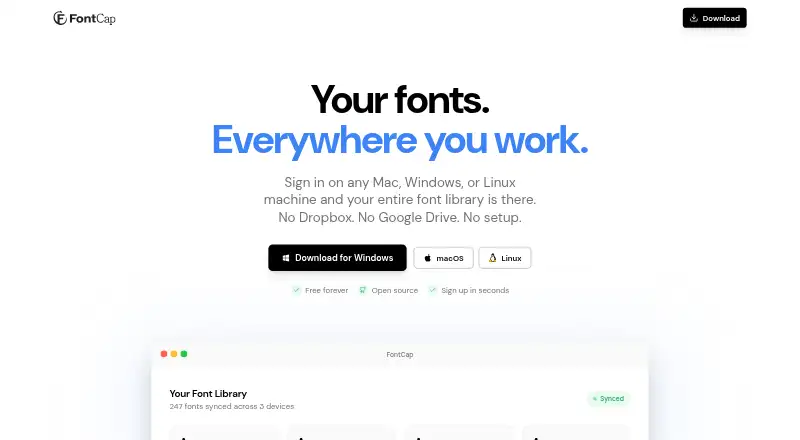
What FontCap is
FontCap syncs a font library across Mac, Windows, and Linux computers through its built-in cloud. It automatically finds installed fonts and supports TTF, OTF, WOFF, and WOFF2 files. After signing in, it downloads and installs fonts missing from a device. Users can drag font files into the app to upload them, view connected machines, check where fonts came from, and adjust syncing for each device. FontCap identifies duplicates using SHA-256 file hashes and supports up to five simultaneous downloads with automatic retry. The service is free, with every feature and font included and no subscription tiers. The maker lists macOS 10.13 or later, 64-bit Windows 10 or later, and Linux AppImage or .deb builds. Its privacy policy says it collects account, device, and synced-font data, but does not sell data or track behavior. Users can export font files, delete fonts, or delete their account and associated data; account data is removed from servers when an account is deleted.
Good
- Syncs fonts across Mac, Windows, and Linux.
- Supports TTF, OTF, WOFF, and WOFF2.
- Automatically installs fonts missing from a device.
- Free access includes every feature and font.
Watch out
- Requires sign-in for automatic font installation.
- Collects account, device, and synced-font data.
- Windows support requires 64-bit Windows 10 or later.
Who it suits
FontCap suits freelancers, design studios, developers, and people who encounter missing-font dialogs and need fonts synced across Mac, Windows, or Linux computers.
Verdict
FontCap brings font syncing, duplicate identification, and per-device controls together in a free service. Check its platform requirements and data collection details before using it.
Plans and prices
From FontCap's own pricing page, checked 3 Oct 2026.
| Plan | Price | What it gives you |
|---|---|---|
| Free | Free | Every feature and every font; no subscription tiers · Free forever |
The facts
Each one read from FontCap's own pages, with the date it was checked.
What it does
- Audience
- The maker describes FontCap as suitable for freelancers, design studios, developers, and people who encounter missing-font dialogs.checked 3 Oct 2026
- Data controls
- Users can access their data, delete fonts, delete their account and associated data, and export font files.checked 3 Oct 2026
- Downloads
- FontCap supports up to five simultaneous downloads with automatic retry.checked 3 Oct 2026
- Drag and drop
- Font files can be dropped directly into FontCap for upload and syncing.checked 3 Oct 2026
- Duplicate detection
- FontCap uses SHA-256 file hashing to identify duplicate fonts.checked 3 Oct 2026
- Font scanning
- The app automatically finds installed fonts and supports TTF, OTF, WOFF, and WOFF2 files.checked 3 Oct 2026
- Installation
- After sign-in, missing fonts are automatically downloaded and installed on a device.checked 3 Oct 2026
- Privacy
- The privacy policy says FontCap collects account, device, and synced-font data, and does not sell data or track behavior.checked 3 Oct 2026
- Purpose
- FontCap syncs a font library across Mac, Windows, and Linux computers through its built-in cloud.checked 3 Oct 2026
- Retention
- The privacy policy says account data is retained while the account is active and permanently removed from the servers when the account is deleted.checked 3 Oct 2026
- Security
- The privacy policy says FontCap uses Supabase row-level security, TLS/HTTPS transmission encryption, bcrypt password hashing, and JWT authentication.checked 3 Oct 2026
- Support contact
- The privacy policy lists [email protected] for questions about the policy or user data.checked 3 Oct 2026
- System requirements
- The maker lists macOS 10.13 or later, Windows 10 or later 64-bit, and Linux AppImage or .deb builds.checked 3 Oct 2026
Where it runs
- Device management
- Users can view connected machines, see which fonts came from where, and manage sync settings per device.checked 3 Oct 2026
The full review of FontCap
FontCap is a desktop font manager that syncs a font library across Linux, macOS, and Windows. It is best suited to people who switch between those systems or want the same fonts installed on several computers. Its strongest case is a free plan with every feature; its cloud-based approach is less suitable for anyone seeking a local-only manager.
Overview
FontCap scans installed fonts and accepts files by drag and drop, supporting TTF, OTF, WOFF, and WOFF2. After sign-in, it downloads and installs missing fonts on a device. That makes a shared library practical to maintain across computers, though the workflow depends on an account and cloud syncing.
Device management shows connected machines and where fonts came from, with sync settings available for each device. SHA-256 file hashing identifies duplicates, helping keep a library from accumulating repeated font files. Downloads can run five at a time and retry automatically, a useful touch when restoring fonts across devices.
Key features
Shared library and device controls
Automatic installation saves the repeated work of locating and adding fonts on each computer. Per-device controls offer some oversight over where fonts are synced, while drag and drop provides a direct way to add files. FontCap is a strong fit when consistency across desktop systems matters more than a standalone catalog.
Privacy and security
FontCap collects account, device, and synced-font data. Its privacy policy says it does not sell data or track behavior, and describes TLS/HTTPS encryption in transit, bcrypt password hashing, JWT authentication, and Supabase row-level security. Users can access their data, export font files, delete fonts, or delete their account and associated data. Account data is retained while the account remains active and is permanently removed from the servers after account deletion. The cloud model still means users must be comfortable storing synced-font data with the service.
Pricing
Free: free, billed Free forever. The plan includes every feature and every font, with no subscription tiers. There is no paid plan to upgrade to, so readers who want cloud sync and device management get the full feature set without weighing a limited entry tier against a premium one.
The free offer is unusually straightforward, but the stated plan terms do not give a storage quota or seat cap. Users with specific capacity or team needs should confirm those requirements before relying on FontCap for a large shared library.
Platforms
FontCap supports Linux, macOS, and Windows. The maker lists macOS 10.13 or later, Windows 10 or later in 64-bit, and Linux AppImage or .deb builds. There is no listed mobile platform, making it a desktop choice rather than a way to manage fonts directly on phones or tablets.
Who it's for
FontCap suits freelancers, design studios, developers, and anyone who runs into missing-font dialogs, particularly when work spans Linux, macOS, and Windows computers. Automatic installation and duplicate detection address common library-maintenance chores. It is a poorer fit for people who do not want an account or cloud syncing, or who need mobile support.
Pros and cons
- Pros: The free plan includes every feature and every font, so there is no paid tier needed for the core sync workflow.
- Pros: Automatic installation, duplicate detection, and per-device sync controls reduce manual upkeep across computers.
- Pros: Support for TTF, OTF, WOFF, and WOFF2 covers the formats FontCap identifies as supported.
- Cons: The account-and-cloud model is not a match for users who want a local-only font manager.
- Cons: Linux, macOS, and Windows support does not extend to mobile platforms.
Alternatives
For a broader category search, browse Font Management Software.
- Adobe Fonts is worth considering if a basic library of about 5,500 fonts and support across mobile, desktop, and web platforms better match your needs; its free plan is available with trial subscriptions and some free, team, enterprise, and education accounts.
- FontBase offers free font manager features on Linux, macOS, and Windows. Its Awesome Monthly plan costs $3 a month and allows use on up to two personal computers at the same time.
- Fontist is a free, open-source option for installing and managing fonts across Windows, Linux, and macOS, and also supports API use.
- Launchpad is another free option, with a plan for open-source software projects.
- ZFontManager is a free option for Linux, macOS, and Windows with no paid tier, trial, or unlock.
- Fontmatrix is a free, open-source font manager under GPL v2 for Linux, macOS, and Windows.
- MainType may suit Windows users who want a free edition capped at 2,500 fonts for non-commercial use, with core viewing, installing, and uninstalling features.
- SandollCloud is an alternative for readers considering a service with iOS, macOS, web, and Windows support.
Verdict
Choose FontCap if you need fonts to stay in sync across Linux, macOS, and Windows and want automatic installation without a paid tier. The combination of cross-device controls and an all-feature free plan is its clearest advantage. Look elsewhere if cloud-based syncing, account-linked font data, or the lack of mobile support is a deal-breaker.
Getting started
- Open the FontCap website
- Use a supported macOS, Windows, or Linux build
- Sign in to connect the device
- Allow installed fonts to be scanned
- Drag font files into FontCap to upload and synchronize them
Questions
Is FontCap free?
Yes. The Free plan is 0.00 USD, free forever, and includes every feature and font with no subscription tiers.
Which font formats are supported?
FontCap supports TTF, OTF, WOFF, and WOFF2 files.
Which operating systems can run it?
Listed requirements are macOS 10.13 or later, Windows 10 or later in 64-bit, and Linux AppImage or .deb builds.
What happens after signing in?
FontCap can download and install fonts missing from that device after sign-in.
Can I export or delete my data?
Users can export font files, delete fonts, and delete their account and associated data.
Alternatives to FontCap
- 1

FontBase
Free planWebLinuxmacOSWindows7.7From $3 a month - 2

Adobe Fonts
Free planAndroidiOSWebLinux7.6Free plan - 3
SandollCloud
iOSWebmacOSWindows7.4From 11,000 KRW a month - 4

Launchpad
Free planWebAPILinuxSelf-hosted7.0Free plan - 5
MainType
Free planWindows6.5$49 one-time - 6
iFontCloud
iOSWebmacOSWindows6.4