
FontBase
FontBase is a font manager for Linux, macOS, and Windows.
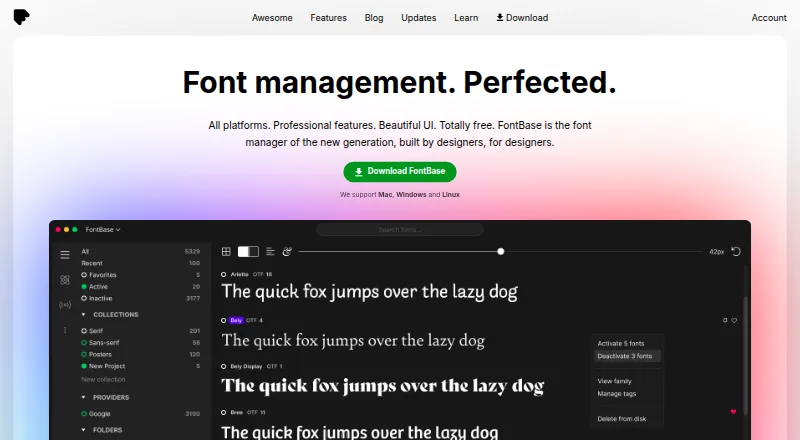
What FontBase is
FontBase is a font manager for Linux, macOS, and Windows. Users can arrange fonts into collections and sub-collections, then activate a collection in one click. Fonts can stay in computer folders rather than being installed; watched folders can also trigger automatic activation when new fonts are added. The free feature set includes OpenType features, glyph viewing and copying, and access to Google's font library as if its fonts were local. The paid Awesome plan adds collection syncing across computers through a cloud drive such as Dropbox or Google Drive, and can automatically activate missing fonts in Photoshop, Illustrator, and InDesign documents. Awesome also includes team tools for managing members, font licenses, and activations. Its monthly plan costs $3 a month per user and can be used on up to two personal computers at once. The maker describes the team offering as designed for design and publishing teams, and says it does not store user data on its servers. Organizations are advised to subscribe per user or contact the maker about a multi-seat account.
Good
- Collections and sub-collections can be activated in one click.
- Fonts can remain in watched folders without installation.
- Free features include OpenType tools and glyph viewing.
- Awesome syncs collections through a cloud drive.
- Awesome can activate missing fonts in Adobe design documents.
Watch out
- Awesome is limited to two personal computers at once.
- Organizations are advised to buy a subscription per user or ask about multi-seat access.
- Awesome costs $3 a month per user.
Who it suits
FontBase suits designers and other users who need to organize and activate fonts across Linux, macOS, or Windows. Awesome adds collaboration and license-management tools for design and publishing teams.
Verdict
FontBase combines font organization with activation that does not require installing fonts from watched folders. Its free features cover core management, while Awesome adds syncing, document-aware activation, and team controls.
Plans and prices
From FontBase's own pricing page, checked 29 Sep 2026.
| Plan | Price | What it gives you |
|---|---|---|
| FontBase | Free | Free font manager features |
| Free | Free | Core font management · Mac, Windows and Linux |
| Awesome monthly | $3 a month | Two personal computers simultaneously; business use requires one subscription per user · per month |
| Awesome Forever | — | One payment for all updates forever; use on up to 2 personal computers at the same time · Single payment; price not shown in the opened page text |
| Awesome Yearly | — | Use on up to 2 personal computers at the same time · Yearly (-20%) |
The facts
Each one read from FontBase's own pages, with the date it was checked.
What it does
- API and SDKs
- No public FontBase application API or SDK is documented; the documentation describes S3 bucket API credentials only for team folders.checked 15 Oct 2026
- Auto-activation
- Awesome can automatically activate missing fonts used in Photoshop, Illustrator and InDesign documents.checked 15 Oct 2026
- Cloud-drive sync
- Collections can be synchronized between computers through cloud drives such as Dropbox and Google Drive.checked 15 Oct 2026
- Cloud sync
- Awesome can sync collections across computers using a cloud drive such as Dropbox or Google Drive.checked 29 Sep 2026
- Collections
- Users can create collections and subcollections and activate a collection with one click.checked 15 Oct 2026
- Design integrations
- Awesome can automatically activate missing fonts in Photoshop, Illustrator, and InDesign documents.checked 29 Sep 2026
- Documentation
- The tutorial library covers installation, activation, collections, supported formats, team folders, Google Fonts, shortcuts and troubleshooting.checked 15 Oct 2026
- Font activation
- FontBase can activate fonts without installing them and can automatically activate fonts added to designated folders.checked 29 Sep 2026
- Font licensing
- Team licensing records seat limits and expiry dates, synchronizes them across the team and can block activations after limits are reached.checked 15 Oct 2026
- Glyph tools
- GlyphsView lets users inspect and copy glyphs for any language and font in a collection.checked 15 Oct 2026
- Google Fonts
- Google Fonts can be browsed and activated from inside FontBase.checked 15 Oct 2026
- Independent review praise
- Mata for Design says the interface is minimalist and functional and that the software runs smoothly on Windows and Mac.checked 15 Oct 2026
- Installation
- The installer uses a single-step flow; default install locations are Applications on Mac and the user's Local Programs directory on Windows.checked 15 Oct 2026
- License management
- Awesome lets users set font license seats, sync licenses across a team, limit usage, and monitor activations.checked 29 Sep 2026
- Limit: activation failures
- A forum report describes fonts failing to activate on macOS even after granting full-disk access.checked 15 Oct 2026
- Limit: crashes
- A February 2026 forum thread reports FontBase crashing at startup on Windows 11 and later recurring crashes for some users.checked 15 Oct 2026
- Limit: missing file details
- A Trustpilot reviewer reports no direct way to open a font file or see its filename, path or containing folder.checked 15 Oct 2026
- Limit: network drives
- FontBase documents inconsistent behavior when root or watched folders are on network drives and recommends regular folders for stability.checked 15 Oct 2026
- Limit: subscription model
- A Trustpilot reviewer criticizes the yearly subscription compared with a one-time payment.checked 15 Oct 2026
- Limit: tag export
- The FAQ says exporting font tags is still pending.checked 15 Oct 2026
- Local data
- Collections and settings are stored in local application-support directories, and deleting those directories resets the app but removes that data.checked 15 Oct 2026
The company
- Company address
- The legal address given in the terms is 8 The Green, Suite A, Dover, Delaware 19901.checked 15 Oct 2026
- Company legal name
- FontBase is identified in its terms as Senary Domain LLC, file number 7243120.checked 15 Oct 2026
- Company status
- Crunchbase lists FontBase as a private, for-profit company with active operating status and headquarters information pointing to Dover, Kent, United Kingdom.checked 15 Oct 2026
The full review of FontBase
Overview
FontBase is a desktop font manager for designers who want to organize and activate fonts without installing them. It is a good fit for solo users who need a tidy working library, while teams and people moving between computers have a stronger reason to consider its paid tier.
Its practical advantage is the combination of watched folders, one-click collections and activation that leaves source files in place. The free plan covers core font work; the paid features matter most when design documents, shared collections or license oversight are part of the workflow.
Key features
Collections and folder-based activation
Collections and sub-collections let users group fonts by project or purpose and activate a set at once. FontBase can display fonts from folders without relocating them, activate fonts without installing them, and automatically activate fonts added to designated folders. That makes it useful for designers who keep fonts organized outside the operating system’s installed-font library. Duplicate detection is also included.
Glyphs, OpenType and Google Fonts
The free feature set includes OpenType features and tools for viewing and copying glyphs, which help when checking character options or working with less common symbols. Access to Google Fonts in one click broadens the library, with those fonts presented as though they were local. Supported formats are TTF and OTF.
Awesome for design work and teams
Awesome can activate missing fonts automatically when opening Photoshop, Illustrator and InDesign documents. For users who regularly switch among client files, that can reduce manual font hunting; it is less compelling if those applications and document-based activation are not part of the job.
Awesome can sync collections between computers through cloud drives such as Dropbox or Google Drive. Team controls cover adding and removing members, seeing who is online and how many fonts they use, and managing license seats, usage limits and activations. These tools are aimed at design and publishing teams, but organizations need a subscription per user or a multi-seat account from the maker.
Pricing
FontBase is freemium, with a free plan at no cost that includes the free font-manager features. It is the sensible starting point for individuals who need collections, activation, OpenType features and glyph tools but do not need syncing or team controls.
Awesome Monthly costs $3 a month, billed $3 dollars per month, and can be used on up to 2 personal computers at once. It adds design-document activation, cloud-drive collection sync and team and license features. The yearly option is billed yearly with a 20% discount, but its price is custom pricing. Awesome Forever is a single payment for all updates forever, also limited to two personal computers; its price is custom pricing. For organizations, the personal-computer limit does not replace the per-user subscription or multi-seat account requirement.
Platforms
FontBase is available for Linux, macOS and Windows, making it a desktop option across the three major computer platforms. Its supported font formats are TTF and OTF.
Who it's for
FontBase suits designers who want a managed font library without moving files or installing every typeface they use. Its free tier is especially appropriate for individual workflows centered on collections, watched folders and glyph access. Awesome is a better fit for designers who work in Photoshop, Illustrator or InDesign and for publishing teams that need shared collections and license oversight. Users seeking a mobile-first font manager, or who do not need these management features, should compare other options.
Pros and cons
- Pros: Watched folders keep fonts in their original locations, while activation can happen without installation; useful for keeping a working library separate from system-installed fonts.
- Pros: The free feature set includes OpenType features, glyph viewing and copying, and Google Fonts access, giving solo users meaningful typographic tools without an Awesome subscription.
- Pros: Awesome combines document-aware activation, cloud-drive sync and team license controls for users whose work spans projects or collaborators.
- Cons: Sync and team controls require Awesome, so the free plan is not a shared-library solution.
- Cons: Awesome is limited to two personal computers at once; organizations must arrange subscriptions per user or request a multi-seat account.
- Cons: The yearly and lifetime prices are custom pricing, making their cost harder to compare with the monthly subscription before choosing.
Alternatives
Browse font management software to compare more options. Adobe Fonts is worth considering for readers who want a freemium font service with a basic library of about 5,500 fonts and access across mobile, desktop and web platforms. FontCap suits users who want a free option with every feature and font and no subscription tiers. Launchpad is an alternative for open-source software projects, with API, Linux, self-hosted and web platforms.
ZFontManager is a free, GPL-3.0 option for Linux, macOS and Windows with no paid tier. Fontist is open-source font management software for installing and managing fonts across Windows, Linux and macOS. Fontmatrix is another free, open-source font manager for Linux, macOS and Windows. MainType is a Windows-only freemium alternative whose free plan supports up to 2,500 fonts for non-commercial use, with core viewing, installing and uninstalling. iFontCloud is an alternative available on iOS, macOS, web and Windows.
Verdict
Choose FontBase if you want a desktop font manager that keeps folder-based libraries in place while making activation and organization straightforward. Its free features make it a credible choice for solo designers; pay for Awesome when document-aware activation, syncing or team license controls address needs you actually have. Look elsewhere if you need mobile support or a fully shared workflow without a paid plan.
Getting started
- Open the FontBase website.
- Choose the free FontBase plan or an Awesome plan.
- Add computer folders whose fonts you want to see in FontBase.
- Create collections and sub-collections, then activate fonts as needed.
- For Awesome features, connect a cloud drive for collection syncing or configure team tools.
Limits worth knowing
The free plan is described as including free font manager features. Awesome can be used on up to two personal computers at once; organizations are told to buy a subscription per user or contact the maker for a multi-seat account.
Questions
Is FontBase free?
Yes. The FontBase plan is listed as free and includes free font manager features.
How much does Awesome cost?
Awesome Monthly is listed at $3 a month, billed at $3 dollars per month. The yearly and single-payment plan prices are not shown in the listed plan details.
Which platforms does FontBase support?
FontBase supports Linux, macOS, and Windows.
Does FontBase support team font management?
Awesome includes team member management, license controls, and information about who is online and how many fonts they use.
Does FontBase store user data on its servers?
The maker says it does not. Stripe handles subscription data, while Auth0 handles login and authentication data.
Can Awesome be used on multiple computers?
An Awesome subscription can be used on up to two personal computers at once. Organizations are directed to subscribe per user or contact the maker about a multi-seat account.
Alternatives to FontBase
- 1

Adobe Fonts
Free planAndroidiOSWebLinux7.6Free plan - 2
SandollCloud
iOSWebmacOSWindows7.4From 11,000 KRW a month - 3

Launchpad
Free planWebAPILinuxSelf-hosted7.0Free plan - 4
MainType
Free planWindows6.5$49 one-time - 5
iFontCloud
iOSWebmacOSWindows6.4 - 6

Insider Font Control Suite
WebLinuxmacOSSelf-hosted6.3