Firepush
Firepush is a web push marketing app for Shopify stores, designed to help merchants recover abandoned carts, re-engage customers, and promote sales.
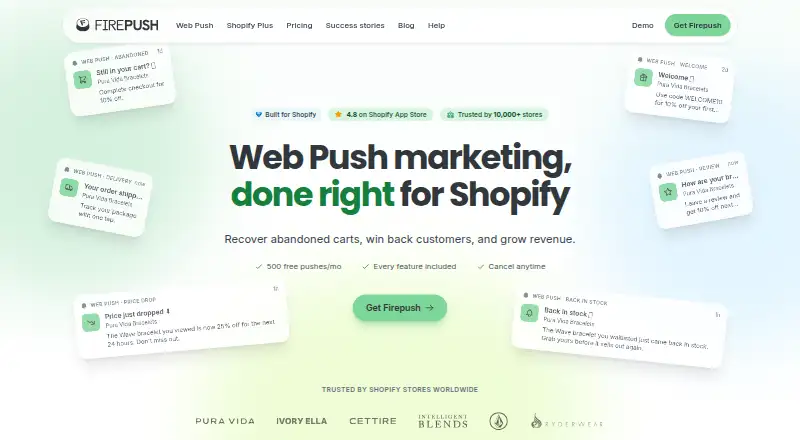
What Firepush is
Firepush is a web push marketing app for Shopify stores, designed to help merchants recover abandoned carts, re-engage customers, and promote sales. Its automations include cart recovery, price-drop and back-in-stock alerts, welcome messages, order updates, shipping notices, and win-back campaigns. Merchants can also schedule promotional or flash-sale campaigns, use countdown timers and discount codes, segment audiences, and add campaign boosts and hero images. Pop-ups, sign-up boxes, a fly-out widget, and embedded buttons provide ways to collect subscriber opt-ins. Reports include subscriber counts, click-through and conversion rates, and revenue from campaigns and automations. The free plan includes 500 push notifications per month. Push campaigns pause at the monthly limit, and unused pushes do not carry forward. Web push reaches modern desktop browsers and Android; iPhone shoppers must add the store to their home screen to subscribe.
Good
- Automates abandoned-cart and win-back campaigns.
- Includes pop-ups and other subscriber opt-in tools.
- Reports clicks, conversions, and campaign revenue.
- Free plan includes 500 pushes per month.
Watch out
- Campaigns pause when the push limit is reached.
- Unused monthly pushes do not carry over.
- iPhone shoppers must add the store to their home screen.
Who it suits
Firepush suits Shopify merchants looking to promote products or automate customer notifications through web push. Its audience segmentation and reporting can help merchants organize campaigns and track their results.
Verdict
Firepush brings subscriber growth, campaign automation, and performance reporting together for Shopify stores. Review the monthly push allowance and platform reach to ensure they suit your audience.
Plans and prices
From Firepush's own pricing page, checked 21 Oct 2026.
| Plan | Price | What it gives you |
|---|---|---|
| Free | Free | 500 push notifications/month · all push features · no SMS · forever |
| Basic - 10,000 pushes | $13 a month | 10,000 pushes per month · billed monthly |
| Basic - 20,000 pushes | $25 a month | 20,000 pushes per month · billed monthly |
| Basic - 30,000 pushes | $35 a month | 30,000 pushes per month · billed monthly |
| Pro - 25,000 pushes | $49 a month | 25,000 pushes per month · billed monthly |
| Pro - 50,000 pushes | $89 a month | 50,000 pushes per month · billed monthly |
| Pro - 100,000 pushes | $159 a month | 100,000 pushes per month · billed monthly |
| Pro - 150,000 pushes | $229 a month | 150,000 pushes per month · billed monthly |
| Pro - 250,000 pushes | $299 a month | 250,000 pushes per month · billed monthly |
| Basic 10,000 | $13 a month | 10,000 pushes/month · all features · standard support · SMS add-on · monthly |
| Basic | $13 a month | 10,000 push notifications/mo · standard support · $13/month |
| Basic 20,000 | $25 a month | 20,000 pushes/month · all features · standard support · SMS add-on · monthly |
| Basic 30,000 | $35 a month | 30,000 pushes/month · all features · standard support · SMS add-on · monthly |
| Pro 25,000 | $49 a month | 25,000 pushes/month · all features · priority support · SMS add-on · monthly |
| Pro | $49 a month | 25,000 push notifications/mo · priority support · better per-push pricing · built for Shopify Plus · $49/month |
| Pro 50,000 | $89 a month | 50,000 pushes/month · all features · priority support · SMS add-on · monthly |
| Pro 100,000 | $159 a month | 100,000 pushes/month · all features · priority support · SMS add-on · monthly |
| Pro 150,000 | $229 a month | 150,000 pushes/month · all features · priority support · SMS add-on · monthly |
| Pro 250,000 | $299 a month | 250,000 pushes/month · all features · priority support · SMS add-on · monthly |
| Pro 500,000 | $499 a month | 500,000 pushes/month · all features · priority support · SMS add-on · monthly |
| Pro - 500,000 pushes | $499 a month | 500,000 pushes per month · billed monthly |
The facts
Each one read from Firepush's own pages, with the date it was checked.
What it does
- Abandoned-cart automation
- It can automatically remind shoppers about abandoned carts through push notifications and SMS.checked 21 Oct 2026
- API and SDKs
- The terms incorporate separate API Guidelines, but the public pages reviewed do not provide a public API reference or SDK documentation.checked 21 Oct 2026
- Audience segmentation
- SMS subscribers can be filtered by spending, order history, country, Shopify tags and recent activity, with AND/OR combinations.checked 21 Oct 2026
- Automations
- Automations include abandoned cart recovery, price drop alerts, back-in-stock alerts, welcome series, order updates, shipping notifications, and win-back campaigns.checked 8 Oct 2026
- Back-in-stock alerts
- It provides notifications when previously unavailable products return to stock.checked 21 Oct 2026
- Campaign tools
- Campaign features include promotional and flash sale campaigns, scheduling, countdown timers, discount codes, audience segmentation, campaign boosts, and hero images.checked 8 Oct 2026
- Delivery updates
- Delivery-related SMS automations cover order confirmation, shipment and payment-refund events.checked 21 Oct 2026
- Documentation
- The help center is organized into getting-started, web-push, subscribers, pricing, SMS, compliance, settings and troubleshooting sections.checked 21 Oct 2026
- Installation method
- Merchants install from the Shopify App Store and enable the Firepush app embed in their Shopify theme.checked 21 Oct 2026
- Installation requirements
- Installation requires an active Shopify store, SSL and removal of storefront password protection.checked 21 Oct 2026
- Integrations
- The product page names Growave and PageFly as third-party integrations, and the Shopify Plus page describes Shopify Flow integration as a feature that will be launched soon.checked 8 Oct 2026
- Intended users
- Firepush is described as a Shopify web push marketing app, with a dedicated Shopify Plus offering for high-volume stores.checked 8 Oct 2026
- Licence
- Firepush is delivered as a proprietary hosted Shopify service; its terms prohibit reverse engineering, decompilation and source-code discovery.checked 21 Oct 2026
- Limit: customization
- A G2 reviewer wanted more control over notification fonts and colors.checked 21 Oct 2026
- Limit: delivery reliability
- Firepush says web-push delivery commonly ranges from 60% to 85% because of browser settings, expired tokens and inactive devices.checked 21 Oct 2026
- Limit: email capability
- A Capterra reviewer said email functionality was limited and an abandoned-cart email feature remained unavailable for an extended period.checked 21 Oct 2026
- Limit: merchant unsubscribe control
- Merchants cannot force-unsubscribe a push subscriber; the subscriber must change browser permissions.checked 21 Oct 2026
Money
- Billing
- Paid plans are billed through Shopify on the regular Shopify invoice, with a monthly spending cap, and can be canceled from Shopify admin.checked 8 Oct 2026
- Free plan
- Yeschecked 21 Sep 2026
Where it runs
- Browser support
- Supported delivery browsers include Chrome, Firefox, Edge, Opera and macOS Safari; Android browsers are supported.checked 21 Oct 2026
- iOS requirement
- iPhone and iPad push requires Safari on iOS 16.4 or later and the shopper must add the store to the Home Screen.checked 21 Oct 2026
The company
- Company LinkedIn facts
- LinkedIn lists Firepush in Poole, England, with 2–10 employees and a 2016 founding year.checked 21 Oct 2026
- Headquarters
- Poole, United Kingdomchecked 28 Sep 2026
- Legal company
- Firepush Ltd is an active UK company registered as 10732167 and incorporated on 20 April 2017.checked 21 Oct 2026
The full review of Firepush
Firepush is a Shopify-focused web push marketing app for stores seeking to turn browser subscribers into repeat purchases. It suits merchants who want push campaigns and automated customer messages rather than a broader email-marketing platform. Its free tier makes it possible to start small, but push quotas and iPhone opt-in requirements shape its reach.
Overview
Firepush brings subscriber collection, campaign creation, automations, and performance reporting into one Shopify-oriented workflow. Stores can use it to address abandoned carts, announce promotions, and follow up with customers through browser notifications. Audience segmentation supports more targeted sends; the trade-off is that every plan is bounded by a monthly push allowance.
Push notifications can reach users of modern desktop browsers, including Chrome, Firefox, Edge, and Safari, as well as Android devices. On iPhone, shoppers must first add the store to their home screen to subscribe, an extra step that may limit opt-ins compared with a frictionless browser prompt.
Key features
Automations and campaigns
Automated messages cover abandoned carts, price drops, back-in-stock alerts, welcome sequences, order and shipping updates, and win-back campaigns. These give Shopify stores several lifecycle moments to address without relying solely on one-off promotions. Campaign tools add scheduling, countdown timers, discount codes, campaign boosts, and hero images for promotional or flash-sale pushes.
Subscriber growth and reporting
Pop-ups, sign-up boxes, a fly-out widget, and embedded buttons provide several ways to invite shoppers to subscribe. Reporting tracks subscriber counts, click-through and conversion rates, and campaign or automation revenue, giving merchants measures beyond message volume.
Named third-party integrations include Growave and PageFly. Shopify Flow integration is described as a forthcoming feature for the Shopify Plus offering, so it should not be treated as a current capability.
Pricing
Firepush has a free plan and monthly paid tiers billed through Shopify. The free plan costs $0/forever and includes 500 push notifications per month, with email support. It is a sensible way to assess whether browser pushes suit a store, but the low allowance limits ongoing use.
Basic starts at $13/month for 10,000 pushes per month and standard support. Larger Basic allowances are $25/month for 20,000 pushes and $35/month for 30,000 pushes. These tiers suit stores that need more volume without Pro's stated Shopify Plus focus or priority support.
Pro starts at $49/month for 25,000 pushes per month, with priority support, better per-push pricing, and positioning for Shopify Plus. Higher monthly allowances cost $89 for 50,000 pushes, $159 for 100,000, $229 for 150,000, and $299 for 250,000. Pro is the more appropriate tier for high-volume stores that can use its larger quotas; the Basic plans cost less but do not include the stated Pro support and per-push advantages.
The dashboard warns when usage reaches 80% of the push limit. At 100%, campaigns pause automatically until the next billing cycle, and unused pushes do not roll over. Paid plans have a monthly spending cap and can be canceled in Shopify admin. Shopify handles subscription billing; Firepush says it does not collect or store payment card details.
Platforms
Firepush supports Android, iOS, and web as platforms, while its push reach depends on browser and device conditions: modern desktop browsers and Android are supported, and iPhone shoppers must add the store to their home screen before subscribing.
Who it's for
Firepush is best suited to Shopify merchants who want browser-based promotions and automated follow-ups, especially stores with enough subscriber activity to make a monthly push quota useful. The free tier can serve a small trial run; established or high-volume stores should compare the paid allowance against expected sends before choosing a tier. It is a weaker fit for businesses seeking email-first marketing or broad mobile push reach without the iPhone home-screen requirement.
Pros and cons
- Pros: A free plan provides 500 monthly pushes, and paid entry begins at $13/month for 10,000 pushes, giving smaller stores a low-cost route into push marketing.
- Pros: Automations span cart recovery, stock and price alerts, customer onboarding, order updates, and win-back campaigns, covering more than promotional blasts.
- Pros: Reporting connects sends to clicks, conversions, and generated revenue, helping merchants assess campaign outcomes.
- Cons: Sends stop at the monthly cap until the next billing cycle, and unused pushes do not carry over; stores with volatile campaign demand have little quota flexibility.
- Cons: iPhone shoppers must add the store to their home screen to subscribe, adding friction to subscriber growth on that platform.
Alternatives
For a broader email-marketing option, compare AWeber, which has a free tier with up to 500 subscribers and 3,000 monthly emails. Mailchimp may suit a store prioritizing email and contact management: its free plan allows 250 contacts, 500 emails per month, one audience, and one seat. Mailjet is another email-focused choice, with a free allowance of 6,000 emails per month, capped at 200 per day, and up to 1,000 contacts.
Twilio Segment is worth considering when visitor data and integrations are the priority; its free plan includes 1,000 visitors per month, two sources, and 700+ integrations. Zoho Campaigns offers a free email tier for up to 2,000 contacts and 6,000 emails per month, with five users and basic reporting. Direct Mail is an alternative for Mac and iOS users, with a free plan capped at 150 emails per month. JetEmail offers a free tier that does not expire, with 1,000 subscribers and 1 GB of image storage. listmonk is free and open source for teams able to self-host and manage its PostgreSQL database requirement.
Readers comparing categories can also browse Email Marketing Software and Push Notification Software.
Verdict
Choose Firepush if you run a Shopify store and want browser push campaigns, lifecycle automations, and revenue reporting under one roof, with a free tier to begin. Its clearest limits are the hard monthly quota and the extra iPhone subscription step. Stores whose audience favors email or whose growth depends on effortless iPhone opt-ins should look elsewhere.
Getting started
- Visit https://getfirepush.com/.
- Choose the Free plan or a paid plan based on its monthly push allowance.
- Connect the app to your Shopify store.
- Add subscriber opt-in tools such as pop-ups, sign-up boxes, or embedded buttons.
- Create an automation or campaign and review its reporting.
Limits worth knowing
The Free plan includes 500 push notifications per month. The dashboard warns at 80% of the push limit, campaigns pause at 100% until the next billing cycle, and unused pushes do not carry over.
Questions
How much does Firepush cost?
The Free plan is free. Basic - 10,000 pushes costs $13 a month, and Pro - 25,000 pushes costs $49 a month.
Is there a free plan?
Yes. It includes 500 push notifications per month and email support.
Which platforms support Firepush notifications?
Web push works in modern desktop browsers including Chrome, Firefox, Edge, and Safari, and on Android. iPhone shoppers must add the store to their home screen to subscribe.
What integrations does Firepush name?
The product page names Growave and PageFly. Shopify Flow integration is described as a feature to be launched soon.
What happens when a store reaches its push limit?
The dashboard warns at 80% of the limit. Campaigns pause automatically at 100% until the next billing cycle, and unused pushes do not carry over.
How is a paid plan billed?
Paid plans are billed through Shopify on the regular Shopify invoice. They can be canceled from Shopify admin.
Alternatives to Firepush
- 1

Mailchimp
Free planAndroidiOSWebAPI8.3From $13 a month - 2

SendPulse
Free planAndroidiOSWebAPI8.2From $9.60 a month - 3

Substack
Free planAndroidiOSWebAPI8.2$50 one-time - 4

Zoho Campaigns
Free planAndroidiOSWebAPI8.2From $4 a month - 5

Brevo Conversations
Free planAndroidiOSWebAPI8.1From $15 a month - 6

E-goi
Free planAndroidiOSWebAPI8.1From $11.75 a month