
Final Cut Pro
Final Cut Pro is Apple’s video editing app for Mac and iPad, intended for beginning editors and professionals.
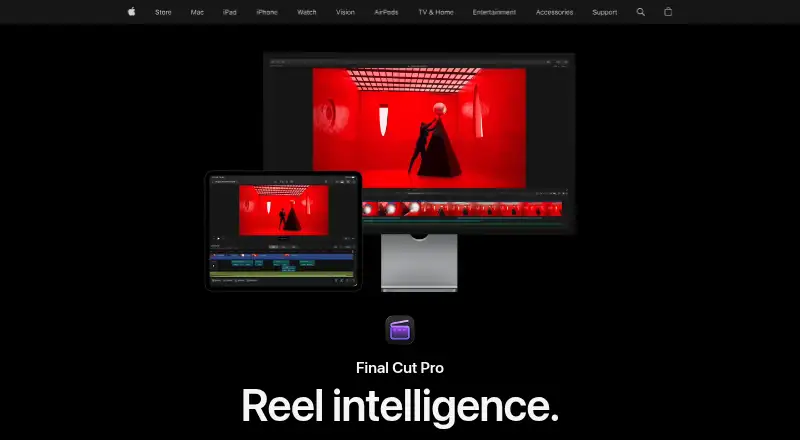
What Final Cut Pro is
Final Cut Pro is Apple’s video editing app for Mac and iPad, intended for beginning editors and professionals. It provides clip trimming, background isolation without a green screen, automatic captions from spoken audio, audio editing, color grading, titles, transitions, effects, keying, rotoscoping, and simulation tools. Magnetic Mask is among Apple’s listed intelligent features, while some Apple Creator Studio features require an Apple Intelligence-capable device. The iPad version offers touch-first controls, Apple Pencil, Live Drawing, Montage Maker, and project transfer to Mac. Mac users can import and export XML for color-grading and sound-mixing workflows, import iMovie projects, and use FxPlug plug-ins. Listed formats include ProRes, ProRes RAW, RED, XAVC, AVCHD, Avid DNxHR, Avid DNxHD, H.264, and HEVC. It supports 4K export, team collaboration, GPU rendering, and privacy controls for certain analytics.
Good
- Works on Mac and iPad
- Supports 4K export
- Automatic spoken-audio captions
- XML and broad format support
- Team collaboration included
Watch out
- No free plan
- Mac requires macOS 15.6 or later
- iPad requires iPadOS 18.6 or later
- Some premium content requires subscription
Who it suits
It suits people editing video on Mac or iPad, from beginners to professional users. Teams needing collaboration, 4K export, or Apple-device workflows may also find it suitable.
Verdict
Final Cut Pro combines detailed editing, creative tools, Apple-device workflows, and broad format support. Choose among the Mac purchase, Apple Creator Studio, or education subscription based on your access needs.
Plans and prices
From Final Cut Pro's own pricing page, checked 5 Oct 2026.
| Plan | Price | What it gives you |
|---|---|---|
| Apple Creator Studio for students and educators | $2.99 a month | Student and educator subscription · includes Final Cut Pro in Apple Creator Studio · $2.99 per month |
| Apple Creator Studio | $12.99 a month | Includes Final Cut Pro for Mac and iPad · also includes Logic Pro, Pixelmator Pro, Motion, Compressor, MainStage, and enhanced Apple productivity apps · $12.99 per month after a 30-day free trial; automatically renews until cancelled |
| Apple Creator Studio for students and educators | $29.99 a year | Student and educator subscription · includes Final Cut Pro in Apple Creator Studio · $29.99 per year |
| Apple Creator Studio | $129 a year | Includes Final Cut Pro for Mac and iPad · also includes Logic Pro, Pixelmator Pro, Motion, Compressor, MainStage, and enhanced Apple productivity apps · $129 per year after a 30-day free trial; automatically renews until cancelled |
| Final Cut Pro for Mac | $299.99, paid once | Mac app · some premium content is available only to Apple Creator Studio subscribers · One-time purchase |
The facts
Each one read from Final Cut Pro's own pages, with the date it was checked.
What it does
- 4K export
- Yeschecked 20 Sep 2026
- AI features
- Apple lists intelligent features including Magnetic Mask and automatic captions, and says some Apple Creator Studio features require an Apple Intelligence-capable device.checked 5 Oct 2026
- Audience
- Apple describes Final Cut Pro as suitable for both beginning editors and professionals.checked 5 Oct 2026
- Creative tools
- Final Cut Pro includes tools for audio editing, color grading, titles, transitions, and effects.checked 5 Oct 2026
- Editing features
- Its editing tools include clip trimming, background isolation without a green screen, and automatic caption creation from spoken audio.checked 5 Oct 2026
- Export and workflow
- The Mac app supports XML import and export for third-party workflows such as color grading and sound mixing.checked 5 Oct 2026
- Formats and plugins
- The Mac App Store listing names support for formats including ProRes, ProRes RAW, RED, XAVC, AVCHD, Avid DNxHR, Avid DNxHD, H.264, and HEVC, plus third-party FxPlug plug-ins.checked 5 Oct 2026
- Integrations
- Apple says users can import iMovie projects and use Final Cut Pro with other Apple Creator Studio apps and Apple accessories.checked 5 Oct 2026
- iPad workflow
- The iPad app supports a touch-first interface, Apple Pencil, Live Drawing, Montage Maker, and sending projects to Mac.checked 5 Oct 2026
- Managed accounts
- Apple says Apple Creator Studio subscriptions and related services are unavailable when Final Cut Pro is accessed while signed in to a Managed Apple Account.checked 5 Oct 2026
- Paid from
- 2.99checked 20 Sep 2026
- Privacy
- Apple says some Final Cut Pro analytics are associated with random identifiers rather than an Apple Account, and users can opt out of certain analytics collection in the app settings.checked 5 Oct 2026
- Purchase limit
- Apple says some premium content is available only to Apple Creator Studio subscribers, while existing one-time purchasers will continue to receive updates.checked 5 Oct 2026
- Purpose
- Final Cut Pro is a video editing app for creating polished, professional-quality videos on Mac and iPad.checked 5 Oct 2026
Where it runs
- Desktop app
- Yeschecked 20 Sep 2026
- Mobile app
- Yeschecked 20 Sep 2026
- Platforms and requirements
- Final Cut Pro is available for Mac and iPad; the Mac version requires macOS 15.6 or later, while the iPad version requires iPadOS 18.6 or later and a listed compatible iPad.checked 5 Oct 2026
- Web app
- Nochecked 20 Sep 2026
Money
- Free plan
- Nochecked 20 Sep 2026
The company
- Team collaboration
- Yeschecked 20 Sep 2026
Alternatives to Final Cut Pro
- 1

CyberLink PowerDirector
Free planAndroidiOSmacOSWindows9.0From $59.99 a year - 2

Captions
Free planAndroidiOSWebAPI9.0From $4.99 a month - 3
Vizard
Free planAndroidiOSWebAPI8.9From $29 a month - 4

InVideo AI
Free planAndroidiOSWebAPI8.9From $4 a month - 5
FlexClip
Free planAndroidiOSWebWindows8.8From $143.88 a year - 6

Simplified
Free planAndroidiOSWebAPI8.8From $19 a month