
FileToText
FileToText converts uploaded audio and video files into transcripts, with speaker labels, per-word timestamps, and synced audio playback.
What FileToText is
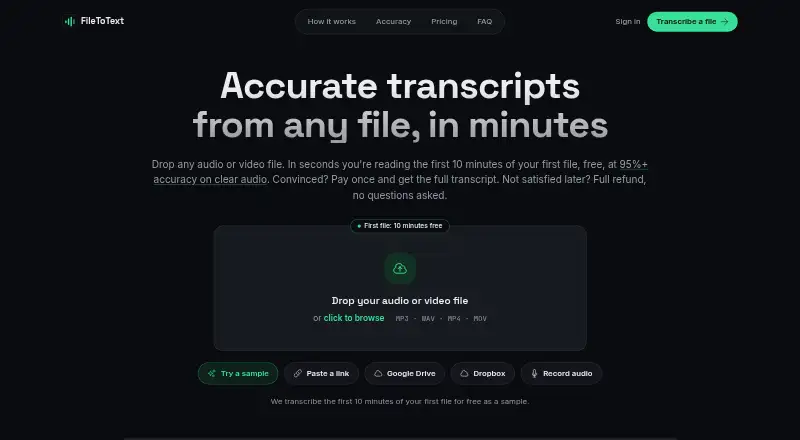
FileToText converts uploaded audio and video files into transcripts, with speaker labels, per-word timestamps, and synced audio playback. It accepts formats including MP3, WAV, M4A, AAC, OGG, FLAC, MP4, MOV, WebM, MKV, and AVI. Supported files can be up to 20 hours long, and users can select up to 10 files in one batch. Speaker tools include diarization, renaming labels, and reassignment. Exports are available as TXT, DOCX, SRT, and WebVTT. Google Drive and Dropbox are listed as input options, and subscriptions include API and MCP access. A free preview covers the first 10 minutes of the first file without requiring a credit card. Monthly plans include Basic at $10 a month for 600 minutes, Pro at $20 a month for 1,800 minutes, and Business at $50 a month for 6,000 minutes. Pay per file is a one-time $3 per file, with a 3.00 USD minimum and 12.00 USD maximum. FileToText says clear audio can reach 95%+ accuracy and offers a full refund if a transcript is unsatisfactory. Users must upload a file rather than paste a YouTube page link.
Good
- Supports files up to 20 hours long.
- Batch selection supports up to 10 files.
- Exports TXT, DOCX, SRT, and WebVTT.
- First 10 minutes of the first file are free.
- Subscriptions include API and MCP access.
Watch out
- YouTube page links cannot be pasted.
- Free preview covers only the first 10 minutes of one file.
- Paid plans have specified monthly minute allowances.
Who it suits
FileToText suits people who need transcripts from audio or video files and want speaker labeling, timestamps, or multiple export formats. It also has options for users who need API or MCP access through a subscription.
Verdict
FileToText combines speaker and timestamp tools with several export formats and a no-card preview. Choose a plan around your expected minutes, and note that YouTube links are not accepted in place of uploaded files.
Plans and prices
From FileToText's own pricing page, checked 20 Sep 2026.
| Plan | Price | What it gives you |
|---|---|---|
| Pay per file | $3 a month | $3 minimum per file · $12 maximum per file · One-time payment per file; $3 minimum and $12 maximum per file |
| Basic | $10 a month | 600 minutes included · 600 minutes · Month-to-month; cancel anytime |
| Pro | $20 a month | 1,800 minutes included · 1,800 minutes · Month-to-month; cancel anytime |
| Business | $50 a month | 6,000 minutes included · 6,000 minutes · Month-to-month; cancel anytime |
| Pay as you go | $3, paid once | $3 minimum and $12 maximum per file · billed per started audio hour |
| Free | Free | 10 minutes free on the first file |
The facts
Each one read from FileToText's own pages, with the date it was checked.
What it does
- API access
- Yeschecked 20 Sep 2026
- API and MCP access
- Subscriptions include API and MCP accesschecked 28 Sep 2026
- Available integrations
- Google Drive and Dropbox are listed as input optionschecked 28 Sep 2026
- Batch upload limit
- Up to 10 files can be selected in one batchchecked 28 Sep 2026
- Clear audio accuracy
- 95%+ accuracy on clear audiochecked 28 Sep 2026
- Credit card requirement
- No credit card is needed for the free previewchecked 28 Sep 2026
- Export formats
- TXT, DOCX, SRT, and VTT/WebVTTchecked 28 Sep 2026
- File length limit
- Files up to 20 hours long are supportedchecked 28 Sep 2026
- Included minutes
- 600checked 20 Sep 2026
- Paid from
- 10checked 20 Sep 2026
- Refund policy
- Full refund if a transcript is not satisfactorychecked 28 Sep 2026
- Sign-in options
- Users can sign in with Google, Apple, or emailchecked 28 Sep 2026
- Speaker features
- Speaker labels, diarization, renaming, and reassignment are supportedchecked 28 Sep 2026
- Speaker identification
- Yeschecked 20 Sep 2026
- Supported file types
- Audio and video formats include MP3, WAV, M4A, AAC, OGG, FLAC, MP4, MOV, WebM, MKV, and AVIchecked 28 Sep 2026
- Support response time
- Email replies are promised within one business daychecked 28 Sep 2026
- Timestamp features
- Per-word timestamps and synced audio playback are includedchecked 28 Sep 2026
- Timestamp support
- Yeschecked 20 Sep 2026
- YouTube link limitation
- Users must upload a file rather than paste a YouTube page linkchecked 28 Sep 2026
The company
- Company identity
- FileToText is a product of Supreme Ventures B.V. in Amsterdam, Netherlandschecked 28 Sep 2026
- Headquarters
- Amsterdam, Netherlandschecked 28 Sep 2026
- Team background
- The product is built by the team behind YoutubeToTextchecked 28 Sep 2026
Money
- Free plan
- Nochecked 20 Sep 2026
- Free preview limit
- The first 10 minutes of the first file are freechecked 28 Sep 2026
Alternatives to FileToText
- 1

Whisper
Free planOpen sourceAPILinuxmacOSSelf-hosted8.9$0.01 usage-based - 2

Notta
Free planAndroidiOSWebExtension8.9From $8.17 a month - 3

Rev AI
Free planAndroidiOSWebAPI8.8Free plan - 4

Superwhisper
Free planAndroidiOSAPILinux8.7From $84.99 a year - 5

Happy Scribe
Free planAndroidiOSAPImacOS8.5From $8.50 a month - 6
Express Scribe
Free planAPILinuxmacOSWindows8.2Free plan