FilesAnywhere
FilesAnywhere is a cloud service for file storage, sharing, backup, synchronization, editing, and collaboration.
What FilesAnywhere is
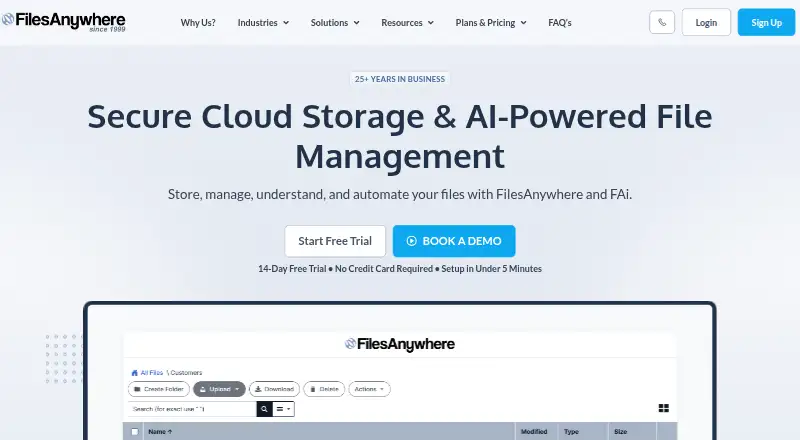
FilesAnywhere is a cloud service for file storage, sharing, backup, synchronization, editing, and collaboration. It serves consumers and organizations, with access through Android, iOS, macOS, web, and Windows; device listings also include iPhone and iPad. Business Starter is presented for small businesses with desktop, web, and mobile access. Professional adds secure storage, team collaboration, administration controls, and workflow automation. Both plans state that uploads have no file-size limit. Listed integrations include Adobe Sign, Autodesk, DocuSign, Google Docs Editor, Microsoft Online Editor, and Zoho Editor. Transfers use TLS, while business and enterprise accounts include 256-bit SSL encryption at rest. FilesAnywhere says it takes daily account snapshots and keeps point-in-time backups for 60 days. A 14-day trial is available. Business Starter requires at least two users and 100 GB; Professional requires four users and 3,000GB encrypted storage. Flex Storage Pro supports Azure and AWS storage.
Good
- Works across web, desktop, and mobile platforms
- No file-size upload limit on listed business plans
- Includes file versioning and business administration controls
- Daily snapshots and 60-day point-in-time backups
- Supports SSO options and major office integrations
Watch out
- Paid service with only a 14-day trial listed
- Business Starter requires at least two users
- Professional requires at least four users
- Several plans require custom pricing or quotes
Who it suits
It suits individuals, students, small businesses, and larger organizations needing shared files, administration, and collaboration. Teams can choose plans based on user minimums and storage arrangements.
Verdict
FilesAnywhere combines broad platform access with business sharing, administration, integrations, and backup features. Its plan minimums and storage requirements matter when selecting an option for a team.
Plans and prices
From FilesAnywhere's own pricing page, checked 11 Oct 2026.
| Plan | Price | What it gives you |
|---|---|---|
| Business Starter | — | Min. of 2 users · 100 GB storage · easy sharing and file/folder uploads · per user/month; monthly starting price shown |
| Professional | — | Min. of 4 users · 3000GB encrypted storage · no file size upload limit · MFA and SSO · per user/month; monthly starting price shown |
| Flex Storage Pro | — | 15 user min./Custom Plans · as much storage as needed · Azure, AWS storage · full on-premise available · per user/month; plan starts at $149.85 per month |
| Managed Enterprise | — | Minimum 10 users · Custom enterprise options |
| Enterprise | Priced on request | Designed for larger teams · hosted, customer-managed storage, or hybrid deployment · Contact Sales for custom pricing and deployment options |
The facts
Each one read from FilesAnywhere's own pages, with the date it was checked.
What it does
- Backups
- FilesAnywhere says it takes daily account snapshots and stores point-in-time backups for 60 days.checked 11 Oct 2026
- Business admin controls
- Yeschecked 22 Sep 2026
- Encryption
- The security page states that transfers use TLS and business and enterprise accounts include 256-bit SSL encryption at rest.checked 11 Oct 2026
- Enterprise support
- Enterprise subscriptions include priority support and onboarding assistance, with migration help and user training among available services.checked 11 Oct 2026
- File size
- Business Starter and Professional pages state that users can upload files without a file size limit.checked 11 Oct 2026
- File versioning
- Yeschecked 22 Sep 2026
- Identity
- SSO options listed include ADFS, Azure AD, generic SAML 2.0, LDAP, PingIdentity, OneLogin, IBM Cloud, and WatchGuard.checked 11 Oct 2026
- Integrations
- Listed integrations include Adobe Sign, Autodesk, DocuSign, Google Docs Editor, Microsoft Online Editor, and Zoho Editor.checked 11 Oct 2026
- Intended customers
- The maker describes FilesAnywhere as serving consumers and corporations, from personal users and students to small businesses and Fortune 500 companies.checked 11 Oct 2026
- Product
- FilesAnywhere provides cloud file storage, file sharing, backup, synchronization, editing, and collaboration.checked 11 Oct 2026
- Professional features
- Professional includes secure storage, file sharing, team collaboration, administration controls, and workflow automation.checked 11 Oct 2026
- Security and compliance
- The maker lists a SOC-2 certified data center and compliance entries including HIPAA, FINRA, PCI, FISMA, HITRUST, and ISO27001.checked 11 Oct 2026
- Starter use
- Business Starter is presented for small businesses and includes access from desktop, web, and mobile.checked 11 Oct 2026
- Storage integrations
- Flex Storage Pro supports Azure Blob Storage, Azure Data Lake, Azure Government, AWS S3 Storage, and AWS Government.checked 11 Oct 2026
- Storage limit
- 100checked 22 Sep 2026
The company
- Company history
- The About page says FilesAnywhere began on July 4, 1999, as a creation of Dallas-based software design and consulting firm Officeware Systems.checked 11 Oct 2026
- Founded
- 1999checked 28 Sep 2026
- Headquarters
- Flower Mound, Texas, USAchecked 28 Sep 2026
Where it runs
- Device platforms
- Windows,Mac,iPhone,iPad,Androidchecked 22 Sep 2026
Alternatives to FilesAnywhere
- 1

Internxt Drive
Free planOpen sourceAndroidiOSWebAPI8.6Free plan - 2

Seafile
Free planOpen sourceAndroidiOSWebAPI8.6Free plan - 3
Box
Free planAndroidiOSWebAPI8.3From $5 a month - 4
Google Drive
Free planAndroidiOSmacOSWindows8.2Free plan - 5

MEGA
Free planAndroidiOSWebAPI8.2Free plan - 6
Microsoft OneDrive
Free planAndroidiOSmacOSWindows8.0From $1.99 a month