Filera
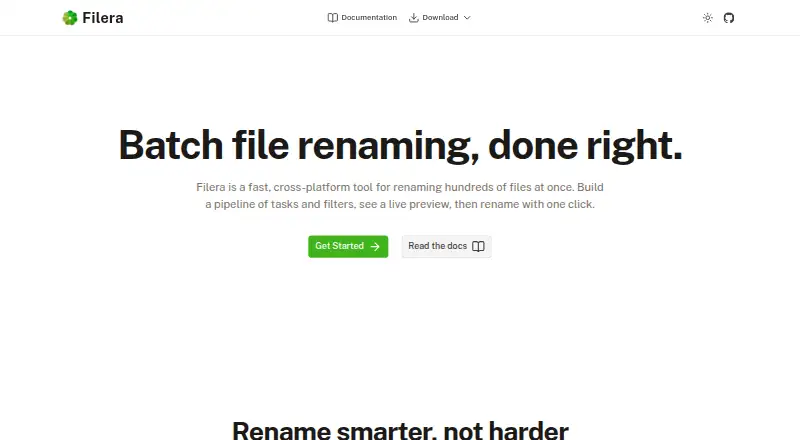
Filera is a free batch file renaming tool for Linux, macOS, and Windows, designed to process hundreds of files through a visual task pipeline.
What Filera is
Filera is a free batch file renaming tool for Linux, macOS, and Windows, designed to process hundreds of files through a visual task pipeline. Rename tasks include find and replace, number sequences, dates, custom text, and case conversion, without requiring scripting or regex. A live preview places current and proposed filenames side by side, and nothing changes on disk until you apply the rename. Filters can target files by name, type, date range, or size; filtered files are skipped. Filera can traverse directory trees and subfolders in one pass. Renamed files can be changed in place, copied to another directory, or moved. The tool supports metadata-based renaming, but not regex renaming, folder renaming, or undoing changes. It is built with Tauri and Rust and is MIT licensed. Linux installation instructions include .deb packages for Debian and Ubuntu and .rpm packages for Fedora and RHEL. The Windows installer is not yet code-signed, so Windows Defender SmartScreen may display a warning.
Good
- Free and MIT licensed.
- Preview shows old and proposed names before applying.
- Filters target name, type, date range, or size.
- Can traverse subfolders in one pass.
- Offers in-place, copy, and move output modes.
Watch out
- Does not support regex renaming.
- Cannot rename folders or undo changes.
- Windows installer is not yet code-signed.
Who it suits
Filera suits people who need to rename many files at once using visual steps rather than scripting. Its filters and recursive folder processing can help when working with selected files across a directory tree.
Verdict
Filera provides a visual way to batch-rename files, with previews, filters, and several output modes. Windows users should be aware that SmartScreen may warn about its unsigned installer.
Plans and prices
From Filera's own pricing page, checked 7 Oct 2026.
| Plan | Price | What it gives you |
|---|---|---|
| Free | Free | Download for free · MIT License |
The facts
Each one read from Filera's own pages, with the date it was checked.
What it does
- Build from source
- The docs say users can build Filera from source and list Rust, Node.js v18 or higher, and platform Tauri dependencies as requirements.checked 7 Oct 2026
- Filters
- Users can target files by name, file type, date range, or size; filtered files are skipped during renaming.checked 7 Oct 2026
- Interface
- The app uses a visual pipeline and says no scripting or regex is required.checked 7 Oct 2026
- License
- The homepage identifies Filera as MIT licensed.checked 7 Oct 2026
- Live preview
- The app shows old and new filenames side by side, and nothing changes on disk until the user applies the rename.checked 7 Oct 2026
- Output modes
- Users can rename files in place, copy renamed files to another directory, or move them.checked 7 Oct 2026
- Purpose
- Filera is a batch file renaming tool for renaming hundreds of files at once.checked 7 Oct 2026
- Recursive folders
- Filera can open directory trees and walk subfolders to process files in one pass.checked 7 Oct 2026
- Rename tasks
- Its task pipeline includes find and replace, number sequences, dates, custom text, case conversion, and more.checked 7 Oct 2026
- Technology
- Filera is built with Tauri and Rust.checked 7 Oct 2026
Where it runs
- Linux packages
- Installation instructions list .deb packages for Debian/Ubuntu and .rpm packages for Fedora/RHEL.checked 7 Oct 2026
- Platforms
- Pre-built binaries are available for Windows, macOS, and Linux; the macOS binary supports Apple Silicon and Intel.checked 7 Oct 2026
- Windows installer
- The Windows installer is not yet code-signed, and Windows Defender SmartScreen may show a warning.checked 7 Oct 2026
The full review of Filera
Overview
Filera is a desktop batch-renaming app for Linux, macOS and Windows. It suits people who need to apply several common filename changes across a folder tree without scripting. Its visual workflow and preview reduce guesswork, but the lack of undo makes a careful final check essential.
Key features
Filera arranges rename operations in a visual pipeline, including find and replace, number sequences, dates, custom text and case conversion. That is a useful approach for repeatable cleanup jobs: users can combine steps in one workflow instead of editing files individually. The no-scripting, no-regex design favors common transformations over workflows that depend on regular expressions.
A side-by-side view shows each old filename and its proposed replacement. Nothing changes on disk until the user applies the batch, giving them a chance to catch mistakes before committing. That safeguard matters, but it is not a recovery feature: Filera has no undo, so a mistaken rename can leave users without an in-app way to reverse it.
Filters can select files by name, type, date range or size; files that do not meet the filters are skipped. Filera can also traverse subfolders, making it more useful for batches spread through a directory tree. It can rename files in place, copy renamed files to another directory or move them there. Those output choices help separate a reorganization from the originals, although Filera cannot rename folders themselves.
Metadata-based renaming is supported, extending the tool beyond changes based only on visible filename text. Filera is built with Tauri and Rust, and its homepage identifies the software as MIT licensed.
Pricing
Filera is free: the Free plan costs nothing and is offered under the MIT License. There is no free trial because the product is free. That makes it a straightforward fit for individual users who want a desktop renamer without a subscription or paid tier; there is no stated free-plan quota or seat count to weigh.
Platforms
Filera runs on Linux, macOS and Windows. Linux installation instructions cover .deb packages for Debian and Ubuntu and .rpm packages for Fedora and RHEL. Users who prefer to compile it can build from source, provided they have Rust, Node.js v18 or higher and the platform's Tauri dependencies.
The Windows installer is not code-signed, so Windows Defender SmartScreen may display a warning. That is a practical installation hurdle for users who expect a signed installer, even though Windows is a supported platform.
Who it's for
Filera is best for desktop users who need to rename batches of files with a sequence of standard operations, want to preview changes first and value the ability to filter or process nested folders. It is less suitable for anyone who needs folder renaming, regex-based rules or an undo function to recover from an applied mistake.
Pros and cons
Pros
- Preview before applying: Old and new filenames appear side by side, while files stay unchanged until the user commits.
- Useful batch controls: Filters, subfolder traversal and several output modes help handle targeted jobs across directory trees.
- Free and MIT licensed: The desktop app has no paid tier or trial-to-paid decision.
- Cross-platform: Linux, macOS and Windows support gives it a place in mixed desktop environments.
Cons
- No undo: Users need to review the preview carefully because Filera cannot reverse an applied rename.
- No folder renaming or regex: Its scope is file names and visual pipeline tasks, not folder-name changes or regex workflows.
- Windows SmartScreen warning: The unsigned installer may prompt a warning during installation.
Alternatives
For a broader comparison, see File Renaming Software.
reNamerX is another free, MIT-licensed desktop batch renamer for Linux, macOS and Windows; it may suit readers comparing cross-platform free tools.
Renamer.ai is worth considering if a monthly allowance and Magic Folders are a better fit: its Starter plan is free with 25 renames per month, while Pro costs $9.95 a month.
Nomina, PBRenamer and Bulk Renamer are also free alternatives for readers comparing desktop renamers across Linux, macOS and Windows. PBRenamer uses GPL-3.0; Bulk Renamer is MIT licensed and has no account requirement.
Bulk Rename Utility is an option for Windows users willing to compare paid tiers, while Ant Renamer is a free Windows program with source code available.
ReNamer may fit non-commercial Windows users who can work within its free Lite limits of five renaming rules and five presets.
Verdict
Choose Filera if you want a free, cross-platform desktop tool for previewing and applying multi-step file renames across filtered batches and nested folders. Its strongest case is the combination of visual control and flexible output modes; look elsewhere if you need folder renaming, regex or a way to undo an applied batch.
Getting started
- Open the Filera website
- Choose the package for Linux, macOS, or Windows
- On Linux, use the .deb or .rpm package matching your distribution
- Install and open Filera
- Build a visual rename pipeline and review the preview
- Apply the rename, copy, or move operation
Limits worth knowing
The free plan is the complete listed offering at 0.00 USD. Filera has no regex renaming, folder renaming, or undo capability.
Questions
How much does Filera cost?
Filera is free, with a listed Free plan priced at 0.00 USD.
Which platforms does Filera support?
Filera supports Linux, macOS, and Windows.
Does Filera require scripting or regex?
Its visual pipeline is designed without scripting or regex, and regex renaming is not supported.
Can Filera preview changes before renaming?
Yes. It shows old and proposed filenames side by side and leaves files unchanged until you apply the operation.
Is Filera open source?
The homepage identifies Filera as MIT licensed.
Alternatives to Filera
- 1
Renamer.ai
Free planWebAPImacOSWindows7.6From $9.95 a month - 2
Avidemux
Free planOpen sourceWebLinuxmacOSWindows7.3Free plan - 3
Easy File Renamer
WebmacOSWindows7.2 - 4

Batch File Renamer
Free planOpen sourceWebSelf-hosted7.0Free plan - 5

Bulk Rename Utility
Free planWindows6.9Free plan - 6
Advanced Renamer
Free planAPImacOSWindows6.8Free plan