Nomina
Nomina is a free desktop app for renaming files and folders in batches, with a live preview and a flexible rules system.
What Nomina is
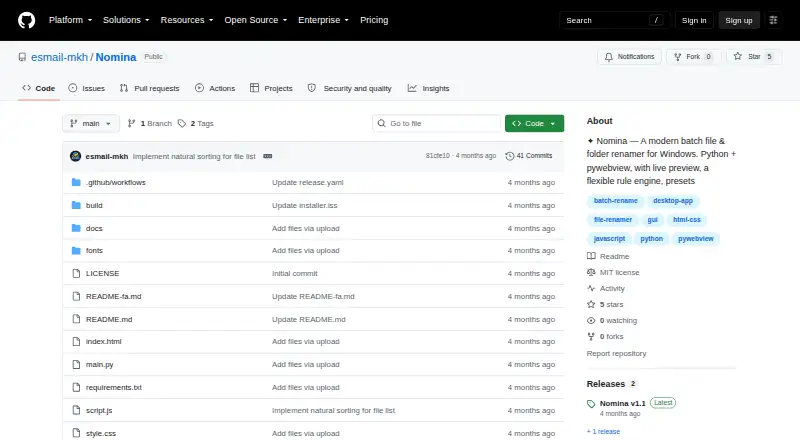
Nomina is a free desktop app for renaming files and folders in batches, with a live preview and a flexible rules system. Rules can add prefixes or suffixes, replace text with optional regular expressions, remove or slice name sections, change case, number items and alter extensions. The app scans folders recursively, filters results, accepts drag-and-drop items and can load paths from the clipboard. Before a rename is committed, it flags invalid characters, name conflicts and reserved names; the last batch can be undone. Users can save, import and export rule presets as JSON files, and optionally clean metadata during renaming. The interface has English and Persian language support, including right-to-left layout, plus dark and light themes. The README describes the app as having no telemetry. Prebuilt downloads are listed for Windows x64, Linux x64 and ARM64, and macOS Apple Silicon; the macOS build is stated to run on Intel through Rosetta 2. Running from source requires Python 3.10 or newer. Listed desktop requirements specify Windows 10/11, Linux with GTK 3 and WebKit2GTK 4.1, or macOS 11 or newer.
Good
- Preview changes before committing a rename.
- Supports regex replacement and many other rule types.
- Can undo the last rename batch.
- Preset rules can be saved as JSON.
- README describes no telemetry.
Watch out
- Listed macOS downloads target Apple Silicon.
- Intel Macs rely on Rosetta 2.
- Running from source requires Python 3.10 or newer.
Who it suits
Nomina suits people who need repeatable bulk renaming rules and want to inspect changes before applying them. It is available for Windows, Linux and macOS, with language options including Persian right-to-left layout.
Verdict
Nomina brings batch renaming, rule presets and safety checks into a free desktop app. Its preview and undo features help keep changes controlled, while platform requirements vary by operating system.
Plans and prices
From Nomina's own pricing page, checked 30 Sep 2026.
| Plan | Price | What it gives you |
|---|---|---|
| Nomina | Free | No paid plans or usage limits are stated |
The facts
Each one read from Nomina's own pages, with the date it was checked.
What it does
- Developer
- The README identifies the developer as E.MKH, a Python developer.checked 30 Sep 2026
- Download integrity
- The README says every release includes a SHA256SUMS.txt file for verifying downloads.checked 30 Sep 2026
- Downloads
- Prebuilt downloads are listed for Windows x64, Linux x64 and ARM64, and macOS Apple Silicon; the macOS build is stated to run on Intel via Rosetta 2.checked 30 Sep 2026
- Integrations
- The README lists no third-party service integrations; it describes importing and exporting presets through JSON files.checked 30 Sep 2026
- Languages
- The interface supports English and Persian, including right-to-left layout.checked 30 Sep 2026
- License
- The repository identifies the project as MIT licensed.checked 30 Sep 2026
- Other features
- The app supports recursive folder scanning, filtering, drag and drop, clipboard path loading, dark and light themes, and optional metadata cleanup when renaming.checked 30 Sep 2026
- Presets
- Users can save, import, and export rule presets as JSON files.checked 30 Sep 2026
- Privacy
- The README describes Nomina as having no telemetry.checked 30 Sep 2026
- Purpose
- Nomina is a desktop app for renaming files and folders in bulk, with a live preview and flexible rule engine.checked 30 Sep 2026
- Requirements
- Running from source requires Python 3.10+; the listed desktop requirements are Windows 10/11, Linux with GTK 3 and WebKit2GTK 4.1, or macOS 11+.checked 30 Sep 2026
- Rule engine
- Rename rules include prefix, suffix, replace with optional regex, remove, slice, case transformations, numbering, and extension changes.checked 30 Sep 2026
- Safe preview
- The README says files are not renamed until the user commits the rename, allowing a preview first.checked 30 Sep 2026
- Validation and undo
- The app detects invalid characters, name conflicts, and reserved names, and can undo the last rename batch.checked 30 Sep 2026
The full review of Nomina
Overview
Nomina is a free desktop utility for renaming files and folders in batches. It is best suited to people who want configurable, local renaming across Windows, Linux and macOS; its preview and validation make complex batches more controlled, but it is not a web or API-based workflow.
Key features
Its rule engine handles prefixes, suffixes, text replacement with optional regex, removal, slicing, case conversion, numbering and extension changes. That range suits both routine cleanup and pattern-driven edits without charging for advanced rules. Recursive scanning, filters, drag and drop, and clipboard path loading help gather items from nested folders or existing paths.
Proposed names appear in a preview, and files are not changed until the rename is committed. Nomina also detects invalid characters, name conflicts and reserved names, then lets users undo the last batch. These safeguards are valuable when a small rule error could affect many files, though undo covers only the most recent batch.
Rule presets can be saved, imported and exported as JSON, making repeat jobs easier to reproduce or share. Optional metadata cleanup can accompany renaming. English and Persian interfaces, including right-to-left layout, and dark and light themes add flexibility without changing the core workflow. The README describes Nomina as having no telemetry.
Pricing
Nomina costs nothing. The free plan has no stated usage limits, and there are no paid plans or free trial. That makes it a straightforward fit for occasional personal batches as well as repeat work, with no paid tier to unlock a larger quota. It is MIT licensed.
Platforms
Nomina runs on Windows 10/11, Linux with GTK 3 and WebKit2GTK 4.1, and macOS 11 or later. Prebuilt downloads cover Windows x64, Linux x64 and ARM64, and Apple Silicon Macs; the macOS build can also run on Intel through Rosetta 2. Running from source requires Python 3.10 or later. Releases include a SHA256SUMS.txt file for download verification.
The interface supports English and Persian. Nomina has no listed third-party service integrations; presets move through JSON files instead.
Who it's for
Choose Nomina if you need a desktop batch renamer with regex-capable rules, folder support, reusable presets and a preview before committing changes. Its cross-platform builds are useful for mixed-device households or teams, while the absence of telemetry may appeal to people who prefer a local tool. Look elsewhere if the workflow depends on a web or API service, metadata-based renaming, or undoing more than the latest batch.
Pros and cons
- Pros: Broad rename rules, including optional regex replacement, are available in the free plan.
- Pros: Preview, conflict checks and last-batch undo provide concrete safeguards for bulk changes.
- Pros: JSON presets and recursive scanning support repeatable work across folders.
- Cons: Undo is limited to the most recent rename batch.
- Cons: Metadata-based renaming is not supported, despite optional metadata cleanup.
- Cons: Linux requires GTK 3 and WebKit2GTK 4.1, so platform coverage still carries setup requirements.
Alternatives
Compare file renaming software if you want to weigh more tools in the category. For another free, MIT-licensed desktop batch renamer across Linux, macOS and Windows, consider reNamerX. PBRenamer is another free cross-platform option with no paid tiers or stated usage limits. Bulk Renamer is also free and cross-platform, and specifies no account, trial or watermark.
Windows-only users can consider Ant Renamer, a free Windows program with source code available. ReNamer may suit non-commercial Windows use when a five-rule and five-preset cap is enough; its Pro plan is $29.95, paid once. Mac users on macOS 14 or later can choose Transnomino, a free batch rename utility. Advanced Renamer offers a free tier capped at 10,000 files and five methods per batch, while its Personal plan has custom pricing and removes those caps.
Renamer.ai is the better fit for someone seeking desktop apps plus web and API availability: its free Starter plan allows 25 renames per month and includes Batch rename and Magic Folders, while Pro costs $9.95 a month.
Verdict
Nomina is an easy recommendation for people who want a capable, free desktop batch renamer with reusable rules and practical safeguards across major operating systems. Its strongest reason to choose it is that flexibility comes without a stated quota or subscription. Choose another tool if you need metadata-based naming, web or API access, or broader recovery than undoing the latest batch.
Alternatives to Nomina
- 1
Renamer.ai
Free planWebAPImacOSWindows7.6From $9.95 a month - 2
Avidemux
Free planOpen sourceWebLinuxmacOSWindows7.3Free plan - 3
Easy File Renamer
WebmacOSWindows7.2 - 4

Batch File Renamer
Free planOpen sourceWebSelf-hosted7.0Free plan - 5

Bulk Rename Utility
Free planWindows6.9Free plan - 6
Advanced Renamer
Free planAPImacOSWindows6.8Free plan