PBRenamer
PBRenamer is a free graphical utility for renaming batches of files on Linux, macOS and Windows.
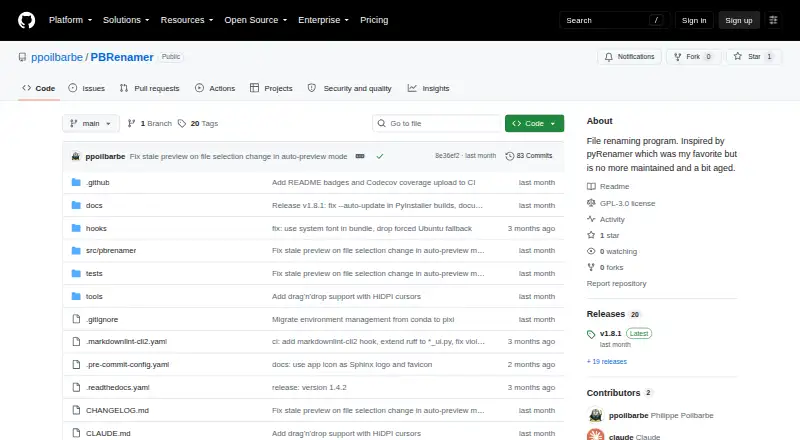
What PBRenamer is
PBRenamer is a free graphical utility for renaming batches of files on Linux, macOS and Windows. It can apply search-and-replace patterns, text substitutions, counters, dates and parent-folder names; replacement patterns can also use image EXIF/IPTC, audio tags and video metadata. A live preview shows proposed names and flags collisions, and the Rename action stays disabled until conflicts are cleared. Other tools include recursive traversal, extension handling, sidecar groups, drag and drop, saved presets and undo for the last batch. For terminal workflows, headless mode can preview and confirm a rename, or print equivalent mv commands as a dry run. Standalone builds are listed for Linux x86-64, Windows x86-64 and Apple Silicon macOS. Source installation requires Python 3.12 or later and PySide6 6.6 or later. PBRenamer is distributed under GPL version 3 and includes English, German, Spanish, French, Italian, Russian, Vietnamese and Chinese, with more languages addable through gettext files.
Good
- Live preview flags name collisions before renaming.
- Rules can use image, audio and video metadata.
- Undo is available for the last rename batch.
- Runs on Linux, macOS and Windows.
- Free software under GPL version 3.
Watch out
- Source installation requires Python 3.12 or later.
- Source installation requires PySide6 6.6 or later.
Who it suits
PBRenamer suits people who need to rename files in batches and want previews before committing changes. Its graphical interface, terminal mode and metadata-based patterns support different renaming workflows.
Verdict
PBRenamer provides flexible batch rules with previews and conflict checks, plus terminal options for headless use. It is free and available for Linux, Windows and Apple Silicon macOS builds.
Plans and prices
From PBRenamer's own pricing page, checked 30 Sep 2026.
| Plan | Price | What it gives you |
|---|---|---|
| PBRenamer | Free | GPL-3.0 software · no paid tiers or usage limits stated |
The facts
Each one read from PBRenamer's own pages, with the date it was checked.
What it does
- Audience
- The project describes itself as a cross-platform graphical batch file renamer inspired by pyRenamer.checked 30 Sep 2026
- Batch tools
- It supports recursive traversal, extension handling, sidecar groups, drag and drop, saved presets, and undo for the last rename batch.checked 30 Sep 2026
- Command line
- Headless mode can rename from the terminal, preview and confirm, or print equivalent mv commands with dry run.checked 30 Sep 2026
- Downloads
- The README lists standalone Linux x86-64, Windows x86-64, and Apple Silicon macOS builds, available from GitHub releases.checked 30 Sep 2026
- Integrations
- The README documents metadata support through Pillow, mutagen, and pymediainfo and drag and drop with external applications; it does not list service integrations.checked 30 Sep 2026
- Languages
- The app includes English, German, Spanish, French, Italian, Russian, Vietnamese, and Chinese, with additional languages addable through gettext files.checked 30 Sep 2026
- License
- PBRenamer is free software distributed under the GNU General Public License version 3.checked 30 Sep 2026
- Metadata
- Replacement patterns can use image EXIF/IPTC, audio tags, and video metadata.checked 30 Sep 2026
- Preview and conflicts
- It previews renamed entries live, highlights collisions, and disables Rename until conflicts are resolved.checked 30 Sep 2026
- Purpose
- PBRenamer is a graphical utility for batch renaming files, including hundreds at once.checked 30 Sep 2026
- Rename rules
- Rules include pattern search and replace, text substitutions, counters, dates, and parent-folder names.checked 30 Sep 2026
- Security
- The opened project page does not state security certifications or compliance claims.checked 30 Sep 2026
- Source installation
- The README gives Python 3.12 or later and PySide6 6.6 or later as requirements and documents installation from PyPI or source.checked 30 Sep 2026
The full review of PBRenamer
Overview
PBRenamer is a batch file-renaming utility for people who need to apply consistent rules across large groups of files, whether through a desktop interface or a terminal. Its standout advantage is control before commitment: proposed names are previewed, and collisions must be fixed before a rename can proceed.
It is a strong fit for users who want flexible, media-aware rules without a paid tier. Those seeking a broader file-management suite or a specific service integration should look elsewhere.
For more options, browse File Renaming Software. PBRenamer is GPL-3.0 software, and its project cites pyRenamer as an inspiration.
Key features
Rules cover search and replace, text substitutions, counters, dates, and parent-folder names. Replacement patterns can draw on image EXIF/IPTC data, audio tags, and video metadata, which is useful for organizing media by embedded information rather than filenames alone. The range suits varied naming schemes, though users who only need a simple one-off rename may not need this breadth.
For larger jobs, recursive traversal, extension handling, and sidecar-group support help keep related files together. Drag and drop simplifies adding files, saved presets let users reuse rule sets, and undo is available for the last rename batch. The live preview and collision warnings are meaningful safeguards: the app prevents a batch from proceeding while name conflicts remain.
Headless mode extends the same workflow to terminal use. It can preview and confirm a rename, or print equivalent mv commands as a dry run, making it a practical option for scripted or keyboard-oriented workflows without requiring the graphical interface.
Pricing
PBRenamer costs nothing under the PBRenamer plan. It is free software under GPL-3.0, with no paid tiers or stated usage limits. There is no free trial because no paid plan is offered. That makes it suitable for both occasional batches and larger recurring jobs without a subscription or per-batch cap stated; the trade-off is that there is no paid tier to turn to for a different licensing arrangement or service package.
Platforms
PBRenamer supports Linux, Windows, and macOS. Standalone downloads are provided for Linux x86-64, Windows x86-64, and Apple Silicon macOS. Installing from PyPI or source requires Python 3.12 or later and PySide6 6.6 or later, so users outside the listed standalone builds may need to meet those dependencies themselves.
The interface includes English, German, Spanish, French, Italian, Russian, Vietnamese, and Chinese; additional languages can be added through gettext files. The project documents metadata support through Pillow, mutagen, and pymediainfo, and drag and drop with external applications, but no service integrations.
Who it's for
PBRenamer is best for people who regularly organize mixed file collections, especially media libraries where tags or embedded image metadata can inform filenames. Its presets, recursive processing, and batch undo also suit repeat workflows where consistency and a way back matter. Terminal users can choose headless preview and dry-run commands.
It is less compelling for someone who needs a platform beyond Linux, Windows, or Apple Silicon macOS standalone builds, or who is looking for documented service integrations or security certifications.
Pros and cons
- Metadata-aware rules: EXIF/IPTC, audio tags, and video metadata can shape replacement patterns, giving media organizers more than basic text-based renaming.
- Collision checks before changes: the live preview flags conflicts and disables Rename until they are resolved, reducing the chance of applying a batch with duplicate destinations.
- Flexible batch workflow: recursion, sidecar groups, presets, drag and drop, and undo cover useful stages from selection to recovery.
- Terminal mode: preview, confirmation, and dry-run mv output help users who want to work without the GUI.
- Build coverage has a boundary: standalone downloads target Linux and Windows x86-64 and Apple Silicon macOS; source or PyPI installation requires the documented Python and PySide6 versions.
- No stated service integrations or security certifications: it is a focused renaming utility, not a documented connected or compliance-oriented platform.
Alternatives
Choose Advanced Renamer if you use macOS or Windows and prefer a freemium tool with a stated free allowance of 10,000 files and five methods per batch; its Personal plan has unlimited files and methods per batch, with price not listed.
Nomina is another free option for Linux, macOS, and Windows, with no paid plans or usage limits stated.
For Mac-only use, Transnomino is a free batch renamer; version 10.1.0 requires macOS 14 or later.
Pick ReNamer if you need a Windows tool with a non-commercial free Lite version capped at five rules and five presets, or a Pro license at $29.95, paid once.
RenameKit offers a three-day full-feature trial across Linux, macOS, and Windows, followed by a 20-item batch limit on its 9.99 USD one-time Lifetime License; choose it if that trial-and-license arrangement suits your workflow.
Ant Renamer is a free Windows program with source code available.
For a Windows-only option, Bulk Rename Utility offers Home / Academic at $24.95 a month for one computer and Commercial at $92.95 a month for one computer; its commercial volume plan for two to five computers is $63.95 a month.
reNamerX is a free, MIT-licensed desktop batch-renaming tool for Linux, macOS, and Windows.
Verdict
PBRenamer is an easy recommendation for users who want a capable, free batch renamer with media metadata rules, safeguards against name collisions, and both GUI and terminal workflows. Look elsewhere if your platform falls outside its supported builds or you need service integrations or a compliance-focused product.
Alternatives to PBRenamer
- 1
Renamer.ai
Free planWebAPImacOSWindows7.6From $9.95 a month - 2
Avidemux
Free planOpen sourceWebLinuxmacOSWindows7.3Free plan - 3
Easy File Renamer
WebmacOSWindows7.2 - 4

Batch File Renamer
Free planOpen sourceWebSelf-hosted7.0Free plan - 5

Bulk Rename Utility
Free planWindows6.9Free plan - 6

Advanced Renamer
Free planAPImacOSWindows6.8Free plan