reNamerX
reNamerX is a desktop application for batch file renaming on Linux, macOS, and Windows.
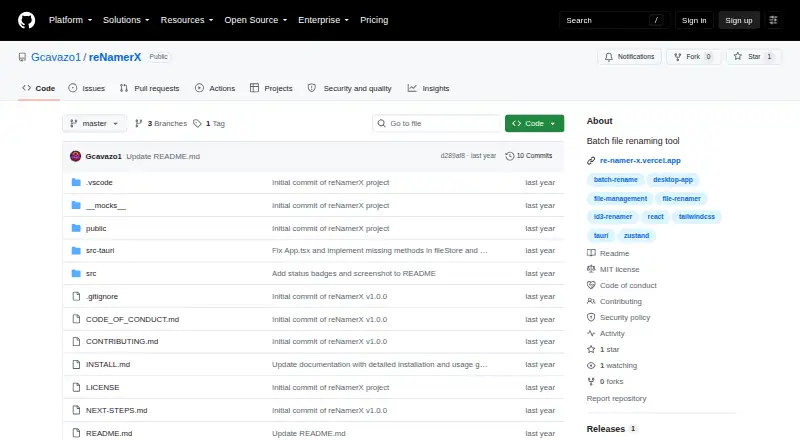
What reNamerX is
reNamerX is a desktop application for batch file renaming on Linux, macOS, and Windows. It applies consistent rules to groups of files, including text operations, case changes, and sequential numbering, and can process hundreds of files. A live preview shows proposed names before changes are made. For more complex renaming, it supports regular expressions, date and time insertion, metadata such as creation date and size, and reusable rule presets. Users can select individual files or all files in a directory. Rename operations can be undone with Ctrl+Z, and the app also offers redo. The interface supports dark and cyberpunk themes. It is free and distributed under the MIT License. The repository provides Windows MSI and EXE installer options. Windows installation requires Windows 10 or newer, a 64-bit system, at least 50MB of free disk space, and 4GB of recommended RAM.
Good
- Live preview shows proposed filenames before changes.
- Supports regular expressions, metadata, and reusable presets.
- Undo and redo are available.
- Free and distributed under the MIT License.
Watch out
- Windows requires Windows 10 or newer.
- Windows needs a 64-bit system.
- Windows installation requires at least 50MB of disk space.
Who it suits
reNamerX suits people who need to apply repeatable naming rules to many files across desktop platforms. Its preview and undo features may be useful to anyone who wants to review changes before applying them.
Verdict
reNamerX provides batch rules, a preview, and recovery controls for desktop file renaming. Windows users should check the stated system requirements before installing.
Plans and prices
From reNamerX's own pricing page, checked 2 Oct 2026.
| Plan | Price | What it gives you |
|---|---|---|
| Free | Free | MIT-licensed desktop batch file renaming tool |
The facts
Each one read from reNamerX's own pages, with the date it was checked.
What it does
- Advanced rules
- The user guide documents regular expressions, date and time insertion, and reusable rule presets.checked 1 Oct 2026
- Batch processing
- It can rename hundreds of files at once using customizable patterns and rules.checked 2 Oct 2026
- Download
- The repository README provides Windows MSI and EXE installer options.checked 2 Oct 2026
- File selection
- Users can select individual files with Browse Files or all files in a directory with Browse Folder.checked 1 Oct 2026
- Integrations
- The repository says the app is built with Tauri, React, and TailwindCSS and uses Zustand for state management.checked 2 Oct 2026
- Interface
- The product site lists drag-and-drop file handling, dark mode, and keyboard shortcuts.checked 2 Oct 2026
- License
- The project is licensed under the MIT License.checked 2 Oct 2026
- Metadata
- The product site says files can be renamed using metadata such as creation date and size.checked 2 Oct 2026
- Preview
- A live preview shows how files will be renamed before changes are applied.checked 1 Oct 2026
- Preview and recovery
- It offers a live preview before applying changes and an undo/redo system.checked 2 Oct 2026
- Purpose
- reNamerX is a desktop application for batch file renaming.checked 2 Oct 2026
- Regular expressions
- The product site says it supports regular expressions for complex renaming scenarios.checked 2 Oct 2026
- Release
- The GitHub releases page lists v1.0.0 as the initial release.checked 2 Oct 2026
- Renaming rules
- The project describes text operations, case transformation, and sequential numbering as renaming rules.checked 2 Oct 2026
- Security
- The repository links a security policy, but the page opened did not provide specific security or compliance claims.checked 2 Oct 2026
- Source build
- Building from source requires Node.js 16 or newer, npm or yarn, Rust and Cargo, and Git.checked 1 Oct 2026
- Support
- The product site links to documentation, contact, and GitHub issue reporting.checked 2 Oct 2026
- Technology
- The project is built with Tauri, React, and TailwindCSS and uses Zustand for state management.checked 1 Oct 2026
- Undo
- Batch rename operations can be undone with Ctrl+Z.checked 1 Oct 2026
The company
- Maker
- The repository identifies Gabriel Cavazos (GigaCode) as the developer.checked 1 Oct 2026
Where it runs
- Platforms
- The product site lists Windows, macOS, and Linux availability, while the repository README says macOS and Linux are coming soon.checked 2 Oct 2026
- Windows requirements
- Windows installation requires Windows 10 or newer, a 64-bit operating system, at least 50MB of free disk space, and 4GB of recommended RAM.checked 1 Oct 2026
The full review of reNamerX
Overview
reNamerX is a free desktop utility for applying consistent naming changes across batches of files. It is best suited to people who need flexible rules on Linux, macOS, or Windows without paying for a renaming tool. Its live preview and undo controls help keep batch changes deliberate, though it does not rename folders themselves.
Key features
Basic rules cover text operations, case changes, and sequential numbering, while regular expressions extend the app to more complex transformations. It can also use file metadata such as creation date and size, with date and time insertion documented in the user guide. That range should cover both routine cleanup and more tailored naming schemes.
Before applying a rule, a live preview shows the resulting filenames; after a batch operation, Ctrl+Z can undo the change, and the app also offers redo. These safeguards matter when a rule affects hundreds of files. Users can pick individual items with Browse Files or select files in a directory with Browse Folder, but directory selection is not the same as folder renaming: reNamerX does not rename folders.
Reusable rule presets help when the same naming pattern returns regularly. The interface supports dark and cyberpunk themes, a choice of presentation rather than a change to what the rules can do.
Pricing
reNamerX is free: the Free plan costs nothing and is distributed under the MIT License. There are no paid plans to weigh against the free offering in the stated pricing model, making it a straightforward option for users who want desktop batch renaming without a software charge.
Platforms
reNamerX is available for Linux, macOS, and Windows. Windows requires Windows 10 or newer, a 64-bit operating system, at least 50MB of free disk space, and 4GB of recommended RAM. The repository provides Windows MSI and EXE installers. Building from source requires Node.js 16 or newer, npm or yarn, Rust and Cargo, and Git; users needing installation help are directed to open a GitHub issue.
Who it's for
Choose reNamerX for repeatable file-renaming jobs that benefit from regex, metadata, or reusable presets, especially when a preview and undo are important safeguards. Its cross-platform availability suits households or teams using different desktop systems. It is not the right fit when the task is renaming directories rather than files.
Pros and cons
- Pros: Free, MIT-licensed availability across Linux, macOS, and Windows makes it accessible without a paid tier.
- Pros: Regex, metadata, date and time insertion, and reusable presets offer more flexibility than basic text and numbering rules alone.
- Pros: Live preview and undo/redo give users a way to review and recover from batch changes.
- Cons: It renames files, not folders, so directory-naming workflows need another tool.
- Cons: Windows users need a 64-bit Windows 10-or-newer system and should account for the stated disk and recommended memory requirements.
Alternatives
File Renaming Software is the broader category for comparing tools. Among the alternatives, choose Nomina or PBRenamer if you want another free option spanning Linux, macOS, and Windows; PBRenamer is GPL-3.0 software. Bulk Renamer is also free across those platforms and is described as open-source under MIT, with no account or watermark.
RenameKit may suit users willing to pay once for a lifetime license: it costs $9.99, paid once, includes a three-day full-feature trial, then caps batches at 20 items and allows one device at a time, transferable. Ant Renamer is a free Windows-only alternative. ReNamer is Windows-only and has a free non-commercial Lite tier limited to five rules and five presets, alongside a Pro tier priced at $29.95, paid once.
Advanced Renamer is an option for macOS or Windows users whose batches fit its free limits of 10,000 files and five methods; its Personal plan offers unlimited files and methods with custom pricing. Renamer.ai is another freemium option for web, Windows, or macOS.
Verdict
reNamerX is a strong fit for desktop users who need free, repeatable file renaming with flexible rules and a preview-and-recovery path before and after batch changes. Its main appeal is that combination across three desktop platforms without a paid tier. Look elsewhere if renaming folders is essential or if Windows system requirements rule it out.
Getting started
- Open the reNamerX GitHub repository.
- On Windows, choose the MSI or EXE installer.
- Confirm Windows is version 10 or newer and 64-bit, with at least 50MB free disk space.
- Select individual files with Browse Files or choose a directory with Browse Folder.
- Set renaming rules and review the live preview before applying them.
- If installation problems arise, open an issue on GitHub.
Questions
How much does reNamerX cost?
It is free, with a listed price of no cost plan.
Which operating systems does it support?
Linux, macOS, and Windows.
Can it use regular expressions and file metadata?
Yes. It supports regular expressions and metadata such as creation date and size.
Can I preview or undo a batch rename?
Yes. It shows a live preview before applying changes, and batch operations can be undone with Ctrl+Z.
Is reNamerX open source?
The project is distributed under the MIT License.
Who develops reNamerX?
The repository identifies Gabriel Cavazos (GigaCode) as the developer.
Alternatives to reNamerX
- 1
Renamer.ai
Free planWebAPImacOSWindows7.6From $9.95 a month - 2
Avidemux
Free planOpen sourceWebLinuxmacOSWindows7.3Free plan - 3
Easy File Renamer
WebmacOSWindows7.2 - 4

Batch File Renamer
Free planOpen sourceWebSelf-hosted7.0Free plan - 5

Bulk Rename Utility
Free planWindows6.9Free plan - 6

Advanced Renamer
Free planAPImacOSWindows6.8Free plan