
Featureflip
Featureflip provides feature flags for changing which functionality is active in a running application without deploying new code.
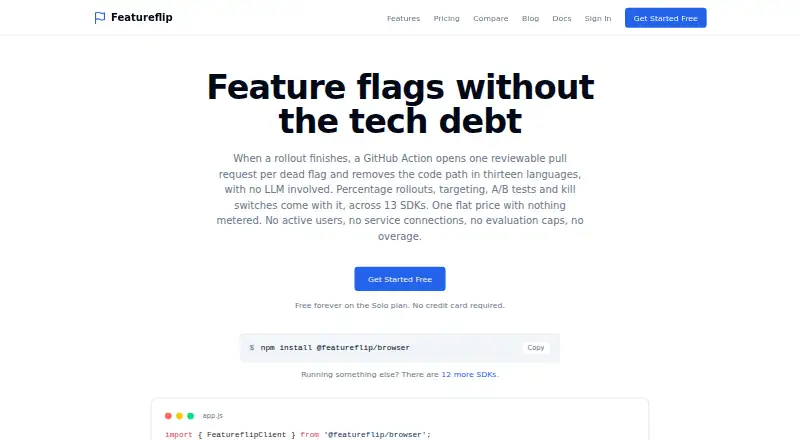
What Featureflip is
Featureflip provides feature flags for changing which functionality is active in a running application without deploying new code. Teams can use percentage rollouts, targeting rules, kill switches, A/B tests, and isolated environments. It offers thirteen SDKs and OpenFeature providers, plus a REST Management API for managing flags and an Evaluation API for checking them. Server SDKs evaluate flags locally from an in-memory configuration and keep using the last configuration if the service cannot be reached. A GitHub Action can open a reviewable pull request to remove a dead flag's code path across thirteen languages; after merge, the flag is archived. Integrations include an MCP server for Claude Code, Cursor, Copilot, and Cline, as well as a Terraform provider and GitHub Action. Free plan limits include one project, ten flags per project, two environments per project, and up to three team members. The service and its PostgreSQL database run on Hetzner Cloud in the European Union. Featureflip is built by Atlanta-based Canopy Labs LLC.
Good
- Supports percentage rollouts, targeting, and kill switches.
- Includes A/B tests and isolated environments.
- Server SDKs continue with their last configuration offline.
- GitHub Action can prepare dead-flag removal pull requests.
- Two-factor authentication is available on every plan.
Watch out
- Free plan is limited to one project.
- Free plan allows ten flags per project.
- Free plan allows two environments per project.
- Visual editor is not included.
Who it suits
Featureflip suits teams that need to control feature availability, target rollouts, or run experiments across web and mobile applications. Its tooling may also fit teams that want flag management through SDKs, APIs, or the listed developer integrations.
Verdict
Featureflip covers feature control, experimentation, and flag cleanup through a broad set of APIs and integrations. Its free-tier project and environment caps are worth checking against a team's needs.
Plans and prices
From Featureflip's own pricing page, checked 23 Sep 2026.
| Plan | Price | What it gives you |
|---|---|---|
| Solo | Free | 10 flags per project · 2 environments · 1 project · 1 developer · 7-day audit logs · Free forever |
| Pro | $99 a month | Unlimited flags · 5 environments/project · 10 projects · up to 10 team members · flag owners · 30-day audit logs · 3 webhook endpoints · email support · $79 /mo billed annually |
| Business | $249 a month | Unlimited flags · unlimited environments · 25 projects · up to 25 team members · OIDC SSO · 90-day audit logs · unlimited webhook endpoints · priority support · $199 /mo billed annually |
| Free | Free | 10 flags/project · 2 environments/project · 1 project · up to 3 team members · 7-day audit logs · 1 webhook endpoint · community support · Free forever |
| Team | $49 a month | Unlimited flags · 3 environments/project · 3 projects · up to 5 team members · 30-day audit logs · 3 webhook endpoints · email support · $39 /mo billed annually |
| Enterprise | Priced on request | Custom scale and requirements · custom data retention · contracted SLA · on-premise deployment · SAML/SCIM · Negotiated directly |
The facts
Each one read from Featureflip's own pages, with the date it was checked.
What it does
- Account security
- Two-factor authentication is available on every plan, and the security page describes Google sign-in, hashed passwords, and temporary account lockouts after repeated failed sign-ins.checked 9 Oct 2026
- Data location
- Featureflip says its service and PostgreSQL database run on Hetzner Cloud in the European Union, where customer data is stored and processed.checked 9 Oct 2026
- Evaluation behavior
- Server SDKs evaluate flags locally from an in-memory configuration, and continue using their last configuration if Featureflip is unreachable.checked 9 Oct 2026
- Evaluation context
- The security page says evaluation context is not stored; server SDKs do not transmit it, while client SDKs send it for evaluation and it is then discarded.checked 9 Oct 2026
- Flag cleanup
- When a flag is dead, its GitHub Action can open a reviewable pull request that removes the code path across thirteen languages and archives the flag after merge.checked 9 Oct 2026
- Integrations
- Featureflip offers an MCP server for agents including Claude Code, Cursor, Copilot, and Cline, plus a Terraform provider and GitHub Action.checked 9 Oct 2026
- Intended users
- Canopy Labs describes Featureflip as feature flag infrastructure for small teams, indie developers, startups, and consultants.checked 9 Oct 2026
- Notable limits
- The Free plan allows one project, ten flags per project, two environments per project, and up to three team members.checked 9 Oct 2026
- Rollouts and targeting
- The product supports percentage rollouts, targeting rules, kill switches, A/B tests, and isolated environments.checked 9 Oct 2026
- SDKs and API
- It provides thirteen SDKs and OpenFeature providers, and flags can also be managed through its REST Management API or evaluated through the Evaluation API.checked 9 Oct 2026
- Support
- The Free plan includes community support, Team and Pro include email support, and Business includes priority support.checked 9 Oct 2026
- What it does
- Featureflip provides feature flags for controlling functionality in a running application without deploying new code.checked 9 Oct 2026
The company
- Company
- Featureflip is built by Canopy Labs LLC, an Atlanta-based, bootstrapped and independently operated software company.checked 9 Oct 2026
The full review of Featureflip
Overview
Featureflip is feature-flag infrastructure for changing application behavior without deploying new code, with experiments and flag cleanup built into the same toolkit. It best suits small teams and developers who want flags managed through APIs and development tools as well as a dashboard. Its strongest case is the path from rollout to removal; the free tier’s project and team limits make a close look at plan fit worthwhile.
Key features
Percentage rollouts, targeting rules, kill switches, A/B tests, and isolated environments cover the core jobs of releasing gradually and responding when a change needs to be turned off. That combination is useful for teams that want experimentation alongside operational control, though there is no visual editor for building tests.
Flag cleanup is unusually practical: a GitHub Action can open a reviewable pull request to remove a dead flag’s code path across thirteen languages, then archive the flag after the pull request is merged. This makes cleanup part of the code-review workflow rather than a separate reminder, especially for teams with many short-lived flags.
Developers can connect agents including Claude Code, Cursor, Copilot, and Cline through an MCP server, or use the Terraform provider and GitHub Action. Thirteen SDKs and OpenFeature providers, a REST Management API, and an Evaluation API offer several ways to manage and evaluate flags. Server SDKs evaluate locally from in-memory configuration and keep using the last configuration if Featureflip cannot be reached, which helps avoid making a service dependency part of every flag check.
Featureflip says its service and PostgreSQL database run on Hetzner Cloud in the EU. Evaluation context is not stored: server SDKs do not transmit it, while client SDKs send it for evaluation and it is discarded afterward. Two-factor authentication is included on every plan; account security also includes Google sign-in, hashed passwords, and temporary lockouts after repeated failed sign-ins.
Pricing
Featureflip is freemium, with a Free plan and paid plans starting at $49/mo. Free and Solo are both shown as free, billed Free forever. Free allows one project, ten flags per project, two environments per project, up to three team members, seven-day audit logs, one webhook endpoint, and community support. Solo has the same project, flag, environment, and audit-log caps, but is limited to one developer; it does not include the Free plan’s additional team members or webhook endpoint. The Free plan is the more useful starting point for a small group, while Solo fits a single developer.
Team costs $49 a month, or $39 /mo billed annually. It provides unlimited flags, three environments per project, three projects, up to five team members, 30-day audit logs, three webhook endpoints, and email support. It suits a small team that has outgrown the free project or flag caps, but the three-project and five-seat ceilings remain relevant.
Pro costs $99 a month, or $79 /mo billed annually. Its ten projects, five environments per project, up to ten team members, flag owners, 30-day audit logs, three webhook endpoints, and email support make it a better fit for teams coordinating flags across more projects. Business costs $249 a month, or $199 /mo billed annually, and raises the limits to 25 projects, unlimited environments, and up to 25 team members. It adds OIDC SSO, 90-day audit logs, unlimited webhook endpoints, and priority support for organizations that need those controls.
Enterprise has custom pricing, negotiated directly, for custom scale and requirements, custom data retention, a contracted SLA, on-premise deployment, and SAML/SCIM. There is no free trial; the Free plan offers a way to start without a paid commitment. Free includes two environments and up to three members, so teams should weigh those caps against their project needs before choosing a paid tier.
Platforms
Featureflip supports Android, iOS, macOS, web, APIs, and self-hosted deployments. Mobile SDK support and server-side testing make it relevant to teams releasing across both client and server applications.
Who it's for
Featureflip is a strong fit for indie developers, startups, consultants, and small teams that need feature control plus a maintainable route for retiring flags. Teams that rely on visual experiment editing, need more than the Free plan’s one project or three members, or require enterprise deployment and identity controls should compare their needs carefully against the relevant paid tier.
Pros and cons
- Pro: The GitHub Action turns flag removal into a reviewable pull request across thirteen languages, helping teams avoid leaving dead code paths behind.
- Pro: Local server-side evaluation with the last known configuration supports continued flag evaluation during a Featureflip outage.
- Pro: MCP, Terraform, SDKs, OpenFeature providers, and APIs give development teams multiple integration paths.
- Con: The Free plan is constrained to one project and two environments, and seats are capped at three; growing teams may need to move to a paid tier early.
- Con: There is no visual editor, so teams seeking a visual way to configure experiments should look elsewhere.
Alternatives
For a broader comparison, browse Feature Flag Software or A/B Testing Tools.
- Experimently is worth considering if self-hosting on your AWS account and a free plan with all features included are priorities.
- Apex may suit teams focused on experimentation who want a free-forever starter tier with three live experiments and 10,000 tested visits, plus a free trial.
- Confidence by Spotify is an option for teams prioritizing a free allocation of 75,000 credits per month, unlimited flags and seats, and a choice of EU or US hosting.
- Crazy Egg is a different fit for teams seeking web analytics, heatmaps, conversion analytics, and surveys in its free plan.
- DevCycle is another freemium option; its free plan has stated client and server request quotas.
- Firebase Cloud Messaging is listed as a no-cost service for teams evaluating that option.
- GrowthBook may appeal to teams wanting self-hosted open-source flags and experiments with unlimited traffic on its free plan.
- LaunchDarkly Experimentation offers a free Developer plan with experimentation usage and project limits, plus a free trial.
Verdict
Choose Featureflip if your team needs feature flags, rollout controls, and experiments, and wants flag retirement tied directly to code review. Its broad integrations and resilient server-side evaluation make it a compelling fit for developer-led teams; look elsewhere if visual editing is essential or the free tier’s project and seat caps do not fit.
Getting started
- Visit https://featureflip.io/.
- Choose the Free plan or a paid plan; there is no free trial.
- Use the available SDKs or OpenFeature providers to integrate flag evaluation.
- Manage flags through the REST Management API or evaluate them with the Evaluation API.
- Use the Terraform provider, GitHub Action, or MCP server integrations as needed.
Limits worth knowing
The Free plan includes one project, ten flags per project, two environments per project, up to three team members, seven-day audit logs, and one webhook endpoint. Team costs $49 a month and includes up to three environments per project, three projects, and five team members.
Questions
How much does Featureflip cost?
The Free plan is free. Team is $49 a month, Pro is $99 a month, and Business is $249 a month; Enterprise pricing is negotiated directly.
Is there a free plan or trial?
Yes. The Free plan is free forever, and there is no free trial.
Which platforms does Featureflip support?
Listed platforms are Android, API, iOS, macOS, self-hosted, and web.
What integrations does it offer?
Featureflip offers an MCP server for Claude Code, Cursor, Copilot, and Cline, plus a Terraform provider and GitHub Action.
Where is customer data stored and processed?
Featureflip says its service and PostgreSQL database run on Hetzner Cloud in the European Union, where customer data is stored and processed.
Who makes Featureflip?
It is built by Canopy Labs LLC, an Atlanta-based, bootstrapped and independently operated software company.
Alternatives to Featureflip
- 1

GrowthBook
Free planOpen sourceAndroidiOSWebAPI8.5From $40 a month - 2

Amplitude
Free planAndroidiOSWebAPI8.3From $995 a month - 3

Statsig
Free planAndroidiOSWebAPI8.1From $150 a month - 4

Zoho PageSense
Free planAndroidiOSWebAPI8.1From $20 a month - 5

DevCycle
Free planAndroidiOSWebAPI8.0From $625 a month - 6

Omniconvert Explore
Free planAndroidiOSWebAPI8.0From $167 a month