
Excel AI App
Excel AI App is a web-based spreadsheet analytics platform for uploading Excel or CSV files and producing analysis, formulas, pivots and dashboards.
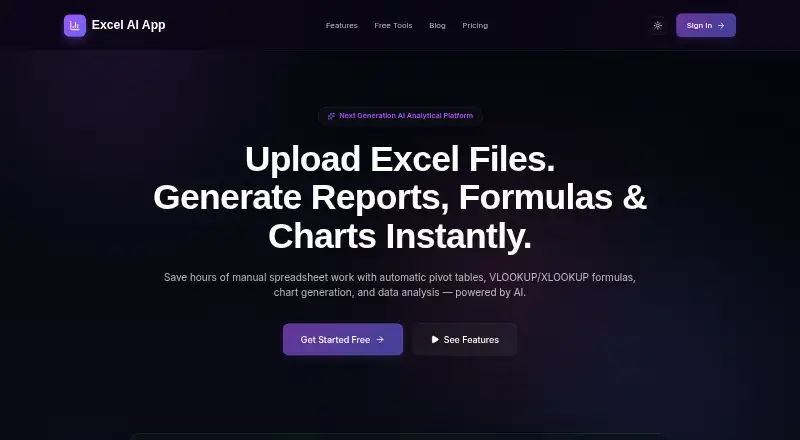
What Excel AI App is
Excel AI App is a web-based spreadsheet analytics platform for uploading Excel or CSV files and producing analysis, formulas, pivots and dashboards. It generates charts, KPI tiles, trendlines and interactive Smart BI dashboards from spreadsheet data. Users can create formulas in natural language for Microsoft Excel and Google Sheets, group and summarize rows with the pivot builder, and export pivot matrices to Excel. A lookup engine joins sheets using shared keys such as Employee ID, SKU or Email. The app scans numeric columns with Z-score analysis and flags outliers, type mismatches and invalid values. It can also convert spreadsheet metrics and chart summaries into widescreen PowerPoint decks. A Gemini-powered assistant accepts typed or spoken commands to build pivots, create charts and explain findings. The Free plan provides 3,000 AI Credits refreshed every 30 days and supports uploads up to 5MB, but excludes exports, cell editing, Google Sheets import and voice assistance. Pro costs $10 a month and adds 200,000 AI Credits, 50MB uploads, exports and those additional tools. A separate Credit Top-Up is listed at 10.00 USD as a one-time purchase.
Good
- Generates Excel- and Sheets-compatible formulas
- Joins sheets using shared keys
- Flags outliers and invalid values
- Creates charts, dashboards and PowerPoint decks
Watch out
- Free uploads are limited to 5MB
- Free excludes PowerPoint, PDF and Excel exports
- Pro costs $10 a month
- Free files are deleted after 24 hours
Who it suits
Excel AI App may suit people who analyze Excel or CSV data and want help creating formulas, pivots, charts or dashboards. The Free plan suits smaller uploads and basic use; Pro adds larger uploads and more editing, import and export options.
Verdict
Excel AI App combines spreadsheet analysis, transformation and presentation outputs in a web tool. The Free plan has a smaller upload limit and excludes several functions that Pro adds.
Plans and prices
From Excel AI App's own pricing page, checked 7 Oct 2026.
| Plan | Price | What it gives you |
|---|---|---|
| Free | Free | 3,000 AI Credits refreshed every 30 days · Excel and CSV uploads up to 5MB · no PowerPoint, PDF or Excel exports · files deleted after 24 hours |
| Pro | $10 a month | 200,000 AI Credits refilled every 30 days · 50 MB uploads · files kept for 30 days · exports, bulk AI enrichment, cell editing, Google Sheets import, voice helper, premium AI models · billed monthly, cancel anytime |
| Credit Top-Up | $10 a month | 200,000 AI credits · one-time purchase, no expiry |
| Credit Top-Up Add-on | $10, paid once | 100,000 AI Credits · Pro accounts only · credits only; unavailable on Free plan · one-time purchase, no expiry |
The facts
Each one read from Excel AI App's own pages, with the date it was checked.
What it does
- AI assistant
- The Gemini-powered helper accepts typed or spoken commands and can build pivots, generate charts and explain findings.checked 7 Oct 2026
- Anomaly detection
- The app scans numeric columns using Z-score analysis and flags outliers, type mismatches and invalid values.checked 7 Oct 2026
- Charts and dashboards
- It generates charts, KPI tiles, trendlines and interactive Smart BI dashboards from spreadsheet data.checked 7 Oct 2026
- Formula generation
- Yeschecked 20 Sep 2026
- Formulas
- Its natural-language formula generator produces formulas compatible with Microsoft Excel and Google Sheets.checked 7 Oct 2026
- Founder
- The About page identifies Ashok Kumar P as founder of DigiMoor and creator of Excel AI App.checked 7 Oct 2026
- Integrations
- Pro includes live Google Sheets import; generated formulas are described as compatible with Excel and Google Sheets.checked 7 Oct 2026
- Limits
- The Free plan has a 5MB upload limit and excludes PowerPoint, PDF and Excel exports, bulk AI enrichment, cell editing, Google Sheets import and voice helper.checked 7 Oct 2026
- Lookups and joins
- The VLOOKUP/XLOOKUP engine merges sheets using shared keys such as Employee ID, SKU or Email.checked 7 Oct 2026
- Pivot tables
- The pivot builder groups and summarizes spreadsheet rows and can export pivot matrices to Excel.checked 7 Oct 2026
- PowerPoint export
- It converts spreadsheet metrics, charts and KPI summaries into widescreen PowerPoint decks.checked 7 Oct 2026
- Product
- Excel AI App is a spreadsheet analytics platform for uploading Excel or CSV files and generating analysis, formulas, pivots and dashboards.checked 7 Oct 2026
- Retention
- Free uploads are purged after 24 hours; Pro files are archived after 14 days and deleted after 30 days.checked 7 Oct 2026
- Security
- The maker says uploaded files are parsed in a secure sandbox, processed in memory, and not used to train public LLM models.checked 7 Oct 2026
- Spreadsheet analysis
- Yeschecked 20 Sep 2026
- Support
- The About page says users can email [email protected] for help, billing questions, refunds or grievances, with a stated response aim of 1–2 business days.checked 7 Oct 2026
- Table transformation
- Yeschecked 20 Sep 2026
- Workflow automation
- Yeschecked 20 Sep 2026
Money
- Free plan
- Yeschecked 20 Sep 2026
The company
- Maker
- The site identifies ExcelAiApp as a product of DIGIMOOR TECHNOLOGY SOLUTIONS LLP.checked 7 Oct 2026
Where it runs
- Primary platform
- standalonechecked 20 Sep 2026
Alternatives to Excel AI App
- 1

Quadratic
Free planAndroidiOSWebAPI8.2From $18 a month - 2

Sourcetable
Free planAndroidiOSWebAPI8.1From $29 a month - 3

remio
Free planAndroidiOSExtensionmacOS7.6From $13.90 a month - 4
SheetFactorys
Free planAndroidiOSWebmacOS7.6From $19 a month - 5

Grist
Free planWebAPILinuxmacOS7.5From $96 a year - 6
XcelAI
Free planWebWindows7.5From $89 a year