
Eneris
Eneris turns property inspection observations into professional PDF reports that inspectors can share with clients.
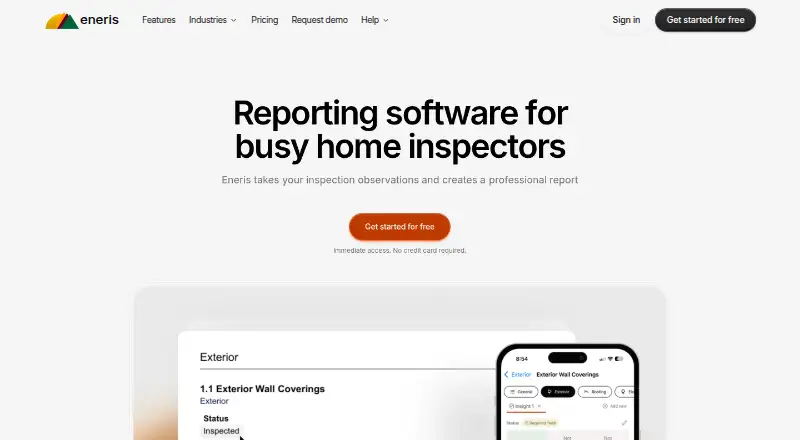
What Eneris is
Eneris turns property inspection observations into professional PDF reports that inspectors can share with clients. Inspectors can add text, photos, and videos to an inspection, then adapt report layout and language with customizable templates for different job types. The software supports offline inspections: users can work without Wi-Fi or cell coverage, and data syncs automatically when they are back online. Teams can track jobs, assign inspectors, and maintain consistency across reports. Eneris is available on the web and on Apple and Android devices, including phones, tablets, and computers. The Free plan includes two inspections per month. The Standard plan is listed at $48 per person per month when billed annually and includes unlimited inspections and priority support; a free trial is also available. All plans include Eneris features, unlimited cloud storage for reports, access on Apple, Android, and desktop, and a dedicated support team. Eneris says it serves self-employed inspectors, small to midsize businesses, and large enterprises involved in home inspections. Founded in 2018, the company is headquartered in Burnaby, British Columbia, Canada.
Good
- Inspections can include text, photos, and videos.
- Custom templates control report layout and language.
- Offline inspections sync automatically when users reconnect.
- Teams can track jobs and assign inspectors.
- All plans include unlimited cloud storage for reports.
Watch out
- The Free plan allows only two inspections per month.
- The Standard plan costs $48 per person per month when billed annually.
Who it suits
Eneris suits self-employed property inspectors and inspection teams that need to turn observations into client-ready PDF reports. Its job tracking and inspector assignment features also fit small to midsize businesses and large enterprises involved in home inspections.
Verdict
Choose Eneris if your inspection workflow needs customizable PDF reports, offline work, or team job assignment. The Free plan is limited to two inspections per month, so teams needing unlimited inspections must consider the paid Standard plan.
Plans and prices
From Eneris's own pricing page, checked 5 Oct 2026.
| Plan | Price | What it gives you |
|---|---|---|
| Enterprise | $40 a month | Contact sales |
| Standard | $48 a month | Unlimited inspections · priority support · per person / month billed annually |
| Standard | $57 a month | Unlimited inspections · priority support · billed monthly |
| Free | — | 2 free inspections/month |
The facts
Each one read from Eneris's own pages, with the date it was checked.
What it does
- Data location
- Eneris says personal data from users outside Canada is transferred to and processed in Canada.checked 5 Oct 2026
- Inputs
- Inspectors can add text, photos, and videos to an inspection.checked 5 Oct 2026
- Integrations
- The opened maker pages do not state any third-party integrations.checked 5 Oct 2026
- Intended users
- Eneris says it is suitable for self-employed inspectors, small to midsize businesses, and large enterprises involved in home inspections.checked 5 Oct 2026
- Offline use
- Eneris supports completing inspections without Wi-Fi or cell coverage and syncs data automatically when the user is back online.checked 5 Oct 2026
- Purpose
- Eneris takes property inspection observations and creates professional reports.checked 5 Oct 2026
- Report output
- The software combines inspection observations into PDF reports that inspectors can share with clients.checked 5 Oct 2026
- Security
- Eneris says it strives to use commercially acceptable means to protect personal data but cannot guarantee absolute security.checked 5 Oct 2026
- Supported access
- Eneris says it works on Apple devices, Android devices, and the web, including phones, tablets, and computers.checked 5 Oct 2026
- Templates
- Inspectors can customize templates for different job types and control their layout and language.checked 5 Oct 2026
The company
- Founded
- 2018checked 28 Sep 2026
- Headquarters
- Burnaby, British Columbia, Canadachecked 28 Sep 2026
- Team workflows
- Teams can track jobs, assign inspectors, and maintain consistency across reports.checked 5 Oct 2026
Money
- Free-plan limit
- The Free plan includes two inspections per month.checked 5 Oct 2026
- Included with plans
- The pricing page says all plans include all Eneris features, access on Apple, Android, and desktop, unlimited cloud storage for reports, and access to a dedicated support team.checked 5 Oct 2026
The full review of Eneris
Eneris is inspection software that turns field observations into client-ready PDF reports. It suits independent inspectors and businesses coordinating several inspectors, especially when work takes place beyond reliable mobile coverage. Its strongest case is a flexible, all-device workflow; the main constraint is the Free plan’s very small monthly allowance.
Overview
Inspectors can capture written notes, photographs, and videos in an inspection and combine them into a PDF for the client. Keeping evidence and report production in one system should reduce the need to reassemble material elsewhere, while customizable templates let each job type use its own wording and page arrangement.
Eneris also includes appointment scheduling and payment collection. Those additions are useful for an inspection business that wants administrative steps near its reporting workflow, but the product’s defining value remains documenting properties and producing consistent reports.
Key features
Offline fieldwork
Inspections can continue without Wi-Fi or cellular service. Eneris synchronizes the captured data when the device reconnects, making it a sensible choice for remote properties or buildings with weak reception. Users who always work in well-connected locations may place less value on this advantage.
Flexible report design
Templates can be adapted for different kinds of jobs, with control over both layout and language. That gives a solo inspector room to develop a preferred format and gives a company a way to keep reports recognizable while serving varied assignments.
Team coordination
Teams can track jobs, assign inspectors, and promote consistency between reports. This is more useful than a single-user note-taking tool for small and midsize firms, and Eneris also positions itself for larger enterprises. The available feature description does not establish how complex enterprise structures are handled, so very large operations should confirm that fit.
Pricing
Eneris uses a freemium model. The Free plan allows two inspections per month, making it appropriate for occasional work or an initial evaluation, but the cap is quickly restrictive for a working inspector.
The Standard plan is listed at $48 a year, billed per person per month on an annual term, and includes unlimited inspections and priority support. The pricing summary also states paid service starts at $48/user/mo (annual). This is the plan to consider when regular volume matters and each inspector needs a continuing account.
Enterprise is listed at $40 a month with “Contact sales,” so organizations considering that tier should obtain the commercial terms directly. A free trial is offered. All plans include the complete Eneris feature set, access from Apple, Android, and desktop devices, unlimited cloud storage for reports, and a dedicated support team; the lower tier therefore sacrifices inspection volume rather than core functionality.
Platforms
Eneris works on Android, iOS, and the web, including phones, tablets, and computers. This broad access helps teams mix mobile field devices with desktop report work without changing products. Personal data from users outside Canada is transferred to and processed in Canada, and Eneris says it uses commercially acceptable protections without guaranteeing absolute security.
Who it's for
Self-employed inspectors get customizable reports and offline capture without committing to a full team workflow. Small and midsize companies gain assignment, job-tracking, and consistency tools alongside scheduling and payment collection. Enterprises may value the same standardized process, but should clarify whether the Enterprise arrangement and operational controls match their scale.
Pros and cons
Pros
- Offline synchronization: field inspections can proceed where coverage is poor.
- Template control: language and layout can be tailored to different inspection types.
- One workflow for teams: job tracking and inspector assignment support coordinated operations.
- Complete features on every plan: paid upgrades remove the Free quota without withholding the feature set.
- Cross-platform access: Android, iOS, and web support covers common field and office devices.
Cons
- Free-plan ceiling: two inspections per month is unsuitable for regular professional volume.
- Annual paid commitment: the Standard price is tied to annual billing, which is less flexible than a month-to-month arrangement.
- Canadian data processing: organizations with location-sensitive data requirements must account for transfers to Canada.
- No absolute security guarantee: Eneris does not promise perfect protection of personal data.
Alternatives
3D Inspection Systems is the better direction when Windows support and a 30-day live evaluation are priorities. Choose ReportHost if per-report billing suits a low or variable inspection volume. Horizon Inspection Software is an option for readers comparing annual and monthly subscriptions across a wider desktop-and-mobile platform mix. SpecMind fits iOS and web users who want a free allowance based on published reports rather than inspections. InspectDesk is an iOS-only alternative with a free tier centered on one full inspection and one custom template. ScribeWare suits buyers who prefer one-off report pricing or a paid desktop-oriented option. HomeGauge is a paid alternative with a 30-day trial. QuickInspect is worth comparing when pay-per-report or small monthly inspection bundles are preferable.
See the broader Home Inspection Software category for more choices.
Verdict
Choose Eneris for customizable inspection PDFs, dependable offline capture, and job assignment across a mixed-device team. It is a particularly good fit once inspection volume exceeds the Free allowance and a business wants reporting, scheduling, and payments in one system. Look elsewhere if you need a genuinely generous free tier, a clearly flexible monthly commitment, or data processing outside Canada.
Getting started
- Visit https://www.eneris.ca/.
- Choose the Free plan or review the Standard plan and free trial.
- Access Eneris on the web or an Apple or Android device.
- Add inspection observations as text, photos, or videos and customize a report template.
- For offline work, complete the inspection and let the data sync when you are back online.
Limits worth knowing
The Free plan includes two inspections per month. Standard is listed at $48 per person per month when billed annually and includes unlimited inspections and priority support.
Questions
What does Eneris do?
It turns property inspection observations into PDF reports that inspectors can share with clients.
Is there a free plan or trial?
Yes. The Free plan includes two inspections per month, and a free trial is available.
How much is the Standard plan?
Standard is listed at $48 per person per month when billed annually. It includes unlimited inspections and priority support.
What devices can I use?
Eneris works on the web and on Apple and Android devices, including phones, tablets, and computers.
Can inspectors work offline?
Yes. Inspections can be completed without Wi-Fi or cell coverage, and data syncs automatically when the user is back online.
Where is Eneris based?
Eneris was founded in 2018 and is headquartered in Burnaby, British Columbia, Canada.
Alternatives to Eneris
- 1

Home Inspector Pro
AndroidiOSWebLinux7.6From $74 a month - 2
Horizon Inspection Software
AndroidiOSWebmacOS7.4From $799 a year - 3
3D Inspection Systems
Free planAndroidiOSWindows7.2From $1,199 a year - 4
InspectDesk
Free planiOS7.2$79.99 one-time - 5
Report Form Pro
AndroidiOSmacOSWindows7.1$149 one-time - 6
QuickInspect
AndroidiOSWebmacOS7.0From $20 a month