Effekseer
Effekseer is a free, open-source tool for making particle effects for games and movies.
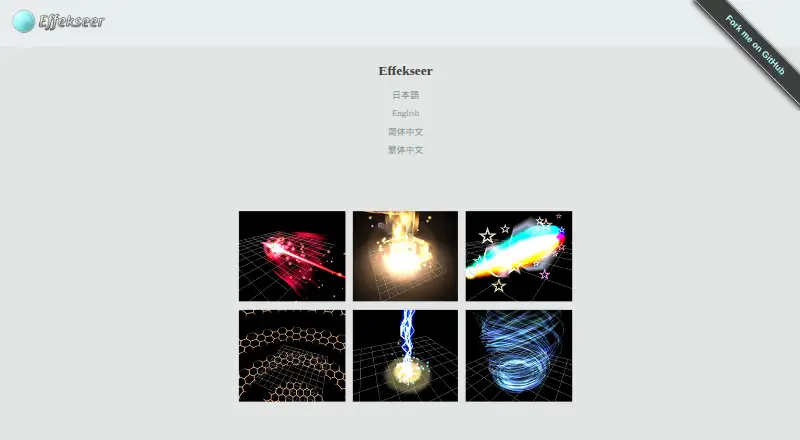
What Effekseer is
Effekseer is a free, open-source tool for making particle effects for games and movies. It can export effects as 2D animations or 3D effects, with runtimes available for Windows, Mac OS X, Linux, iOS, Android and Emscripten. Included runtimes support DirectX, OpenGL, Unity, UnrealEngine4 and Cocos2d-x; separate downloads provide plugins or libraries for Unity, UnrealEngine, GodotEngine, RPGMakerMZ, WebGL, DXLibrary and Cocos2d-x. Programmer libraries support DirectX 9/11/12, OpenGL, Metal and Vulkan. Version 1.80.7 is listed as available. Version 1.80 adds collision settings, UV repetition for tracks and ribbons, movement-aligned rotation, continuous and trigger-based spawning, external-model emission sources and directional billboarding. It also supports direct loading of gltf, glb, obj, geo and bgeo models. GPU particle simulation and CPU/GPU profiling are preview features that may not be available in every environment. The tool and runtime use the MIT license; texture and effect data use CC-0. Playing effects in a game requires separate runtime or library packages.
Good
- Exports effects as 2D animations or 3D effects
- Supports several graphics APIs and engines
- Directly loads five listed model formats
- Free and open source
Watch out
- Playing effects requires separate runtime or library packages
- GPU simulation and profiling are preview features
Who it suits
Effekseer suits game and movie creators who need to build particle effects, including those targeting its listed runtimes or integrations. Its free, open-source licensing may also suit users who need an editable effects tool.
Verdict
Effekseer provides a free tool for authoring particle effects and exporting them for multiple runtimes. Check the separate runtime requirement and preview status of GPU features when planning a project.
Plans and prices
From Effekseer's own pricing page, checked 1 Oct 2026.
| Plan | Price | What it gives you |
|---|---|---|
| Effekseer | Free | free and open-source |
The facts
Each one read from Effekseer's own pages, with the date it was checked.
What it does
- Exports
- Effects can be exported as 2D animations or 3D effects.checked 1 Oct 2026
- GPU and profiling
- Version 1.80 adds GPU-based particle simulation and a CPU/GPU profiler, both marked preview features that may not be available in all environments.checked 1 Oct 2026
- Graphics APIs
- Programmer libraries support DirectX 9/11/12, OpenGL, Metal and Vulkan.checked 1 Oct 2026
- Installation
- On Windows the editing tool runs from its Tool directory and does not modify the registry or anything else.checked 1 Oct 2026
- Integrations
- Official downloads include plugins or libraries for Unity, UnrealEngine, GodotEngine, RPGMakerMZ, WebGL, DXLibrary and Cocos2d-x.checked 1 Oct 2026
- Latest version
- The site lists version 1.80.7 as available.checked 1 Oct 2026
- Licensing
- The documentation states that the runtime and tool use the MIT license and that texture and effect data is CC-0.checked 1 Oct 2026
- Model formats
- Version 1.80 supports directly loading gltf, glb, obj, geo and bgeo models.checked 1 Oct 2026
- Open source
- The official site describes Effekseer as a free, open-source program.checked 1 Oct 2026
- Particle features
- Version 1.80 adds collision settings, track and ribbon UV repetition, movement-aligned rotation, continuous and trigger spawning, external-model emission sources and directional billboarding.checked 1 Oct 2026
- Purpose
- Effekseer is a tool for creating particle effects for games and movies.checked 1 Oct 2026
- Sample assets
- User-contributed sample effects are free to use and edit in games or movies, with almost all distributed under CC-0.checked 1 Oct 2026
- Separate runtimes
- To play effects in a game, users must download separate runtime, Unity or DX library packages.checked 1 Oct 2026
- Support
- User support is provided through Twitter, GitHub, Slack, Discord and email for bug reports, requests and questions.checked 1 Oct 2026
Where it runs
- Rendering platforms
- Included runtimes support DirectX, OpenGL, Unity, UnrealEngine4 and Cocos2d-x, with effects available on Windows, Mac OS X, Linux, iOS, Android and Emscripten.checked 1 Oct 2026
The full review of Effekseer
Effekseer is a free, open-source editor for particle effects used in games and movies. It is best for creators who need to author effects for more than one engine or graphics API. Its broad runtime support is a strong draw; the catch is that playback requires a separate runtime package.
Overview
Effekseer exports effects as either 2D animations or 3D effects, making it useful for projects with different output needs. The tool and runtime use the MIT license, while texture and effect data use CC-0. User-contributed sample effects can be used and edited in games or movies, with almost all distributed under CC-0.
On Windows, the editor runs from its Tool directory without changing the registry or other system settings. That self-contained setup is convenient, but it does not bundle the runtime needed to play effects in a game.
Key features
Version 1.80 adds collision settings, repeated UVs for track and ribbon effects, movement-aligned rotation, continuous and trigger-based spawning, external-model emission sources, and directional billboarding. These controls give authors more ways to shape motion, trails, and emission, making Effekseer a better fit for effects that need more than simple bursts.
Direct loading of gltf, glb, obj, geo, and bgeo models broadens the available sources for model-based effects. GPU-based particle simulation and a CPU/GPU profiler are also included as preview features. Because they may not work in every environment, projects that depend on them should account for that uncertainty.
The tool supports runtimes for DirectX, OpenGL, Unity, UnrealEngine4, and Cocos2d-x, with effects available on Windows, Mac OS X, Linux, iOS, Android, and Emscripten. Official downloads also include plugins or libraries for Unity, UnrealEngine, GodotEngine, RPGMakerMZ, WebGL, DXLibrary, and Cocos2d-x. Programmer libraries support DirectX 9/11/12, OpenGL, Metal, and Vulkan. This reach makes Effekseer appealing for teams targeting varied runtimes, but each project still needs the appropriate separate package.
Pricing
Effekseer costs nothing and is free and open-source. The free plan includes particle effects and runtime export, with no paid tier or plan trade-off stated. It is a practical choice for solo creators and teams that want to develop effects without a software charge; the separate runtime downloads remain part of getting effects into a game.
Platforms
The listed platforms are Android, iOS, Linux, macOS, web, and Windows. Runtime targets include DirectX 9/11/12, OpenGL, Metal, Vulkan, WebGL, Unity, Unreal Engine, Godot Engine, DX Library, Cocos2d-x, iOS, Android, and Emscripten. The editing tool's Windows setup is portable, while playing effects requires downloading separate runtime, Unity, or DX library packages.
Who it's for
Effekseer suits game and movie creators who need particle effects, especially developers integrating effects across several engines or graphics APIs. Its open licensing and reusable sample effects also suit projects that value permissive asset use. It is less suitable for someone expecting a single installation to include both the editor and everything required for in-game playback.
Pros and cons
Pros
- Free and open-source: The tool and runtime use the MIT license, and texture and effect data use CC-0.
- Broad runtime reach: Support spans multiple engines, graphics APIs, desktop and mobile systems, and Emscripten.
- More control over particle behavior: Version 1.80 adds collision, spawning, rotation, and trail controls, alongside direct model loading.
- Portable Windows editor: It runs from its Tool directory without registry or other system changes.
Cons
- Playback requires extra downloads: Users must obtain separate runtime, Unity, or DX library packages to play effects in a game.
- Preview features carry uncertainty: GPU simulation and profiling may not be available in all environments.
Alternatives
For a wider look at software in this area, browse 2D Game Animation Software.
- Rive is worth considering for collaborative design and animation in its editor; its free plan allows 3 collaborative files and 1 project.
- Live2D Cubism is an alternative with a free plan and a month-by-month Cubism PRO for indie plan at $13.26 a month.
- SkelForm is a free and open-source 2D skeletal animator.
- LibreSprite is a free, open-source option under GNU General Public License Version 2.
- Spriter offers a free version with PNG and spritesheet animation and basic animation features.
- SpineBones offers a free timeline capped at 300 frames, playback up to 120 FPS, and WebM, PNG sequence, and sprite sheet exports.
- Spine is a paid option with an Essential plan listed at $99 a month and exports to every supported format.
- Creature is a paid alternative with a perpetual Pro license listed at $99, paid once when upgrading from Basic.
Verdict
Choose Effekseer if you want a free, open-source particle-effect tool with broad engine and graphics API targets. Its strongest advantage is that reach; its main drawback is the separate runtime setup required for playback. If that extra integration step fits your workflow, Effekseer is a compelling option for game and movie effects.
Getting started
- Visit https://effekseer.github.io/.
- On Windows, run the editing tool from its Tool directory.
- Create effects and export them as 2D animations or 3D effects.
- Download the separate runtime, Unity or DX library package needed to play effects in a game.
Questions
Is Effekseer free?
Yes. It is free and open source, and the listed Effekseer plan costs nothing.
What platforms and rendering targets does it support?
Listed platforms include Android, iOS, Linux, macOS, web and Windows. Runtime targets include DirectX 9/11/12, OpenGL, Metal, Vulkan, WebGL, Unity, Unreal Engine, Godot Engine, DX Library, Cocos2d-x and Emscripten.
What can it export?
Effects can be exported as 2D animations or 3D effects.
What licenses apply?
The tool and runtime use the MIT license. Texture and effect data use CC-0.
Can I play effects in a game right away?
Playing effects in a game requires downloading separate runtime or library packages.
Where can I get help?
Support is provided through Twitter, GitHub, Slack, Discord and email for bug reports, requests and questions.
Alternatives to Effekseer
- 1
LibreSprite
Free planOpen sourceAndroidWebAPILinux8.0Free plan - 2

Rive
Free planAndroidiOSWebLinux8.0From $9 a month - 3

Live2D Cubism
AndroidiOSWebmacOS7.4 - 4
LoongBones
AndroidiOSWebLinux7.4From CN¥199.90 a year - 5

Spriter
Free planLinuxWindows6.9$59.99 one-time - 6

SpineBones
Free planAPImacOSWindows6.8Free plan