Eclipse PHP Development Tools
Eclipse PHP Development Tools (PDT) is a free, open-source PHP IDE framework for Eclipse, intended for developing PHP-based web applications and extending PH…
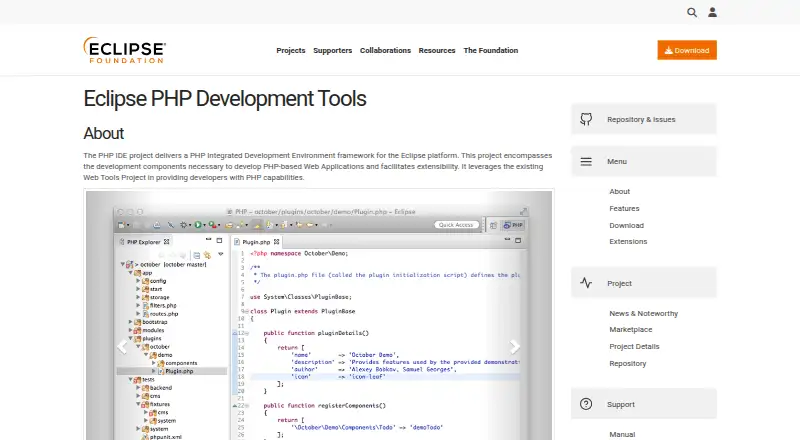
What Eclipse PHP Development Tools is
Eclipse PHP Development Tools (PDT) is a free, open-source PHP IDE framework for Eclipse, intended for developing PHP-based web applications and extending PHP capabilities through the Web Tools Project. Editing tools include syntax highlighting and validation, content assist, code navigation, formatting, refactoring, and code templates. PDT also lists PHP debugging and profiling with Zend Debugger or Xdebug, PHPUnit support, and Remote Projects. The PHP Developers package is described as a starting point for PHP developers and includes PHP language support, a Git client, XML Editor, Mylyn, and Terminal. Downloads are available for macOS, Windows, and Linux in 64-bit and ARM 64-bit builds, and Java must be installed. PDT can be added to an existing Eclipse workspace using its installation menu or by dragging it into the running workspace. Listed extensions include Symfony, Twig, YAML, Smarty, Emmet, and CS-Fixer. The project labels PDT Mature and lists version 8.4, dated 2025-12-10, as its latest release. Support resources include a manual, forum, wiki, mailing list, and bug submission link.
Good
- Free, open-source PHP IDE framework.
- Supports Xdebug and Zend Debugger.
- Includes PHPUnit and Remote Projects.
- Available for Linux, macOS, and Windows.
Watch out
- Java must be installed.
- Some source code or binaries may have different license terms.
Who it suits
PDT suits PHP developers who want PHP tools within the Eclipse environment. Its package and listed extensions cover developers working with PHP projects and related web technologies.
Verdict
PDT provides PHP editing, debugging, testing, and remote-project features within Eclipse at no cost. Check the Java requirement and license terms for individual components before choosing it.
Plans and prices
From Eclipse PHP Development Tools's own pricing page, checked 29 Sep 2026.
| Plan | Price | What it gives you |
|---|---|---|
| Eclipse PHP Development Tools | Free | PHP IDE framework for Eclipse · open source |
The facts
Each one read from Eclipse PHP Development Tools's own pages, with the date it was checked.
What it does
- Debugging and profiling
- PDT lists PHP debugging and profiling with Zend Debugger or Xdebug.checked 29 Sep 2026
- Downloads
- The PHP Developers package is offered for OS X, Windows, and Linux in 64-bit and ARM 64-bit builds, and requires Java to be installed.checked 29 Sep 2026
- Eclipse integration
- PDT can be installed into an existing Eclipse workspace through Help → Install New Software or by dragging to the running workspace.checked 29 Sep 2026
- Editing
- Listed features include syntax highlighting, syntax validation, content assist, code navigation, formatting, refactoring, and code templates.checked 29 Sep 2026
- Extensions
- The site lists open source PDT extensions including Symfony, Twig, YAML, Smarty, Emmet, and CS-Fixer.checked 29 Sep 2026
- License
- The Eclipse project page lists Eclipse Public License 2.0 and notes that some source code or binaries may have different terms.checked 29 Sep 2026
- Purpose
- PDT provides a PHP IDE framework for Eclipse to develop PHP-based web applications and extend PHP capabilities through the Web Tools Project.checked 29 Sep 2026
- Release status
- The project page labels PDT as Mature and lists version 8.4 dated 2025-12-10 as its latest release.checked 29 Sep 2026
- Remote projects
- Remote Projects is listed as a PDT feature.checked 29 Sep 2026
- Support
- The PDT site points users to its manual, forum, wiki, mailing list, and bug submission link.checked 29 Sep 2026
- Testing
- PHPUnit is listed as a PDT feature.checked 29 Sep 2026
- Who it serves
- The PHP Developers package is described as a starting point for PHP developers and includes PHP language support, a Git client, XML Editor, Mylyn, and Terminal.checked 29 Sep 2026
The company
- Founded
- 2004checked 23 Sep 2026
- Headquarters
- Brussels, Belgiumchecked 23 Sep 2026
The full review of Eclipse PHP Development Tools
Overview
Eclipse PHP Development Tools (PDT) is a PHP development environment built on the Eclipse framework, for developers creating PHP web applications or extending Eclipse for PHP work. It suits developers who want editing, debugging, testing, and remote-project tools in one open-source environment. Its breadth is useful, but choosing it also means accepting an Eclipse-based workflow and a Java prerequisite.
Key features
Editing and maintenance
PDT combines syntax highlighting and validation with content assist, navigation, formatting, refactoring, and code templates. That range supports both day-to-day coding and work on established code, rather than limiting the environment to a basic text editor.
Debugging, testing, and remote work
PHP debugging and profiling with Zend Debugger or Xdebug, PHPUnit support, and Remote Projects cover important parts of a PHP development workflow. Developers who need those capabilities can keep them alongside editing in Eclipse; those seeking a standalone editor may prefer a different setup.
Extensions and setup
Open-source extensions include Symfony, Twig, YAML, Smarty, Emmet, and CS-Fixer. PDT can be installed into an existing Eclipse workspace through Help → Install New Software or by dragging it into the running workspace, so current Eclipse users can add PHP tools without starting a separate workspace. The PHP Developers package is also offered for a ready starting point, with PHP language support, a Git client, XML Editor, Mylyn, and Terminal.
Pricing
PDT is free: its plan costs nothing and includes the PHP IDE framework for Eclipse as open-source software. There are no paid tiers or seat limits stated for this plan. The project page lists the Eclipse Public License 2.0, while cautioning that some source code or binaries may have different terms, so check the terms for individual components if licensing matters to your use.
The PHP Developers package is available at no cost, but requires Java to be installed. That requirement is worth considering before choosing the package, especially if Java is not already part of your development setup.
Platforms
PDT supports Linux, macOS, and Windows. The PHP Developers package is offered for OS X, Windows, and Linux in 64-bit and ARM 64-bit builds. The project is marked Mature and lists version 8.4, dated 2025-12-10, as its latest release.
Who it's for
PDT is a strong fit for PHP developers who already work in Eclipse or want an Eclipse-centered environment with refactoring, Xdebug or Zend debugging, PHPUnit, and remote-project support. Its extensions may also suit teams working with frameworks and tools such as Symfony and Twig. It is less compelling for someone seeking an editor outside the Eclipse framework or unwilling to install Java for the PHP Developers package.
Pros and cons
- Broad PHP workflow at no cost: editing, refactoring, debugging, profiling, PHPUnit, and remote-project features are all part of the offering.
- Fits existing Eclipse workspaces: PDT can be installed into a running workspace, and the PHP Developers package includes a Git client, XML Editor, Mylyn, and Terminal.
- Java prerequisite: the packaged download requires Java, adding a setup dependency.
- Component license terms can vary: the Eclipse Public License 2.0 applies to the project, but some source or binaries may have different terms.
Alternatives
Compare PHP IDEs if you want to weigh PDT against other PHP-focused choices. Choose OpenIDE if you want a freemium IDE with a free plan across Linux, macOS, and Windows. Visual Studio Code is a free option for Linux, macOS, Windows, and web. ICEcoder is another free choice, with Android and web among its supported platforms and a browser-based editor.
NuSphere PhpED is worth considering if you want a paid PHP IDE with a free trial; its PhpED Personal plan costs $81, paid once, is for individual developers only, includes one year of free upgrades, and cannot be purchased by companies or reimbursed by a business. Apache NetBeans is a free alternative for Linux, macOS, and Windows, with commercial and non-commercial use permitted under Apache License 2.0. CodeLite is another free cross-platform IDE, distributed under GPLv2 with an exception allowing separately developed plugins to use any license. PhpStorm is a paid alternative for Windows, macOS, and Linux. Choose Bluefish if a free desktop editor for Linux, macOS, or Windows is a better fit.
Verdict
Choose PDT if you want a no-cost PHP toolkit inside Eclipse, especially when refactoring, debugging, PHPUnit, and remote projects matter in the same environment. Look elsewhere if Java setup or Eclipse itself does not suit your workflow, and review component license terms before adopting it in a project with specific licensing needs.
Alternatives to Eclipse PHP Development Tools
- 1

IntelliJ IDEA
Free planAPIExtensionLinuxmacOS7.8Free plan - 2
PaizaCloud Cloud IDE
Free planAndroidiOSWebLinux7.7From $9.80 a month - 3

Zed
Free planLinuxmacOSWindows7.6From $10 a month - 4
Geany
Free planOpen sourceLinuxmacOSWindows7.4Free plan - 5

Visual Studio Code
Free planWebLinuxmacOSWindows7.4Free plan - 6
ICEcoder
Free planAndroidWebAPILinux7.1Free plan