
Apache NetBeans
Apache NetBeans is a development environment, tooling platform, and application framework for Windows, macOS, and Linux.
What Apache NetBeans is
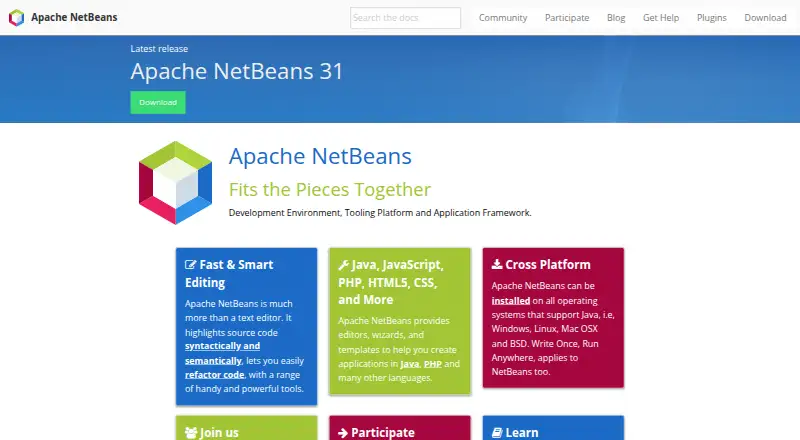
Apache NetBeans is a development environment, tooling platform, and application framework for Windows, macOS, and Linux. Its editor highlights source code by syntax and meaning, and includes code refactoring. Editors, wizards, and templates support Java, PHP, and other languages, while the project links to plugins and support for JavaFX and JavaScript.
The NetBeans Platform is a modular framework for Swing applications. It includes features such as state saving, menus, toolbars, keyboard shortcuts, and window management. NetBeans is free for commercial and non-commercial use under the Apache License.
The listed latest release, NetBeans 31, is dated August 10, 2026. It runs on JDK 26, 25, or 21, with initial support for JDK 27. Downloads include platform-independent binary and source ZIP files. Linked Windows, macOS, and Linux installers are provided by NetBeans committers for convenience, rather than released by the Apache Software Foundation. The release page provides SHA-512 hashes and PGP signatures for checking downloaded files. Windows/ARM is not currently fully supported, and older releases are no longer supported.
Good
- Free for commercial and non-commercial use.
- Editor supports semantic highlighting and refactoring.
- Includes Java, PHP, and other language tools.
- Provides platform-independent binary and source downloads.
Watch out
- Windows/ARM is not fully supported.
- Older releases are no longer supported.
- Linked OS installers are not Apache Foundation releases.
Who it suits
NetBeans suits developers looking for editors and tools for Java, PHP, or other languages on Windows, macOS, or Linux. Its modular platform also suits people building Swing applications.
Verdict
NetBeans combines a code editor with tools for several languages and a framework for Swing applications. Check its platform support and JDK requirements when choosing a release.
Plans and prices
From Apache NetBeans's own pricing page, checked 30 Sep 2026.
| Plan | Price | What it gives you |
|---|---|---|
| Apache NetBeans IDE and Platform | Free | Free for commercial and non-commercial use · Apache License 2.0 |
The facts
Each one read from Apache NetBeans's own pages, with the date it was checked.
What it does
- Community support
- The NetBeans community uses mailing lists as its primary communication channel and welcomes contributions.checked 30 Sep 2026
- Downloads
- The release page offers platform-independent binary and source ZIP files, and links to third-party Windows, macOS, and Linux packages.checked 30 Sep 2026
- Editing
- It highlights source code syntactically and semantically and supports code refactoring.checked 30 Sep 2026
- Integrations
- The website links to NetBeans plugins and describes support for languages and frameworks including Java, PHP, JavaFX, and JavaScript.checked 30 Sep 2026
- Integrity
- The release page provides SHA-512 hashes and PGP signatures to verify downloaded files.checked 30 Sep 2026
- Known issue
- The project states that Windows/ARM is not currently a fully supported platform.checked 30 Sep 2026
- Languages
- It provides editors, wizards, and templates for Java, PHP, and other languages.checked 30 Sep 2026
- License
- The IDE and Platform are free for commercial and non-commercial use under the Apache License.checked 30 Sep 2026
- Package status
- The linked Windows, macOS, and Linux installers are provided by NetBeans committers for convenience and are not Apache Software Foundation releases.checked 30 Sep 2026
- Product
- Apache NetBeans is a development environment, tooling platform, and application framework.checked 30 Sep 2026
- Project history
- Oracle donated NetBeans source code to the Apache Software Foundation in 2016, and Apache NetBeans became a top-level Apache project in April 2019.checked 30 Sep 2026
- Release
- Apache NetBeans 31 is the latest release, dated August 10, 2026.checked 30 Sep 2026
- Runtime
- NetBeans 31 supports running on JDK 26, 25, or 21, with initial support for JDK 27.checked 30 Sep 2026
- Support status
- Older Apache NetBeans releases remain downloadable but are no longer supported.checked 30 Sep 2026
The company
- Founded
- 1996checked 28 Sep 2026
Where it runs
- Platform framework
- The NetBeans Platform is a modular framework for Swing applications with features such as state saving, menus, toolbars, keyboard shortcuts, and window management.checked 30 Sep 2026
The full review of Apache NetBeans
Apache NetBeans is a free development environment and application framework for programmers working in Java, PHP, and other languages. It is especially suited to developers who want integrated coding tools or a modular framework for Swing applications. Its broad language support and Apache-licensed use make it a practical no-cost option, though release compatibility and Windows/ARM support deserve attention.
Overview
NetBeans brings together an IDE, a tooling platform, and a framework for building Swing applications. The editor combines syntactic and semantic code highlighting with refactoring, while language editors, wizards, and templates extend its reach beyond Java to PHP and other languages. That range makes it a more versatile choice than a narrowly focused Java editor, but its clearest distinction is the ability to use the NetBeans Platform for modular desktop software.
The project’s source code was donated by Oracle to the Apache Software Foundation in 2016, and NetBeans became a top-level Apache project in April 2019. The IDE and Platform are free for commercial and non-commercial use under Apache License 2.0.
Key features
Editing and development tools
Semantic and syntactic highlighting make code structure easier to inspect, while refactoring support helps when changing existing code. A built-in debugger, build tools, and integrated testing tools bring several common development tasks into one environment. This combination is useful for developers who want more than a text editor, although the value of the bundled workflow depends on whether NetBeans suits their language and project setup.
Language support and plugins
Editors, wizards, and templates support Java, PHP, and other languages. The project also points to plugins and describes support for JavaFX and JavaScript, giving developers ways to extend the environment. That breadth is an advantage for mixed-language work, though the stated language range alone does not establish that every workflow has equal depth.
Framework for Swing applications
The NetBeans Platform is a modular framework for Swing applications. It includes capabilities such as state saving, menus, toolbars, keyboard shortcuts, and window management, which can provide a foundation for desktop application structure instead of leaving those concerns entirely to an individual implementation. It is a compelling reason to consider NetBeans for Swing projects, but less relevant if the target is not a Swing application.
Pricing
Apache NetBeans IDE and Platform: free. The plan is free for commercial and non-commercial use under Apache License 2.0, with no paid tier or free-trial period to weigh against it. That makes it accessible for individual developers and teams alike, without a seat price or stated usage cap.
Platforms
NetBeans supports Linux, macOS, and Windows. Apache NetBeans 31, dated August 10, 2026, supports running on JDK 26, 25, or 21, with initial support for JDK 27; checking the required JDK against a project’s environment is essential before adopting that release. Windows/ARM is not currently a fully supported platform, so users on that configuration should be cautious.
The release page offers platform-independent binary and source ZIP files, alongside links to Windows, macOS, and Linux packages supplied by NetBeans committers for convenience rather than released by the Apache Software Foundation. SHA-512 hashes and PGP signatures are provided for verifying downloads. Older releases remain downloadable but are no longer supported, which makes staying on a current release important for users who need project support.
Who it's for
NetBeans suits developers seeking a free IDE with editing, refactoring, debugging, build, and testing tools, particularly those working in Java or PHP. It is also a strong candidate for teams building modular Swing applications who can use the platform’s desktop-app capabilities. It is a less suitable choice for Windows/ARM users who require full platform support or anyone whose required JDK does not align with a supported runtime.
The NetBeans community uses mailing lists as its primary communication channel and welcomes contributions. That approach may suit developers comfortable with community mailing-list support and participation.
Pros and cons
- Pros: Free for commercial and non-commercial use under Apache License 2.0, so there is no licensing fee to weigh against adoption.
- Pros: Editors, wizards, and templates cover Java, PHP, and other languages, making it useful beyond a single-language niche.
- Pros: The Swing application framework includes window management, menus, toolbars, shortcuts, and state saving, offering a meaningful foundation for desktop software.
- Cons: Windows/ARM is not fully supported, which can rule it out for users who need a supported setup on that architecture.
- Cons: NetBeans 31 targets specific JDK versions, so projects on other runtimes may need a different release or environment.
- Cons: Older releases are no longer supported, limiting their suitability for users who need ongoing project support.
Alternatives
For a Java-focused comparison, Eclipse IDE is another free, open-source IDE for Linux, macOS, and Windows. IntelliJ IDEA offers a free core for Java and Kotlin as well as a $100 a year Ultimate subscription, making it an option to compare if that split between core and subscription tiers suits your needs. BlueJ is a free Java development environment designed for beginners, so it is a more targeted alternative for learning-oriented use.
Java-Editor is a free option available on Android, Linux, macOS, and Windows. CS++ Java IDE is a freemium alternative available on iOS, macOS, web, and Windows. MCreator and Processing are free alternatives for readers comparing other software in this category. Spring Tools for Eclipse is a free, open-source option available as an extension and on Linux, macOS, and Windows.
Browse Java IDEs, Integrated Development Environments, PHP IDEs, Web Development IDEs, or IDE Software to compare more options.
Verdict
Choose Apache NetBeans if you want a capable, no-cost IDE for Java, PHP, and other languages, or if the NetBeans Platform’s modular Swing framework fits your desktop project. Its main appeal is the combination of development tools and commercial-use-friendly licensing at no charge. Look elsewhere if Windows/ARM support is essential or your required JDK does not fit the release’s runtime support.
Getting started
- Open the Apache NetBeans website
- Choose the release downloads page
- Select a binary ZIP or a linked package for your operating system
- Verify the download with its SHA-512 hash or PGP signature
- Install or extract NetBeans and run it with JDK 26, 25, or 21
Questions
Is Apache NetBeans free?
Yes. The IDE and NetBeans Platform cost 0.00 USD and are free for commercial and non-commercial use under Apache License 2.0.
Which operating systems are supported?
Supported systems are Windows, macOS, and Linux. Windows/ARM is not currently fully supported.
Which JDK versions can NetBeans 31 run on?
NetBeans 31 supports JDK 26, 25, and 21, with initial support for JDK 27.
What languages does it support?
Editors, wizards, and templates are provided for Java, PHP, and other languages. The site also links support for JavaFX and JavaScript.
Are downloads verifiable?
Yes. The release page provides SHA-512 hashes and PGP signatures for downloaded files.
Alternatives to Apache NetBeans
- 1

IntelliJ IDEA
Free planAPIExtensionLinuxmacOS7.8Free plan - 2
Java-Editor
Free planOpen sourceAndroidLinuxmacOSWindows7.4Free plan - 3

AIDE
Free planAndroid6.8$2.99 one-time - 4

MyEclipse
LinuxmacOSWindows6.6From $37 a year - 5
CS++ Java IDE
Free planiOSWebmacOSWindows6.5Free plan - 6

Eclipse Che
Free planWebLinuxSelf-hosted6.4Free plan