Java-Editor
Java-Editor is a free integrated development environment for Java, aimed at school teaching and home use on lower-specification computers.
What Java-Editor is
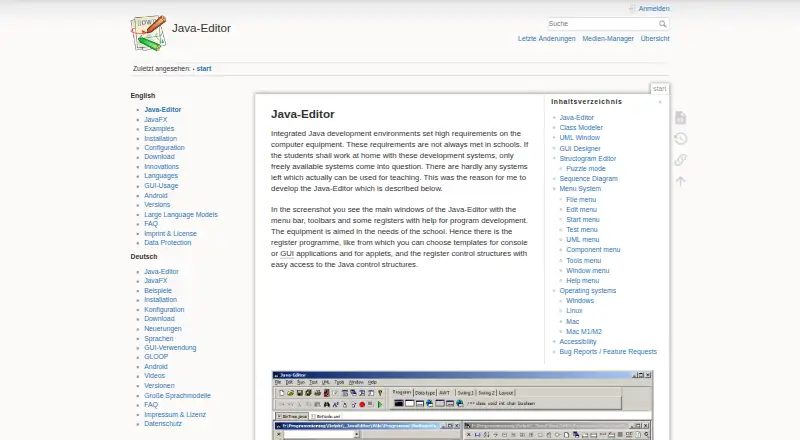
Java-Editor is a free integrated development environment for Java, aimed at school teaching and home use on lower-specification computers. Its class modeler reads source files, presents classes with their attributes and methods, and can carry model edits back into code. The UML window lets users create objects and try methods or attributes without a main method. A visual designer supports AWT, Swing, and JavaFX components and synchronizes form changes with source code. Students can use the structogram editor to make control-flow diagrams, generate programs or methods, and work in puzzle mode. Debugging tools include breakpoints, stepwise execution, watch expressions, local values, parameters, and call-stack details. Optional menus appear when Git, Subversion, or JUnit is installed. LLM assistance supports OpenAI and Gemini cloud models and local models through Ollama. The program requires a Java Development Kit; JavaFX must be installed separately for JDK 11 and later. Classroom versions support USB deployment, INI configuration, and network folders. It is available for Windows, Linux via Wine, and macOS via CrossOver or virtualization.
Good
- Free for personal, commercial, and government use.
- Class modeler transfers model changes back to source.
- Structogram editor can generate Java programs or methods.
- Debugger includes breakpoints and call-stack information.
- Supports local models through Ollama.
Watch out
- Requires a Java Development Kit.
- JavaFX must be installed separately for JDK 11 and later.
- OpenAI assistance requires an API key and paid account or credits.
- Linux support is via Wine.
Who it suits
Java-Editor is suited to teachers and learners who want a Java environment for lessons or home use, including on lower-specification computers. It also offers classroom deployment options and Android project preparation for teachers.
Verdict
Java-Editor combines coding, modeling, diagramming, and debugging tools in a free Java environment. Check its Java prerequisites and platform requirements before choosing it.
Plans and prices
From Java-Editor's own pricing page, checked 19 Oct 2026.
| Plan | Price | What it gives you |
|---|---|---|
| Free | Free | No paid tier stated · free for personal, commercial and government use |
The facts
Each one read from Java-Editor's own pages, with the date it was checked.
What it does
- Accessibility
- The software supports larger fonts and a component menu for users who cannot use a mouse, including visually impaired or blind pupils.checked 19 Oct 2026
- Build and debug
- Java-Editor can compile, run and debug programs, showing breakpoints, watches, parameters, attributes and call stacks.checked 19 Oct 2026
- Class modeler
- The class modeler reads Java source files, displays attributes and methods, and writes model changes back to source code.checked 19 Oct 2026
- Class modeling
- Its class modeler reads Java source files, displays classes with attributes and methods, and transfers model changes back to source files.checked 2 Oct 2026
- Classroom deployment
- Special versions support portable USB use, INI-based configuration and installation in local or network folders.checked 19 Oct 2026
- Debugging
- The application provides a debugger with breakpoints, stepwise execution, watch expressions, local variables, parameters and call-stack information.checked 2 Oct 2026
- Documentation depth
- Documentation covers installation, configuration, Java tools, editor options, UML, Android, Mindstorms, language files and integrations.checked 19 Oct 2026
- Editing tools
- The editor provides syntax highlighting, search and replace across multiple files, regular expressions, bookmarks, formatting and shortcuts.checked 19 Oct 2026
- GUI design
- The GUI designer supports AWT, Swing and JavaFX components and synchronizes form changes with source code.checked 2 Oct 2026
- GUI designer
- The GUI designer supports AWT, Swing and JavaFX components and synchronizes form edits with source code.checked 19 Oct 2026
- Independent education adoption
- The University of Göttingen publishes teaching materials that use Java-Editor for introductory Java GUI programming and data-structure lessons.checked 19 Oct 2026
- Independent maintainer fact
- German Wikipedia identifies Gerhard Röhner as the main developer and describes the program as Delphi software for Windows.checked 19 Oct 2026
- Java dependency
- A Java Development Kit must be installed for Java-Editor to work fully.checked 19 Oct 2026
- JavaFX dependency
- For JDK 11 and later, JavaFX must be installed separately because it is no longer bundled with the JDK.checked 19 Oct 2026
- Languages
- The interface is available in English, German, Dutch, Spanish, Brazilian Portuguese and Chinese.checked 19 Oct 2026
- Latest release
- The download page lists version 23.25 dated 2026-10-14 for both 64-bit and 32-bit distributions.checked 19 Oct 2026
- Licence statement
- The official imprint says no licence is required and permits personal, commercial and government use without liability or warranty.checked 19 Oct 2026
- Limit: compatibility setup
- Heise notes that Linux requires Wine, Mac requires compatibility or virtualization software, and a current 32-bit JDK is required in its listing.checked 19 Oct 2026
- LLM integrations
- Built-in LLM assistance supports OpenAI and Gemini cloud models plus local models through Ollama.checked 2 Oct 2026
Where it runs
- Android mode
- Android mode uses an Android SDK and can build or install projects prepared with Android Studio on a connected device.checked 19 Oct 2026
- Limit: Android app reliability
- Google Play reviews report crashes that lost unsaved work and criticize the custom keyboard and limited save workflow.checked 19 Oct 2026
- Linux support
- Linux use is documented through Wine and requires Microsoft core fonts.checked 19 Oct 2026
The company
- Headquarters
- Mainz, Germanychecked 28 Sep 2026
Money
- LLM cost requirement
- OpenAI integration requires an API key and a paid account or credits with OpenAI.checked 19 Oct 2026
The full review of Java-Editor
Overview
Java-Editor is a Java IDE built around teaching tools, with classroom deployment options and a mode for preparing Android projects. It is best suited to students, teachers and home users who want to connect code with visual models and diagrams; its main trade-off is the separate Java setup it requires.
Its strongest case is the way class modeling, UML object tests, GUI design and structograms sit alongside ordinary debugging. That makes it a more teaching-focused choice than a general-purpose editor, while the Java Development Kit requirement—and separate JavaFX installation for JDK 11 and later—adds setup work.
Key features
Models, diagrams and interfaces
The class modeler reads Java source files and shows classes, attributes and methods, then transfers model edits back to source. That two-way workflow can help learners connect a class diagram to its implementation. The UML window goes further by letting users create objects interactively and test methods or attributes without writing a main method first.
The GUI designer supports AWT, Swing and JavaFX components and synchronizes form edits with source code. The structogram editor creates control-flow diagrams and can generate Java programs or methods from them; puzzle mode gives teachers a format for student exercises. These tools make Java-Editor particularly relevant when instruction includes visual design and program structure, though readers seeking only a conventional coding environment may not need them.
Debugging and integrations
The debugger provides breakpoints, stepwise execution, watch expressions, local variables, parameters and call-stack information. This is a substantial teaching aid: learners can follow execution and inspect state rather than relying only on output. Installing Git or Subversion adds the corresponding menus, while installing JUnit adds a JUnit menu, so those integrations depend on separate software being installed.
Built-in LLM assistance works with OpenAI and Gemini cloud models, as well as local models through Ollama. OpenAI use requires an API key and a paid account or credits; Ollama avoids cloud-model use but needs suitable CPU, GPU and disk space. These are optional capabilities, not a way around the editor's Java prerequisites.
Classroom and Android use
Special classroom versions support portable USB installations, INI-file configuration and deployment from a network folder. Android mode lets teachers prepare Android Studio projects for students and build or transfer apps to a connected device, making the editor useful for guided Android exercises as well as standard Java instruction.
Pricing
Java-Editor is free: its Free plan costs nothing and covers personal, commercial and government use. There is no free trial because there is no paid tier described; the meaningful cost is the required Java Development Kit and, for JDK 11 and later, a separate JavaFX installation.
Platforms
Java-Editor supports Windows, Linux through Wine, and macOS through CrossOver or virtualization. Those compatibility layers are an important caveat for Linux and Mac users: the platform support is not presented as a native Linux or macOS edition. JavaFX is supported, but with JDK 11 and later it must be installed separately.
Who it's for
Teachers and students are the clearest fit, especially where class models, UML testing, structograms or classroom-wide deployment matter. Home users on lower-specification computers are also within its intended audience. Developers who want an IDE centered on broad project work rather than instruction-oriented visual tools, or who prefer not to manage a JDK and JavaFX setup, should consider another option.
Pros and cons
Pros
- Class, UML, GUI and structogram tools link visual instruction to Java source and execution.
- The debugger exposes breakpoints, variables, parameters and the call stack for step-by-step learning.
- Classroom deployment options and Android mode support teacher-led setup and exercises.
- The free plan permits personal, commercial and government use.
Cons
- A Java Development Kit is required, and JavaFX needs separate installation for JDK 11 and later.
- Linux and macOS use depends on Wine, CrossOver or virtualization rather than a native platform listing.
- OpenAI assistance needs an API key and paid account or credits; local Ollama models need adequate hardware and storage.
- Git, Subversion and JUnit menus appear only after their respective software is installed.
Alternatives
For a broader set of Java IDE choices, browse Java IDEs.
- Apache NetBeans is a free option for Linux, macOS and Windows, with its IDE and platform available at no cost; choose it instead if Java-Editor's classroom modeling and diagramming focus is not your priority.
- CS++ Java IDE is a freemium alternative for iOS, macOS, web and Windows; choose it if those platforms matter more to you.
- Eclipse IDE is a free option for Linux, macOS and Windows, with the Eclipse IDE at no cost; consider it if you want an alternative IDE rather than Java-Editor's teaching-centered feature set.
- IntelliJ IDEA offers a free core for Java and Kotlin at no cost and an Ultimate subscription at $100 a year; choose it if you want its core Java and Kotlin functionality or are considering the paid Ultimate tier.
- BlueJ is a free Java development environment designed for beginners; it is a relevant alternative for learners seeking a beginner-oriented environment.
- Processing is free and open source for Linux, macOS and Windows; consider it if that is the environment you are looking for.
- Spring Tools for Eclipse is a free, open-source option for Linux, macOS, Windows and extension use; consider it if you want an Eclipse extension.
- SnapCode runs on Linux, macOS, web and Windows; consider it if you need one of those platforms.
Verdict
Java-Editor is a strong fit for teachers and students who benefit from modeling, diagramming, debugger visibility and classroom deployment in one free Java environment. Choose it for that instructional toolkit; look elsewhere if you need native Linux or macOS support, or want to avoid installing and maintaining Java prerequisites.
Getting started
- Visit https://javaeditor.org/
- Install a Java Development Kit
- Install JavaFX separately if using JDK 11 or later
- Install Git, Subversion, or JUnit to add their corresponding menus
- For OpenAI assistance, provide an API key and paid account or credits
- For local LLM assistance, use Ollama with suitable CPU, GPU, and disk space
Questions
How much does Java-Editor cost?
The Free plan costs nothing. It is free for personal, commercial, and government use.
Which platforms are supported?
The listed platforms are Android, Linux, macOS, and Windows. Supported operating systems are Windows, Linux via Wine, and macOS via CrossOver or virtualization.
Does Java-Editor require Java?
Yes. It requires a Java Development Kit, and JavaFX must be installed separately for JDK 11 and later.
Which LLM services can it use?
Built-in assistance supports OpenAI and Gemini cloud models, plus local models through Ollama. OpenAI requires an API key and paid account or credits; local models need suitable CPU, GPU, and disk space.
Does it include classroom deployment options?
Special classroom versions support portable USB installations, INI-file configuration, and network-folder deployment.
Alternatives to Java-Editor
- 1

IntelliJ IDEA
Free planAPIExtensionLinuxmacOS7.8Free plan - 2

AIDE
Free planAndroid6.8$2.99 one-time - 3

MyEclipse
LinuxmacOSWindows6.6From $37 a year - 4
CS++ Java IDE
Free planiOSWebmacOSWindows6.5Free plan - 5

Apache NetBeans
Free planLinuxmacOSWindows6.4Free plan - 6

Eclipse Che
Free planWebLinuxSelf-hosted6.4Free plan