CS++ Java IDE
CS++ Java IDE lets users write, run, and auto-test Java in a browser without installing a JDK.
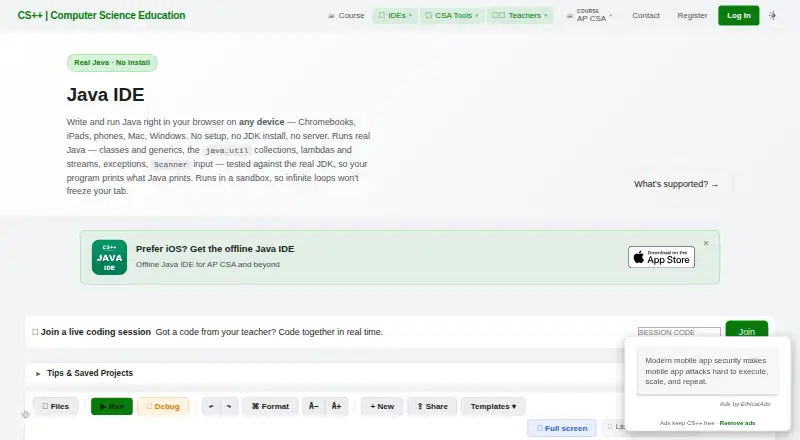
What CS++ Java IDE is
CS++ Java IDE lets users write, run, and auto-test Java in a browser without installing a JDK. It is designed for beginners and AP Computer Science A students, and includes a step-through debugger and clear error messages. Its custom interpreter supports most of Java and core standard-library features such as classes, generics, collections, lambdas, and streams. It does not support threads, writing files, reflection, enums, records, or switch expressions. The browser IDE works on Chromebooks, iPads, phones, Macs, and Windows PCs, including locked-down school devices. Users can start without an account; signing in is optional and adds cloud saving across devices. Teachers can share starter code and worked examples through links, and use the IDE for demonstrations and homework. The free plan allows browser-based writing, running, and auto-testing without signup to start. The listed pricing note says paid access starts at $9.99. CS++ is published by Yellow Dart Publishing (Kevin P Hare LLC), founded by Kevin Hare in 2018.
Good
- Runs Java in a browser without a JDK.
- No signup is required to start.
- Step-through debugger and clear error messages.
- Optional sign-in adds cloud saving across devices.
- Works on Chromebooks, phones, and desktop systems.
Watch out
- The interpreter does not support threads or file writing.
- Reflection, enums, records, and switch expressions are unsupported.
- Paid access starts at $9.99.
Who it suits
It suits new Java learners and AP Computer Science A students who want to code in a browser. Teachers can also use its shareable examples for demonstrations or homework.
Verdict
CS++ Java IDE is a browser-based option for learning and teaching Java, with a beginner-focused debugger and broad device support. Review its runtime limits if a course or project needs unsupported Java features.
Plans and prices
From CS++ Java IDE's own pricing page, checked 4 Oct 2026.
| Plan | Price | What it gives you |
|---|---|---|
| CS++ Java IDE | Free | Write, run, and auto-test Java in browser · no signup required to start · Free to use |
The facts
Each one read from CS++ Java IDE's own pages, with the date it was checked.
What it does
- Classroom use
- Teachers can share starter code and worked examples using shareable links and use the IDE for demonstrations and homework.checked 4 Oct 2026
- Debugger
- It includes a step-through debugger and clear error messages for beginners.checked 4 Oct 2026
- Founder experience
- The maker describes Kevin Hare as an AP Computer Science teacher with more than 20 years in the classroom and a published AP CSP textbook author.checked 4 Oct 2026
- Intended users
- The IDE is designed for beginners and AP Computer Science A students, and its supported topics extend beyond the AP CSA exam to generics, collections, lambdas, and streams.checked 4 Oct 2026
- Language support
- The custom in-browser interpreter supports most of Java and the core of the standard library, including classes, generics, collections, lambdas, and streams.checked 4 Oct 2026
- Runtime limits
- The interpreter does not support threads, writing files, reflection, enums, records, or switch expressions.checked 4 Oct 2026
- Security and privacy
- CS++ publishes a privacy policy describing its collection, use, and protection of student and teacher data, cookies, analytics, subprocessors, and privacy rights.checked 4 Oct 2026
- Sign-in and saving
- Users can start without logging in; signing in is optional and adds cloud save across devices.checked 4 Oct 2026
- What it does
- The Java IDE lets users write and run Java in a browser without installing a JDK.checked 4 Oct 2026
Where it runs
- Devices
- The browser IDE works on Chromebooks, iPads, phones, Macs, and Windows PCs, including locked-down school devices.checked 4 Oct 2026
The company
- Founded
- 2018checked 28 Sep 2026
- Maker
- CS++ is published by Yellow Dart Publishing (Kevin P Hare LLC), founded by Kevin Hare in 2018.checked 4 Oct 2026
The full review of CS++ Java IDE
CS++ Java IDE is a browser-based Java workspace for students and teachers who want to avoid local setup. Its strongest case is beginner-friendly practice across school and personal devices; it is a poor fit for projects that depend on parts of Java its interpreter omits.
Overview
Users can write and run Java in a browser without installing a JDK, and can begin without an account. Signing in adds cloud saving across devices, a useful option for students moving between home and school computers. The step-through debugger and clear error messages support learning by making program flow and mistakes easier to follow.
For teachers, shareable links let them distribute starter code and worked examples, then use the IDE for demonstrations and homework. That makes CS++ a practical classroom tool where installing software is difficult, including on locked-down school devices. It remains a teaching-focused environment rather than a full Java development setup: programs run in a custom interpreter with notable runtime restrictions.
Key features
The interpreter supports most of Java and core standard-library features, including classes, generics, collections, lambdas, and streams. AP Computer Science A students can therefore work beyond the exam's scope without immediately changing tools. However, CS++ does not support threads, file writing, reflection, enums, records, or switch expressions. Assignments or projects that require those features need a different environment.
The maker, Yellow Dart Publishing (Kevin P Hare LLC), was founded by Kevin Hare in 2018. Founder Kevin Hare is described as an AP Computer Science teacher with more than 20 years of classroom experience and a published AP CSP textbook author. CS++ also publishes a privacy policy covering student and teacher data, cookies, analytics, subprocessors, and privacy rights, relevant considerations for schools assessing classroom software.
Pricing
CS++ Java IDE has a free plan at no cost, with browser-based Java writing, running, and auto-testing, and no signup required to start. That removes the cost and account barrier for individual learners and classroom exercises. There is no free trial. Paid plans start at $9.99; the free plan is the clear starting point for users who need core browser coding, while anyone considering paid access should weigh it against their requirements for Java features the interpreter does not support.
Platforms
CS++ runs on the web and supports Windows, macOS, and iOS. Its browser-based approach reaches Chromebooks, iPads, phones, Macs, and Windows PCs, including restricted school devices. This breadth is useful when a class uses mixed hardware, though device access does not remove the interpreter's language and runtime limits.
Who it's for
Beginners, AP Computer Science A students, and teachers are the best fit. Students get a debugger, approachable error messages, and coverage that extends into generics, collections, lambdas, and streams; teachers get link-based sharing for examples and assignments. Developers building Java software that needs file access, concurrency, reflection, or other unsupported features should choose a full local IDE instead.
Pros and cons
- Pros: No JDK installation or initial signup is needed, lowering setup friction for students and locked-down school computers.
- Pros: The debugger, clear errors, and shareable classroom materials are specifically useful for learning and teaching Java.
- Pros: Support for generics, collections, lambdas, and streams extends beyond AP Computer Science A fundamentals.
- Cons: The custom interpreter lacks threads, file writing, reflection, enums, records, and switch expressions, excluding projects built around them.
- Cons: Its browser-based, teaching-oriented focus is not a replacement for a full Java development environment when a project needs a complete runtime.
Alternatives
Browse Java IDEs for a broader category comparison. Choose Java-Editor if Android or Linux support matters; it is free for personal, commercial, and government use and also runs on macOS and Windows. Eclipse IDE is a free, open-source option for Linux, macOS, and Windows, backed by an international non-profit foundation. Apache NetBeans is another free option for those desktop platforms, available for commercial and non-commercial use under Apache License 2.0.
BlueJ is worth considering for a free Java environment designed for beginners on Linux, macOS, and Windows. Greenfoot is a free downloadable option for Windows, macOS, Ubuntu/Debian, or a generic operating system with JDK and JavaFX. IntelliJ IDEA offers free core Java and Kotlin functionality on Linux, macOS, and Windows, with a paid Ultimate subscription at $100 a year; it suits readers who want to compare free core use with a paid tier. MCreator is free software for Linux, macOS, and Windows, with voluntary donations. Processing is a free, open-source option for Linux, macOS, and Windows.
Verdict
Choose CS++ Java IDE for beginner Java practice or classroom teaching when browser access, minimal setup, and shareable examples matter most. Its debugger and broad device reach make it a convenient learning workspace, but the unsupported runtime features are a decisive reason to look elsewhere for general Java development.
Getting started
- Open https://csplusplus.com/java-ide/ in a supported browser.
- Start writing, running, and auto-testing Java without signing in.
- Sign in optionally to add cloud saving across devices.
- Use the shareable links to provide starter code or worked examples.
Limits worth knowing
The free plan allows browser-based Java writing, running, and auto-testing. Its interpreter does not support threads, writing files, reflection, enums, records, or switch expressions.
Questions
Can I use CS++ Java IDE for free?
Yes. The listed plan is free and supports writing, running, and auto-testing Java in a browser.
Do I need to sign up to begin?
No. Users can start without logging in; signing in is optional and adds cloud saving across devices.
Which platforms does it work on?
It is a browser IDE for Chromebooks, iPads, phones, Macs, and Windows PCs. Supported platforms are web, Windows, macOS, and iOS.
What Java features are unsupported?
The interpreter does not support threads, writing files, reflection, enums, records, or switch expressions.
Who publishes CS++ Java IDE?
It is published by Yellow Dart Publishing (Kevin P Hare LLC), founded by Kevin Hare in 2018.
Is there a paid plan?
Paid access is listed as starting at $9.99; no free trial is offered.
Alternatives to CS++ Java IDE
- 1

IntelliJ IDEA
Free planAPIExtensionLinuxmacOS7.8Free plan - 2

Java-Editor
Free planOpen sourceAndroidLinuxmacOSWindows7.4Free plan - 3

AIDE
Free planAndroid6.8$2.99 one-time - 4

MyEclipse
LinuxmacOSWindows6.6From $37 a year - 5

Apache NetBeans
Free planLinuxmacOSWindows6.4Free plan - 6

Eclipse Che
Free planWebLinuxSelf-hosted6.4Free plan