Greenfoot
Greenfoot is free educational software for learning object-oriented programming with standard Java code.
What Greenfoot is
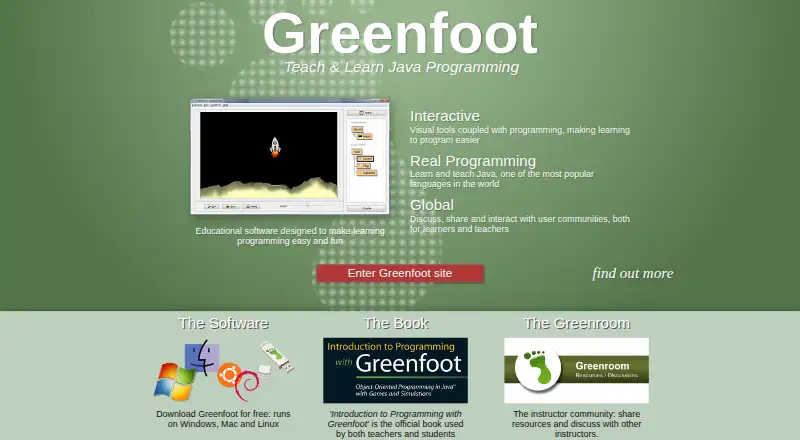
Greenfoot is free educational software for learning object-oriented programming with standard Java code. Learners work with actors that live in worlds to create games, simulations, and other graphical programs. The programming environment includes visualization and interaction tools, while its IDE offers project management, auto-completion, syntax highlighting, and other development tools. Projects can be published online so others can play and comment, and online sharing is built into the environment. Greenfoot provides written and video tutorials for beginners and advanced users, as well as the Greenroom community where instructors share resources and discuss teaching. It runs on Windows, macOS, and Linux; download options include Windows 10 and 11, macOS 11 and later, Ubuntu with Debian support, and a generic option for systems with JDK and JavaFX. From version 3.6.0, Intel/AMD systems need a 64-bit CPU and operating system; users requiring 32-bit support are directed to version 3.5.4. The IDE source code is available under the GNU General Public Licence version 2 with classpath exception.
Good
- Free software for learning Java programming.
- Builds games and simulations with interactive actors and worlds.
- Includes project management and code-completion tools.
- Projects can be published for others to play and comment.
- Written and video tutorials cover beginners and advanced users.
Watch out
- Version 3.6.0 requires a 64-bit CPU and operating system.
- Generic OS option requires JDK and JavaFX.
- 32-bit support is directed to version 3.5.4.
Who it suits
Greenfoot suits children and young adults learning Java and object-oriented programming through interactive projects. Teachers can use the Greenroom to share resources and discuss teaching with the software.
Verdict
Greenfoot gives learners a visual, project-based way to practice object-oriented Java programming, with tutorials and online sharing. Check the listed operating-system requirements, especially if 32-bit support is needed.
Plans and prices
From Greenfoot's own pricing page, checked 4 Oct 2026.
| Plan | Price | What it gives you |
|---|---|---|
| Greenfoot | Free | Free software download · Windows, macOS, Ubuntu/Debian, or generic OS with JDK+JavaFX |
The facts
Each one read from Greenfoot's own pages, with the date it was checked.
What it does
- Audience
- The site says Greenfoot is aimed at children and young adults and requires posted content to be safe for minors.checked 4 Oct 2026
- Hardware limit
- From version 3.6.0, Intel/AMD systems require a 64-bit CPU and operating system; the page directs users needing 32-bit support to version 3.5.4.checked 4 Oct 2026
- IDE features
- Its IDE includes project management, auto-completion, syntax highlighting, and other tools common to IDEs.checked 4 Oct 2026
- Integrations
- The about page says Greenfoot provides an easy transition into BlueJ and more professional IDEs.checked 4 Oct 2026
- Learning resources
- The site offers written and video tutorials, and says resources are available for beginners and advanced users.checked 4 Oct 2026
- License
- The Greenfoot IDE source code is available under the GNU General Public Licence version 2 with classpath exception.checked 4 Oct 2026
- Privacy
- The site says it does not pass email addresses or other user data to third parties or use them for purposes other than operating the website.checked 4 Oct 2026
- Programming
- Greenfoot teaches object orientation with standard Java code, using actors that live in worlds to build games, simulations, and other graphical programs.checked 4 Oct 2026
- Publishing and sharing
- Users can publish projects online for others to play and comment on, and online sharing is built into the environment.checked 4 Oct 2026
- Purpose
- Greenfoot is educational software designed to make learning programming easy and fun.checked 4 Oct 2026
- Support
- Technical support handles installation and operation problems by email; programming questions should go to the discussions area.checked 4 Oct 2026
- Supported systems
- The download page lists Windows 10 and 11, macOS 11 and later, Ubuntu with Debian support, and a generic option for any OS that needs JDK and JavaFX.checked 4 Oct 2026
- Teacher community
- The Greenroom is an instructor community for sharing teaching resources and discussing teaching with Greenfoot.checked 4 Oct 2026
- Visual tools
- Visualization and interaction tools are built into the programming environment.checked 4 Oct 2026
The company
- Founded
- 2006checked 28 Sep 2026
- Headquarters
- Canterbury, United Kingdomchecked 28 Sep 2026
The full review of Greenfoot
Greenfoot is a free Java learning environment built around graphical projects in which actors interact inside worlds. It is aimed chiefly at children, young adults, and teachers introducing object-oriented programming. Choose it for a visual, project-led route into standard Java; choose another tool if your priority is a broad production IDE.
Overview
Greenfoot makes Java concepts tangible through games, simulations, and other graphical programs. Learners write standard Java code while seeing objects behave in a visible world, giving classes, methods, and object interaction an immediate context. That focus lowers the abstraction barrier for beginners without replacing Java with a proprietary language.
The environment remains recognisably an IDE, with project management, auto-completion, syntax highlighting, and related coding tools. Projects can be published online for others to play and comment on, and sharing is built into the workspace. Written and video tutorials serve beginners through advanced users, while the Greenroom instructor community supports teachers exchanging resources and classroom ideas.
Greenfoot is designed for younger learners, and posted content is required to be safe for minors. Its stated progression into BlueJ and then more professional IDEs makes it a sensible starting point, rather than a claim that it should replace a full professional workflow.
Key features
Visual Java projects
Actors living in worlds let students connect standard Java code to visible results. This is particularly effective when a learner needs to see object-oriented behaviour rather than study it only in text. The trade-off is that the graphical-world model is most useful for educational projects, not every kind of Java application.
IDE foundations
Project management, completion suggestions, syntax highlighting, and other familiar IDE facilities provide structure as programs grow. Students therefore practise real Java syntax and basic development habits, while the visual layer keeps early exercises approachable.
Built-in interaction and sharing
Visualization and interaction tools are part of the programming environment, so demonstrations and feedback can happen inside the project. Online publishing lets others play projects and leave comments, a practical fit for classes or learning communities where showing progress matters.
Learning and teaching resources
Written and video tutorials give self-learners a route from introductory work toward more advanced material. Teachers gain a dedicated Greenroom community for sharing teaching resources and discussing how to use Greenfoot in instruction.
Pricing
Greenfoot costs free under its Greenfoot plan. The plan is a free software download for Windows, macOS, Ubuntu/Debian, or a generic operating system with JDK and JavaFX. There is no free trial because the software itself is free, and no paid tier, seat allowance, renewal charge, or usage quota is stated.
That single plan suits students, families, and schools that want a no-cost Java teaching environment. It also means there is no commercial support tier or paid upgrade path to add professional tooling; users needing that kind of IDE should compare alternatives instead.
Platforms
Greenfoot supports Windows, macOS, and Linux. The download page specifies Windows 10 and 11, macOS 11 and later, and Ubuntu with Debian support. A generic package is offered for other systems that provide a JDK and JavaFX.
From version 3.6.0, Intel and AMD computers require a 64-bit CPU and operating system. Anyone who needs 32-bit support is directed to version 3.5.4, so older hardware should be checked before deployment across a class or lab.
Who it's for
Greenfoot is a strong fit for children and young adults beginning object-oriented Java, and for instructors who want visual projects, tutorials, and a teacher community in one environment. It also works for independent learners who benefit from publishing projects for play and comments.
It is less suitable as a primary tool for experienced developers building general-purpose Java software. The educational actor-and-world model and the stated handoff to BlueJ and professional IDEs point to a first-stage learning role rather than a complete professional stack.
Pros and cons
Pros
- Free for every learner: the download costs 0.00 USD, with no paid plan or trial decisions.
- Concrete object-oriented practice: actors and worlds make standard Java behaviour visible in games and simulations.
- Useful teaching ecosystem: tutorials, online project comments, and the Greenroom support classroom-led learning.
- Real IDE habits: project management, auto-completion, and syntax highlighting keep exercises grounded in Java development.
- Open-source IDE code: the source is available under the GNU General Public Licence version 2 with classpath exception.
Cons
- Educational scope: the visual world model is not a substitute for a broad, production-oriented Java IDE.
- Hardware caveat: current versions require 64-bit Intel/AMD systems, with version 3.5.4 needed for 32-bit support.
- Separate question channels: email support covers installation and operation, while programming questions belong in the discussions area.
Alternatives
For a wider catalogue of Java tools, browse Java IDEs or Integrated Development Environments.
- Java-Editor is another free Java option across Android, Linux, macOS, and Windows, with personal, commercial, and government use covered by its free plan.
- CS++ Java IDE is a freemium choice available on iOS, macOS, the web, and Windows.
- Eclipse IDE is free and open source for Linux, macOS, and Windows, better suited when a general Java IDE is the priority.
- Apache NetBeans is free for commercial and non-commercial use on Linux, macOS, and Windows.
- BlueJ is a free Java development environment designed for beginners and is the natural next step when you want a less game-centred introduction.
- IntelliJ IDEA offers free core Java and Kotlin functionality, with an Ultimate subscription at $100 a year for expanded capabilities.
- Processing is a free, open-source option for visual programming projects.
- Spring Tools for Eclipse is a free open-source extension for Spring-focused work.
Verdict
Greenfoot is the right choice for learners and teachers who want to teach object-oriented Java through visible, shareable projects at no cost. Its strongest advantage is the combination of standard Java, visual feedback, tutorials, and classroom-oriented sharing. Look elsewhere when you need a general-purpose IDE for professional application development or must support 32-bit hardware without using an older release.
Alternatives to Greenfoot
- 1

IntelliJ IDEA
Free planAPIExtensionLinuxmacOS7.8Free plan - 2

Java-Editor
Free planOpen sourceAndroidLinuxmacOSWindows7.4Free plan - 3

AIDE
Free planAndroid6.8$2.99 one-time - 4

MyEclipse
LinuxmacOSWindows6.6From $37 a year - 5
CS++ Java IDE
Free planiOSWebmacOSWindows6.5Free plan - 6

Apache NetBeans
Free planLinuxmacOSWindows6.4Free plan