DXVK
DXVK is a Vulkan-based translation layer that lets Direct3D 8, 9, 10, and 11 applications run on Linux through Wine.
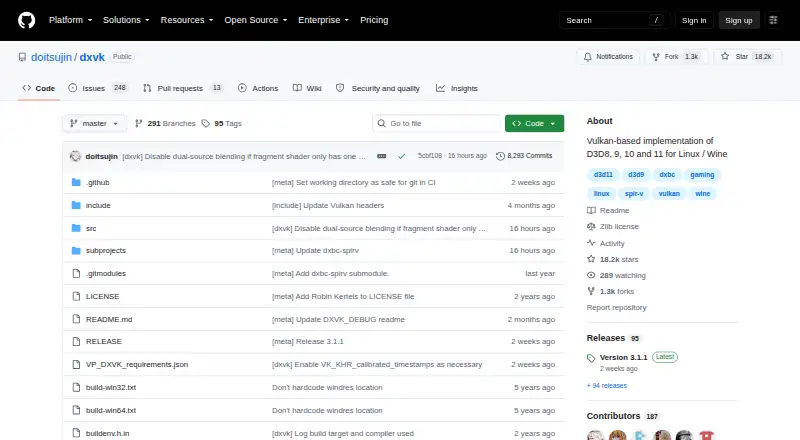
What DXVK is
DXVK is a Vulkan-based translation layer that lets Direct3D 8, 9, 10, and 11 applications run on Linux through Wine. DXVK Native can run without Wine and is intended for game and application ports or port bring-up. Release packages include 32-bit and 64-bit versions, and the project links both release builds and recent development builds through GitHub. Steam Play, Lutris, Bottles, and Heroic Launcher can configure DXVK automatically when enabled. An optional HUD can show frame rate, frame times, GPU load, memory use, API feature level, and shader compiler activity. On supported drivers, Graphics Pipeline Library can compile Vulkan shaders as a game loads its Direct3D shaders, which may reduce or eliminate shader compilation stutter in many games. Configuration options include shader caching, logging, and GPU selection. DXVK is free under the zlib/libpng license and also supports Windows. It requires a sufficiently recent Vulkan driver. The project warns that modifying Direct3D libraries in multiplayer games may be treated as cheating and could lead to an account ban.
Good
- Supports Direct3D 8, 9, 10, and 11
- DXVK Native can run without Wine
- Release packages include 32-bit and 64-bit versions
- Several launchers can configure it automatically
- Optional HUD reports graphics and shader details
Watch out
- Requires a sufficiently recent Vulkan driver
- Changing libraries in multiplayer games risks an account ban
- Shader compilation features depend on supported drivers
Who it suits
DXVK may suit Linux users running Direct3D applications through Wine, as well as developers working on game or application ports with DXVK Native. Users should check Vulkan driver requirements and consider the multiplayer warning before changing game libraries.
Verdict
DXVK provides a translation path for Direct3D applications on Linux through Wine, with launcher setup options and configurable diagnostics. Vulkan support is required, and modifying libraries in multiplayer games may carry account risk.
Plans and prices
From DXVK's own pricing page, checked 29 Sep 2026.
| Plan | Price | What it gives you |
|---|---|---|
| DXVK | Free | Free software under the zlib/libpng license · Vulkan required · Linux/Wine use requires a compatible Vulkan driver |
The facts
Each one read from DXVK's own pages, with the date it was checked.
What it does
- Architecture
- Release packages include both 32 bit and 64 bit versions of DXVK.checked 29 Sep 2026
- Configuration
- Users can configure DXVK with environment variables or a configuration file, including shader cache, logging and GPU selection options.checked 29 Sep 2026
- Diagnostics
- An optional HUD can show frame rate, frame times, GPU load, memory use, API feature level and shader compiler activity.checked 29 Sep 2026
- Downloads
- The project provides release builds and links to recent development builds through its GitHub repository.checked 29 Sep 2026
- Launcher integrations
- Steam Play, Lutris, Bottles and Heroic Launcher can set up DXVK automatically when enabled.checked 29 Sep 2026
- License
- The software uses the zlib/libpng license, which permits use for any purpose including commercial applications, subject to stated conditions.checked 29 Sep 2026
- Multiplayer caution
- The project warns that modifying Direct3D libraries in multiplayer games may be treated as cheating and could result in an account ban.checked 29 Sep 2026
- Native version
- DXVK Native can be used without Wine and is intended for game and application ports or port bring up.checked 29 Sep 2026
- Purpose
- DXVK is a Vulkan based translation layer for Direct3D 8, 9, 10 and 11 that lets 3D applications run on Linux using Wine.checked 29 Sep 2026
- Release signing
- The latest listed release is signed with the committer's verified signature.checked 29 Sep 2026
- Requirements
- DXVK needs a sufficiently recent Vulkan driver for the user's hardware; the project directs users to its wiki for current driver status.checked 29 Sep 2026
- Shader compilation
- On supported drivers, Graphics Pipeline Library can compile Vulkan shaders when a game loads its D3D shaders, reducing or eliminating shader compilation stutter in many games.checked 29 Sep 2026
The full review of DXVK
DXVK is a compatibility layer for running Direct3D software through Vulkan, with particular value for Linux users working through Wine and for developers bringing ports up. It is best suited to systems with a current Vulkan driver and users comfortable with launcher settings or technical diagnostics. The main qualification is multiplayer: replacing graphics libraries can trigger anti-cheat action.
Overview
DXVK translates Direct3D 8, 9, 10 and 11 calls into Vulkan rather than acting as a launcher or game manager. In the usual Linux workflow, Wine supplies the Windows compatibility environment and DXVK supplies the graphics translation. DXVK Native removes the Wine requirement for porting work and application bring-up, giving developers another route when adapting software to platforms that can use Vulkan.
Release packages contain both 32-bit and 64-bit builds, and the project publishes stable releases alongside links to newer development builds through its GitHub repository. That split serves conservative users who want a release build and developers or troubleshooters who need newer changes. A sufficiently recent Vulkan driver is mandatory; hardware without a compatible driver is not a workable DXVK target.
Key features
Launcher integration and architecture
Steam Play, Lutris, Bottles and Heroic Launcher can configure DXVK automatically when enabled. This is a meaningful convenience for users already in those ecosystems, because setup can happen at the launcher level instead of requiring every library to be placed manually. It does not make DXVK universal: the underlying game still needs a Direct3D version it supports, and Vulkan driver compatibility remains the deciding prerequisite.
Shader and performance behavior
On supported drivers, Graphics Pipeline Library can compile Vulkan shaders as a game loads its Direct3D shaders. That can reduce or eliminate shader-compilation stutter in many games, but the result depends on driver support and the individual title. It is therefore a practical mitigation rather than a guarantee of smoothness for every workload.
HUD, logging and control
The optional HUD exposes frame rate, frame times, GPU load, memory use, API feature level and shader-compiler activity. Those metrics help users isolate rendering or compilation problems and give developers useful runtime visibility; players who only want a transparent launch may prefer to leave the overlay disabled. Environment variables and a configuration file provide control over shader caching, logging and GPU selection, rewarding users who need reproducible or targeted setups while adding complexity for newcomers.
Pricing
DXVK — free. The software is free under the zlib/libpng license, which permits commercial use subject to its conditions. There is no paid tier, seat allowance, subscription renewal or trial period to manage. The trade-off is technical rather than financial: Linux/Wine use requires a compatible Vulkan driver, and the project offers no paid support tier in this plan.
Platforms
DXVK is hosted for Linux and Windows, with Linux/Wine as its primary compatibility scenario. Its translation runtime targets DirectX 9, 10 and 11 in the listed plan, while the project purpose also covers Direct3D 8. Vulkan support is required. The 32-bit and 64-bit release packages help it address software built for either architecture, but they do not remove the need for suitable graphics hardware and drivers.
Who it's for
Choose DXVK if you run Windows games or applications on Linux through Wine and your hardware has a sufficiently recent Vulkan driver. It also fits developers using DXVK Native for game or application ports and bring-up, and technically minded users who want HUD metrics, logs, shader-cache controls or explicit GPU selection. It is a poor choice for multiplayer users who cannot verify that changing Direct3D libraries is permitted: the project warns that such modifications may be treated as cheating and could result in an account ban.
Pros and cons
- Pro: Direct3D 8–11 coverage provides one translation path for a broad range of older and newer Windows software.
- Pro: Automatic setup in Steam Play, Lutris, Bottles and Heroic Launcher reduces manual configuration for users of those tools.
- Pro: Optional HUD and configurable logging, caching and GPU selection support serious troubleshooting.
- Pro: Free commercial use under the zlib/libpng license and both 32-bit and 64-bit builds keep adoption flexible.
- Con: A recent, compatible Vulkan driver is required, excluding hardware or driver stacks that cannot provide it.
- Con: Multiplayer library replacement can carry account-ban risk when anti-cheat systems treat it as cheating.
Alternatives
Browse Game Compatibility Layers when you want to compare this category broadly rather than select a single translation project.
- cnc-ddraw is the better fit for games using a DirectDraw software renderer; it is free, MIT-licensed and runs on Android, Linux, macOS and Windows.
- FAudio suits audio compatibility work across iOS, Linux, macOS and Windows, provided SDL 3.2.0 or newer is available.
- GameHub is aimed at Android, iOS and macOS users seeking a gaming front end; cloud gaming and streaming require a stable network.
- Bannerlator is an Android-only option when compatibility varies by GPU, Android version and game and no support commitment is required.
- umu-launcher is a Linux alternative for users wanting a GPL-3.0 open-source launcher project.
- PlayOnLinux is another Linux/macOS Wine-oriented choice, with support gaps and occasional performance decreases.
- TDF fits GNU/Linux systems with an x86_64 CPU and Vulkan 1.3-or-newer GPU.
- vkd3d-proton is the alternative to consider for its open-source project model when you want a free option without paid plans.
Verdict
DXVK is the right choice for Linux Wine users and port developers who have Vulkan-ready hardware and want broad Direct3D translation, launcher-assisted setup and optional diagnostics at no cost. Look elsewhere—or avoid changing libraries—when a multiplayer game's anti-cheat policy makes that modification unsafe, or when the system cannot provide a sufficiently recent Vulkan driver.
Alternatives to DXVK
- 1
FAudio
Free planOpen sourceiOSAPILinuxmacOS7.5Free plan - 2
cnc-ddraw
Free planOpen sourceAndroidLinuxmacOSSelf-hosted7.4Free plan - 3

CrossOver
Free planLinuxmacOS7.4From $74 a year - 4
PlayOnLinux
Free planOpen sourceLinuxmacOS7.2Free plan - 5
GameHub
Free planAndroidiOSmacOS6.7Free plan - 6
Bannerlator
Free planAndroid6.4Free plan