umu-launcher
umu-launcher runs Windows games on Linux through Proton without requiring the Steam client or Steam binaries.
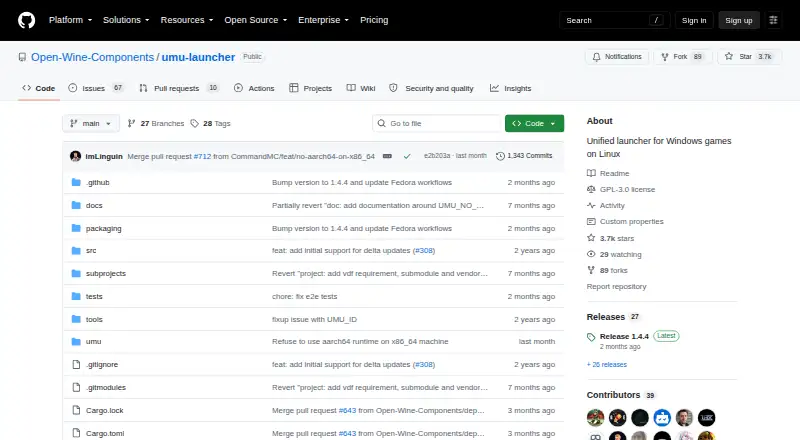
What umu-launcher is
umu-launcher runs Windows games on Linux through Proton without requiring the Steam client or Steam binaries. It automatically downloads the Steam Runtime needed by Proton and keeps its files under $HOME/.local/share/umu. You can use UMU-Proton, select a Proton directory or version, or have umu download GE-Proton. When supported, Lutris, Heroic Games Launcher, Bottles, and Rare can use it. Clients can apply game-specific fixes from a shared online database using a game ID and store value. Launch configuration can use environment variables or a TOML file, and you can set a WINE prefix path or use the default under $HOME/Games/umu. The command-line tool can run Winetricks verbs with GE-Proton or UMU-Proton. For native Linux games, UMU_NO_PROTON runs an executable inside the Steam Linux Runtime. umu-launcher is free and open source under GPL-3.0, with installation options including packages for Nobara, Arch Linux, and Nix, GitHub Linux packages, and source builds.
Good
- Runs games without Steam or Steam binaries.
- Automatically downloads the Steam Runtime for Proton.
- Supports several Proton selection options.
- Can use a shared database of game fixes.
- Supports environment-variable and TOML configuration.
Watch out
- Available for Linux only.
- Some launcher integrations work only when supported.
- Winetricks verbs require GE-Proton or UMU-Proton.
- Unsupported compatibility-tool issues should go to their maintainers.
Who it suits
It suits Linux users who want to run Windows games through Proton independently of Steam, including through supported launcher clients. It may also suit users who need configurable Proton versions, game fixes, or WINE prefixes.
Verdict
umu-launcher brings Proton-based Windows game launching to Linux without requiring Steam. Its configurable Proton options and supported launcher integrations make it relevant for users who want to manage that setup outside Steam.
Plans and prices
From umu-launcher's own pricing page, checked 8 Oct 2026.
| Plan | Price | What it gives you |
|---|---|---|
| umu-launcher | Free | No price listed · GPL-3.0 licensed open-source software |
The facts
Each one read from umu-launcher's own pages, with the date it was checked.
What it does
- Additional tool
- The command-line interface can run winetricks verbs when GE-Proton or UMU-Proton is used.checked 8 Oct 2026
- Configuration
- Games can be launched with environment variables or a TOML configuration file.checked 8 Oct 2026
- Distribution packages
- The README lists installation through Nobara, Arch Linux, and Nix; GitHub releases also provide Linux packages.checked 8 Oct 2026
- Game fixes
- The launcher uses a unified online database of game fixes, selected with game ID and store settings.checked 8 Oct 2026
- Installation
- The README documents distribution packages for Nobara, Arch Linux, and Nix, as well as building from source.checked 8 Oct 2026
- Install options
- The project documents distribution packages, user and system builds, uv setup, and a Nix package and flake.checked 8 Oct 2026
- Launcher integrations
- The documentation names Lutris, Heroic Games Launcher, Bottles, and Rare as clients that can use umu when supported.checked 8 Oct 2026
- Launcher support
- The project names Lutris, Heroic Games Launcher, Bottles, and Rare as clients that can use umu.checked 8 Oct 2026
- License
- The GitHub repository identifies the project license as GPL-3.0.checked 8 Oct 2026
- Logging
- UMU_LOG enables launcher debug logs, and the README recommends attaching logs when reporting game failures.checked 8 Oct 2026
- Maintainers
- The manual says umu is maintained by Open Wine Components members with help from other open-source contributors.checked 8 Oct 2026
- Native games
- The UMU_NO_PROTON option runs an executable natively inside the Steam Linux Runtime, and the documentation says it is intended for native Linux games.checked 8 Oct 2026
- Prefix configuration
- Users can set a WINE prefix path; otherwise umu uses a default path under $HOME/Games/umu.checked 8 Oct 2026
- Proton fixes
- Clients can use a unified online database of game fixes, and umu applies fixes using a game ID and store value.checked 8 Oct 2026
- Proton selection
- Users can specify a Proton directory or version, use GE-Proton, or use UMU-Proton by default.checked 8 Oct 2026
- Proton versions
- umu-run can use UMU-Proton by default, a specified Proton directory or version, or automatically download GE-Proton.checked 8 Oct 2026
- Purpose
- umu is a unified launcher for running Windows games on Linux through Proton outside the Steam client.checked 8 Oct 2026
- Runtime
- It automatically downloads the Steam Runtime required by Proton and stores its files under $HOME/.local/share/umu.checked 8 Oct 2026
- Support
- The project asks users to report game failures with UMU_LOG=1 logs and directs unsupported compatibility-tool issues to those tools’ maintainers.checked 8 Oct 2026
- Support and contributions
- The project welcomes contributions and directs users to GitHub issue reports for bugs.checked 8 Oct 2026
- Supported compatibility tools
- The README asks users to report issues with unsupported compatibility tools to those tools’ maintainers first.checked 8 Oct 2026
- Winetricks
- umu-run can run Winetricks verbs when used with GE-Proton or UMU-Proton.checked 8 Oct 2026
The company
- Steam independence
- Games can be run without Steam or Steam binaries installed.checked 8 Oct 2026
- Steam requirement
- Games can run through umu without Steam or Steam binaries installed.checked 8 Oct 2026
The full review of umu-launcher
Overview
umu-launcher is a Linux utility for starting Windows games with Proton while leaving the Steam client out of the equation. It is aimed at players who want to control Proton builds, prefixes, and fixes themselves, rather than accept a single managed path. The trade-off is equally clear: this is a focused launcher component, not a one-click game library, so setup and compatibility decisions remain part of the job.
Key features
Steam independence is umu’s central strength. Games can run without Steam or Steam binaries installed, while umu downloads the Steam Runtime required by Proton and keeps it in $HOME/.local/share/umu. That gives users the runtime Proton expects without installing the full client, although it does not remove the need to organize game files and launch commands.
Proton choice is unusually flexible. umu-run can use UMU-Proton by default, a Proton directory or version selected by the user, or GE-Proton downloaded automatically. This is valuable when a title behaves differently between compatibility builds, but it also makes version selection and maintenance the user’s responsibility. Lutris, Heroic Games Launcher, Bottles, and Rare can use umu when their own support is enabled, making it more useful as a backend for established launchers than as a standalone graphical library.
A unified online database supplies game fixes chosen with a game ID and store value. Launches can be configured through environment variables or a TOML file, and a custom Wine prefix can be assigned; without one, umu uses $HOME/Games/umu. The command-line interface can run Winetricks verbs when GE-Proton or UMU-Proton is in use, giving experienced users a direct way to apply Windows component changes.
The UMU_NO_PROTON option runs an executable natively inside the Steam Linux Runtime and is intended for native Linux games. Debug output is available through UMU_LOG, which is particularly useful when reporting failures. The project asks users to take problems with unsupported compatibility tools to those tools’ maintainers first, so support boundaries matter.
Pricing
umu-launcher is free: the umu-launcher plan costs nothing and is GPL-3.0 licensed open-source software. There is no trial because there is no paid tier or subscription. The plan includes the launcher and its documented runtime and configuration capabilities, with no seat, quota, or renewal charge. Its cost advantage is absolute; the price you pay instead is time spent selecting Proton versions, configuring prefixes, and diagnosing individual games.
Platforms
Linux is the supported host platform. Installation documentation covers packages for Nobara, Arch Linux, and Nix, alongside user and system builds, uv setup, a Nix package and flake, source compilation, and Linux packages from GitHub releases. That breadth suits distributions with established packaging workflows, while source building remains an option for users outside those routes.
Who it's for
Choose umu-launcher if you play Windows games on Linux and specifically want Proton without installing Steam, or if you need to switch between UMU-Proton, GE-Proton, and other Proton directories. It also fits users already working in Lutris, Heroic Games Launcher, Bottles, or Rare and wanting a shared Proton backend with configurable fixes and prefixes.
Look elsewhere if you expect a fully managed, Steam-like experience or do not want to troubleshoot compatibility-tool choices. umu’s command-line and configuration options reward technical control, not minimal setup.
Pros and cons
Pros
- Runs without Steam: Proton games can launch without Steam or its binaries, while the required Steam Runtime is downloaded automatically.
- Broad Proton control: Users can select a directory or version, use UMU-Proton, or download GE-Proton automatically.
- Useful integration layer: Lutris, Heroic Games Launcher, Bottles, and Rare can use umu when supported.
- Configurable troubleshooting: Game-fix database entries, TOML or environment-variable settings, custom prefixes, Winetricks support, and debug logs give advanced users practical levers.
Cons
- Linux-only: Windows and macOS users cannot use it as a host launcher.
- More responsibility on the user: Proton selection, prefix management, and compatibility diagnosis are not abstracted away.
- Integration is conditional: Named clients can use umu only when their support is enabled, and unsupported compatibility tools are routed to their own maintainers.
Alternatives
Game Compatibility Layers is the broader category starting point when you want to compare approaches rather than commit to umu’s Proton-focused, Steam-independent workflow.
cnc-ddraw is a free, MIT-licensed option for games requiring a DirectDraw software renderer, and supports Android, Linux, macOS, and Windows.
FAudio is a free, zlib-licensed audio component for Linux, macOS, Windows, and iOS; choose it for its audio scope rather than a Proton launcher.
GameHub is free on Android, iOS, and macOS, with cloud gaming and streaming requiring a stable network.
Bannerlator is a free GPL-3.0 Android project with no guarantee on other devices and compatibility that varies by GPU, Android version, and game.
DXVK is free software for Linux and Windows that requires Vulkan and a compatible Vulkan driver for Linux/Wine use; pick it when the translation layer itself is your focus.
PlayOnLinux is a free Linux and macOS option, though not every game is supported and performance can occasionally decrease.
TDF is free, GNU/Linux-only software requiring an x86_64 CPU and a GPU with Vulkan 1.3 or newer.
vkd3d-proton is a free open-source project with no paid plans or listed price, suited to readers seeking that specific project rather than a complete launcher.
Verdict
umu-launcher is the right choice for technically confident Linux gamers who want Proton’s Windows-game compatibility without Steam and value control over versions, fixes, and prefixes. Its free GPL-3.0 model and client integrations make it a capable foundation. Look elsewhere if you want a turnkey library, broad host-platform support, or a workflow that hides compatibility troubleshooting.
Alternatives to umu-launcher
- 1
FAudio
Free planOpen sourceiOSAPILinuxmacOS7.5Free plan - 2
cnc-ddraw
Free planOpen sourceAndroidLinuxmacOSSelf-hosted7.4Free plan - 3

CrossOver
Free planLinuxmacOS7.4From $74 a year - 4
PlayOnLinux
Free planOpen sourceLinuxmacOS7.2Free plan - 5
GameHub
Free planAndroidiOSmacOS6.7Free plan - 6
Bannerlator
Free planAndroid6.4Free plan